> ## Documentation Index
> Fetch the complete documentation index at: https://docs.dodopayments.com/llms.txt
> Use this file to discover all available pages before exploring further.
# v1.101.0 (June 2, 2026)
> Automatic subscription payment retries to recover failed renewal revenue, business-level proration defaults with per-product-collection overrides, and business name collection for B2B invoices — plus bug fixes and improvements.
## New Features
### 1. **Subscription Payment Retries**
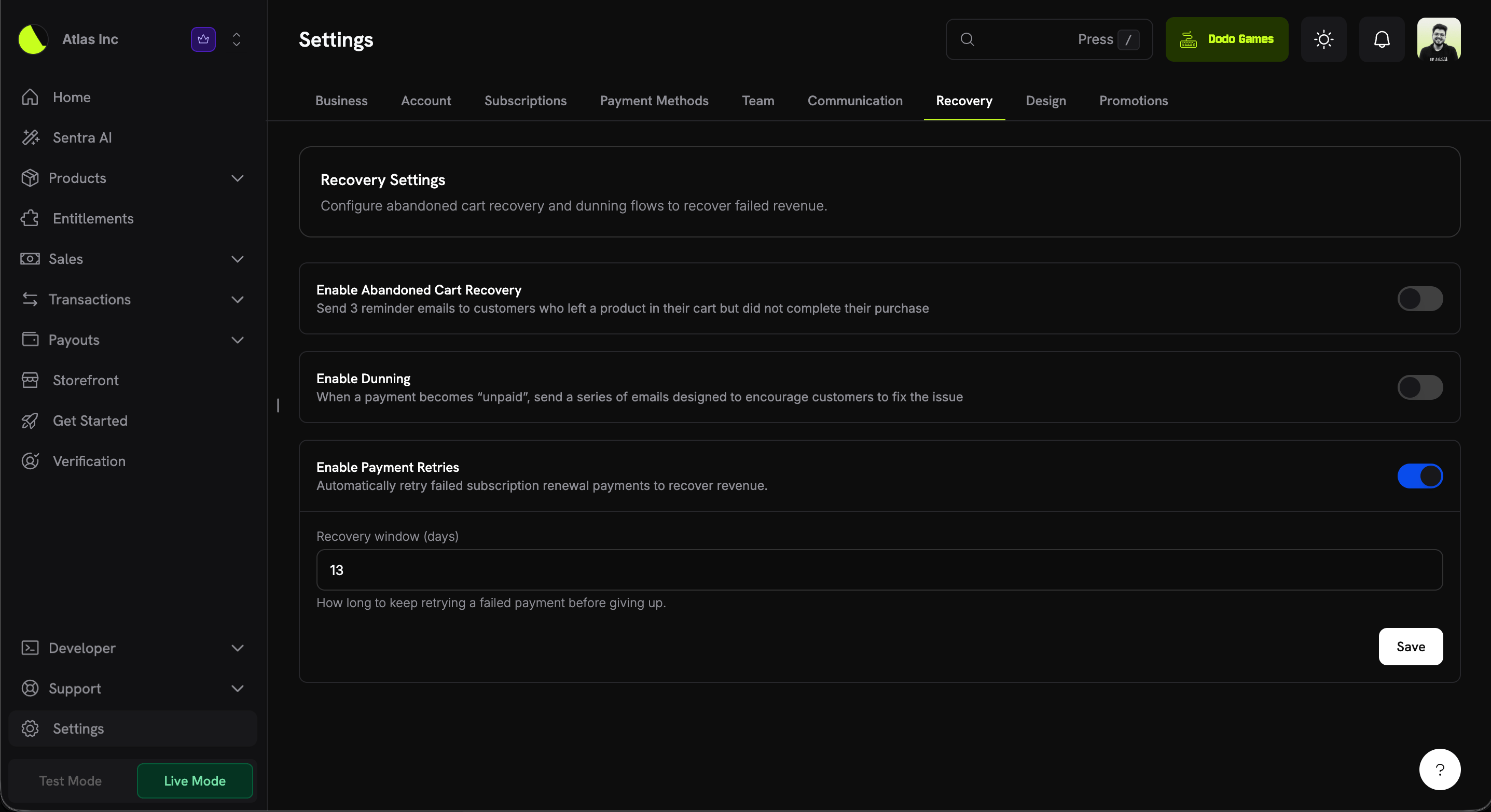
Failed subscription **renewal** payments can now be retried automatically to recover revenue, with no integration work required. Enable it from **Settings → Recovery**, set a recovery window, and Dodo Payments retries the renewal on a smart schedule until it succeeds or the window closes.
 | Setting | Description | Default |
| - | - | - |
| **Enable Payment Retries** | Automatically retry failed subscription renewal payments to recover revenue. | Off (opt-in) |
| **Recovery window (days)** | How long to keep retrying a failed payment before giving up (1–30). | 13 |
**How it works**
1. A subscription renewal payment fails and the subscription moves to `on_hold`.
2. If the decline is retryable (a soft decline such as insufficient funds or a temporary network error), the next attempt is scheduled automatically.
3. Retries fire off-session on a back-off schedule, bounded by your recovery window.
4. On the first successful retry, the subscription returns to `active` and the next billing date is advanced as normal.
**Retry schedule**
Retries back off progressively, anchored to the time the failed invoice was created. Up to **8 attempts** are made, as long as they fit inside your recovery window:
| Attempt | Delay after previous |
| - | - |
| 1 | 12 hours |
| 2 | 24 hours |
| 3 | 48 hours |
| 4 | 72 hours |
| 5 | 96 hours |
| 6 | 120 hours |
| 7 | 7 days |
| 8 | 7 days |
Only **soft declines** are retried (e.g. insufficient funds, generic decline, processing or network errors). **Hard declines** end the retry chain immediately, since retrying won't change the outcome.
This complements the existing recovery tools — **Subscription Dunning** emails the customer to update their payment method, while Payment Retries silently re-attempts the existing one. They work well together.
Learn more: [Subscription Payment Retries](/features/recovery/payment-retries) | [Subscription Dunning](/features/recovery/subscription-dunning)
### 2. **Business Proration Settings**
You can now set **default upgrade & downgrade behavior** once at the business level instead of passing proration parameters on every plan change. These defaults apply whenever a customer changes their plan from the customer portal, and you can **override them per product collection**.
| Setting | Description | Default |
| - | - | - |
| **Enable Payment Retries** | Automatically retry failed subscription renewal payments to recover revenue. | Off (opt-in) |
| **Recovery window (days)** | How long to keep retrying a failed payment before giving up (1–30). | 13 |
**How it works**
1. A subscription renewal payment fails and the subscription moves to `on_hold`.
2. If the decline is retryable (a soft decline such as insufficient funds or a temporary network error), the next attempt is scheduled automatically.
3. Retries fire off-session on a back-off schedule, bounded by your recovery window.
4. On the first successful retry, the subscription returns to `active` and the next billing date is advanced as normal.
**Retry schedule**
Retries back off progressively, anchored to the time the failed invoice was created. Up to **8 attempts** are made, as long as they fit inside your recovery window:
| Attempt | Delay after previous |
| - | - |
| 1 | 12 hours |
| 2 | 24 hours |
| 3 | 48 hours |
| 4 | 72 hours |
| 5 | 96 hours |
| 6 | 120 hours |
| 7 | 7 days |
| 8 | 7 days |
Only **soft declines** are retried (e.g. insufficient funds, generic decline, processing or network errors). **Hard declines** end the retry chain immediately, since retrying won't change the outcome.
This complements the existing recovery tools — **Subscription Dunning** emails the customer to update their payment method, while Payment Retries silently re-attempts the existing one. They work well together.
Learn more: [Subscription Payment Retries](/features/recovery/payment-retries) | [Subscription Dunning](/features/recovery/subscription-dunning)
### 2. **Business Proration Settings**
You can now set **default upgrade & downgrade behavior** once at the business level instead of passing proration parameters on every plan change. These defaults apply whenever a customer changes their plan from the customer portal, and you can **override them per product collection**.
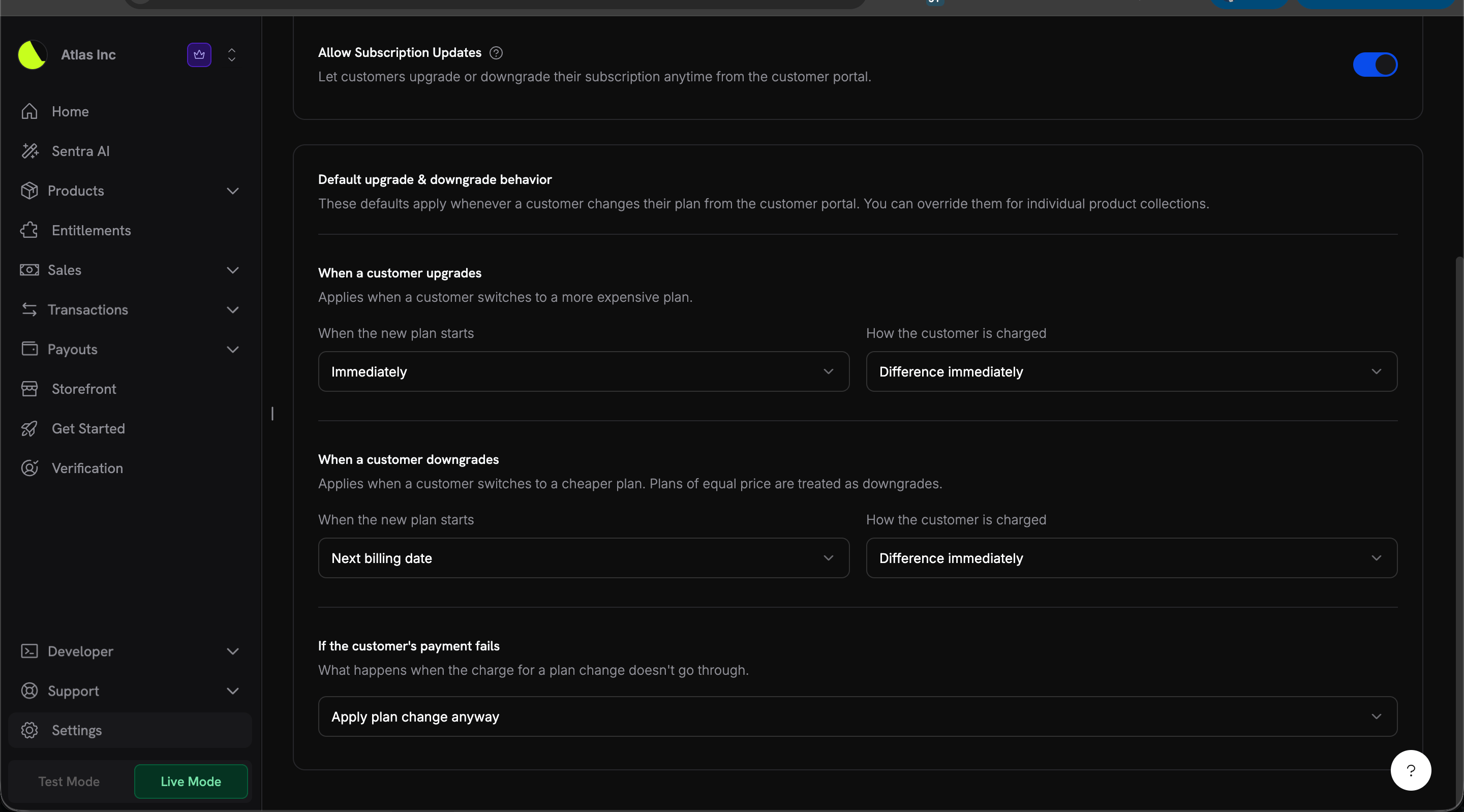 Each direction (upgrade and downgrade) has two independent controls, plus a shared payment-failure policy:
| Setting | Field | Default (upgrade) | Default (downgrade) |
| - | - | - | - |
| **When the new plan starts** | `effective_at_on_upgrade` / `effective_at_on_downgrade` | `immediately` | `next_billing_date` |
| **How the customer is charged** | `proration_billing_mode_on_upgrade` / `proration_billing_mode_on_downgrade` | `difference_immediately` | `difference_immediately` |
| **If the customer's payment fails** | `on_payment_failure` | `apply_change` | `apply_change` |
**When the new plan starts** (`effective_at`)
| Value | Behavior |
| - | - |
| `immediately` | The customer moves to the new plan right away. |
| `next_billing_date` | The customer stays on their current plan until the next billing date, then switches to the new one. |
**How the customer is charged** (`proration_billing_mode`)
| Value | Behavior |
| - | - |
| `prorated_immediately` | Credit the time left in the current billing cycle, then charge a full cycle of the new plan. |
| `full_immediately` | Charge the full price of the new plan right now. |
| `difference_immediately` | Charge only the price difference between the new plan and the current one. |
| `do_not_bill` | Don't charge anything now. Any adjustment is applied on the next invoice. |
**If the customer's payment fails** (`on_payment_failure`)
| Value | Behavior |
| - | - |
| `prevent_change` | Keep the customer on their current plan if the payment doesn't go through. |
| `apply_change` | Move the customer to the new plan even if the payment doesn't go through. You can collect the amount later. |
**Per-collection overrides**
Every product collection can override any of these defaults. Each field is independent — leave it on **Inherit from business** to follow the business default, or set an explicit value to override it for that collection only.
Each direction (upgrade and downgrade) has two independent controls, plus a shared payment-failure policy:
| Setting | Field | Default (upgrade) | Default (downgrade) |
| - | - | - | - |
| **When the new plan starts** | `effective_at_on_upgrade` / `effective_at_on_downgrade` | `immediately` | `next_billing_date` |
| **How the customer is charged** | `proration_billing_mode_on_upgrade` / `proration_billing_mode_on_downgrade` | `difference_immediately` | `difference_immediately` |
| **If the customer's payment fails** | `on_payment_failure` | `apply_change` | `apply_change` |
**When the new plan starts** (`effective_at`)
| Value | Behavior |
| - | - |
| `immediately` | The customer moves to the new plan right away. |
| `next_billing_date` | The customer stays on their current plan until the next billing date, then switches to the new one. |
**How the customer is charged** (`proration_billing_mode`)
| Value | Behavior |
| - | - |
| `prorated_immediately` | Credit the time left in the current billing cycle, then charge a full cycle of the new plan. |
| `full_immediately` | Charge the full price of the new plan right now. |
| `difference_immediately` | Charge only the price difference between the new plan and the current one. |
| `do_not_bill` | Don't charge anything now. Any adjustment is applied on the next invoice. |
**If the customer's payment fails** (`on_payment_failure`)
| Value | Behavior |
| - | - |
| `prevent_change` | Keep the customer on their current plan if the payment doesn't go through. |
| `apply_change` | Move the customer to the new plan even if the payment doesn't go through. You can collect the amount later. |
**Per-collection overrides**
Every product collection can override any of these defaults. Each field is independent — leave it on **Inherit from business** to follow the business default, or set an explicit value to override it for that collection only.
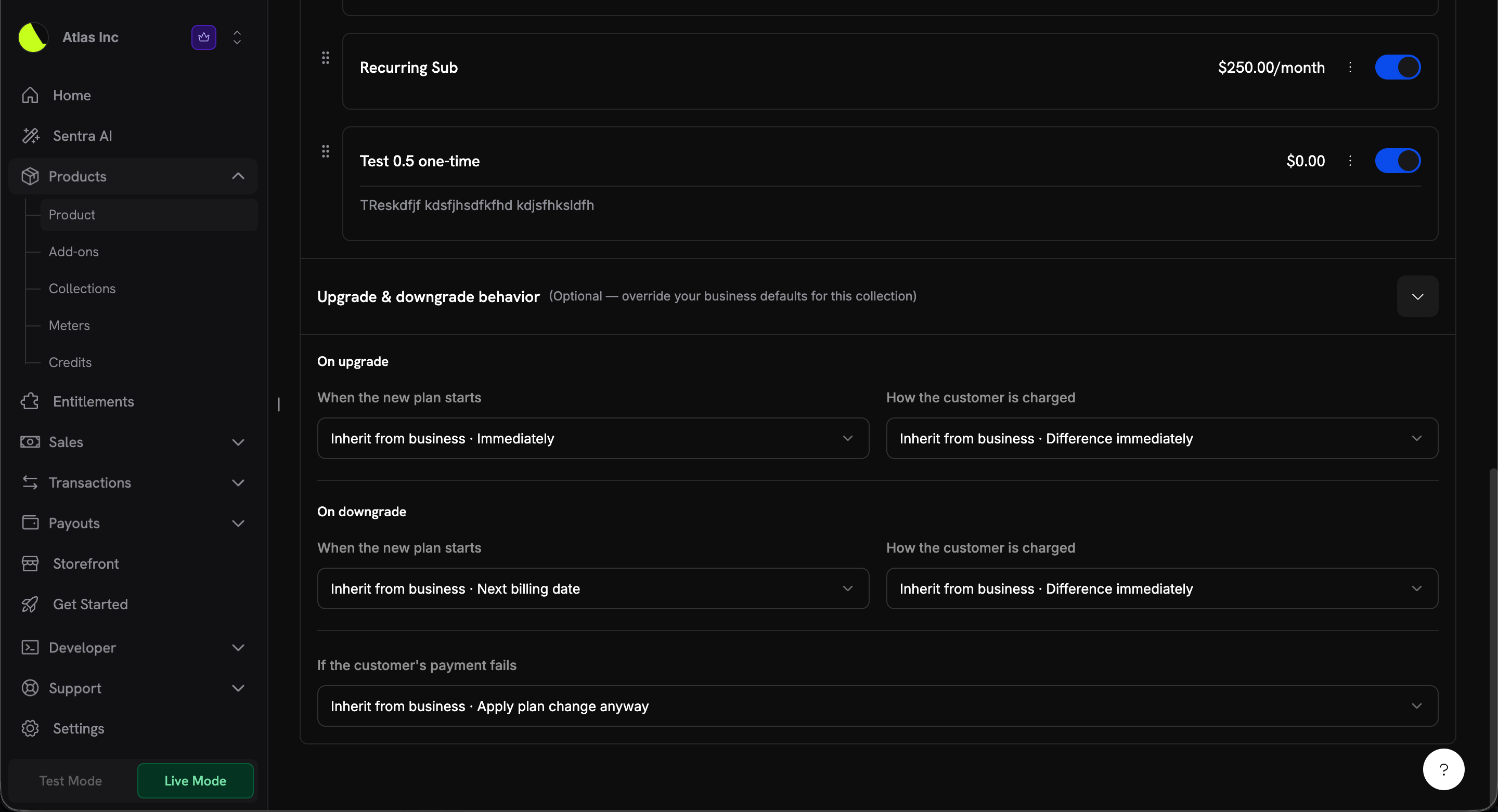 Each setting resolves in this order:
```
per-request value (Change Plan API) → collection field (if set) → business field → system default
```
A per-request value passed to the [Change Plan API](/api-reference/subscriptions/change-plan) (`proration_billing_mode`, `effective_at`, `on_payment_failure`) always takes precedence over both the collection and business defaults. The new settings only change what happens when no explicit value is supplied — which is the case for all customer-portal plan changes.
Learn more: [Subscription Upgrade & Downgrade](/developer-resources/subscription-upgrade-downgrade) | [Product Collections](/features/product-collections)
### 3. **Collect Business Name for B2B Invoices**
B2B customers can now have their **legal business name** rendered on the invoice instead of the buyer's personal name. When a valid Tax ID is supplied at checkout, you can also collect the associated `customer_business_name` so the invoice reflects the purchasing entity.
Each setting resolves in this order:
```
per-request value (Change Plan API) → collection field (if set) → business field → system default
```
A per-request value passed to the [Change Plan API](/api-reference/subscriptions/change-plan) (`proration_billing_mode`, `effective_at`, `on_payment_failure`) always takes precedence over both the collection and business defaults. The new settings only change what happens when no explicit value is supplied — which is the case for all customer-portal plan changes.
Learn more: [Subscription Upgrade & Downgrade](/developer-resources/subscription-upgrade-downgrade) | [Product Collections](/features/product-collections)
### 3. **Collect Business Name for B2B Invoices**
B2B customers can now have their **legal business name** rendered on the invoice instead of the buyer's personal name. When a valid Tax ID is supplied at checkout, you can also collect the associated `customer_business_name` so the invoice reflects the purchasing entity.
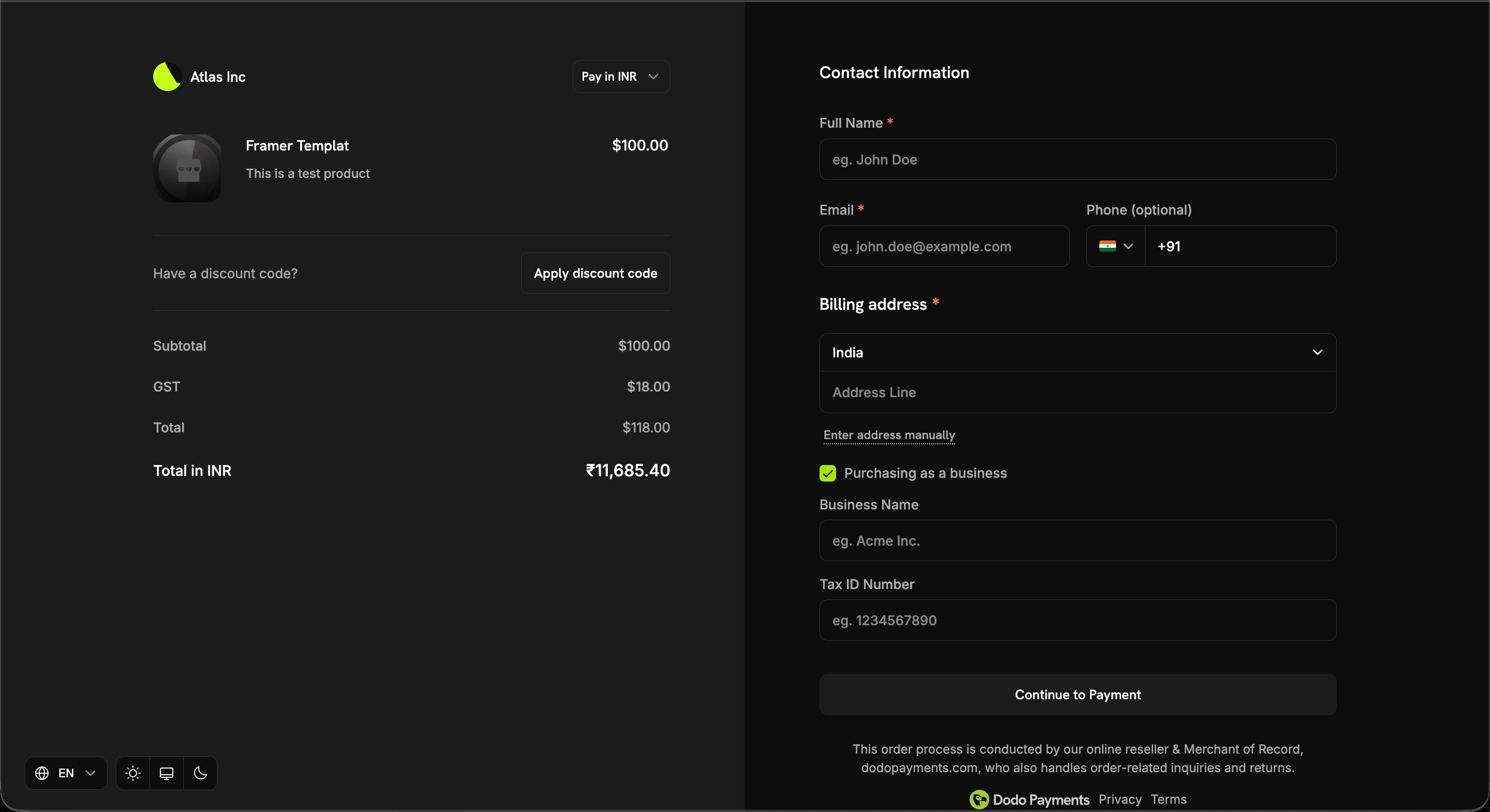 When the customer selects **Purchasing as a business** at checkout, they're prompted for both a **Business Name** and a **Tax ID Number**.
The business name appears on the invoice only when **all three** conditions are met:
1. The transaction is B2B (`b2b = true`)
2. A `tax_id` is present
3. A non-empty `customer_business_name` is supplied
Otherwise the customer's personal name is used.
**Collecting it at checkout**
Set `customer_business_name` directly, and/or enable `allow_customer_editing_business_name` to let the customer enter or edit it on the checkout page alongside their Tax ID:
```typescript theme={null}
const session = await client.checkoutSessions.create({
product_cart: [{ product_id: 'pdt_abc', quantity: 1 }],
customer: { email: 'buyer@acme.com' },
tax_id: 'GB123456789',
customer_business_name: 'Acme Corp Ltd',
feature_flags: {
allow_tax_id: true,
allow_customer_editing_business_name: true // let the customer enter/edit it
},
return_url: 'https://yoursite.com/return'
});
```
**Where it applies**
| Surface | Field | Notes |
| - | - | - |
| Checkout Sessions | `customer_business_name`, `feature_flags.allow_customer_editing_business_name` | Max 250 chars; flag defaults to `false` |
| Payments | `customer_business_name` | Max 250 chars |
| Subscriptions | `customer_business_name` | Set or clear via `PATCH /subscriptions/{subscription_id}` |
`customer_business_name` cannot be set without a `tax_id`. Sending a business name with no Tax ID is rejected. Clearing the `tax_id` also clears the business name, since the two are coupled on the invoice.
Surrounding whitespace is trimmed, and whitespace-only values are treated as an explicit clear — so stored data always matches what's rendered on the invoice.
Learn more: [B2B Payments](/features/b2b-payments) | [Invoice Management](/features/invoice-generation) | [Checkout Session](/developer-resources/checkout-session)
## Bug Fixes & Improvements
* Minor bug fixes and stability improvements across the platform.
This documentation is built and hosted on [Mintlify](https://mintlify.com), a developer documentation platform.
When the customer selects **Purchasing as a business** at checkout, they're prompted for both a **Business Name** and a **Tax ID Number**.
The business name appears on the invoice only when **all three** conditions are met:
1. The transaction is B2B (`b2b = true`)
2. A `tax_id` is present
3. A non-empty `customer_business_name` is supplied
Otherwise the customer's personal name is used.
**Collecting it at checkout**
Set `customer_business_name` directly, and/or enable `allow_customer_editing_business_name` to let the customer enter or edit it on the checkout page alongside their Tax ID:
```typescript theme={null}
const session = await client.checkoutSessions.create({
product_cart: [{ product_id: 'pdt_abc', quantity: 1 }],
customer: { email: 'buyer@acme.com' },
tax_id: 'GB123456789',
customer_business_name: 'Acme Corp Ltd',
feature_flags: {
allow_tax_id: true,
allow_customer_editing_business_name: true // let the customer enter/edit it
},
return_url: 'https://yoursite.com/return'
});
```
**Where it applies**
| Surface | Field | Notes |
| - | - | - |
| Checkout Sessions | `customer_business_name`, `feature_flags.allow_customer_editing_business_name` | Max 250 chars; flag defaults to `false` |
| Payments | `customer_business_name` | Max 250 chars |
| Subscriptions | `customer_business_name` | Set or clear via `PATCH /subscriptions/{subscription_id}` |
`customer_business_name` cannot be set without a `tax_id`. Sending a business name with no Tax ID is rejected. Clearing the `tax_id` also clears the business name, since the two are coupled on the invoice.
Surrounding whitespace is trimmed, and whitespace-only values are treated as an explicit clear — so stored data always matches what's rendered on the invoice.
Learn more: [B2B Payments](/features/b2b-payments) | [Invoice Management](/features/invoice-generation) | [Checkout Session](/developer-resources/checkout-session)
## Bug Fixes & Improvements
* Minor bug fixes and stability improvements across the platform.
This documentation is built and hosted on [Mintlify](https://mintlify.com), a developer documentation platform.