> ## Documentation Index
> Fetch the complete documentation index at: https://docs.dodopayments.com/llms.txt
> Use this file to discover all available pages before exploring further.
# Build a Prepaid Email Service with Credit-Based Billing
> Build MailKit, a prepaid transactional email service with Dodo Payments and Resend: a monthly credit plan, top-up packs, a debit per send, and low-balance alerts.
To have your coding agent write the integration, install the [Dodo Agent Plugin](/developer-resources/build-with-ai-coding-agents). It adds the Dodo Payments skills and MCP servers to Claude Code, Codex CLI, Cursor, VS Code / GitHub Copilot, Kiro, and OpenCode.
You'll build **MailKit**, a transactional email service where customers prepay for email credits. A monthly plan grants 5,000 emails per billing cycle. A customer who runs low buys a top-up pack instead of waiting for the next cycle. Each send debits one credit.
This tutorial uses [Resend](https://resend.com) as the email provider. Its free tier (3,000 emails per month) covers building and testing the whole flow. The billing pattern works with any provider: replace `resend.emails.send` with a call to SendGrid, Postmark, Amazon SES, or your own SMTP relay.
When you finish, you'll know how to:
* Create a custom credit entitlement for emails in the dashboard.
* Attach credits to a subscription plan and a one-time top-up product.
* Send email through Resend and debit one credit per send with a ledger entry.
* Read a customer's live credit balance from your frontend.
* Verify Dodo Payments webhooks and handle `credit.balance_low` to warn customers before their balance reaches zero.
## What We're Building
MailKit sells two products:
| Product | Price | Emails |
| - | - | - |
| MailKit Plan | \$19/month | 5,000 emails per billing cycle |
| Top-Up Pack | \$9 one-time | +5,000 emails |
The unit is **one email = one credit**. Customers don't need to reason about tokens, batches, or weighted units. They see "4,231 emails left this month."
Before you start, you need:
* A Dodo Payments account. Build everything in test mode.
* A free [Resend](https://resend.com) account and API key.
* Node.js 22 or later, and working knowledge of TypeScript.
## Step 1: Create Your Email Credit Entitlement
The credit entitlement defines the unit MailKit sells: one email send.
1. Log in to the Dodo Payments dashboard.
2. Click **Products** in the sidebar.
3. Select the **Credits** tab.
4. Click **Create Credit**.
Enter these values:
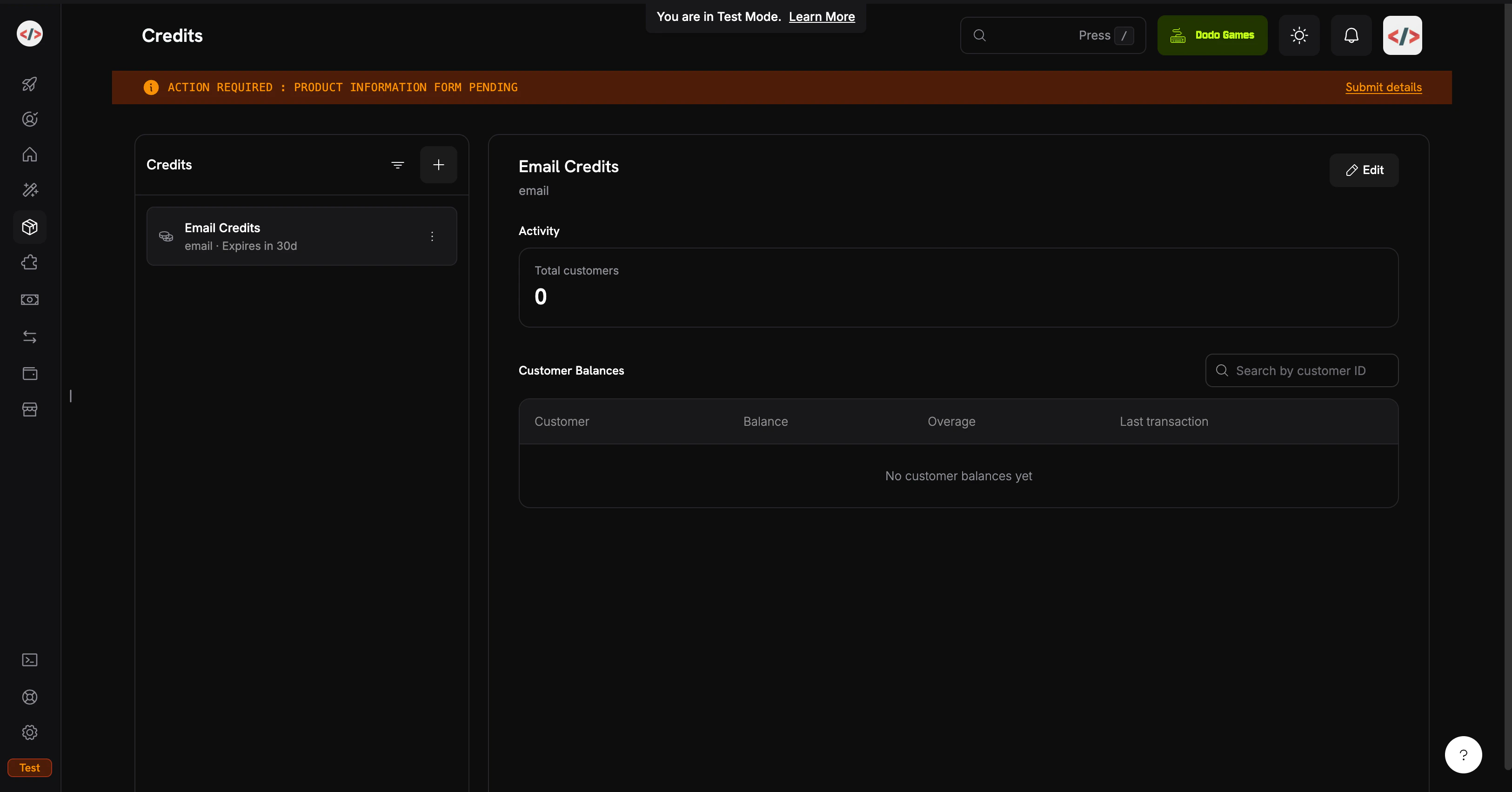
**Credit Name**: `Email Credits`
**Credit Type**: **Custom Unit**
**Unit Name**: `email`
**Define Precision**: `0`. An email is a whole unit, so the balance never needs decimals.
**Credit Expiry**: `30 days`. Unused credits expire 30 days after they're issued.
Precision can't be changed after you create the credit. For discrete units such as emails, messages, or sessions, use `0`.
This tutorial leaves rollover and overage off to keep the credit flow minimal. You can turn them on later, either on the credit or on each product's credit attachment.
Click **Create Credit**. Open the credit and copy its ID, which starts with `cde_`. The backend uses it for balance reads and ledger entries.
The `Email Credits` entitlement is ready. Next, create the products that grant it to customers.
## Step 2: Create the Plan and Top-Up Pack
Create two products that attach the same `Email Credits` entitlement: a **Subscription** plan that grants 5,000 emails each billing cycle, and a **One Time** top-up that adds 5,000 more on demand.
This tutorial debits credits with ledger entries instead of usage meters. A ledger debit is applied when the API call returns, needs no meter setup, and fits cases where one user action costs exactly one credit. To deduct credits automatically from ingested usage events, which suits weighted units such as tokens or megabytes processed, see [Usage Billing with Credits](/features/credit-based-billing) in the Credit-Based Billing guide.
### MailKit Plan (\$19/month, 5,000 Emails)
1. Go to **Products** and click **Add Product**.
2. Enter the product details:
**Product Name**: `MailKit Plan`
**Description**: `5,000 transactional emails per month.`
3. Under **Pricing Type**, select **Subscription**.
4. Set the recurring price:
**Price**: `19.00`
**Repeat payment every**: `1` month
**Currency**: `USD`
In the **Entitlements** section, click **Attach** next to **Credits** and configure:
**Select credits**: `Email Credits`
**Credits issued per billing cycle**: `5000`
**Low Balance Threshold (%)**: `20`. Dodo Payments sends `credit.balance_low` when the balance falls below 20% of the credits issued per cycle, which is 1,000 emails.
**Import Default Credit Settings**: on, so the product uses the 30-day expiry from Step 1.
Add the credit to the product, then save the product. Copy the product ID, which starts with `pdt_`.
Plan: \$19/month, with 5,000 emails issued each billing cycle.
### Top-Up Pack (\$9 One-Time, 5,000 Emails)
1. Go to **Products** and click **Add Product**.
2. Enter the product details:
**Product Name**: `Email Top-Up Pack`
**Description**: `Add 5,000 emails to your MailKit balance.`
3. Under **Pricing Type**, select **One Time**.
4. Set the price:
**Price**: `9.00`
**Currency**: `USD`
In the **Entitlements** section, click **Attach** next to **Credits** and configure:
* **Select credits**: `Email Credits`
* **No of credits issued**: `5000`
A one-time product grants credits with their own expiry: 30 days from purchase, from the default you set in Step 1. Top-up credits add to the subscription credits. They don't replace them.
Save the product and copy its ID.
Top-Up Pack: \$9 for 5,000 emails, added to the balance after the payment succeeds.
## Step 3: Set Up the Backend
Build the Express server that creates checkouts, sends email, reads balances, and receives webhooks.
```bash theme={null}
mkdir mailkit && cd mailkit
npm init -y
npm install dodopayments resend express dotenv
npm install -D tsx @types/node @types/express
```
Add a dev script to `package.json`:
```json theme={null}
{
"scripts": {
"dev": "tsx watch server.ts"
}
}
```
[`tsx`](https://tsx.is) runs TypeScript directly, without a build step or a `tsconfig.json`. For production, add a `tsconfig.json` and a `build` script.
Create `.env` with a test mode API key from **Developer → API Keys** and the IDs from Steps 1 and 2:
```bash .env theme={null}
# Dodo Payments
DODO_PAYMENTS_API_KEY=your_dodo_test_api_key
DODO_PAYMENTS_WEBHOOK_KEY=your_dodo_webhook_signing_secret
CREDIT_ENTITLEMENT_ID=cde_xxxxxxxxxxxx
PLAN_PRODUCT_ID=pdt_xxxxxxxxxxxx
TOPUP_PRODUCT_ID=pdt_xxxxxxxxxxxx
# Resend
RESEND_API_KEY=re_xxxxxxxxxxxx
# App
BASE_URL=http://localhost:3000
PORT=3000
```
You fill in `DODO_PAYMENTS_WEBHOOK_KEY` in Step 4, after you create the webhook endpoint. Create the Resend API key at [resend.com/api-keys](https://resend.com/api-keys).
Add `.env` to `.gitignore` before your first commit. Never commit API keys.
Create `server.ts` in the project root. The server exposes five routes: subscribe checkout, top-up checkout, balance read, send, and the webhook receiver.
```typescript server.ts expandable theme={null}
import 'dotenv/config';
import express, { Request, Response } from 'express';
import DodoPayments from 'dodopayments';
import { Resend } from 'resend';
const app = express();
const dodo = new DodoPayments({
bearerToken: process.env.DODO_PAYMENTS_API_KEY!,
webhookKey: process.env.DODO_PAYMENTS_WEBHOOK_KEY!,
environment: 'test_mode',
});
const resend = new Resend(process.env.RESEND_API_KEY!);
const CREDIT_ENTITLEMENT_ID = process.env.CREDIT_ENTITLEMENT_ID!;
const BASE_URL = process.env.BASE_URL!;
// ---------------------------------------------------------------
// Webhook endpoint MUST receive the raw body for signature
// verification. Register it BEFORE express.json().
// ---------------------------------------------------------------
app.post(
'/webhooks/dodo',
express.raw({ type: 'application/json' }),
async (req: Request, res: Response) => {
const headers = {
'webhook-id': req.headers['webhook-id'] as string,
'webhook-signature': req.headers['webhook-signature'] as string,
'webhook-timestamp': req.headers['webhook-timestamp'] as string,
};
let event: any;
try {
event = await dodo.webhooks.unwrap(req.body.toString('utf8'), { headers });
} catch (err) {
console.error('Webhook signature verification failed:', err);
return res.status(401).json({ error: 'invalid signature' });
}
switch (event.type) {
case 'credit.balance_low': {
const { customer_id, credit_entitlement_name, available_balance, threshold_percent } =
event.data;
console.log(
`[low-balance] ${customer_id} has ${available_balance} ${credit_entitlement_name} ` +
`left (under ${threshold_percent}%)`
);
await notifyCustomerLowBalance(customer_id, Number(available_balance));
break;
}
case 'credit.added':
console.log('[credit.added]', event.data);
break;
case 'credit.rolled_over':
console.log('[rolled_over]', event.data);
break;
}
res.json({ received: true });
}
);
// JSON parsing for everything else.
app.use(express.json());
// ---------------------------------------------------------------
// POST /checkout/subscribe → start the MailKit subscription.
// ---------------------------------------------------------------
app.post('/checkout/subscribe', async (req, res) => {
const { email, name } = req.body as { email: string; name: string };
const session = await dodo.checkoutSessions.create({
product_cart: [{ product_id: process.env.PLAN_PRODUCT_ID!, quantity: 1 }],
customer: { email, name },
return_url: `${BASE_URL}/?subscribed=1`,
});
res.json({ checkout_url: session.checkout_url });
});
// ---------------------------------------------------------------
// POST /checkout/topup → buy a 5,000-email top-up for an existing
// customer. In a real app, customer_id is resolved from the
// authenticated session, never trusted from request input.
// ---------------------------------------------------------------
app.post('/checkout/topup', async (req, res) => {
const { customer_id } = req.body as { customer_id: string };
const session = await dodo.checkoutSessions.create({
product_cart: [{ product_id: process.env.TOPUP_PRODUCT_ID!, quantity: 1 }],
customer: { customer_id },
return_url: `${BASE_URL}/?topped_up=1`,
});
res.json({ checkout_url: session.checkout_url });
});
// ---------------------------------------------------------------
// GET /credits/:customerId → live balance for the dashboard widget.
// ---------------------------------------------------------------
app.get('/credits/:customerId', async (req, res) => {
const balance = await dodo.creditEntitlements.balances.retrieve(req.params.customerId, {
credit_entitlement_id: CREDIT_ENTITLEMENT_ID,
});
res.json({ balance: balance.balance });
});
// ---------------------------------------------------------------
// POST /send → send an email via Resend, then write a ledger entry
// to debit 1 credit from the customer's balance. The deduction is
// instant; the next /credits call reflects it.
// ---------------------------------------------------------------
app.post('/send', async (req, res) => {
const { customer_id, to, subject, html } = req.body as {
customer_id: string;
to: string;
subject: string;
html: string;
};
// 1. Pre-flight balance check: refuse to send if the balance is at zero.
const balance = await dodo.creditEntitlements.balances.retrieve(customer_id, {
credit_entitlement_id: CREDIT_ENTITLEMENT_ID,
});
if (Number(balance.balance) <= 0) {
return res.status(402).json({
error: 'No email credits remaining. Buy a top-up pack or upgrade your plan.',
});
}
// 2. Send via Resend.
const { data, error } = await resend.emails.send({
from: 'MailKit ', // swap for your verified domain
to: [to],
subject,
html,
});
if (error) {
return res.status(500).json({ error: error.message });
}
// 3. Debit 1 credit. Resend's message ID is the idempotency key: if this
// ledger call is repeated for the same send, Dodo Payments rejects the
// duplicate with 409 Conflict instead of debiting the customer twice.
await dodo.creditEntitlements.balances.createLedgerEntry(customer_id, {
credit_entitlement_id: CREDIT_ENTITLEMENT_ID,
amount: '1',
entry_type: 'debit',
reason: `email send ${data!.id}`,
idempotency_key: data!.id,
});
res.json({ id: data!.id });
});
async function notifyCustomerLowBalance(customerId: string, available: number) {
// In production: send an email to the account owner, push a banner,
// open an in-app modal, etc. For the demo we just log.
console.log(`[NOTIFY] ${customerId}: ${available} emails left. Consider topping up.`);
}
app.use(express.static('public'));
const port = Number(process.env.PORT) || 3000;
app.listen(port, () => {
console.log(`MailKit running on http://localhost:${port}`);
});
```
The webhook route must receive the raw request body. `express.json()` replaces the body with a parsed object, and signature verification needs the exact bytes Dodo Payments signed. Keep the `/webhooks/dodo` route, with `express.raw()`, above the `app.use(express.json())` line.
The backend is ready: subscribe, top-up, balance, send, and the webhook handler.
Create `public/index.html`. It calls each route from a simple form, so you can test the flow in a browser:
```html public/index.html expandable theme={null}
MailKit Demo
MailKit
Prepaid transactional email, billed per send.
1. Subscribe to MailKit ($19/mo, 5,000 emails)
2. Check your balance
3. Send a transactional email
4. Run low? Buy a top-up pack
```
## Step 4: Wire Up the Webhook Endpoint
The `credit.balance_low` event lets you warn customers before they run out. Without it, a customer first notices the problem when an email fails to send.
Webhooks need a public URL. While you develop, use [ngrok](https://ngrok.com) or another tunnel:
```bash theme={null}
ngrok http 3000
```
Copy the HTTPS forwarding URL, for example `https://1234abcd.ngrok-free.app`.
1. Go to **Developer → Webhooks** and click **Add endpoint**.
2. Enter the URL `https://1234abcd.ngrok-free.app/webhooks/dodo`, using your own tunnel host.
3. Select the events `credit.added`, `credit.balance_low`, and `credit.rolled_over`.
4. Click **Create endpoint**.
5. Copy the signing secret from the endpoint's **Overview** tab into `.env` as `DODO_PAYMENTS_WEBHOOK_KEY`.
6. Restart the server.
## Step 5: Test the Full Flow
```bash theme={null}
npm run dev
```
The server logs `MailKit running on http://localhost:3000`. Open that URL in your browser.
1. In section 1, enter a test email address and name, then click **Get checkout link**.
2. Open the link and complete checkout with a [test card](/miscellaneous/testing-process).
3. In the dashboard, go to **Customers** and copy the new customer's ID, which starts with `cus_`.
The customer has **5,000 emails** in their balance. To confirm, open the customer in **Customers** and select the **Credits** tab.
1. Paste the customer ID into section 3.
2. Leave **To** set to `delivered@resend.dev`, a Resend test address that accepts every message.
3. Click **Send**.
The page shows the Resend message ID. Refresh the balance in section 2: it reads 4,999. A ledger debit is part of the balance as soon as the API call returns.
The threshold is 20%, or 1,000 of the 5,000 emails issued per cycle. To reach it without sending 4,000 emails, debit the balance manually in the dashboard:
1. Open the customer in **Customers**, select the **Credits** tab, and choose **Email Credits**.
2. Click **Apply Credit/Debit**, select **Debit**, and enter `4000`. The balance is now exactly 1,000, which isn't below the threshold yet.
3. Send one more email from the demo. The balance drops to 999.
When the webhook arrives, the server logs:
```text theme={null}
[low-balance] cus_xxx has 999 Email Credits left (under 20%)
[NOTIFY] cus_xxx: 999 emails left. Consider topping up.
```
The server received and verified the webhook. In production, this is where you email the customer or show an in-app banner.
1. Paste the customer ID into section 4.
2. Click **Buy 5,000 emails** and complete the test checkout.
3. Refresh the balance. It increases by 5,000.
Dodo Payments sends a `credit.added` event with `transaction_type: "credit_added"`. The grant behind it has `source_type: one_time`, which you can read back with the [List Customer Grants](/api-reference/credit-entitlements/list-customer-grants) API. Top-up credits add to the subscription credits. Debits draw from the grant that expires first, and from the oldest grant when two expire at the same time.
Debit the balance to zero in the dashboard, then try to send one more email. The server responds with `402`:
```json theme={null}
{ "error": "No email credits remaining. Buy a top-up pack or upgrade your plan." }
```
That `402` is your application's enforcement. Treat the Dodo Payments balance API as the source of truth, and don't cache the balance on the client.
## Troubleshooting
The signature covers the raw HTTP body. `express.json()` replaces the body with a parsed object, so verification fails. Register `/webhooks/dodo` with `express.raw({ type: 'application/json' })` above the `app.use(express.json())` line. Then check that `DODO_PAYMENTS_WEBHOOK_KEY` matches the signing secret on the endpoint's **Overview** tab.
Check these three things, in order:
1. The customer **completed checkout**. Credits are issued when the payment succeeds, not when the checkout session is created.
2. `CREDIT_ENTITLEMENT_ID` in `.env` matches the credit attached to the product. The balance and ledger calls use this ID, so a mismatch reads or debits a different credit.
3. The `customer_id` you pass is the Dodo Payments customer ID (it starts with `cus_`), not an ID from your own database.
The test sender `onboarding@resend.dev` delivers only to the email address on your Resend account, or to `delivered@resend.dev`. To send to anyone else, [verify a domain](https://resend.com/docs/dashboard/domains/introduction) and use a `from` address on that domain.
## What You Built
`Email Credits`, defined once and attached to both the subscription plan and the top-up pack.
\$19/month grants 5,000 emails per billing cycle. Customers know what they pay for, and you know your maximum cost.
A one-time product that grants 5,000 emails on top of subscription credits, with no plan change.
One `createLedgerEntry` call after each send, with no meter and no aggregation delay. The Resend message ID as the idempotency key blocks a second debit for the same send.
Rollover, overage modes, ledger management, and the full credit API.
For help, ask in the [Discord Community](https://discord.gg/bYqAp4ayYh) or email [support@dodopayments.com](mailto:support@dodopayments.com).
This documentation is built and hosted on [Mintlify](https://mintlify.com), a developer documentation platform.