> ## Documentation Index
> Fetch the complete documentation index at: https://docs.dodopayments.com/llms.txt
> Use this file to discover all available pages before exploring further.

# Build an AI API Platform with Credit-Based Billing

> Build NeuralAPI, a tiered AI API with token credits. Subscription plans and top-up packs grant credits, and a meter deducts them as customers call your API.

<Tip>
  To have your coding agent write the integration, install the [Dodo Agent Plugin](/developer-resources/build-with-ai-coding-agents). It adds the Dodo Payments skills and MCP servers to Claude Code, Codex CLI, Cursor, VS Code / GitHub Copilot, Kiro, and OpenCode.
</Tip>

You'll build **NeuralAPI**, a tiered AI API where each subscription plan includes a monthly allowance of token credits. Customers who run low buy a top-up pack, and your backend reports the tokens each OpenAI request uses so Dodo Payments deducts them from the customer's balance.

<Note>
  This tutorial uses Node.js, Express, and the OpenAI SDK. The Dodo Payments concepts (credits, meters, and webhooks) work the same with any framework or AI provider.
</Note>

When you finish, you'll know how to:

* Create a custom credit entitlement for tokens, and a meter that deducts from it.
* Attach credits to subscription plans, with and without overage, and to a one-time top-up product.
* Call OpenAI from an endpoint that bills tokens through Dodo Payments.
* Read a customer's live credit balance with the SDK.
* Verify webhook signatures and route Dodo Payments credit events.

## What We're Building

NeuralAPI sells three products:

| Product | Price | Tokens | Overage |
| - | - | - | - |
| Starter Plan | \$29/month | 10,000,000 tokens/cycle | Blocked at zero |
| Pro Plan | \$99/month | 40,000,000 tokens/cycle | \$0.005 per 1K tokens |
| Token Top-Up Pack | \$19 one-time | +5,000,000 tokens | — |

Before you start, you need:

* A Dodo Payments account. Build everything in test mode.
* An OpenAI API key.
* Node.js 22 or later, and working knowledge of TypeScript and Node.js.

## Step 1: Create Your Token Credit Entitlement

Create the credit entitlement that both plans and the top-up pack share. It defines the token unit NeuralAPI sells.

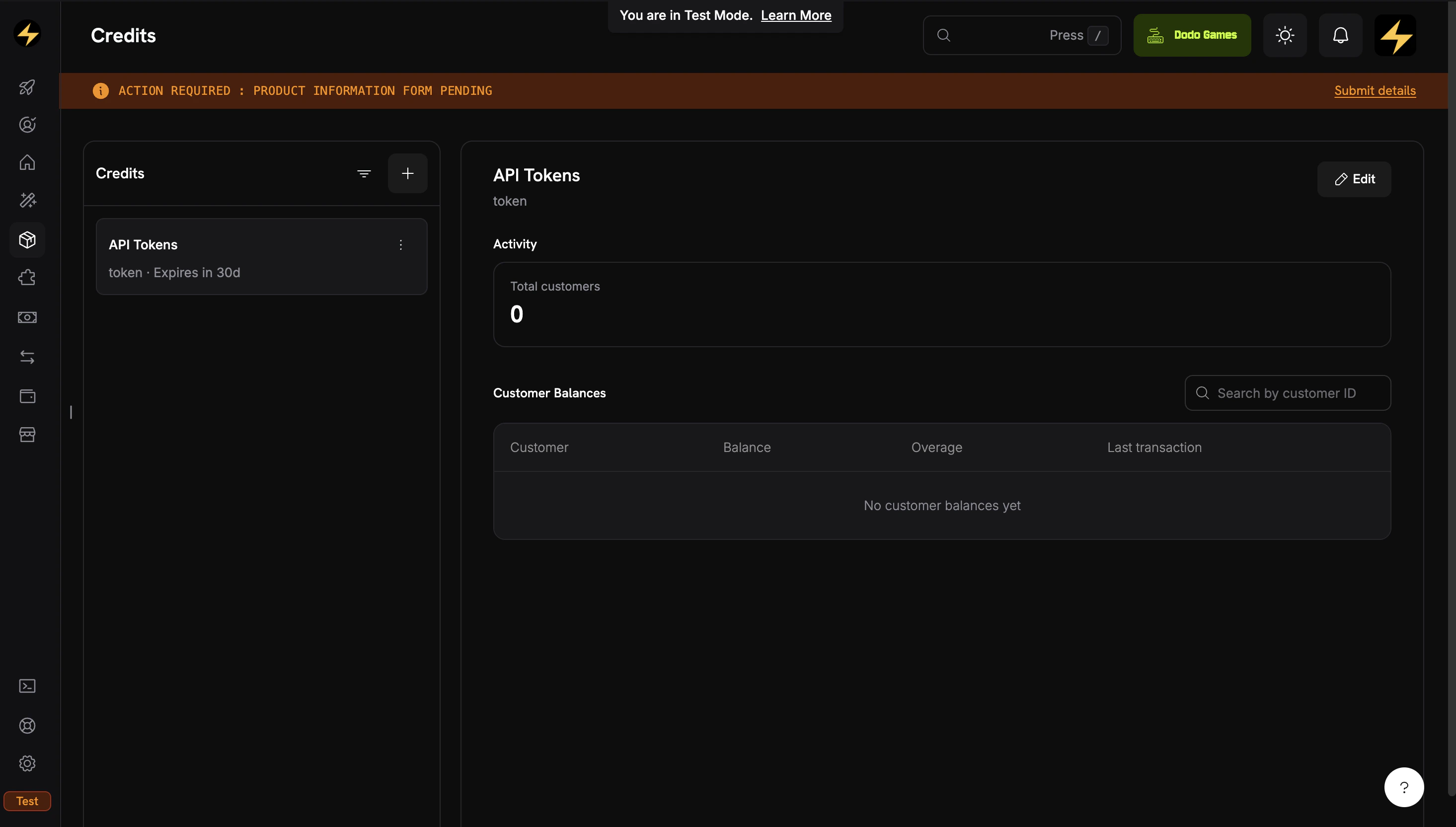
<Frame caption="The Credits tab under Products shows all your credit entitlements.">
  <img src="https://mintcdn.com/dodopayments/eU6ZCQ885P3550bK/images/CBB/Desktop%20-%20Cookbook%20-%20NeuralAPI%20-%20Credit.png?fit=max&auto=format&n=eU6ZCQ885P3550bK&q=85&s=6c34ed3755c78534dcd6012680e98e40" alt="Credits listing page showing created credit entitlements" style={{ maxHeight: '500px', width: 'auto' }} width="2931" height="1665" data-path="images/CBB/Desktop - Cookbook - NeuralAPI - Credit.png" />
</Frame>

<Steps>
  <Step title="Navigate to Credits">
    1. Log in to the Dodo Payments dashboard.
    2. Click **Products** in the sidebar.
    3. Select the **Credits** tab.
    4. Click **Create Credit**.
  </Step>

  <Step title="Configure the Credit Unit">
    Enter these values:

    **Credit Name**: `API Tokens`

    **Credit Type**: **Custom Unit**

    **Unit Name**: `token`

    **Define Precision**: `0`. Token counts are whole numbers.

    **Credit Expiry**: `30 days`. Credits expire 30 days after they're issued, which matches the monthly billing cycle.

    <Warning>
      Precision can't be changed after you create the credit. For token counts, use `0`.
    </Warning>
  </Step>

  <Step title="Skip Overage at the Credit Level">
    Leave overage **disabled** on the credit. You configure it per plan when you attach the credit to each product, so the Starter plan can block usage at zero while the Pro plan allows overage.

    <Tip>
      Overage settings on the credit are defaults. Each product attachment can override them, which Step 3 does for the Pro plan.
    </Tip>
  </Step>

  <Step title="Save and Copy the Credit ID">
    Click **Create Credit**. Open the saved credit and copy its ID, which starts with `cde_`.

    <Check>
      The `API Tokens` credit entitlement is ready. Next, create a meter so that usage events deduct credits.
    </Check>
  </Step>
</Steps>

## Step 2: Create a Meter for Token Usage

A meter aggregates incoming usage events. When you link it to a credit, the aggregated usage is deducted from the customer's credit balance. Create the meter before the plan products, because you attach it while you create them in Step 3.

<Steps>
  <Step title="Open the Meters Section">
    1. In the dashboard sidebar, go to **Products → Meters**.
    2. Click **Create Meter**.
  </Step>

  <Step title="Configure the Meter">
    Enter these values:

    **Meter Name**: `Token Usage Meter`

    **Event Name**: `api.tokens_used`. This must match the `event_name` your app sends.

    **Aggregation Type**: `Sum`, to add up the token count from each event.

    **Over Property**: `tokens`, the metadata key whose value is summed.

    **Measurement Unit**: `tokens`

    <Warning>
      Event names are case-sensitive: `api.tokens_used` and `Api.Tokens.Used` are different events. You can't edit a meter after you create it, so check every value before you confirm.
    </Warning>

    Create the meter. You select it by name when you attach it to products.

    <Check>
      The meter is created. Next, link it to the credit on each plan product.
    </Check>
  </Step>
</Steps>

## Step 3: Create the Plan Products

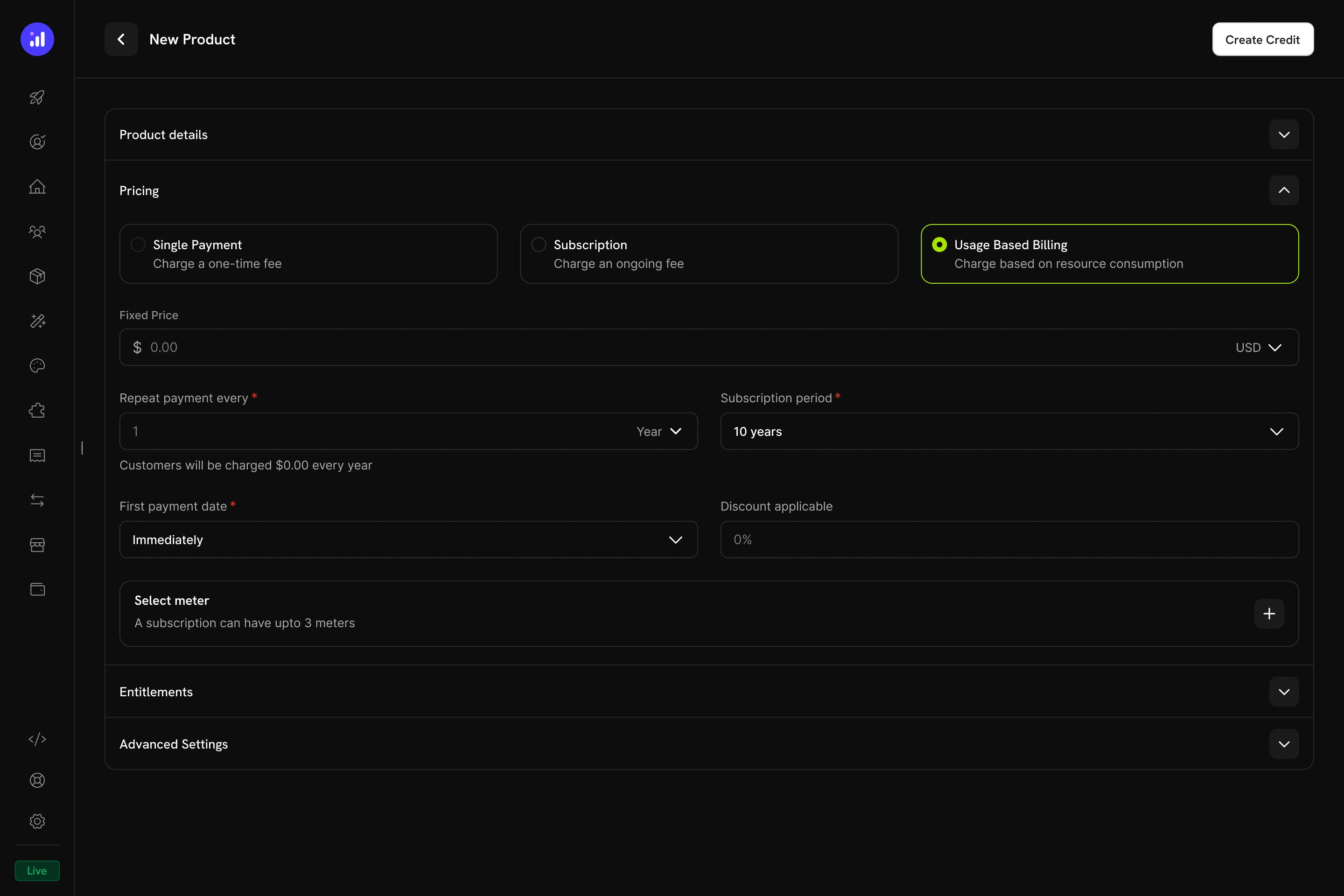
Create both plans with the **Usage Based Billing** pricing type, not plain **Subscription**. Meters attach to Usage Based Billing products, and the meter is what deducts credits as customers call your API. A Usage Based Billing product still charges a recurring base fee (\$29 or \$99), and usage on top of it is billed in credits.

<Frame caption="Usage Based Billing pricing type with meter configuration.">
  <img src="https://mintcdn.com/dodopayments/ibNfoFRyCIGyt3pO/images/CBB/Desktop%20-%20Attach%20Credit%20-%20UBB.jpg?fit=max&auto=format&n=ibNfoFRyCIGyt3pO&q=85&s=41b2862c12d126e7843098307e27e137" alt="Usage Based Billing pricing configuration" style={{ maxHeight: '500px', width: 'auto' }} width="2880" height="1920" data-path="images/CBB/Desktop - Attach Credit - UBB.jpg" />
</Frame>

### Starter Plan (\$29/month — 10M Tokens, No Overage)

<Steps>
  <Step title="Create the Starter Product">
    1. Go to **Products** and click **Add Product**.
    2. Under **Pricing Type**, select **Usage Based Billing**.
    3. Enter these values:

    **Product Name**: `NeuralAPI Starter`

    **Description**: `10 million API tokens per month. Perfect for individual developers and small projects.`

    **Price**: `29.00`. This is the recurring base fee, charged every month even before any usage.

    **Repeat payment every**: `1` month

    **Currency**: `USD`
  </Step>

  <Step title="Attach the Meter">
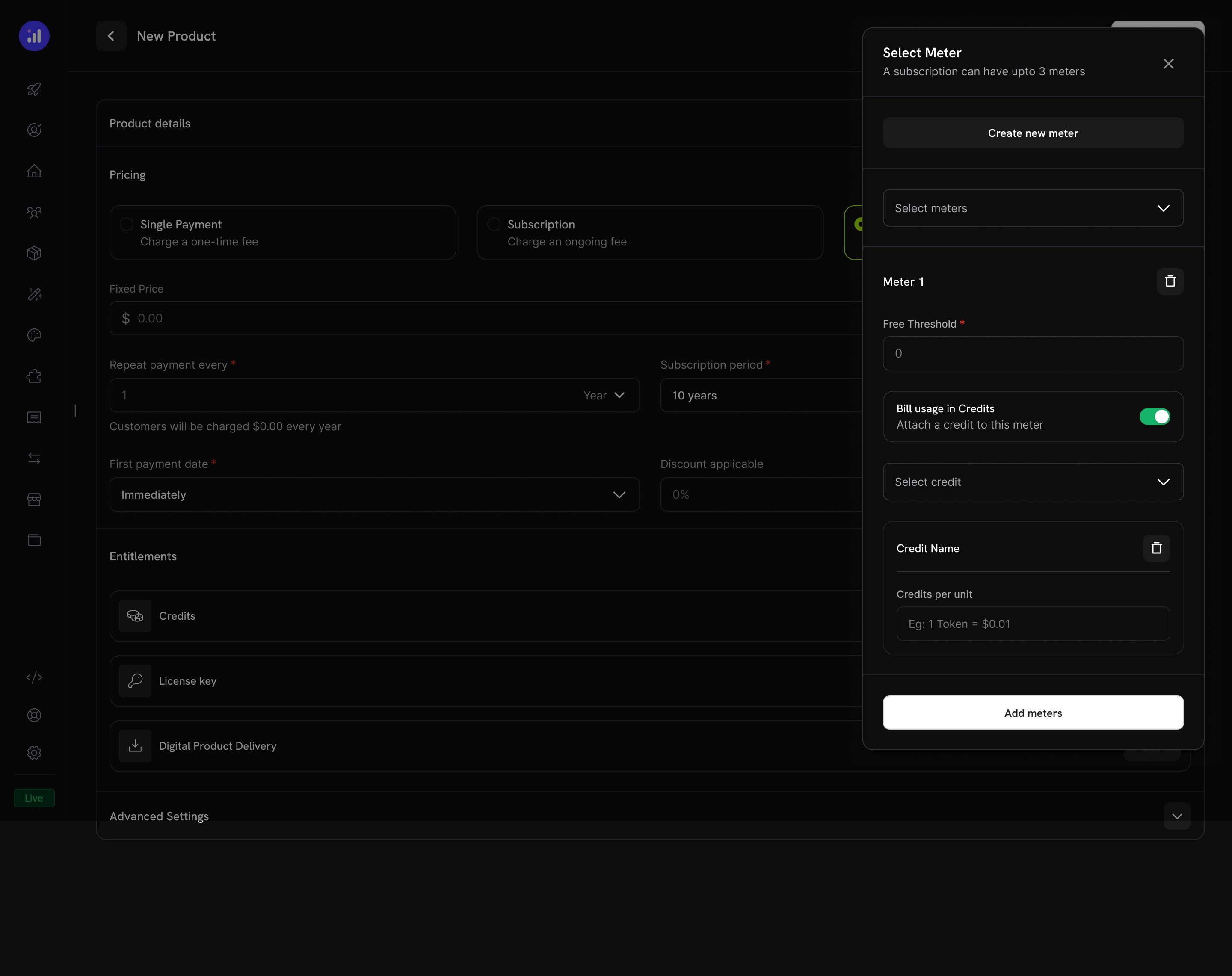
    In the **Select meter** section, click **+** and add `Token Usage Meter`. Then configure the meter:

    1. Turn on **Bill usage in credits**.
    2. **Select credit**: `API Tokens`
    3. **Meter units per credit**: `1`. Each token in an event deducts one credit.
    4. **Free Threshold**: `0`. The free threshold applies only when a meter bills in money. When it bills in credits, every unit is deducted from the balance.

    <Frame caption="Toggle 'Bill usage in Credits' on the meter and pick the credit entitlement.">
      <img src="https://mintcdn.com/dodopayments/ibNfoFRyCIGyt3pO/images/CBB/Desktop%20-%20Attach%20Credit%20-%20UBB-5.jpg?fit=max&auto=format&n=ibNfoFRyCIGyt3pO&q=85&s=b4ef2fe5079cbf3bb39eb3814f101cbd" alt="Meter with Bill usage in Credits enabled and API Tokens selected" style={{ maxHeight: '500px', width: 'auto' }} width="2880" height="2282" data-path="images/CBB/Desktop - Attach Credit - UBB-5.jpg" />
    </Frame>

    This link is what makes incoming `api.tokens_used` events deduct from the customer's balance.
  </Step>

  <Step title="Configure Credit Issuance for Starter">
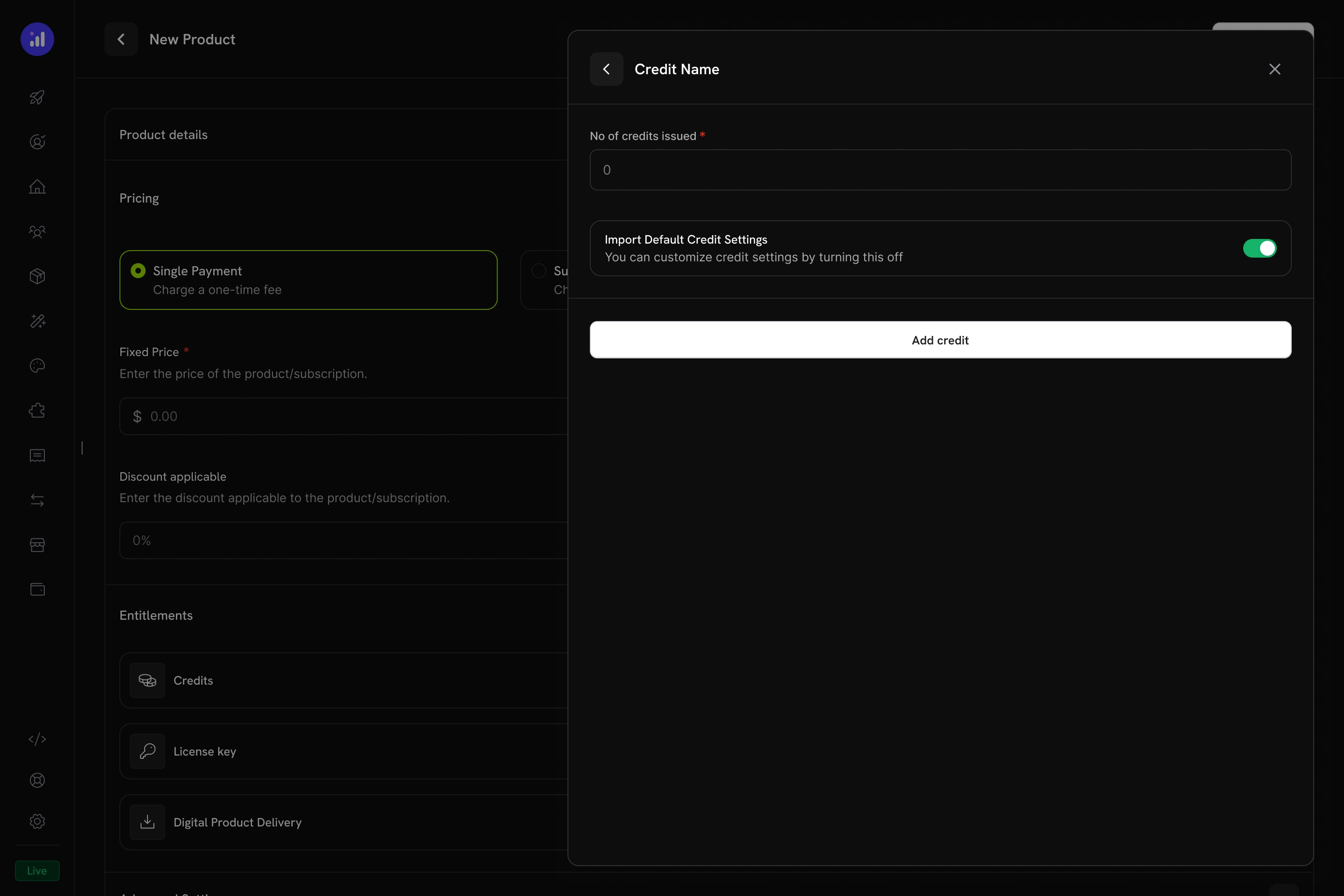
    After you attach a credit-billed meter, the product shows a credit configuration section. Enter:

    **Credits issued per billing cycle**: `10000000`

    **Import Default Credit Settings**: on, so the product uses the 30-day expiry from the credit entitlement.

    **Allow Overage**: off. The default from Step 1 keeps overage disabled, so Starter customers stop at zero.

    <Frame caption="Configure credit issuance per cycle on the UBB product.">
      <img src="https://mintcdn.com/dodopayments/ibNfoFRyCIGyt3pO/images/CBB/Desktop%20-%20Attach%20Credit%20-%20UBB-6.jpg?fit=max&auto=format&n=ibNfoFRyCIGyt3pO&q=85&s=22e99c54f11305a24d63c77e09a4650c" alt="Credit configuration form with per-cycle amount and overage settings" style={{ maxHeight: '500px', width: 'auto' }} width="2880" height="1920" data-path="images/CBB/Desktop - Attach Credit - UBB-6.jpg" />
    </Frame>

    Save the product and copy its ID, which starts with `pdt_`.
    <Check>
      Starter Plan: \$29/month base fee, 10M tokens per cycle, blocked at zero, and deducted through the meter.
    </Check>
  </Step>
</Steps>

### Pro Plan (\$99/month — 40M Tokens, Overage Enabled)

<Steps>
  <Step title="Create the Pro Product">
    Follow the Starter flow with these values:

    **Product Name**: `NeuralAPI Pro`

    **Description**: `40 million API tokens per month with overage. Built for production applications.`

    **Price**: `99.00`

    **Repeat payment every**: `1` month

    **Currency**: `USD`
  </Step>

  <Step title="Attach the Meter">
    Configure the meter as you did for Starter: add `Token Usage Meter`, turn on **Bill usage in credits**, select `API Tokens`, and set **Meter units per credit** to `1` and **Free Threshold** to `0`.
  </Step>

  <Step title="Configure Credit Issuance with Overage">
    Configure credit issuance, this time with overage enabled:

    **Credits issued per billing cycle**: `40000000`

    **Import Default Credit Settings**: off, so you can set overage for this product.

    **Allow Overage**: on

    **Price Per Unit**: `0.000005` USD per token. That is \$0.005 per 1K tokens, or \$5 per 1M tokens, which is above the plan's effective per-token rate and discourages overage.

    **Overage Behavior**: `Bill overage at billing`. Overage is charged on the next invoice, and then the balance resets.

    Save the product and copy its ID.

    <Check>
      Pro Plan: \$99/month base fee, 40M tokens per cycle, overage at \$0.005 per 1K tokens, and deducted through the meter.
    </Check>
  </Step>
</Steps>

## Step 4: Create the Token Top-Up Pack

The top-up pack is a one-time purchase that adds 5,000,000 tokens to an existing customer's balance.

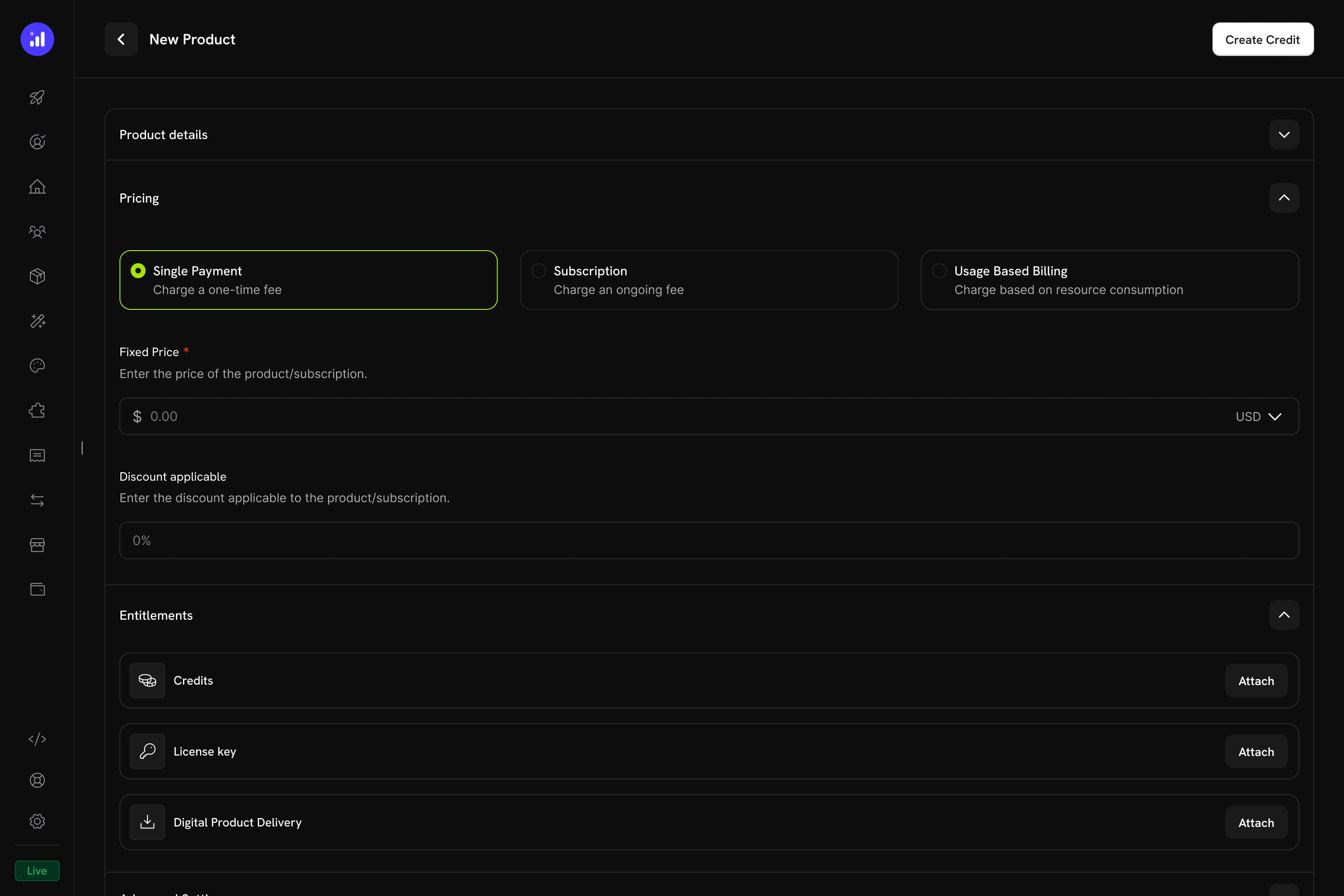
<Frame caption="One-time pricing selected for a credit product.">
  <img src="https://mintcdn.com/dodopayments/ibNfoFRyCIGyt3pO/images/CBB/Desktop%20-%20Attach%20Credit%20-%20OTP.jpg?fit=max&auto=format&n=ibNfoFRyCIGyt3pO&q=85&s=1743cb3e515952f9d4b1b2782cebac8b" alt="Product pricing section with Single Payment selected" style={{ maxHeight: '500px', width: 'auto' }} width="2880" height="1920" data-path="images/CBB/Desktop - Attach Credit - OTP.jpg" />
</Frame>

<Steps>
  <Step title="Create a One-Time Product">
    1. Go to **Products** and click **Add Product**.
    2. Under **Pricing Type**, select **One Time**.
    3. Enter these values:

    **Product Name**: `Token Top-Up Pack`

    **Description**: `Add 5 million tokens to your NeuralAPI balance.`

    **Price**: `19.00`

    **Currency**: `USD`
  </Step>

  <Step title="Attach the Token Credit">
    1. In the **Entitlements** section, click **Attach** next to **Credits**.
    2. Select `API Tokens`.
    3. Set **No of credits issued** to `5000000`.
    4. Turn off **Import Default Credit Settings** to override the default 30-day expiry.
    5. Set **Credit Expiry** to **Custom** and enter `365` days.
    6. Save the product.

    Copy the product ID.

    <Tip>
      Why a longer expiry on top-ups? Subscription credits expire after 30 days because that's the billing cycle. A top-up is a prepaid purchase: the customer paid \$19 upfront and expects the tokens to last longer than a month. A 365-day expiry matches how prepaid API credits work at OpenAI and Anthropic, where purchased credits expire one year after purchase, and still caps your liability so customers can't stockpile credits indefinitely.
    </Tip>

    <Check>
      The Top-Up Pack is configured. Buying it grants 5,000,000 tokens that stay valid for 365 days.
    </Check>
  </Step>
</Steps>

## Step 5: Build the Backend

Build the Express server. It creates subscription and top-up checkouts, calls OpenAI and bills the tokens, reads balances, and receives credit webhook events.

<Steps>
  <Step title="Set Up Your Project">
    ```bash theme={null}
    mkdir neural-api-billing
    cd neural-api-billing
    npm init -y
    npm install dodopayments openai express dotenv
    npm install -D @types/node @types/express typescript tsx
    ```

    Create a `tsconfig.json`:

    ```json tsconfig.json theme={null}
    {
      "compilerOptions": {
        "target": "ES2022",
        "module": "commonjs",
        "outDir": "./dist",
        "rootDir": "./src",
        "strict": true,
        "esModuleInterop": true,
        "skipLibCheck": true
      }
    }
    ```

    Update `package.json` scripts:

    ```json package.json theme={null}
    {
      "scripts": {
        "dev": "tsx watch src/server.ts",
        "build": "tsc",
        "start": "node dist/server.js"
      }
    }
    ```
  </Step>

  <Step title="Set Up Environment Variables">
    Create `.env` with a test mode API key from **Developer → API Keys** and the IDs from the previous steps:

    ```bash .env theme={null}
    DODO_PAYMENTS_API_KEY=your_dodo_api_key_here
    DODO_PAYMENTS_WEBHOOK_KEY=your_webhook_signing_secret_here
    DODO_PAYMENTS_ENVIRONMENT=test_mode
    OPENAI_API_KEY=your_openai_api_key_here
    CREDIT_ENTITLEMENT_ID=cde_xxxxxxxxxxxx
    STARTER_PLAN_PRODUCT_ID=pdt_xxxxxxxxxxxx
    PRO_PLAN_PRODUCT_ID=pdt_xxxxxxxxxxxx
    TOPUP_PRODUCT_ID=pdt_xxxxxxxxxxxx
    BASE_URL=http://localhost:3000
    ```

    <Warning>
      Never commit `.env` to version control. Add it to `.gitignore` before your first commit.
    </Warning>

    You fill in `DODO_PAYMENTS_WEBHOOK_KEY` in Step 7, after you register the webhook endpoint.
  </Step>

  <Step title="Implement the Server">
    Create `src/server.ts`. The completion endpoint calls OpenAI's `gpt-6-luna` model, which suits high-volume requests. The `package.json` tab shows the full dependency list:

    <CodeGroup>
      ```typescript src/server.ts expandable theme={null}
      import 'dotenv/config';
      import DodoPayments from 'dodopayments';
      import OpenAI from 'openai';
      import express, { Request, Response } from 'express';

      const app = express();

      // IMPORTANT: webhook route needs the raw body for signature verification.
      // We register the raw parser ONLY on /webhooks/dodo, then JSON for everything else.
      app.use('/webhooks/dodo', express.raw({ type: 'application/json' }));
      app.use(express.json());
      app.use(express.static('public'));

      const dodo = new DodoPayments({
        bearerToken: process.env.DODO_PAYMENTS_API_KEY!,
        webhookKey: process.env.DODO_PAYMENTS_WEBHOOK_KEY,
        environment: (process.env.DODO_PAYMENTS_ENVIRONMENT as 'test_mode' | 'live_mode') ?? 'test_mode',
      });

      const openai = new OpenAI({ apiKey: process.env.OPENAI_API_KEY! });

      const CREDIT_ENTITLEMENT_ID = process.env.CREDIT_ENTITLEMENT_ID!;
      const BASE_URL = process.env.BASE_URL!;
      const PLAN_PRODUCTS: Record<string, string> = {
        starter: process.env.STARTER_PLAN_PRODUCT_ID!,
        pro: process.env.PRO_PLAN_PRODUCT_ID!,
      };

      // ────────────────────────────────────────────────────────────────────────────
      // Subscription checkout
      // Body: { plan: 'starter' | 'pro', email: string, name: string }
      // ────────────────────────────────────────────────────────────────────────────
      app.post('/checkout/subscribe', async (req: Request, res: Response) => {
        const { plan, email, name } = req.body;
        if (!PLAN_PRODUCTS[plan]) {
          return res.status(400).json({ error: `Unknown plan: ${plan}` });
        }
        try {
          const session = await dodo.checkoutSessions.create({
            product_cart: [{ product_id: PLAN_PRODUCTS[plan], quantity: 1 }],
            customer: { email, name },
            return_url: `${BASE_URL}/?subscribed=1`,
          });
          res.json({ checkout_url: session.checkout_url, session_id: session.session_id });
        } catch (err) {
          console.error('Subscription checkout error:', err);
          res.status(500).json({ error: 'Failed to create subscription checkout' });
        }
      });

      // ────────────────────────────────────────────────────────────────────────────
      // Top-up checkout — buyer must already be a customer
      // Body: { customer_id: string }
      // ────────────────────────────────────────────────────────────────────────────
      app.post('/checkout/topup', async (req: Request, res: Response) => {
        const { customer_id } = req.body;
        if (!customer_id) return res.status(400).json({ error: 'customer_id required' });
        try {
          const session = await dodo.checkoutSessions.create({
            product_cart: [{ product_id: process.env.TOPUP_PRODUCT_ID!, quantity: 1 }],
            customer: { customer_id },
            return_url: `${BASE_URL}/?topup=1`,
          });
          res.json({ checkout_url: session.checkout_url });
        } catch (err) {
          console.error('Top-up checkout error:', err);
          res.status(500).json({ error: 'Failed to create top-up checkout' });
        }
      });

      // ────────────────────────────────────────────────────────────────────────────
      // Live token balance for a customer
      // ────────────────────────────────────────────────────────────────────────────
      app.get('/credits/:customerId', async (req: Request, res: Response) => {
        try {
          const result = await dodo.creditEntitlements.balances.retrieve(req.params.customerId, {
            credit_entitlement_id: CREDIT_ENTITLEMENT_ID,
          });
          res.json({
            balance: result.balance,
            overage: result.overage,
            last_transaction_at: result.last_transaction_at,
          });
        } catch (err) {
          console.error('Balance fetch error:', err);
          res.status(500).json({ error: 'Failed to fetch credit balance' });
        }
      });

      // ────────────────────────────────────────────────────────────────────────────
      // AI completion — calls OpenAI, then ingests a usage event with the real
      // token count. The meter aggregates these and deducts credits automatically.
      // Body: { customer_id: string, prompt: string }
      // ────────────────────────────────────────────────────────────────────────────
      app.post('/api/generate', async (req: Request, res: Response) => {
        const { customer_id, prompt } = req.body;
        if (!customer_id || !prompt) {
          return res.status(400).json({ error: 'customer_id and prompt required' });
        }

        // Best-effort balance gate for Starter (no overage). Note: balance updates
        // are eventually consistent (~1 min lag from event ingestion), so a Starter
        // customer can technically squeeze through a few extra requests right after
        // running out. Use a stricter rate-limiter on top if you need hard cutoffs.
        try {
          const balance = await dodo.creditEntitlements.balances.retrieve(customer_id, {
            credit_entitlement_id: CREDIT_ENTITLEMENT_ID,
          });
          if (Number(balance.balance) <= 0 && Number(balance.overage) <= 0) {
            return res.status(402).json({
              error: 'Out of tokens. Top up or upgrade to continue.',
            });
          }
        } catch {
          // Fall through — if the balance lookup fails, don't block; rely on metering.
        }

        let completion;
        try {
          completion = await openai.chat.completions.create({
            model: 'gpt-6-luna',
            messages: [{ role: 'user', content: prompt }],
          });
        } catch (err) {
          console.error('OpenAI error:', err);
          return res.status(502).json({ error: 'Upstream AI provider failed' });
        }

        const tokensUsed = completion.usage?.total_tokens ?? 0;

        // Fire-and-forget — don't block the response on metering.
        ingestTokenUsage(customer_id, tokensUsed, completion.model).catch((err) =>
          console.error('Usage ingest failed:', err),
        );

        res.json({
          text: completion.choices[0]?.message?.content ?? '',
          tokens_used: tokensUsed,
          model: completion.model,
        });
      });

      async function ingestTokenUsage(customerId: string, tokens: number, model: string) {
        await dodo.usageEvents.ingest({
          events: [
            {
              // event_id is the idempotency key. Use a stable, unique value per request.
              event_id: `req_${Date.now()}_${Math.random().toString(36).slice(2, 10)}`,
              customer_id: customerId,
              event_name: 'api.tokens_used',
              timestamp: new Date().toISOString(),
              metadata: { tokens, model },
            },
          ],
        });
      }

      // ────────────────────────────────────────────────────────────────────────────
      // Webhook handler — verifies signature using the SDK, then routes events.
      // ────────────────────────────────────────────────────────────────────────────
      app.post('/webhooks/dodo', async (req: Request, res: Response) => {
        const rawBody = (req.body as Buffer).toString('utf8');
        const headers = {
          'webhook-id': req.header('webhook-id') ?? '',
          'webhook-signature': req.header('webhook-signature') ?? '',
          'webhook-timestamp': req.header('webhook-timestamp') ?? '',
        };

        let event: { type: string; data: any };
        try {
          event = dodo.webhooks.unwrap(rawBody, { headers }) as any;
        } catch (err) {
          console.error('Webhook verification failed:', err);
          return res.status(401).json({ error: 'Invalid signature' });
        }

        switch (event.type) {
          case 'credit.added':
            console.log(`[credit.added] customer=${event.data.customer_id} amount=${event.data.amount}`);
            break;
          case 'credit.deducted':
            console.log(`[credit.deducted] customer=${event.data.customer_id} amount=${event.data.amount}`);
            break;
          case 'credit.overage_charged':
            console.log(`[credit.overage_charged] customer=${event.data.customer_id}`);
            break;
          default:
            // Ignore other event types
            break;
        }

        res.json({ received: true });
      });

      app.listen(3000, () => {
        console.log('NeuralAPI billing server running on http://localhost:3000');
      });
      ```

      ```json package.json theme={null}
      {
        "name": "neural-api-billing",
        "version": "1.0.0",
        "scripts": {
          "dev": "tsx watch src/server.ts",
          "build": "tsc",
          "start": "node dist/server.js"
        },
        "dependencies": {
          "dodopayments": "latest",
          "openai": "^4.0.0",
          "express": "^4.18.0",
          "dotenv": "^16.0.0"
        },
        "devDependencies": {
          "@types/node": "^20.0.0",
          "@types/express": "^4.17.0",
          "typescript": "^5.0.0",
          "tsx": "^4.0.0"
        }
      }
      ```
    </CodeGroup>

    <Check>
      The backend is done: subscription checkout, top-up checkout, an OpenAI completion with metered token billing, a balance read, and a verified webhook handler.
    </Check>

    <Tip>
      [`@dodopayments/ingestion-blueprints`](/features/usage-based-billing/ingestion-blueprints) provides trackers that make the `usageEvents.ingest` call for you, including the [LLM Blueprint](/developer-resources/ingestion-blueprints/llm), [API gateway](/developer-resources/ingestion-blueprints/api-gateway), [object storage](/developer-resources/ingestion-blueprints/object-storage), [streams](/developer-resources/ingestion-blueprints/stream), and [time-range](/developer-resources/ingestion-blueprints/time-range) usage.
    </Tip>
  </Step>

  <Step title="How Deductions Happen">
    The server never calls a "deduct N credits" endpoint. The meter does the deduction:

    1. Your handler calls OpenAI and reads `usage.total_tokens`, for example 1532.
    2. You ingest one usage event with `event_name: api.tokens_used` and `metadata: { tokens: 1532 }`.
    3. The `Token Usage Meter` aggregates events per customer. A background worker processes new events every minute.
    4. Because the meter bills the `API Tokens` credit through **Bill usage in credits**, Dodo Payments deducts 1532 credits, starting with the customer's grant that expires first (FIFO).
    5. If overage is enabled and the balance runs out, the deficit is tracked and billed on the next invoice.

    Your code only ingests events.
  </Step>
</Steps>

## Step 6: Add a Demo Frontend

Create `public/index.html` to test every flow in your browser. The page saves the customer ID in `localStorage`, so subscribe, generate, and top-up share one identity, as they would in a logged-in app:

<CodeGroup>
  ```html public/index.html expandable theme={null}
  <!DOCTYPE html>
  <html>
  <head>
    <title>NeuralAPI Demo</title>
    <style>
      body { font-family: system-ui, sans-serif; max-width: 760px; margin: 40px auto; padding: 20px; color: #1a1a2e; }
      h1 { font-size: 24px; }
      h2 { margin-top: 36px; border-bottom: 1px solid #eee; padding-bottom: 8px; font-size: 18px; }
      .panel { padding: 16px; background: #fafafe; border: 1px solid #e6e6f0; border-radius: 8px; margin: 12px 0; }
      .form-group { margin: 12px 0; }
      label { display: block; margin-bottom: 4px; font-weight: 600; font-size: 13px; }
      input, select, textarea { width: 100%; padding: 10px; border: 1px solid #ddd; border-radius: 6px; box-sizing: border-box; font-family: inherit; font-size: 14px; }
      textarea { min-height: 80px; resize: vertical; }
      button { background: #6366f1; color: white; padding: 10px 18px; border: none; border-radius: 6px; cursor: pointer; font-size: 14px; font-weight: 600; }
      button:hover { background: #4f46e5; }
      button:disabled { background: #c7c7d4; cursor: not-allowed; }
      .balance { font-size: 32px; font-weight: 700; color: #6366f1; }
      .muted { color: #777; font-size: 13px; margin-top: 4px; }
      .result { margin-top: 12px; padding: 12px; background: #fff; border: 1px solid #e6e6f0; border-radius: 6px; font-size: 14px; white-space: pre-wrap; }
      .row { display: flex; gap: 12px; align-items: center; }
      .row > * { flex: 1; }
    </style>
  </head>
  <body>
    <h1>NeuralAPI Demo</h1>

    <div class="panel">
      <label>Logged-in customer ID (paste once after subscribing)</label>
      <div class="row">
        <input id="customerId" placeholder="cus_xxxxxxxxxxxx" />
        <button onclick="saveCustomerId()" style="flex:0">Save</button>
      </div>
      <div class="muted">After completing checkout, copy the customer ID from your Dodo Payments dashboard (Customers → most recent) and paste here.</div>
    </div>

    <h2>1. Subscribe to a Plan</h2>
    <div class="form-group"><label>Plan</label>
      <select id="plan">
        <option value="starter">Starter — $29/mo, 10M tokens</option>
        <option value="pro">Pro — $99/mo, 40M tokens + overage</option>
      </select>
    </div>
    <div class="form-group"><label>Email</label><input type="email" id="email" placeholder="you@example.com" /></div>
    <div class="form-group"><label>Name</label><input id="name" placeholder="Your name" /></div>
    <button onclick="subscribe(event)">Get Checkout Link</button>
    <div id="subscribeResult" class="result" style="display:none"></div>

    <h2>2. Generate AI Response (deducts tokens)</h2>
    <div class="form-group"><label>Prompt</label><textarea id="prompt" placeholder="Explain quantum computing in one sentence"></textarea></div>
    <button onclick="generate(event)">Generate</button>
    <div id="generateResult" class="result" style="display:none"></div>

    <h2>3. Live Token Balance</h2>
    <button onclick="checkBalance(event)">Refresh Balance</button>
    <div id="balanceResult" class="result" style="display:none"></div>

    <h2>4. Buy a Top-Up Pack</h2>
    <button onclick="topup(event)">Buy 5M Tokens — $19</button>
    <div id="topupResult" class="result" style="display:none"></div>

    <script>
      const $ = (id) => document.getElementById(id);
      document.addEventListener('DOMContentLoaded', () => {
        $('customerId').value = localStorage.getItem('customerId') || '';
      });

      function getCustomerId() {
        const id = $('customerId').value.trim();
        if (!id) { alert('Save a customer ID first'); throw new Error('no customer'); }
        return id;
      }

      function saveCustomerId() {
        localStorage.setItem('customerId', $('customerId').value.trim());
        alert('Saved');
      }

      async function withLoading(btn, loadingLabel, fn) {
        const original = btn.textContent;
        btn.disabled = true;
        btn.textContent = loadingLabel;
        try { await fn(); } finally {
          btn.disabled = false;
          btn.textContent = original;
        }
      }

      async function subscribe(ev) {
        await withLoading(ev.target, 'Loading…', async () => {
          const res = await fetch('/checkout/subscribe', {
            method: 'POST',
            headers: { 'Content-Type': 'application/json' },
            body: JSON.stringify({ plan: $('plan').value, email: $('email').value, name: $('name').value }),
          });
          const data = await res.json();
          const el = $('subscribeResult');
          el.style.display = 'block';
          el.innerHTML = res.ok
            ? `<a href="${data.checkout_url}" target="_blank">Open Checkout →</a>`
            : `Error: ${data.error}`;
        });
      }

      async function generate(ev) {
        const customer_id = getCustomerId();
        await withLoading(ev.target, 'Generating…', async () => {
          const res = await fetch('/api/generate', {
            method: 'POST',
            headers: { 'Content-Type': 'application/json' },
            body: JSON.stringify({ customer_id, prompt: $('prompt').value }),
          });
          const data = await res.json();
          const el = $('generateResult');
          el.style.display = 'block';
          el.innerHTML = res.ok
            ? `<strong>Response:</strong>\n${data.text}\n\n<em>Tokens used: ${data.tokens_used} (${data.model})</em>`
            : `Error: ${data.error}`;
          if (res.ok) refreshBalanceSilently();
        });
      }

      async function checkBalance(ev) {
        const customer_id = getCustomerId();
        await withLoading(ev.target, 'Refreshing…', async () => {
          const res = await fetch('/credits/' + customer_id);
          const data = await res.json();
          const el = $('balanceResult');
          el.style.display = 'block';
          el.innerHTML = res.ok
            ? `<div class="balance">${Number(data.balance).toLocaleString()} tokens</div>
               <div class="muted">Overage used: ${Number(data.overage).toLocaleString()} · Last activity: ${data.last_transaction_at ?? 'never'}</div>`
            : `Error: ${data.error}`;
        });
      }

      async function refreshBalanceSilently() {
        const customer_id = $('customerId').value.trim();
        if (!customer_id) return;
        const res = await fetch('/credits/' + customer_id);
        const data = await res.json();
        const el = $('balanceResult');
        el.style.display = 'block';
        el.innerHTML = res.ok
          ? `<div class="balance">${Number(data.balance).toLocaleString()} tokens</div>
             <div class="muted">Overage used: ${Number(data.overage).toLocaleString()} · Last activity: ${data.last_transaction_at ?? 'never'}</div>`
          : `Error: ${data.error}`;
      }

      async function topup(ev) {
        const customer_id = getCustomerId();
        await withLoading(ev.target, 'Loading…', async () => {
          const res = await fetch('/checkout/topup', {
            method: 'POST',
            headers: { 'Content-Type': 'application/json' },
            body: JSON.stringify({ customer_id }),
          });
          const data = await res.json();
          const el = $('topupResult');
          el.style.display = 'block';
          el.innerHTML = res.ok
            ? `<a href="${data.checkout_url}" target="_blank">Open Top-Up Checkout →</a>`
            : `Error: ${data.error}`;
        });
      }
    </script>
  </body>
  </html>
  ```
</CodeGroup>

## Step 7: Wire Up the Webhook

Webhooks let your server react to balance changes, for example to email a customer whose balance is running low.

<Steps>
  <Step title="Expose Your Local Server">
    Webhooks need a public URL. For local development, use [ngrok](https://ngrok.com) or another tunnel:

    ```bash theme={null}
    ngrok http 3000
    ```

    Copy the HTTPS forwarding URL, which ends in `ngrok-free.app`.
  </Step>

  <Step title="Register the Webhook in Dodo Payments">
    1. In the dashboard, go to **Developer → Webhooks** and click **Add endpoint**.
    2. Enter the URL `https://your-tunnel.ngrok-free.app/webhooks/dodo`, using your own tunnel host.
    3. Select at least these events:
       * `credit.added`
       * `credit.deducted`
       * `credit.overage_charged`
    4. Click **Create endpoint**, then copy the signing secret from the endpoint's **Overview** tab.
    5. Paste it into `.env` as `DODO_PAYMENTS_WEBHOOK_KEY`, then restart `npm run dev`.

    <Tip>
      The SDK's `dodo.webhooks.unwrap()` checks the `webhook-id`, `webhook-timestamp`, and `webhook-signature` headers with your signing secret, then parses the payload. Don't write your own HMAC check: Dodo Payments follows [Standard Webhooks](https://www.standardwebhooks.com/), which signs `id.timestamp.body`, not the body alone.
    </Tip>
  </Step>
</Steps>

## Step 8: Test the Full Flow

<Steps>
  <Step title="Subscribe a Test Customer">
    1. Run `npm run dev`.
    2. Open `http://localhost:3000`.
    3. Pick **Pro**, enter a test email address and name, and click **Get Checkout Link**. Complete checkout with [test card details](/miscellaneous/testing-process).
    4. In the dashboard, go to **Customers**, open the newest customer, and copy its ID, which starts with `cus_`.
    5. Paste the ID into the **Logged-in customer ID** field on the demo and click **Save**.

    <Check>
      The customer has 40,000,000 tokens. Click **Refresh Balance** to confirm.
    </Check>
  </Step>

  <Step title="Generate an AI Response">
    Type a prompt and click **Generate**. The server calls OpenAI, reads the actual `total_tokens`, ingests a usage event, and returns the response.

    <Info>
      A background worker processes usage events every minute, so the balance doesn't drop right away. Wait a minute or two, then click **Refresh Balance** again. An unchanged balance on the first refresh doesn't mean metering failed.
    </Info>
  </Step>

  <Step title="Test the Top-Up Flow">
    Click **Buy 5M Tokens — \$19** and complete checkout. After the payment succeeds, refresh the balance: it increases by 5,000,000 tokens, and the server log shows a `credit.added` event.
  </Step>
</Steps>

## Troubleshooting

<AccordionGroup>
  <Accordion title="Credits not deducting after usage events">
    **Possible causes:**

    * The meter's event name doesn't match the `event_name` you send. `api.tokens_used` is case-sensitive.
    * The meter isn't linked to the `API Tokens` credit on the product. Open the product's meter configuration and confirm **Bill usage in credits** is on.
    * The `metadata.tokens` key doesn't match the meter's **Over Property**.
    * The customer's grant has expired. Check the customer's credit history.

    **What to check:**

    1. In **Products → Meters**, open the meter and confirm the product attachment shows the linked credit name.
    2. Open the meter's **Events** tab. Ingested events appear there even before any deduction.
    3. Open the customer in **Customers** and select the **Credits** tab. Ledger entries appear within a minute or two.
  </Accordion>

  <Accordion title="Balance always shows 0 or 'customer not found'">
    **Possible causes:**

    * The customer hasn't completed checkout. Credits are issued only after a successful payment.
    * You're querying with the wrong `customer_id`. Use the ID that starts with `cus_` from the dashboard, not an ID from your own database.
    * `CREDIT_ENTITLEMENT_ID` in `.env` doesn't match the credit attached to the product.

    **What to check:**
    Open the customer in **Customers** and select the **Credits** tab. If no credits appear, the credit wasn't attached to the product or the payment didn't complete.
  </Accordion>

  <Accordion title="Overage not working for Pro plan customers">
    **Possible causes:**

    * Overage isn't enabled on the **Pro product's credit attachment**. The setting on the credit is only a default.
    * The customer is on Starter, not Pro.
    * **Overage Limit** is set to 0.

    **What to check:**
    Edit the Pro product, open the credit in **Entitlements**, and confirm **Allow Overage** is on and **Price Per Unit** is `0.000005` (\$5 per million tokens). Check the leading zeros: the field takes a price per token, not per 1K tokens.
  </Accordion>

  <Accordion title="`Webhook verification failed` in logs">
    **Possible causes:**

    * Body parsing order: `express.json()` ran on `/webhooks/dodo` before `express.raw()`. The SDK needs the **raw bytes** of the request, not parsed JSON.
    * `DODO_PAYMENTS_WEBHOOK_KEY` holds the wrong signing secret.
    * A reverse proxy rewrites the request headers.

    **What to check:**
    Confirm that the `app.use('/webhooks/dodo', express.raw(...))` line comes before `app.use(express.json())` in `server.ts`.
  </Accordion>
</AccordionGroup>

## Need Help?

* [Discord Community](https://discord.gg/bYqAp4ayYh)
* [support@dodopayments.com](mailto:support@dodopayments.com)

## Congratulations! You've Built Credit-Based Billing for NeuralAPI

NeuralAPI now bills in credits from checkout to deduction:

<CardGroup cols={2}>
  <Card title="Token Credit Entitlement" icon="coins">
    A reusable `API Tokens` credit with a 30-day expiry, shared by both plans and the top-up pack.
  </Card>

  <Card title="Tiered Plans, One Credit" icon="layer-group">
    Starter (10M tokens, hard limit) and Pro (40M tokens plus overage), configured per product without duplicating the credit.
  </Card>

  <Card title="One-Time Top-Up Pack" icon="circle-plus">
    Customers add 5M tokens for \$19 without changing their subscription.
  </Card>

  <Card title="Deduction Through a Meter" icon="bolt">
    Actual OpenAI token counts are ingested as events, and the meter deducts credits FIFO with no manual tracking.
  </Card>

  <Card title="Live Balance API" icon="gauge">
    The current balance, read through the SDK, to gate access, show usage, or warn customers in your app.
  </Card>

  <Card title="Verified Webhook Pipeline" icon="bell">
    Credit ledger events (`credit.added`, `credit.deducted`, `credit.overage_charged`) routed through a handler that verifies signatures with the SDK's Standard Webhooks helper.
  </Card>
</CardGroup>

<Info>
  **Going to production?** Tighten these:

  * **Add authentication to `/credits/:customerId` and `/api/generate`.** As written, anyone can call them with any customer ID. Authenticate users and look up their customer ID on the server.
  * **Use stable `event_id` values.** The example uses `Date.now()` plus a random string. In production, use your request ID so that retries are idempotent: Dodo Payments ignores an event whose `event_id` it has already ingested.
  * **Store the customer-to-user mapping.** Save `customer_id` in your database after the first checkout, so users don't paste it manually.
  * **Decide what happens when a subscription ends.** Plan credits stay in the customer's ledger until they expire 30 days after issuance, and top-up credits stay valid for 365 days. The tutorial's `/api/generate` checks only the balance, not the subscription status, so a cancelled customer can still use their remaining tokens. That's the customer-friendly default. For stricter access, either (a) listen for the `subscription.cancelled` webhook and gate `/api/generate` on subscription status, or (b) on cancellation, debit the unused plan credits with the ledger API. Debits draw from the grant that expires first, so the 30-day plan credits go before the 365-day top-up credits.
  * **Monitor the Usage Billing dashboard** to catch metering anomalies early.
</Info>

<CardGroup cols={2}>
  <Card title="Credit-Based Billing Reference" icon="book" href="/features/credit-based-billing">
    Rollover, overage modes, ledger management, and every credit API endpoint.
  </Card>

  <Card title="Credit Webhook Events" icon="bell" href="/developer-resources/webhooks/intents/credit">
    Payload schemas for every credit event your server can receive.
  </Card>
</CardGroup>


This documentation is built and hosted on [Mintlify](https://mintlify.com), a developer documentation platform.