> ## Documentation Index
> Fetch the complete documentation index at: https://docs.dodopayments.com/llms.txt
> Use this file to discover all available pages before exploring further.
# Adaptive Currency
> Display prices in each customer's local currency to reduce friction and improve conversion. Automatic detection, conversion, and same-currency refunds.
Adaptive Currency displays product prices in the customer's local currency instead of only your base currency. When enabled, checkout defaults to the detected local currency for supported countries, with the option to switch back to your base currency.
## How It Works
Your base currency is whatever you priced the product or add-on in — it can be any currency Dodo Payments can charge, not just USD. Adaptive Currency converts that base price at live exchange rates. To set your own fixed price per currency or country instead, see [Localized Pricing](/features/localized-pricing).
## Key Benefits
* **Localized checkout** — Prices appear in the customer's local currency by default
* **More payment methods** — Unlocks payment methods available only for the local currency
* **Same-currency refunds** — Refund the customer in the currency they paid with
* **Advanced pricing** — Enables [Purchasing Power Parity](/features/purchasing-power-parity) and [Charm Pricing](/features/charm-pricing) for automatic price optimization by market
## Enable Adaptive Currency
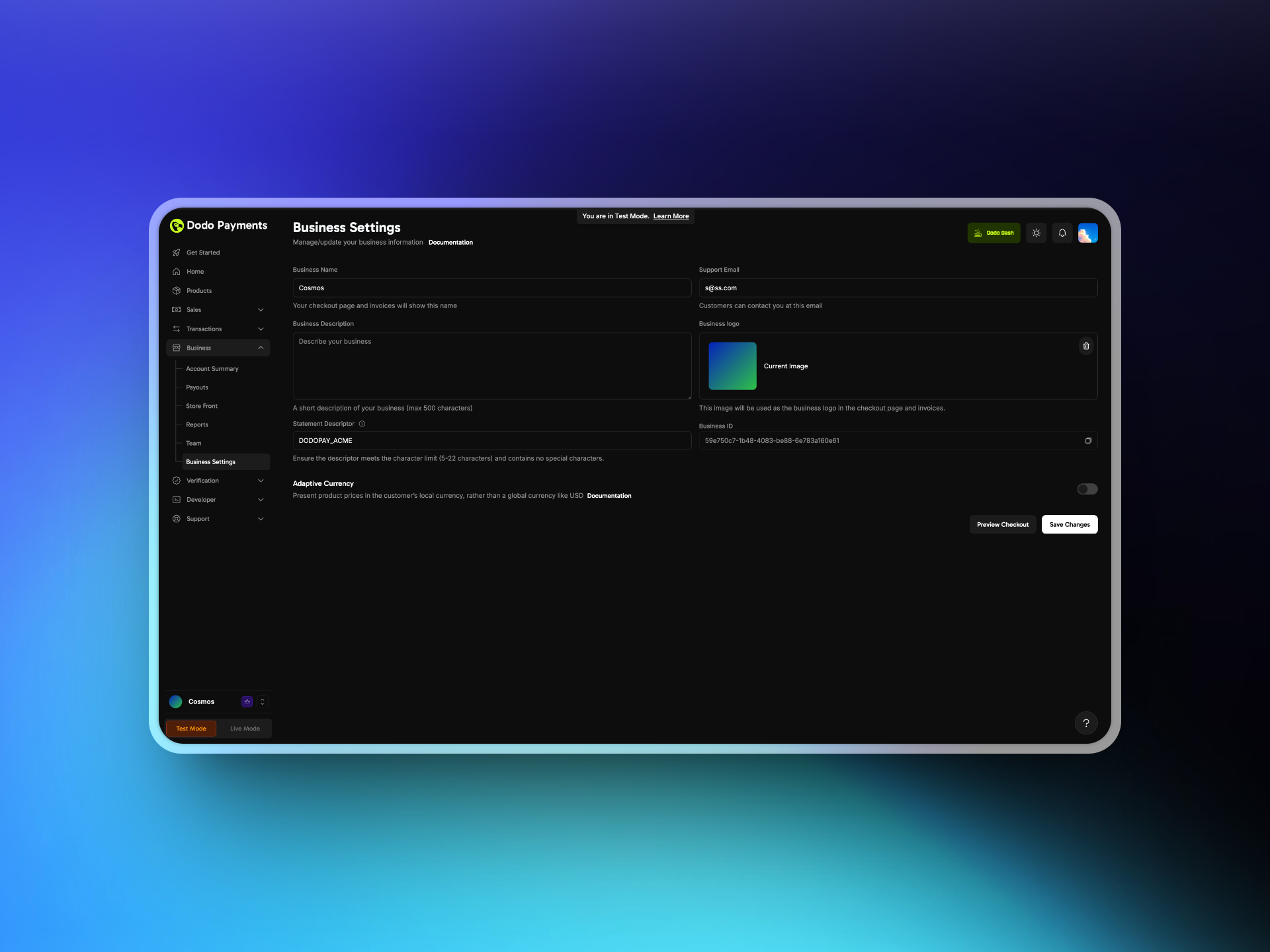
Log in to your Merchant Dashboard and go to **Settings → Business**.
Toggle on Adaptive Currency. You can disable it at any time.
Changes apply only to future transactions.
Save your settings, then verify a test checkout shows prices in your local currency when supported.
 ## Customer Experience
When Adaptive Currency is enabled:
1. **Detection** — The system detects the customer's country based on their billing address
2. **Currency selection** — If the country is supported, prices show in the local currency by default. Customers can switch back to your base currency
3. **Payment methods** — Localized payment methods appear where applicable
4. **Checkout** — Payment is completed in the selected currency
## Conversion and Fees
Adaptive Currency charges the customer in their local currency using live exchange rates. Fees are tiered by order value:
* 4% for orders under \$500
* 3% for orders \$500 to \$1,500
* 2% for orders over \$1,500
By default, these fees are added on top of your displayed price and borne by the customer. With the **Fees Inclusive** setting, you can absorb the fee yourself: the customer sees the same local-currency price, and the fee is deducted from your settlement.
### Enable Fees Inclusive
Go to **Settings → Business** and enable Adaptive Currency if you haven't already.
Once Adaptive Currency is on, enable the **Fees Inclusive** toggle in the same section.
| Mode | Customer Sees | Merchant Settles |
| :- | :- | :- |
| Exclusive (default) | Local price + 2–4% fee on top | Full base price |
| Inclusive | Local price (unchanged) | Base price minus the 2–4% fee |
### Override Per Request
You can override the merchant default per request by passing `adaptive_currency_fees_inclusive` (boolean) on a one-time payment, an on-demand subscription (`on_demand.adaptive_currency_fees_inclusive`), a subscription charge, or a plan change. On checkout sessions, it's accepted only for on-demand subscriptions, as `subscription_data.on_demand.adaptive_currency_fees_inclusive`, and not at the top level of the request:
```typescript theme={null}
// Note: POST /payments is deprecated. Checkout sessions don't accept
// `adaptive_currency_fees_inclusive` for one-time payments, so this override
// still runs through the one-time payment route.
const payment = await client.payments.create({
product_cart: [{ product_id: 'pdt_abc', quantity: 1 }],
customer: { customer_id: 'cus_123' },
billing: { country: 'US' },
adaptive_currency_fees_inclusive: true, // override the business setting for this payment
return_url: 'https://yoursite.com/return'
});
```
INR → INR transactions are always treated as inclusive regardless of the business setting or per-request override.
When a [Localized Pricing](/features/localized-pricing) rule matches, the transaction is always treated as inclusive, regardless of your **Fees Inclusive** setting or any per-request override. The customer pays exactly the localized amount you set, and the conversion fee is deducted from your settlement.
## Minimum Amounts
Every payment must meet the minimum for the currency the customer pays in, and subscriptions have higher minimums than one-time payments. The same minimums apply to every payment method. The check uses the total, including tax.
| Billing Currency | One-Time Payments | Subscriptions |
| :- | :- | :- |
| USD | \$0.50 | \$1.00 |
| EUR and GBP | 0.50 EUR, 0.30 GBP | 0.50 EUR, 0.30 GBP |
| Every other currency | The minimum in [Supported Currencies](#supported-currencies), and at least the equivalent of \$0.50 | The minimum in [Supported Currencies](#supported-currencies), and at least the equivalent of \$1.00 |
Payments in currencies other than USD, EUR, and GBP settle in USD. For these currencies, checkout first checks the price converted to USD, before the Adaptive Currency fee is added, and then checks the amount in the customer's currency. The amount must pass both checks, so the effective minimum can be higher than the listed minimum for the currency.
For example, the listed minimum for AED is 2.00 AED, but a subscription in AED must be worth at least \$1.00, which is about 3.70 AED. A subscription of 2.00 AED fails the USD check.
If a payment is below the minimum, the API returns `TOTAL_PAYMENT_AMOUNT_BELOW_MINIMUM_AMOUNT`. The message names the minimum that failed. For a payment in another currency, that can be the USD minimum, such as `Minimum amount of 1.00 USD is required to process payment`.
## Supported Currencies
The table lists each currency's minimum amount. The minimum applies to one-time payments and subscriptions. See [Minimum Amounts](#minimum-amounts) for the additional USD check.
| Currency Code | Currency Name | Countries | Minimum Amount |
| - | - | - | - |
| AED | UAE Dirham | United Arab Emirates | 2.00 AED |
| ALL | Albanian Lek | Albania | 50.00 ALL |
| AMD | Armenian Dram | Armenia | 500.00 AMD |
| AUD | Australian Dollar | Australia, Nauru | 0.50 AUD |
| AWG | Aruban Florin | Aruba | 2.00 AWG |
| AZN | Azerbaijani Manat | Azerbaijan | 2.00 AZN |
| BAM | Bosnia-Herzegovina Convertible Mark | Bosnia and Herzegovina | 2.00 BAM |
| BDT | Bangladeshi Taka | Bangladesh | 100.00 BDT |
| BMD | Bermudian Dollar | Bermuda | 1.00 BMD |
| BND | Brunei Dollar | Brunei | 1.00 BND |
| BOB | Bolivian Boliviano | Bolivia | 5.00 BOB |
| BRL | Brazilian Real | Brazil | 0.50 BRL |
| BSD | Bahamian Dollar | Bahamas | 1.00 BSD |
| BWP | Botswanan Pula | Botswana | 15.00 BWP |
| BZD | Belize Dollar | Belize | 2.00 BZD |
| CAD | Canadian Dollar | Canada | 0.50 CAD |
| CHF | Swiss Franc | Switzerland, Liechtenstein | 0.50 CHF |
| CLP | Chilean Peso | Chile | 500 CLP |
| CNY | Chinese Yuan | China | 4.00 CNY |
| CRC | Costa Rican Colón | Costa Rica | 500.00 CRC |
| CZK | Czech Koruna | Czech Republic | 15.00 CZK |
| DKK | Danish Krone | Denmark, Greenland | 2.50 DKK |
| DOP | Dominican Peso | Dominican Republic | 100.00 DOP |
| EGP | Egyptian Pound | Egypt | 50.00 EGP |
| ETB | Ethiopian Birr | Ethiopia | 100.00 ETB |
| EUR | Euro | Austria, Belgium, Cyprus, Estonia, Finland, France, Germany, Greece, Ireland, Italy, Latvia, Lithuania, Luxembourg, Malta, Netherlands, Portugal, Slovakia, Slovenia, Spain, Andorra, Monaco, Croatia, San Marino, Montenegro | 0.50 EUR |
| FJD | Fijian Dollar | Fiji | 2.00 FJD |
| GBP | British Pound | United Kingdom | 0.30 GBP |
| GEL | Georgian Lari | Georgia | 3.00 GEL |
| GMD | Gambian Dalasi | Gambia | 100.00 GMD |
| GTQ | Guatemalan Quetzal | Guatemala | 10.00 GTQ |
| GYD | Guyanese Dollar | Guyana | 200.00 GYD |
| HKD | Hong Kong Dollar | Hong Kong | 4.00 HKD |
| HNL | Honduran Lempira | Honduras | 25.00 HNL |
| HUF | Hungarian Forint | Hungary | 175.00 HUF |
| IDR | Indonesian Rupiah | Indonesia | 8500.00 IDR |
| ILS | Israeli New Shekel | Israel | 3.00 ILS |
| INR | Indian Rupee | India | 5.00 INR |
| JPY | Japanese Yen | Japan | 50 JPY |
| KRW | South Korean Won | South Korea | 50 KRW |
| KZT | Kazakhstani Tenge | Kazakhstan | 500.00 KZT |
| LKR | Sri Lankan Rupee | Sri Lanka | 300.00 LKR |
| LRD | Liberian Dollar | Liberia | 200.00 LRD |
| LSL | Lesotho Loti | Lesotho | 20.00 LSL |
| MAD | Moroccan Dirham | Morocco | 10.00 MAD |
| MKD | Macedonian Denar | North Macedonia | 50.00 MKD |
| MOP | Macanese Pataca | Macau | 10.00 MOP |
| MUR | Mauritian Rupee | Mauritius | 50.00 MUR |
| MVR | Maldivian Rufiyaa | Maldives | 15.00 MVR |
| MWK | Malawian Kwacha | Malawi | 2000.00 MWK |
| MXN | Mexican Peso | Mexico | 10.00 MXN |
| MYR | Malaysian Ringgit | Malaysia | 4.00 MYR |
| NGN | Nigerian Naira | Nigeria | 2000.00 NGN |
| NOK | Norwegian Krone | Norway | 3.00 NOK |
| NPR | Nepalese Rupee | Nepal | 150.00 NPR |
| NZD | New Zealand Dollar | New Zealand | 1.00 NZD |
| PEN | Peruvian Sol | Peru | 3.00 PEN |
| PGK | Papua New Guinean Kina | Papua New Guinea | 4.00 PGK |
| PHP | Philippine Peso | Philippines | 50.00 PHP |
| PLN | Polish Zloty | Poland | 2.00 PLN |
| PYG | Paraguayan Guaraní | Paraguay | 4000 PYG |
| QAR | Qatari Rial | Qatar | 3.00 QAR |
| RON | Romanian Leu | Romania | 2.00 RON |
| RSD | Serbian Dinar | Serbia | 60.00 RSD |
| SAR | Saudi Riyal | Saudi Arabia | 2.00 SAR |
| SBD | Solomon Islands Dollar | Solomon Islands | 10.00 SBD |
| SCR | Seychellois Rupee | Seychelles | 15.00 SCR |
| SEK | Swedish Krona | Sweden | 3.00 SEK |
| SGD | Singapore Dollar | Singapore | 0.50 SGD |
| SZL | Swazi Lilangeni | Eswatini | 20.00 SZL |
| THB | Thai Baht | Thailand | 25.00 THB |
| TOP | Tongan Paʻanga | Tonga | 2.00 TOP |
| TRY | Turkish Lira | Turkey | 20.00 TRY |
| TWD | New Taiwan Dollar | Taiwan | 20.00 TWD |
| TZS | Tanzanian Shilling | Tanzania | 3000.00 TZS |
| UYU | Uruguayan Peso | Uruguay | 50.00 UYU |
| VND | Vietnamese Dong | Vietnam | 12000 VND |
| WST | Samoan Tala | Samoa | 2.00 WST |
| XAF | Central African CFA Franc | Cameroon, Central African Republic, Chad, Republic of the Congo, Equatorial Guinea, Gabon | 300 XAF |
| XOF | West African CFA Franc | Benin, Burkina Faso, Côte d'Ivoire, Guinea-Bissau, Mali, Niger, Senegal, Togo | 300 XOF |
| ZAR | South African Rand | South Africa | 20.00 ZAR |
| ZMW | Zambian Kwacha | Zambia | 30.00 ZMW |
## Refunds and Adjustments
Dodo Payments issues refunds in the currency the customer originally paid, using the latest exchange rate. The amount in your base currency remains fixed on your dashboard, invoices, and in the refund. The customer may receive more or less than the original local-currency amount depending on FX changes.
Adaptive Currency fees (FX fees) are not refunded.
### Example Refund
1. You sell a product for 100 USD with Adaptive Currency enabled
2. A Canadian customer sees 137 CAD at an exchange rate of 1.37 CAD per 1 USD and completes the purchase
3. Dodo Payments processes the payment, converting 137 CAD to 100 USD for your settlement
4. Later, the exchange rate changes to 1.40 CAD per 1 USD and you issue a full refund
5. Dodo Payments deducts 100 USD and refunds the customer 140 CAD
## Invoices and Taxation
* Invoices show only the settlement currency amount
* Taxes and platform fees are calculated on the settlement currency amount
* Example: a \$10 sale converted to 36 AED still reflects as \$10 in the Dashboard and invoices
All amounts are rounded according to Dodo Payments' internal rounding logic.
## Set Billing Currency Per Checkout
Pass `billing_currency` to explicitly set the billing currency for a checkout session:
When Adaptive Currency is disabled, `billing_currency` is ignored.
```typescript theme={null}
const session = await client.checkoutSessions.create({
product_cart: [
{
product_id: 'pdt_one_time_or_subscription',
quantity: 1
}
],
billing_currency: 'AED',
return_url: 'https://example.com/return'
});
```
## Related Pages
Reduce prices by country automatically. Requires Adaptive Currency.
Round converted prices to clean endings like 49.99. Requires Adaptive Currency.
Set an exact price per country or currency instead of automatic conversion.
Control whether your prices include tax.
Create checkout sessions with billing currency configuration.
This documentation is built and hosted on [Mintlify](https://mintlify.com), a developer documentation platform.
## Customer Experience
When Adaptive Currency is enabled:
1. **Detection** — The system detects the customer's country based on their billing address
2. **Currency selection** — If the country is supported, prices show in the local currency by default. Customers can switch back to your base currency
3. **Payment methods** — Localized payment methods appear where applicable
4. **Checkout** — Payment is completed in the selected currency
## Conversion and Fees
Adaptive Currency charges the customer in their local currency using live exchange rates. Fees are tiered by order value:
* 4% for orders under \$500
* 3% for orders \$500 to \$1,500
* 2% for orders over \$1,500
By default, these fees are added on top of your displayed price and borne by the customer. With the **Fees Inclusive** setting, you can absorb the fee yourself: the customer sees the same local-currency price, and the fee is deducted from your settlement.
### Enable Fees Inclusive
Go to **Settings → Business** and enable Adaptive Currency if you haven't already.
Once Adaptive Currency is on, enable the **Fees Inclusive** toggle in the same section.
| Mode | Customer Sees | Merchant Settles |
| :- | :- | :- |
| Exclusive (default) | Local price + 2–4% fee on top | Full base price |
| Inclusive | Local price (unchanged) | Base price minus the 2–4% fee |
### Override Per Request
You can override the merchant default per request by passing `adaptive_currency_fees_inclusive` (boolean) on a one-time payment, an on-demand subscription (`on_demand.adaptive_currency_fees_inclusive`), a subscription charge, or a plan change. On checkout sessions, it's accepted only for on-demand subscriptions, as `subscription_data.on_demand.adaptive_currency_fees_inclusive`, and not at the top level of the request:
```typescript theme={null}
// Note: POST /payments is deprecated. Checkout sessions don't accept
// `adaptive_currency_fees_inclusive` for one-time payments, so this override
// still runs through the one-time payment route.
const payment = await client.payments.create({
product_cart: [{ product_id: 'pdt_abc', quantity: 1 }],
customer: { customer_id: 'cus_123' },
billing: { country: 'US' },
adaptive_currency_fees_inclusive: true, // override the business setting for this payment
return_url: 'https://yoursite.com/return'
});
```
INR → INR transactions are always treated as inclusive regardless of the business setting or per-request override.
When a [Localized Pricing](/features/localized-pricing) rule matches, the transaction is always treated as inclusive, regardless of your **Fees Inclusive** setting or any per-request override. The customer pays exactly the localized amount you set, and the conversion fee is deducted from your settlement.
## Minimum Amounts
Every payment must meet the minimum for the currency the customer pays in, and subscriptions have higher minimums than one-time payments. The same minimums apply to every payment method. The check uses the total, including tax.
| Billing Currency | One-Time Payments | Subscriptions |
| :- | :- | :- |
| USD | \$0.50 | \$1.00 |
| EUR and GBP | 0.50 EUR, 0.30 GBP | 0.50 EUR, 0.30 GBP |
| Every other currency | The minimum in [Supported Currencies](#supported-currencies), and at least the equivalent of \$0.50 | The minimum in [Supported Currencies](#supported-currencies), and at least the equivalent of \$1.00 |
Payments in currencies other than USD, EUR, and GBP settle in USD. For these currencies, checkout first checks the price converted to USD, before the Adaptive Currency fee is added, and then checks the amount in the customer's currency. The amount must pass both checks, so the effective minimum can be higher than the listed minimum for the currency.
For example, the listed minimum for AED is 2.00 AED, but a subscription in AED must be worth at least \$1.00, which is about 3.70 AED. A subscription of 2.00 AED fails the USD check.
If a payment is below the minimum, the API returns `TOTAL_PAYMENT_AMOUNT_BELOW_MINIMUM_AMOUNT`. The message names the minimum that failed. For a payment in another currency, that can be the USD minimum, such as `Minimum amount of 1.00 USD is required to process payment`.
## Supported Currencies
The table lists each currency's minimum amount. The minimum applies to one-time payments and subscriptions. See [Minimum Amounts](#minimum-amounts) for the additional USD check.
| Currency Code | Currency Name | Countries | Minimum Amount |
| - | - | - | - |
| AED | UAE Dirham | United Arab Emirates | 2.00 AED |
| ALL | Albanian Lek | Albania | 50.00 ALL |
| AMD | Armenian Dram | Armenia | 500.00 AMD |
| AUD | Australian Dollar | Australia, Nauru | 0.50 AUD |
| AWG | Aruban Florin | Aruba | 2.00 AWG |
| AZN | Azerbaijani Manat | Azerbaijan | 2.00 AZN |
| BAM | Bosnia-Herzegovina Convertible Mark | Bosnia and Herzegovina | 2.00 BAM |
| BDT | Bangladeshi Taka | Bangladesh | 100.00 BDT |
| BMD | Bermudian Dollar | Bermuda | 1.00 BMD |
| BND | Brunei Dollar | Brunei | 1.00 BND |
| BOB | Bolivian Boliviano | Bolivia | 5.00 BOB |
| BRL | Brazilian Real | Brazil | 0.50 BRL |
| BSD | Bahamian Dollar | Bahamas | 1.00 BSD |
| BWP | Botswanan Pula | Botswana | 15.00 BWP |
| BZD | Belize Dollar | Belize | 2.00 BZD |
| CAD | Canadian Dollar | Canada | 0.50 CAD |
| CHF | Swiss Franc | Switzerland, Liechtenstein | 0.50 CHF |
| CLP | Chilean Peso | Chile | 500 CLP |
| CNY | Chinese Yuan | China | 4.00 CNY |
| CRC | Costa Rican Colón | Costa Rica | 500.00 CRC |
| CZK | Czech Koruna | Czech Republic | 15.00 CZK |
| DKK | Danish Krone | Denmark, Greenland | 2.50 DKK |
| DOP | Dominican Peso | Dominican Republic | 100.00 DOP |
| EGP | Egyptian Pound | Egypt | 50.00 EGP |
| ETB | Ethiopian Birr | Ethiopia | 100.00 ETB |
| EUR | Euro | Austria, Belgium, Cyprus, Estonia, Finland, France, Germany, Greece, Ireland, Italy, Latvia, Lithuania, Luxembourg, Malta, Netherlands, Portugal, Slovakia, Slovenia, Spain, Andorra, Monaco, Croatia, San Marino, Montenegro | 0.50 EUR |
| FJD | Fijian Dollar | Fiji | 2.00 FJD |
| GBP | British Pound | United Kingdom | 0.30 GBP |
| GEL | Georgian Lari | Georgia | 3.00 GEL |
| GMD | Gambian Dalasi | Gambia | 100.00 GMD |
| GTQ | Guatemalan Quetzal | Guatemala | 10.00 GTQ |
| GYD | Guyanese Dollar | Guyana | 200.00 GYD |
| HKD | Hong Kong Dollar | Hong Kong | 4.00 HKD |
| HNL | Honduran Lempira | Honduras | 25.00 HNL |
| HUF | Hungarian Forint | Hungary | 175.00 HUF |
| IDR | Indonesian Rupiah | Indonesia | 8500.00 IDR |
| ILS | Israeli New Shekel | Israel | 3.00 ILS |
| INR | Indian Rupee | India | 5.00 INR |
| JPY | Japanese Yen | Japan | 50 JPY |
| KRW | South Korean Won | South Korea | 50 KRW |
| KZT | Kazakhstani Tenge | Kazakhstan | 500.00 KZT |
| LKR | Sri Lankan Rupee | Sri Lanka | 300.00 LKR |
| LRD | Liberian Dollar | Liberia | 200.00 LRD |
| LSL | Lesotho Loti | Lesotho | 20.00 LSL |
| MAD | Moroccan Dirham | Morocco | 10.00 MAD |
| MKD | Macedonian Denar | North Macedonia | 50.00 MKD |
| MOP | Macanese Pataca | Macau | 10.00 MOP |
| MUR | Mauritian Rupee | Mauritius | 50.00 MUR |
| MVR | Maldivian Rufiyaa | Maldives | 15.00 MVR |
| MWK | Malawian Kwacha | Malawi | 2000.00 MWK |
| MXN | Mexican Peso | Mexico | 10.00 MXN |
| MYR | Malaysian Ringgit | Malaysia | 4.00 MYR |
| NGN | Nigerian Naira | Nigeria | 2000.00 NGN |
| NOK | Norwegian Krone | Norway | 3.00 NOK |
| NPR | Nepalese Rupee | Nepal | 150.00 NPR |
| NZD | New Zealand Dollar | New Zealand | 1.00 NZD |
| PEN | Peruvian Sol | Peru | 3.00 PEN |
| PGK | Papua New Guinean Kina | Papua New Guinea | 4.00 PGK |
| PHP | Philippine Peso | Philippines | 50.00 PHP |
| PLN | Polish Zloty | Poland | 2.00 PLN |
| PYG | Paraguayan Guaraní | Paraguay | 4000 PYG |
| QAR | Qatari Rial | Qatar | 3.00 QAR |
| RON | Romanian Leu | Romania | 2.00 RON |
| RSD | Serbian Dinar | Serbia | 60.00 RSD |
| SAR | Saudi Riyal | Saudi Arabia | 2.00 SAR |
| SBD | Solomon Islands Dollar | Solomon Islands | 10.00 SBD |
| SCR | Seychellois Rupee | Seychelles | 15.00 SCR |
| SEK | Swedish Krona | Sweden | 3.00 SEK |
| SGD | Singapore Dollar | Singapore | 0.50 SGD |
| SZL | Swazi Lilangeni | Eswatini | 20.00 SZL |
| THB | Thai Baht | Thailand | 25.00 THB |
| TOP | Tongan Paʻanga | Tonga | 2.00 TOP |
| TRY | Turkish Lira | Turkey | 20.00 TRY |
| TWD | New Taiwan Dollar | Taiwan | 20.00 TWD |
| TZS | Tanzanian Shilling | Tanzania | 3000.00 TZS |
| UYU | Uruguayan Peso | Uruguay | 50.00 UYU |
| VND | Vietnamese Dong | Vietnam | 12000 VND |
| WST | Samoan Tala | Samoa | 2.00 WST |
| XAF | Central African CFA Franc | Cameroon, Central African Republic, Chad, Republic of the Congo, Equatorial Guinea, Gabon | 300 XAF |
| XOF | West African CFA Franc | Benin, Burkina Faso, Côte d'Ivoire, Guinea-Bissau, Mali, Niger, Senegal, Togo | 300 XOF |
| ZAR | South African Rand | South Africa | 20.00 ZAR |
| ZMW | Zambian Kwacha | Zambia | 30.00 ZMW |
## Refunds and Adjustments
Dodo Payments issues refunds in the currency the customer originally paid, using the latest exchange rate. The amount in your base currency remains fixed on your dashboard, invoices, and in the refund. The customer may receive more or less than the original local-currency amount depending on FX changes.
Adaptive Currency fees (FX fees) are not refunded.
### Example Refund
1. You sell a product for 100 USD with Adaptive Currency enabled
2. A Canadian customer sees 137 CAD at an exchange rate of 1.37 CAD per 1 USD and completes the purchase
3. Dodo Payments processes the payment, converting 137 CAD to 100 USD for your settlement
4. Later, the exchange rate changes to 1.40 CAD per 1 USD and you issue a full refund
5. Dodo Payments deducts 100 USD and refunds the customer 140 CAD
## Invoices and Taxation
* Invoices show only the settlement currency amount
* Taxes and platform fees are calculated on the settlement currency amount
* Example: a \$10 sale converted to 36 AED still reflects as \$10 in the Dashboard and invoices
All amounts are rounded according to Dodo Payments' internal rounding logic.
## Set Billing Currency Per Checkout
Pass `billing_currency` to explicitly set the billing currency for a checkout session:
When Adaptive Currency is disabled, `billing_currency` is ignored.
```typescript theme={null}
const session = await client.checkoutSessions.create({
product_cart: [
{
product_id: 'pdt_one_time_or_subscription',
quantity: 1
}
],
billing_currency: 'AED',
return_url: 'https://example.com/return'
});
```
## Related Pages
Reduce prices by country automatically. Requires Adaptive Currency.
Round converted prices to clean endings like 49.99. Requires Adaptive Currency.
Set an exact price per country or currency instead of automatic conversion.
Control whether your prices include tax.
Create checkout sessions with billing currency configuration.
This documentation is built and hosted on [Mintlify](https://mintlify.com), a developer documentation platform.