> ## Documentation Index
> Fetch the complete documentation index at: https://docs.dodopayments.com/llms.txt
> Use this file to discover all available pages before exploring further.
# B2B Payments
> Collect Tax IDs and business names during B2B checkout. Validate Tax IDs and apply the correct tax treatment for the customer's country.
B2B payments let you collect Tax IDs and business names during checkout, validate the Tax IDs, and apply the correct tax treatment based on the customer's country and regulations.
## Tax ID Validation for B2B Transactions
When a valid Tax ID is provided during checkout:
* The invoice includes the customer's Tax ID.
* Tax deductions are determined based on applicable regulations for the customer's country.
* The invoice includes Dodo Payments' tax details and the tax applied to the transaction.
## Collecting a Business Name for B2B Invoices
For B2B purchases, you can have the customer's legal business name rendered on the invoice instead of the buyer's personal name. This is collected alongside the Tax ID via the `customer_business_name` field.
When the customer selects **Purchasing as a business** at checkout, they're prompted for both a **Business Name** and a **Tax ID Number**.
The Tax ID is validated live as the customer types. For EU member states, Great Britain, and Australia, checkout performs both format and checksum validation and a live registry lookup (VIES, HMRC, and ABR respectively) and autofills the registered legal business name when a match is found. For all other countries, only format and checksum validation is performed.
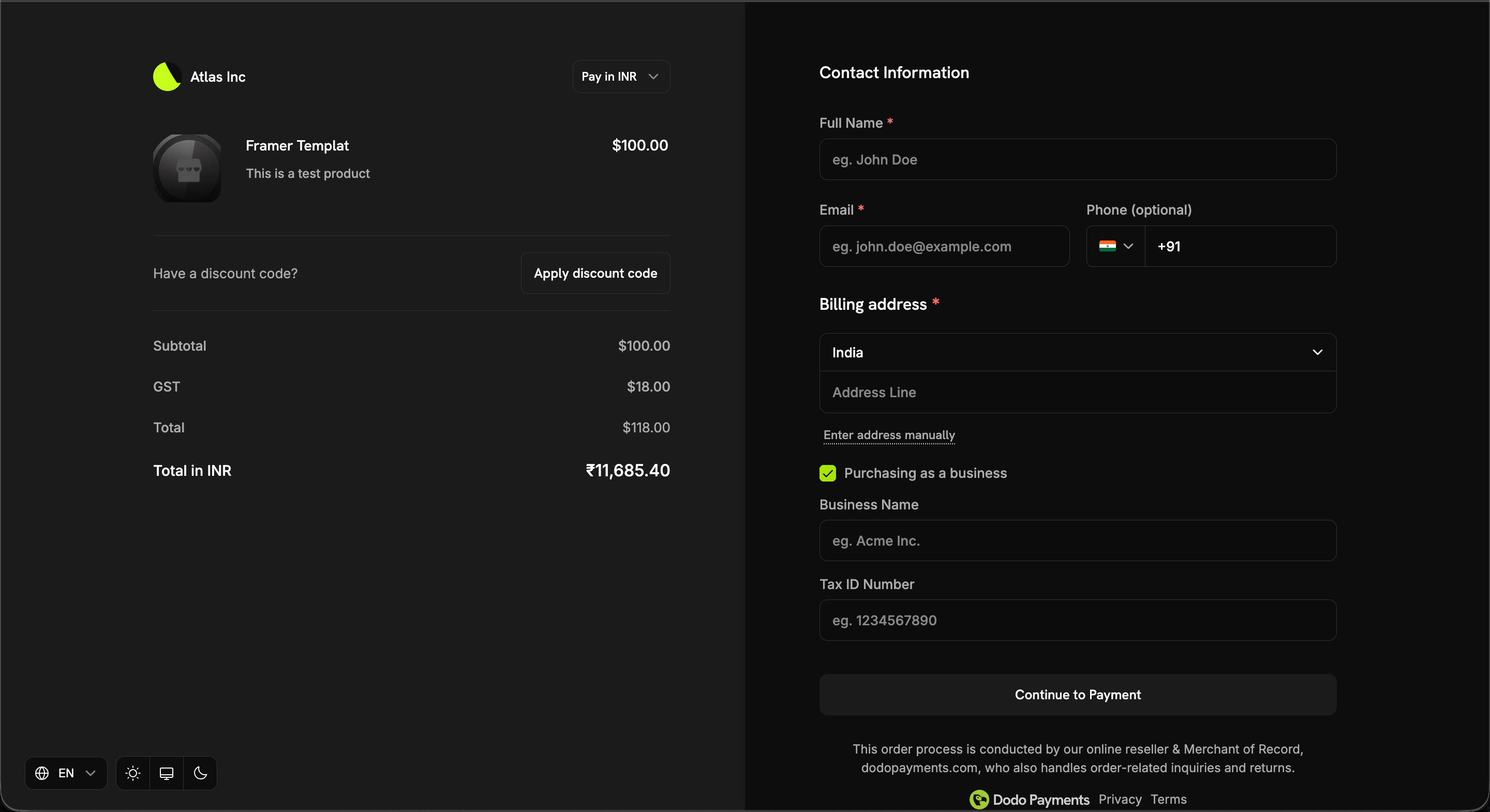 The business name appears on the invoice only when all three conditions are met:
1. The transaction is B2B (`b2b = true`).
2. A `tax_id` is present.
3. A non-empty `customer_business_name` is supplied.
If any condition is not met, the customer's personal name is used instead.
### Setting It at Checkout
Pass `customer_business_name` directly, and/or enable `allow_customer_editing_business_name` to let the customer enter or edit it on the checkout page next to their Tax ID:
```typescript theme={null}
const session = await client.checkoutSessions.create({
product_cart: [{ product_id: 'pdt_abc', quantity: 1 }],
customer: { email: 'buyer@acme.com' },
billing_address: { country: 'GB' },
tax_id: 'GB123456789',
customer_business_name: 'Acme Corp Ltd',
feature_flags: {
allow_tax_id: true,
allow_customer_editing_business_name: true // optional: let the customer edit it
},
return_url: 'https://yoursite.com/return'
});
```
| Surface | Field | Notes |
| - | - | - |
| Checkout Sessions | `customer_business_name`, `feature_flags.allow_customer_editing_business_name` | Max 250 chars; flag defaults to `false` |
| Payments | `customer_business_name` | Max 250 chars |
| Subscriptions | `customer_business_name` | Set or clear via `PATCH /subscriptions/{subscription_id}` |
`customer_business_name` cannot be set without a `tax_id` — the request is rejected. Clearing the `tax_id` also clears the business name, since the two are coupled on the invoice. Surrounding whitespace is trimmed, and whitespace-only values are treated as an explicit clear.
## Making the Tax ID Mandatory
By default the Tax ID is optional — the customer decides whether to purchase as a business. If you sell exclusively to registered businesses, set the `require_tax_id` feature flag on the checkout session to make it compulsory for customers who purchase as a business:
```typescript theme={null}
const session = await client.checkoutSessions.create({
product_cart: [{ product_id: 'pdt_abc', quantity: 1 }],
customer: { email: 'buyer@acme.com' },
billing_address: { country: 'IN' },
feature_flags: {
allow_tax_id: true, // default; must be true
require_tax_id: true
},
return_url: 'https://yoursite.com/return'
});
```
### What Changes at Checkout
* A customer who selects **Purchasing as a business** must fill in both **Business Name** and **Tax ID Number**.
* Checkout doesn't change for a customer who buys as an individual.
* **Continue to Payment** stays greyed out while either field is empty, or while the entered Tax ID is rejected by validation.
Tax ID validation remains fail-open — a lookup outage or an unsupported country never blocks the customer, so the button stays clickable even when it is greyed out.
Passing `tax_id` and `customer_business_name` on the session pre-fills both fields, which satisfies the requirement before the customer touches the form. Omit them if you want the customer to supply their own.
### Rules and Limits
| Rule | Behavior |
| - | - |
| `require_tax_id: true` with `allow_tax_id: false` | Rejected with a `400` — the flag would demand a field the checkout never renders |
| `require_tax_id: true` with `confirm: true` | Rejected with a `422` unless the request includes a non-blank `tax_id`, since `confirm` skips the checkout page |
| Flag omitted | Defaults to `false`; existing sessions and integrations are unaffected |
A blank or whitespace-only `tax_id` counts as missing, both on the `confirm: true` guard and when a hosted-page session is confirmed.
On a hosted checkout page (`confirm: false`), the requirement is enforced in the browser. The API rejects a blank Tax ID on confirmation, but it cannot tell an individual buyer apart from a business buyer who omitted the field, so treat `require_tax_id` on hosted sessions as a checkout experience control rather than a guarantee that every payment carries a Tax ID. A `confirm: true` session is a stricter case: it is always treated as a business purchase and is rejected outright without a Tax ID.
## Tax Treatment for B2C Transactions
Transactions where a valid Tax ID is not provided are treated as B2C transactions, and tax is deducted as per the applicable tax regulations in the customer's country. The invoice includes Dodo Payments' tax details and the tax applied to the transaction.
## Reverse Charge Mechanism
Generally, the supplier of goods or services is liable to pay VAT, Service Tax, or GST. However, in specified cases like imports and other notified supplies, the liability is on the recipient (customer) under the reverse charge mechanism. Reverse Charge means the liability to pay tax is on the recipient of supply of goods or services instead of the supplier in respect of notified categories of supply.
## Reverse Charge Applicability
In certain cases, where applicable by law, tax is not deducted at checkout and the transaction is subject to a reverse charge mechanism. The invoice clearly indicates when a reverse charge applies, as per regulatory requirements.
This documentation is built and hosted on [Mintlify](https://mintlify.com), a developer documentation platform.
The business name appears on the invoice only when all three conditions are met:
1. The transaction is B2B (`b2b = true`).
2. A `tax_id` is present.
3. A non-empty `customer_business_name` is supplied.
If any condition is not met, the customer's personal name is used instead.
### Setting It at Checkout
Pass `customer_business_name` directly, and/or enable `allow_customer_editing_business_name` to let the customer enter or edit it on the checkout page next to their Tax ID:
```typescript theme={null}
const session = await client.checkoutSessions.create({
product_cart: [{ product_id: 'pdt_abc', quantity: 1 }],
customer: { email: 'buyer@acme.com' },
billing_address: { country: 'GB' },
tax_id: 'GB123456789',
customer_business_name: 'Acme Corp Ltd',
feature_flags: {
allow_tax_id: true,
allow_customer_editing_business_name: true // optional: let the customer edit it
},
return_url: 'https://yoursite.com/return'
});
```
| Surface | Field | Notes |
| - | - | - |
| Checkout Sessions | `customer_business_name`, `feature_flags.allow_customer_editing_business_name` | Max 250 chars; flag defaults to `false` |
| Payments | `customer_business_name` | Max 250 chars |
| Subscriptions | `customer_business_name` | Set or clear via `PATCH /subscriptions/{subscription_id}` |
`customer_business_name` cannot be set without a `tax_id` — the request is rejected. Clearing the `tax_id` also clears the business name, since the two are coupled on the invoice. Surrounding whitespace is trimmed, and whitespace-only values are treated as an explicit clear.
## Making the Tax ID Mandatory
By default the Tax ID is optional — the customer decides whether to purchase as a business. If you sell exclusively to registered businesses, set the `require_tax_id` feature flag on the checkout session to make it compulsory for customers who purchase as a business:
```typescript theme={null}
const session = await client.checkoutSessions.create({
product_cart: [{ product_id: 'pdt_abc', quantity: 1 }],
customer: { email: 'buyer@acme.com' },
billing_address: { country: 'IN' },
feature_flags: {
allow_tax_id: true, // default; must be true
require_tax_id: true
},
return_url: 'https://yoursite.com/return'
});
```
### What Changes at Checkout
* A customer who selects **Purchasing as a business** must fill in both **Business Name** and **Tax ID Number**.
* Checkout doesn't change for a customer who buys as an individual.
* **Continue to Payment** stays greyed out while either field is empty, or while the entered Tax ID is rejected by validation.
Tax ID validation remains fail-open — a lookup outage or an unsupported country never blocks the customer, so the button stays clickable even when it is greyed out.
Passing `tax_id` and `customer_business_name` on the session pre-fills both fields, which satisfies the requirement before the customer touches the form. Omit them if you want the customer to supply their own.
### Rules and Limits
| Rule | Behavior |
| - | - |
| `require_tax_id: true` with `allow_tax_id: false` | Rejected with a `400` — the flag would demand a field the checkout never renders |
| `require_tax_id: true` with `confirm: true` | Rejected with a `422` unless the request includes a non-blank `tax_id`, since `confirm` skips the checkout page |
| Flag omitted | Defaults to `false`; existing sessions and integrations are unaffected |
A blank or whitespace-only `tax_id` counts as missing, both on the `confirm: true` guard and when a hosted-page session is confirmed.
On a hosted checkout page (`confirm: false`), the requirement is enforced in the browser. The API rejects a blank Tax ID on confirmation, but it cannot tell an individual buyer apart from a business buyer who omitted the field, so treat `require_tax_id` on hosted sessions as a checkout experience control rather than a guarantee that every payment carries a Tax ID. A `confirm: true` session is a stricter case: it is always treated as a business purchase and is rejected outright without a Tax ID.
## Tax Treatment for B2C Transactions
Transactions where a valid Tax ID is not provided are treated as B2C transactions, and tax is deducted as per the applicable tax regulations in the customer's country. The invoice includes Dodo Payments' tax details and the tax applied to the transaction.
## Reverse Charge Mechanism
Generally, the supplier of goods or services is liable to pay VAT, Service Tax, or GST. However, in specified cases like imports and other notified supplies, the liability is on the recipient (customer) under the reverse charge mechanism. Reverse Charge means the liability to pay tax is on the recipient of supply of goods or services instead of the supplier in respect of notified categories of supply.
## Reverse Charge Applicability
In certain cases, where applicable by law, tax is not deducted at checkout and the transaction is subject to a reverse charge mechanism. The invoice clearly indicates when a reverse charge applies, as per regulatory requirements.
This documentation is built and hosted on [Mintlify](https://mintlify.com), a developer documentation platform.