> ## Documentation Index
> Fetch the complete documentation index at: https://docs.dodopayments.com/llms.txt
> Use this file to discover all available pages before exploring further.
# Checkout Features
> Conversion-optimized, globally compliant checkout with multi-currency, multi-language support, automatic tax calculation, discount codes, add-ons, and smart address collection.
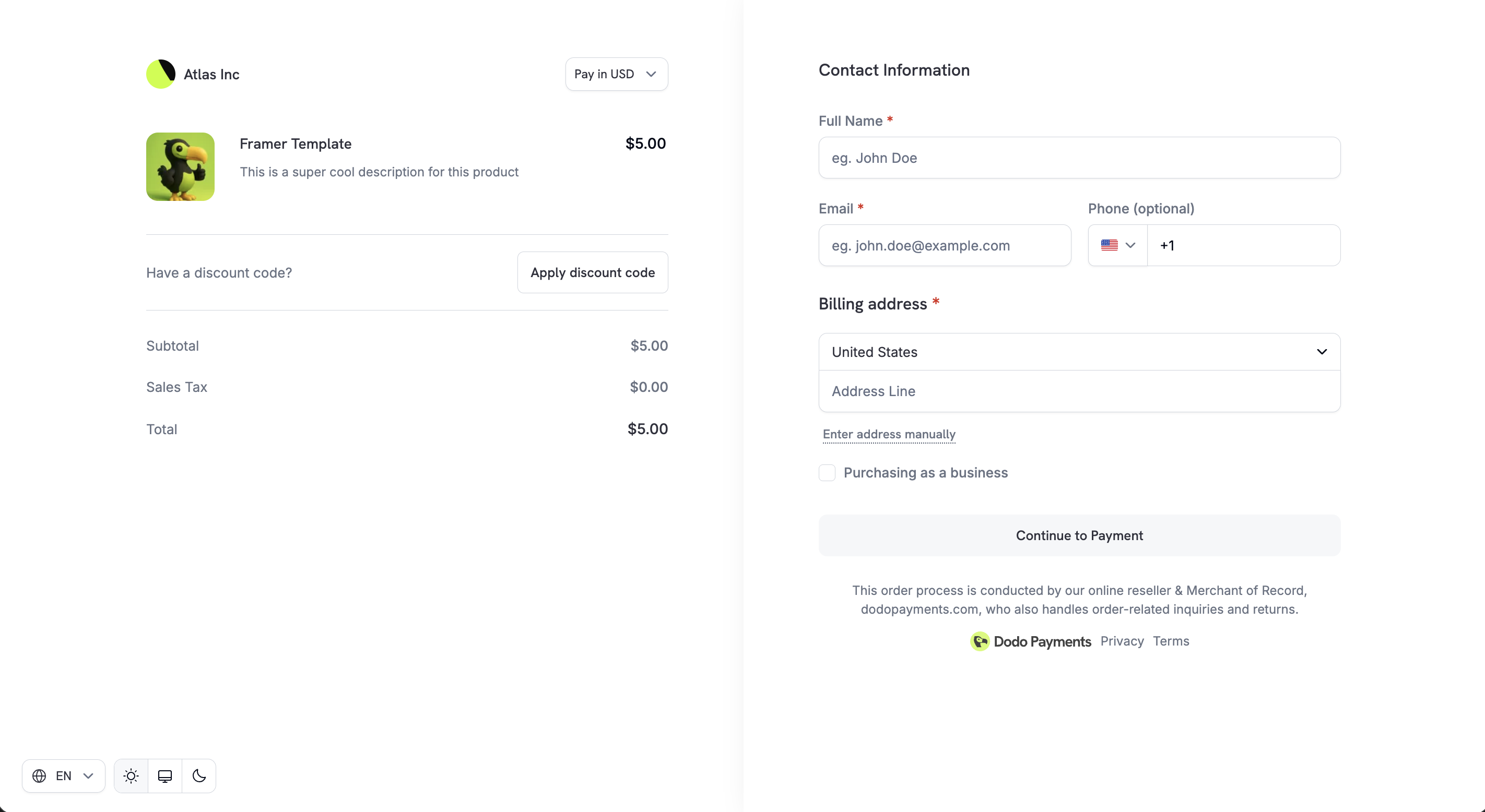 Dodo Payments checkout is a hosted payment page designed for digital products and SaaS. It handles currency conversion, tax calculation, discount codes, address collection, and payment method selection. You create a checkout session via API or dashboard, and customers complete payment on a secure, branded page.
Create checkout sessions programmatically.
Calculate pricing and taxes before creating a session.
Supported payment methods and configuration.
Step-by-step guide to integrating checkout.
Checkout links generated through the [Checkout Sessions API](/api-reference/checkout-sessions/create) are not reusable. They expire after 24 hours, or after 15 minutes if `confirm: true` is set. Generate a fresh session for each customer and each payment attempt.
## Adaptive Currency
Adaptive Currency lets customers pay in their preferred local currency, improving trust and conversion rates.
When enabled, customers see a currency selector on checkout. The price converts to their chosen currency at live FX rates. If the product has [Purchasing Power Parity](/features/purchasing-power-parity) enabled, the PPP-adjusted price converts instead of the base price. If [Charm Pricing](/features/charm-pricing) is enabled, the converted amount rounds to a clean ending like 49.99.
Dodo Payments checkout is a hosted payment page designed for digital products and SaaS. It handles currency conversion, tax calculation, discount codes, address collection, and payment method selection. You create a checkout session via API or dashboard, and customers complete payment on a secure, branded page.
Create checkout sessions programmatically.
Calculate pricing and taxes before creating a session.
Supported payment methods and configuration.
Step-by-step guide to integrating checkout.
Checkout links generated through the [Checkout Sessions API](/api-reference/checkout-sessions/create) are not reusable. They expire after 24 hours, or after 15 minutes if `confirm: true` is set. Generate a fresh session for each customer and each payment attempt.
## Adaptive Currency
Adaptive Currency lets customers pay in their preferred local currency, improving trust and conversion rates.
When enabled, customers see a currency selector on checkout. The price converts to their chosen currency at live FX rates. If the product has [Purchasing Power Parity](/features/purchasing-power-parity) enabled, the PPP-adjusted price converts instead of the base price. If [Charm Pricing](/features/charm-pricing) is enabled, the converted amount rounds to a clean ending like 49.99.
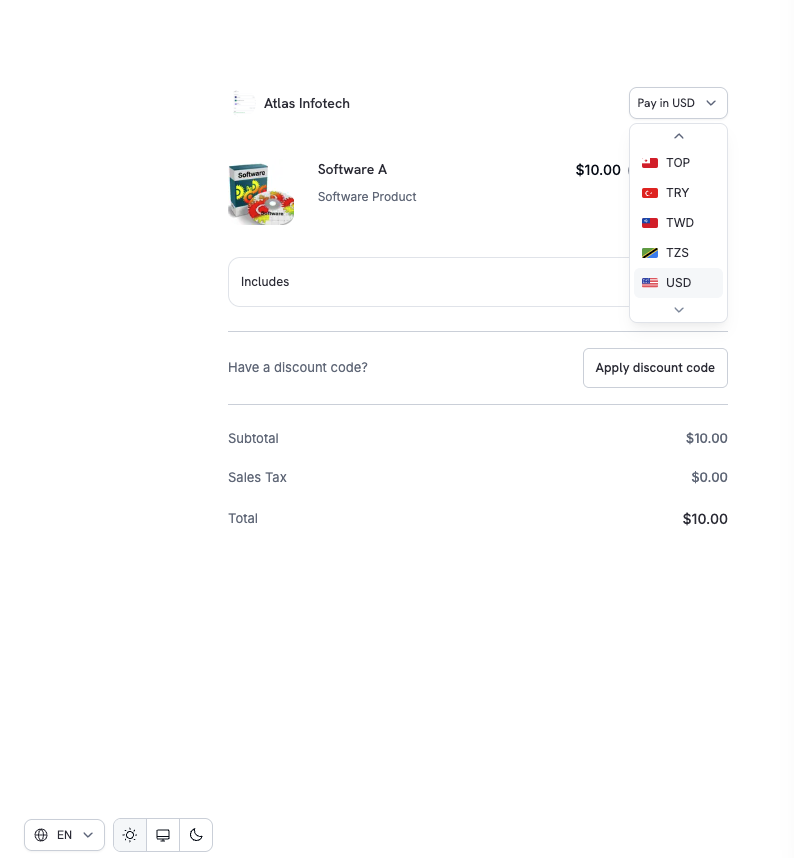 To enable Adaptive Currency, go to **Settings → Business** and toggle it on.
Supported currencies, conversion fees, and refund handling.
## Multi-Language Checkout
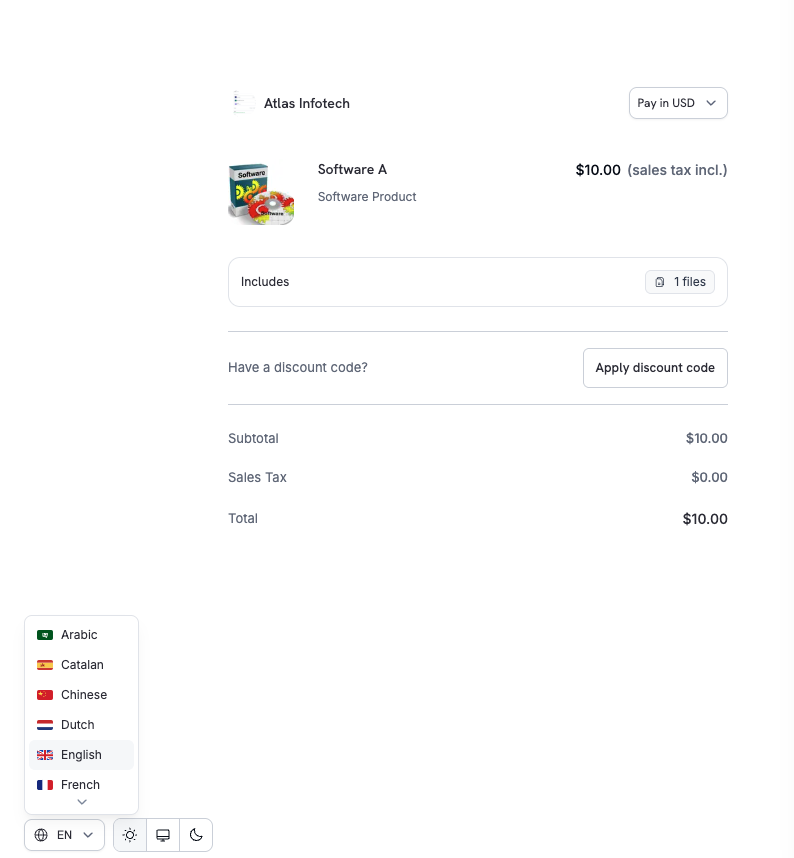
Checkout supports 22 languages. Customers can switch languages directly on the page, and UI text, labels, and system messages are localized.
In Arabic and Hebrew, checkout renders right to left and the whole layout mirrors. Email addresses, codes, and phone numbers keep their natural reading order.
To enable Adaptive Currency, go to **Settings → Business** and toggle it on.
Supported currencies, conversion fees, and refund handling.
## Multi-Language Checkout
Checkout supports 22 languages. Customers can switch languages directly on the page, and UI text, labels, and system messages are localized.
In Arabic and Hebrew, checkout renders right to left and the whole layout mirrors. Email addresses, codes, and phone numbers keep their natural reading order.
 ### Supported Languages
| Language | Code |
| - | - |
| Arabic | `ar` |
| Catalan | `ca` |
| Chinese | `zh` |
| Dutch | `nl` |
| English | `en` |
| French | `fr` |
| Georgian | `ka` |
| German | `de` |
| Hebrew | `he` |
| Indonesian | `id` |
| Italian | `it` |
| Japanese | `ja` |
| Korean | `ko` |
| Malay | `ms` |
| Polish | `pl` |
| Portuguese | `pt` |
| Romanian | `ro` |
| Russian | `ru` |
| Spanish | `es` |
| Swedish | `sv` |
| Thai | `th` |
| Turkish | `tr` |
To force a specific language, set `customization.force_language` when creating a checkout session. See the [Checkout Sessions API](/developer-resources/checkout-session) for details.
## Automatic Tax Calculation
Taxes are calculated automatically based on the customer's billing location, ensuring compliance with GST, VAT, and sales tax requirements.
Tax rules apply based on the customer's country and region where applicable. The tax amount updates automatically when the customer changes their country or updates their address. The final tax breakdown is shown clearly before payment.
Tax calculation is fully automated. No manual configuration required for standard digital goods and SaaS products.
## Business Tax ID Support
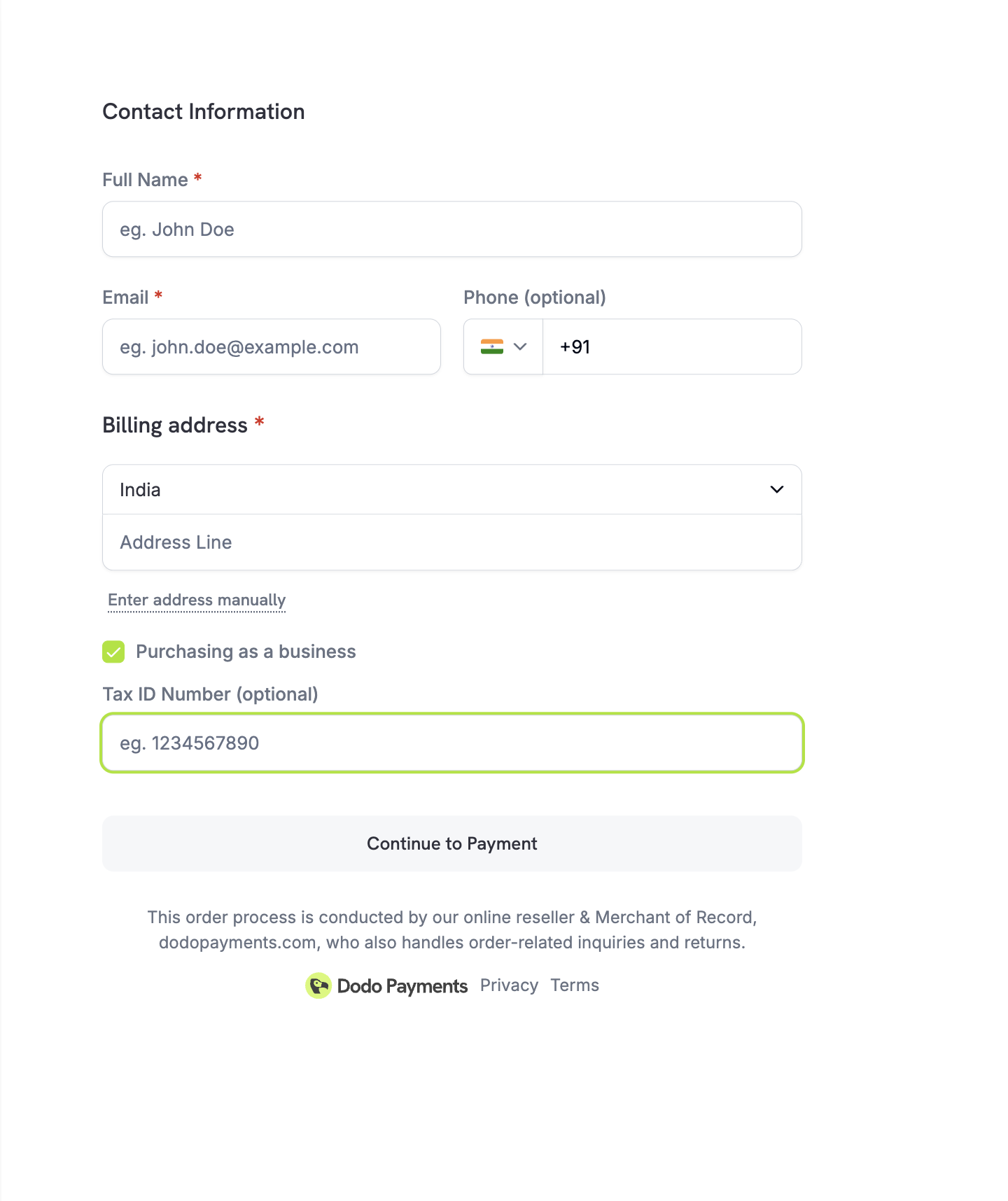
For B2B transactions, checkout allows customers to enter their Business Tax ID (e.g., VAT or GST number). When entered, the tax ID is validated in real-time and applicable tax exemptions or reverse-charge rules are applied automatically.
### Supported Languages
| Language | Code |
| - | - |
| Arabic | `ar` |
| Catalan | `ca` |
| Chinese | `zh` |
| Dutch | `nl` |
| English | `en` |
| French | `fr` |
| Georgian | `ka` |
| German | `de` |
| Hebrew | `he` |
| Indonesian | `id` |
| Italian | `it` |
| Japanese | `ja` |
| Korean | `ko` |
| Malay | `ms` |
| Polish | `pl` |
| Portuguese | `pt` |
| Romanian | `ro` |
| Russian | `ru` |
| Spanish | `es` |
| Swedish | `sv` |
| Thai | `th` |
| Turkish | `tr` |
To force a specific language, set `customization.force_language` when creating a checkout session. See the [Checkout Sessions API](/developer-resources/checkout-session) for details.
## Automatic Tax Calculation
Taxes are calculated automatically based on the customer's billing location, ensuring compliance with GST, VAT, and sales tax requirements.
Tax rules apply based on the customer's country and region where applicable. The tax amount updates automatically when the customer changes their country or updates their address. The final tax breakdown is shown clearly before payment.
Tax calculation is fully automated. No manual configuration required for standard digital goods and SaaS products.
## Business Tax ID Support
For B2B transactions, checkout allows customers to enter their Business Tax ID (e.g., VAT or GST number). When entered, the tax ID is validated in real-time and applicable tax exemptions or reverse-charge rules are applied automatically.
 ## Discount Codes
Customers can apply discount or promo codes you've created in the dashboard. The discount is validated instantly and the updated price is shown.
When [Purchasing Power Parity](/features/purchasing-power-parity) is enabled on a product, the discount applies to the PPP-adjusted price, not the base price.
## Discount Codes
Customers can apply discount or promo codes you've created in the dashboard. The discount is validated instantly and the updated price is shown.
When [Purchasing Power Parity](/features/purchasing-power-parity) is enabled on a product, the discount applies to the PPP-adjusted price, not the base price.
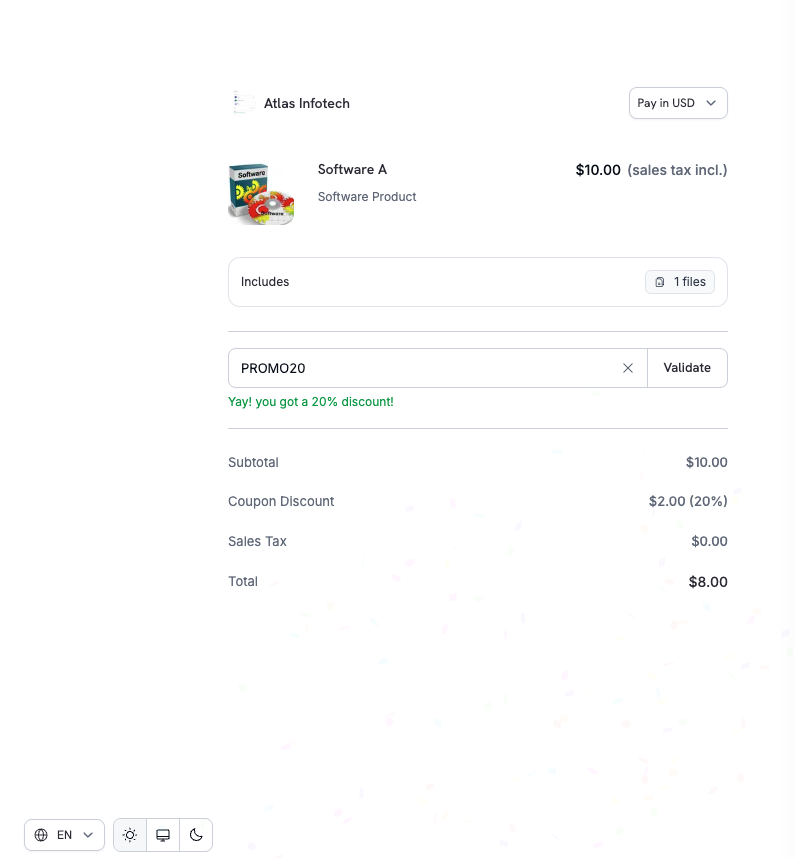 You can pre-apply discount codes or enable the discount input field via the API:
```typescript theme={null}
const session = await client.checkoutSessions.create({
product_cart: [
{ product_id: 'pdt_abc', quantity: 1 }
],
discount_codes: ['WELCOME20'], // Pre-apply one or more codes (max 20)
feature_flags: {
allow_discount_code: true // Shown by default; set to false to hide the field
},
return_url: 'https://yoursite.com/return'
});
```
`discount_codes` accepts an array of up to 20 codes that stack in order. The singular `discount_code` field is deprecated but still works for backward compatibility.
Create and manage discount codes.
Look up and validate discounts using code names.
## Smart Address Collection
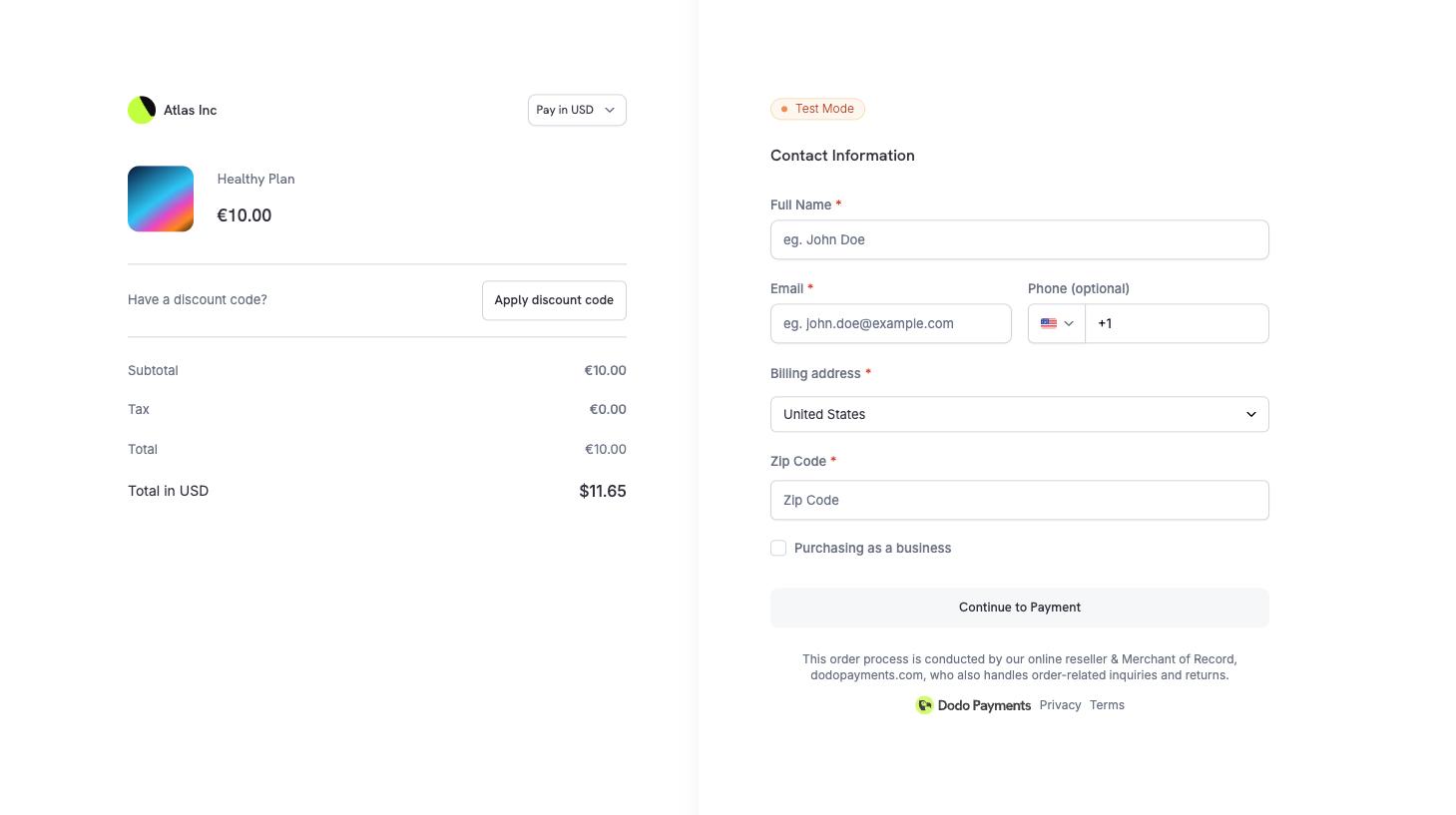
Checkout supports flexible address entry to balance speed, accuracy, and global coverage.
### Options
| Option | Description |
| - | - |
| **Google Address Autofill** | Quick selection with autocomplete |
| **Manual Entry** | Full control for complete addresses |
| **Country Selection** | Required for tax and compliance logic |
| **Minimal Address Mode** | Collect only country and ZIP where required for tax |
### Minimal Address Mode
For maximum conversion, enable minimal address collection to reduce checkout friction. When `minimal_address` is set to `true`, checkout only collects:
* **Country** — always required for tax determination
* **ZIP/Postal code** — only in regions where it's necessary for sales tax, VAT, or GST calculation
All other address fields are skipped.
You can pre-apply discount codes or enable the discount input field via the API:
```typescript theme={null}
const session = await client.checkoutSessions.create({
product_cart: [
{ product_id: 'pdt_abc', quantity: 1 }
],
discount_codes: ['WELCOME20'], // Pre-apply one or more codes (max 20)
feature_flags: {
allow_discount_code: true // Shown by default; set to false to hide the field
},
return_url: 'https://yoursite.com/return'
});
```
`discount_codes` accepts an array of up to 20 codes that stack in order. The singular `discount_code` field is deprecated but still works for backward compatibility.
Create and manage discount codes.
Look up and validate discounts using code names.
## Smart Address Collection
Checkout supports flexible address entry to balance speed, accuracy, and global coverage.
### Options
| Option | Description |
| - | - |
| **Google Address Autofill** | Quick selection with autocomplete |
| **Manual Entry** | Full control for complete addresses |
| **Country Selection** | Required for tax and compliance logic |
| **Minimal Address Mode** | Collect only country and ZIP where required for tax |
### Minimal Address Mode
For maximum conversion, enable minimal address collection to reduce checkout friction. When `minimal_address` is set to `true`, checkout only collects:
* **Country** — always required for tax determination
* **ZIP/Postal code** — only in regions where it's necessary for sales tax, VAT, or GST calculation
All other address fields are skipped.
 ```typescript theme={null}
const session = await client.checkoutSessions.create({
product_cart: [
{ product_id: 'pdt_abc', quantity: 1 }
],
minimal_address: true,
return_url: 'https://yoursite.com/return'
});
```
Full address collection is the default. Enable `minimal_address` for digital products and SaaS flows where complete billing details aren't required.
## Phone Number Collection
Control whether the phone number field appears on checkout and whether it's required.
| Flag | Default | Behavior |
| - | - | - |
| `allow_phone_number_collection` | `true` | Shows the phone number field |
| `require_phone_number` | `false` | Makes the phone number field required |
```typescript theme={null}
const session = await client.checkoutSessions.create({
product_cart: [{ product_id: 'pdt_abc', quantity: 1 }],
feature_flags: {
allow_phone_number_collection: true,
require_phone_number: true
},
return_url: 'https://yoursite.com/return'
});
```
`require_phone_number: true` requires `allow_phone_number_collection: true`. The API rejects sessions where phone collection is disabled while phone number is required.
## Custom Fields
Collect additional information from customers during checkout by defining custom form fields. This is useful for gathering company name, team size, referral source, or any other business-specific data.
### Available Field Types
| Type | Description |
| - | - |
| `text` | Single-line text input |
| `number` | Numeric input |
| `email` | Email address with validation |
| `url` | URL with validation |
| `date` | Date picker |
| `dropdown` | Select from predefined options |
| `boolean` | Yes/No toggle |
### Example
```typescript theme={null}
const session = await client.checkoutSessions.create({
product_cart: [
{ product_id: 'pdt_abc', quantity: 1 }
],
custom_fields: [
{
key: 'company_name',
label: 'Company Name',
field_type: 'text',
required: true
},
{
key: 'team_size',
label: 'Team Size',
field_type: 'dropdown',
required: true,
options: ['1-10', '11-50', '51-200', '200+']
}
],
return_url: 'https://yoursite.com/return'
});
```
Customer responses are automatically included in webhook payloads (`payment.succeeded`, `subscription.active`) and API responses via the `custom_field_responses` array. You can define up to 5 custom fields per checkout session.
Custom field configuration and accessing responses.
## Privacy Policy & Terms Acceptance
To ensure legal and compliance transparency:
* [Privacy Policy](https://dodopayments.com/privacy-policy) and [Buyer Terms](https://dodopayments.com/buyer-terms) links are clearly displayed on checkout
* Customers explicitly acknowledge these before completing payment
This helps meet global consumer protection and data privacy requirements including GDPR compliance.
## Product Collections
Product Collections enable a unified checkout experience where customers view and select from multiple related products (e.g., Starter, Pro, Enterprise plans) in a single checkout.
When using a collection, all active products in the collection are displayed. The first product is pre-selected, and customers can compare options before choosing.
```typescript theme={null}
const session = await client.checkoutSessions.create({
product_collection_id: 'pdc_abc123',
product_cart: [], // Required: pass an empty array for collection checkout
return_url: 'https://yoursite.com/return'
});
```
When using `product_collection_id`, pass an empty `product_cart` array. Discount codes cannot be pre-applied at session creation.
Create and manage product collections.
## Checkout Session Configuration
Control checkout behavior using the Checkout Sessions API:
```typescript theme={null}
const session = await client.checkoutSessions.create({
product_cart: [
{ product_id: 'pdt_abc', quantity: 1 }
],
customer: {
email: 'customer@example.com',
name: 'Jane Doe'
},
billing_currency: 'EUR',
discount_codes: ['PROMO10'],
feature_flags: {
allow_discount_code: true
},
return_url: 'https://yoursite.com/return',
cancel_url: 'https://yoursite.com/pricing',
metadata: {
order_ref: 'ORD-12345'
}
});
```
After payment, customers are redirected to your `return_url` with query parameters appended automatically -- including `payment_id` or `subscription_id`, `status`, `email`, and `license_key` (if applicable). See the [Checkout Sessions guide](/developer-resources/checkout-session#request-body) for the full list.
Complete API reference for checkout sessions.
Step-by-step guide to integrating checkout.
## Theme Customization
Customize the checkout page appearance to match your brand using the `customization.theme_config` parameter. Configure colors, fonts, border radius, and button text for both light and dark modes.
This section covers the server-side API, which uses property names such as `bg_primary`. A theme set on the session applies to hosted, overlay, and inline checkout. The Checkout SDK's client-side `themeConfig` option, which uses property names such as `bgPrimary`, is deprecated. See [Overlay Checkout](/developer-resources/overlay-checkout#theme-customization).
```typescript theme={null}
const session = await client.checkoutSessions.create({
product_cart: [
{ product_id: 'pdt_abc', quantity: 1 }
],
minimal_address: true,
return_url: 'https://yoursite.com/return'
});
```
Full address collection is the default. Enable `minimal_address` for digital products and SaaS flows where complete billing details aren't required.
## Phone Number Collection
Control whether the phone number field appears on checkout and whether it's required.
| Flag | Default | Behavior |
| - | - | - |
| `allow_phone_number_collection` | `true` | Shows the phone number field |
| `require_phone_number` | `false` | Makes the phone number field required |
```typescript theme={null}
const session = await client.checkoutSessions.create({
product_cart: [{ product_id: 'pdt_abc', quantity: 1 }],
feature_flags: {
allow_phone_number_collection: true,
require_phone_number: true
},
return_url: 'https://yoursite.com/return'
});
```
`require_phone_number: true` requires `allow_phone_number_collection: true`. The API rejects sessions where phone collection is disabled while phone number is required.
## Custom Fields
Collect additional information from customers during checkout by defining custom form fields. This is useful for gathering company name, team size, referral source, or any other business-specific data.
### Available Field Types
| Type | Description |
| - | - |
| `text` | Single-line text input |
| `number` | Numeric input |
| `email` | Email address with validation |
| `url` | URL with validation |
| `date` | Date picker |
| `dropdown` | Select from predefined options |
| `boolean` | Yes/No toggle |
### Example
```typescript theme={null}
const session = await client.checkoutSessions.create({
product_cart: [
{ product_id: 'pdt_abc', quantity: 1 }
],
custom_fields: [
{
key: 'company_name',
label: 'Company Name',
field_type: 'text',
required: true
},
{
key: 'team_size',
label: 'Team Size',
field_type: 'dropdown',
required: true,
options: ['1-10', '11-50', '51-200', '200+']
}
],
return_url: 'https://yoursite.com/return'
});
```
Customer responses are automatically included in webhook payloads (`payment.succeeded`, `subscription.active`) and API responses via the `custom_field_responses` array. You can define up to 5 custom fields per checkout session.
Custom field configuration and accessing responses.
## Privacy Policy & Terms Acceptance
To ensure legal and compliance transparency:
* [Privacy Policy](https://dodopayments.com/privacy-policy) and [Buyer Terms](https://dodopayments.com/buyer-terms) links are clearly displayed on checkout
* Customers explicitly acknowledge these before completing payment
This helps meet global consumer protection and data privacy requirements including GDPR compliance.
## Product Collections
Product Collections enable a unified checkout experience where customers view and select from multiple related products (e.g., Starter, Pro, Enterprise plans) in a single checkout.
When using a collection, all active products in the collection are displayed. The first product is pre-selected, and customers can compare options before choosing.
```typescript theme={null}
const session = await client.checkoutSessions.create({
product_collection_id: 'pdc_abc123',
product_cart: [], // Required: pass an empty array for collection checkout
return_url: 'https://yoursite.com/return'
});
```
When using `product_collection_id`, pass an empty `product_cart` array. Discount codes cannot be pre-applied at session creation.
Create and manage product collections.
## Checkout Session Configuration
Control checkout behavior using the Checkout Sessions API:
```typescript theme={null}
const session = await client.checkoutSessions.create({
product_cart: [
{ product_id: 'pdt_abc', quantity: 1 }
],
customer: {
email: 'customer@example.com',
name: 'Jane Doe'
},
billing_currency: 'EUR',
discount_codes: ['PROMO10'],
feature_flags: {
allow_discount_code: true
},
return_url: 'https://yoursite.com/return',
cancel_url: 'https://yoursite.com/pricing',
metadata: {
order_ref: 'ORD-12345'
}
});
```
After payment, customers are redirected to your `return_url` with query parameters appended automatically -- including `payment_id` or `subscription_id`, `status`, `email`, and `license_key` (if applicable). See the [Checkout Sessions guide](/developer-resources/checkout-session#request-body) for the full list.
Complete API reference for checkout sessions.
Step-by-step guide to integrating checkout.
## Theme Customization
Customize the checkout page appearance to match your brand using the `customization.theme_config` parameter. Configure colors, fonts, border radius, and button text for both light and dark modes.
This section covers the server-side API, which uses property names such as `bg_primary`. A theme set on the session applies to hosted, overlay, and inline checkout. The Checkout SDK's client-side `themeConfig` option, which uses property names such as `bgPrimary`, is deprecated. See [Overlay Checkout](/developer-resources/overlay-checkout#theme-customization).
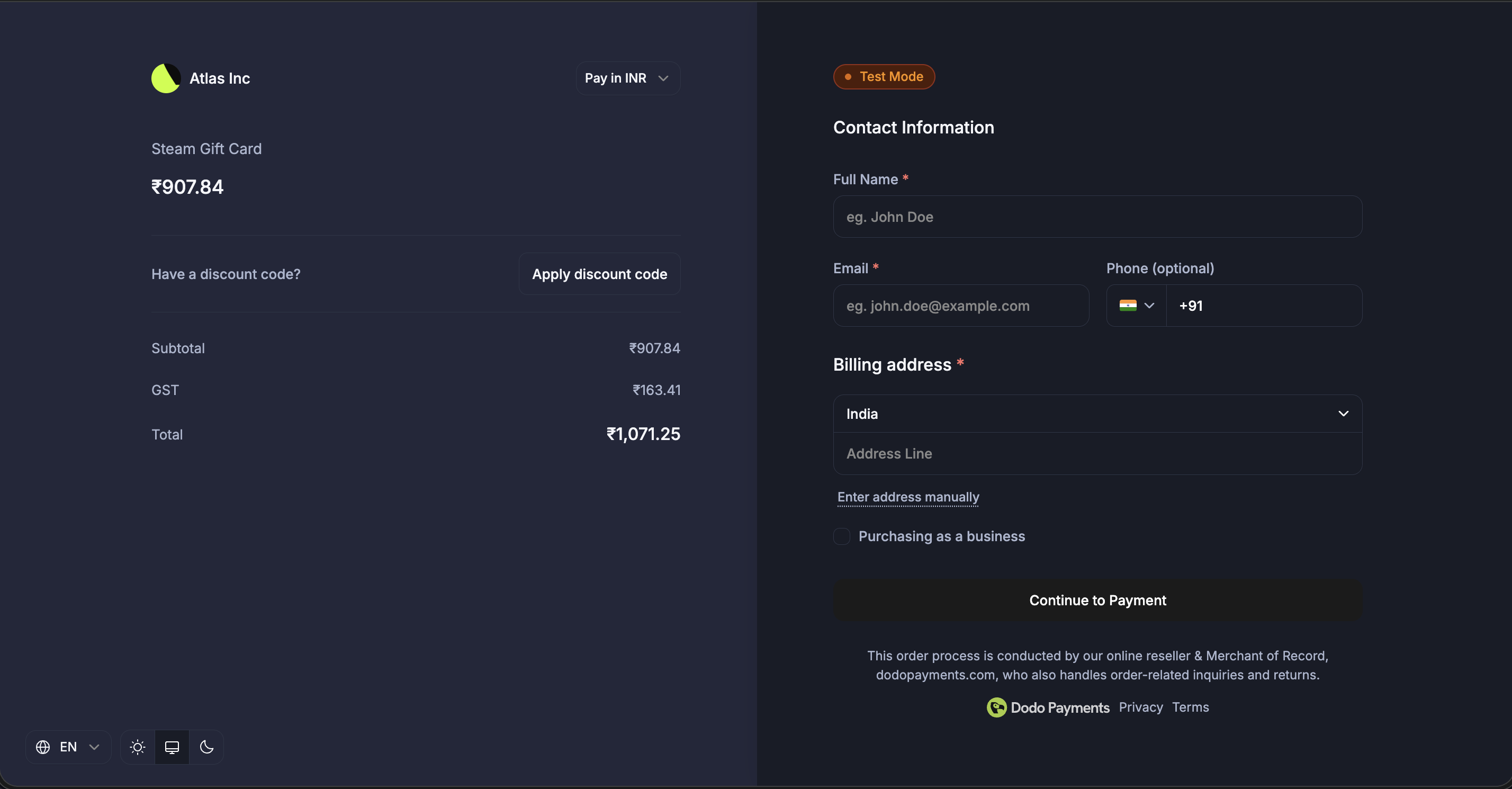 Configure themes visually from the dashboard with pre-built themes, typography, colors, and live preview.
### Theme Configuration Options
| Property | Description |
| - | - |
| `light` | Color configuration for light mode |
| `dark` | Color configuration for dark mode |
| `font_primary_url` | URL for the primary font |
| `font_secondary_url` | URL for the secondary font |
| `font_size` | Font size: `xs`, `sm`, `md`, `lg`, `xl`, `2xl` |
| `font_weight` | Font weight: `normal`, `medium`, `bold`, `extraBold` |
| `radius` | Border radius for UI elements (e.g., `4px`, `0.5rem`, `8px`) |
| `pay_button_text` | Custom text for the pay button (e.g., "Complete Purchase", "Subscribe Now") |
### Color Configuration (Light/Dark Mode)
Each mode supports these color properties:
| Property | Description |
| - | - |
| `bg_primary` | Background primary color |
| `bg_secondary` | Background secondary color |
| `text_primary` | Text primary color |
| `text_secondary` | Text secondary color |
| `text_placeholder` | Text placeholder color |
| `text_error` | Text error color |
| `text_success` | Text success color |
| `border_primary` | Border primary color |
| `border_secondary` | Border secondary color |
| `button_primary` | Primary button background color |
| `button_primary_hover` | Primary button hover color |
| `button_secondary` | Secondary button background color |
| `button_secondary_hover` | Secondary button hover color |
| `button_text_primary` | Primary button text color |
| `button_text_secondary` | Secondary button text color |
| `input_focus_border` | Input focus border color |
All color fields accept standard CSS color formats:
* Hex: `#fff`, `#ffffff`, `#ffffffff`
* RGB/RGBA: `rgb(255, 255, 255)`, `rgba(255, 255, 255, 0.5)`
* HSL/HSLA: `hsl(120, 100%, 50%)`, `hsla(120, 100%, 50%, 0.5)`
* Named colors: `red`, `blue`, `transparent`
### Example
```typescript theme={null}
const session = await client.checkoutSessions.create({
product_cart: [
{ product_id: 'pdt_abc', quantity: 1 }
],
customization: {
theme_config: {
font_primary_url: 'https://fonts.googleapis.com/css2?family=Inter:wght@400;500;600&display=swap',
font_size: 'md',
font_weight: 'medium',
radius: '8px',
pay_button_text: 'Complete Purchase',
light: {
bg_primary: '#ffffff',
bg_secondary: '#f5f5f5',
text_primary: '#1a1a1a',
text_secondary: '#666666',
button_primary: '#0066ff',
button_primary_hover: '#0052cc',
button_text_primary: '#ffffff',
border_primary: '#e0e0e0'
},
dark: {
bg_primary: '#1a1a1a',
bg_secondary: '#2d2d2d',
text_primary: '#ffffff',
text_secondary: '#a0a0a0',
button_primary: '#3385ff',
button_primary_hover: '#4d99ff',
button_text_primary: '#ffffff',
border_primary: '#404040'
}
}
},
return_url: 'https://yoursite.com/return'
});
```
You don't need to specify all color properties. Unspecified properties use the default theme values.
This documentation is built and hosted on [Mintlify](https://mintlify.com), a developer documentation platform.
Configure themes visually from the dashboard with pre-built themes, typography, colors, and live preview.
### Theme Configuration Options
| Property | Description |
| - | - |
| `light` | Color configuration for light mode |
| `dark` | Color configuration for dark mode |
| `font_primary_url` | URL for the primary font |
| `font_secondary_url` | URL for the secondary font |
| `font_size` | Font size: `xs`, `sm`, `md`, `lg`, `xl`, `2xl` |
| `font_weight` | Font weight: `normal`, `medium`, `bold`, `extraBold` |
| `radius` | Border radius for UI elements (e.g., `4px`, `0.5rem`, `8px`) |
| `pay_button_text` | Custom text for the pay button (e.g., "Complete Purchase", "Subscribe Now") |
### Color Configuration (Light/Dark Mode)
Each mode supports these color properties:
| Property | Description |
| - | - |
| `bg_primary` | Background primary color |
| `bg_secondary` | Background secondary color |
| `text_primary` | Text primary color |
| `text_secondary` | Text secondary color |
| `text_placeholder` | Text placeholder color |
| `text_error` | Text error color |
| `text_success` | Text success color |
| `border_primary` | Border primary color |
| `border_secondary` | Border secondary color |
| `button_primary` | Primary button background color |
| `button_primary_hover` | Primary button hover color |
| `button_secondary` | Secondary button background color |
| `button_secondary_hover` | Secondary button hover color |
| `button_text_primary` | Primary button text color |
| `button_text_secondary` | Secondary button text color |
| `input_focus_border` | Input focus border color |
All color fields accept standard CSS color formats:
* Hex: `#fff`, `#ffffff`, `#ffffffff`
* RGB/RGBA: `rgb(255, 255, 255)`, `rgba(255, 255, 255, 0.5)`
* HSL/HSLA: `hsl(120, 100%, 50%)`, `hsla(120, 100%, 50%, 0.5)`
* Named colors: `red`, `blue`, `transparent`
### Example
```typescript theme={null}
const session = await client.checkoutSessions.create({
product_cart: [
{ product_id: 'pdt_abc', quantity: 1 }
],
customization: {
theme_config: {
font_primary_url: 'https://fonts.googleapis.com/css2?family=Inter:wght@400;500;600&display=swap',
font_size: 'md',
font_weight: 'medium',
radius: '8px',
pay_button_text: 'Complete Purchase',
light: {
bg_primary: '#ffffff',
bg_secondary: '#f5f5f5',
text_primary: '#1a1a1a',
text_secondary: '#666666',
button_primary: '#0066ff',
button_primary_hover: '#0052cc',
button_text_primary: '#ffffff',
border_primary: '#e0e0e0'
},
dark: {
bg_primary: '#1a1a1a',
bg_secondary: '#2d2d2d',
text_primary: '#ffffff',
text_secondary: '#a0a0a0',
button_primary: '#3385ff',
button_primary_hover: '#4d99ff',
button_text_primary: '#ffffff',
border_primary: '#404040'
}
}
},
return_url: 'https://yoursite.com/return'
});
```
You don't need to specify all color properties. Unspecified properties use the default theme values.
This documentation is built and hosted on [Mintlify](https://mintlify.com), a developer documentation platform.