> ## Documentation Index
> Fetch the complete documentation index at: https://docs.dodopayments.com/llms.txt
> Use this file to discover all available pages before exploring further.
# Customer Wallets
> Hold prepaid money for your customers. Add or deduct funds, apply balances to subscription charges, issue refunds as wallet funds, and track every change.
Get a customer's balance in each currency.
Add funds to or deduct funds from a wallet.
Page through every wallet transaction.
## What Are Customer Wallets?
A customer wallet holds real money for a customer, with one balance per currency. Use wallets to:
* **Store prepaid funds** for future subscription payments
* **Handle refunds** as wallet balance instead of a refund to the card
* **Issue promotional balances**, such as welcome bonuses or loyalty rewards
* **Apply wallet funds to subscription charges** automatically at billing time
* **Track every transaction** in a ledger with the balance before and after
You don't create wallets yourself. A customer's wallet for a currency is created, with a zero balance, the first time you add a ledger entry in that currency. Until then, [Get Customer Wallets](/api-reference/customers/get-customer-wallets) returns no entry for that currency.
**Customer Wallets ≠ Credit-Based Billing**
Customer Wallets hold **real money** that Dodo Payments applies to subscription charges.
To track virtual usage units such as API calls, tokens, or compute hours, use [Credit-Based Billing](/features/credit-based-billing) instead.
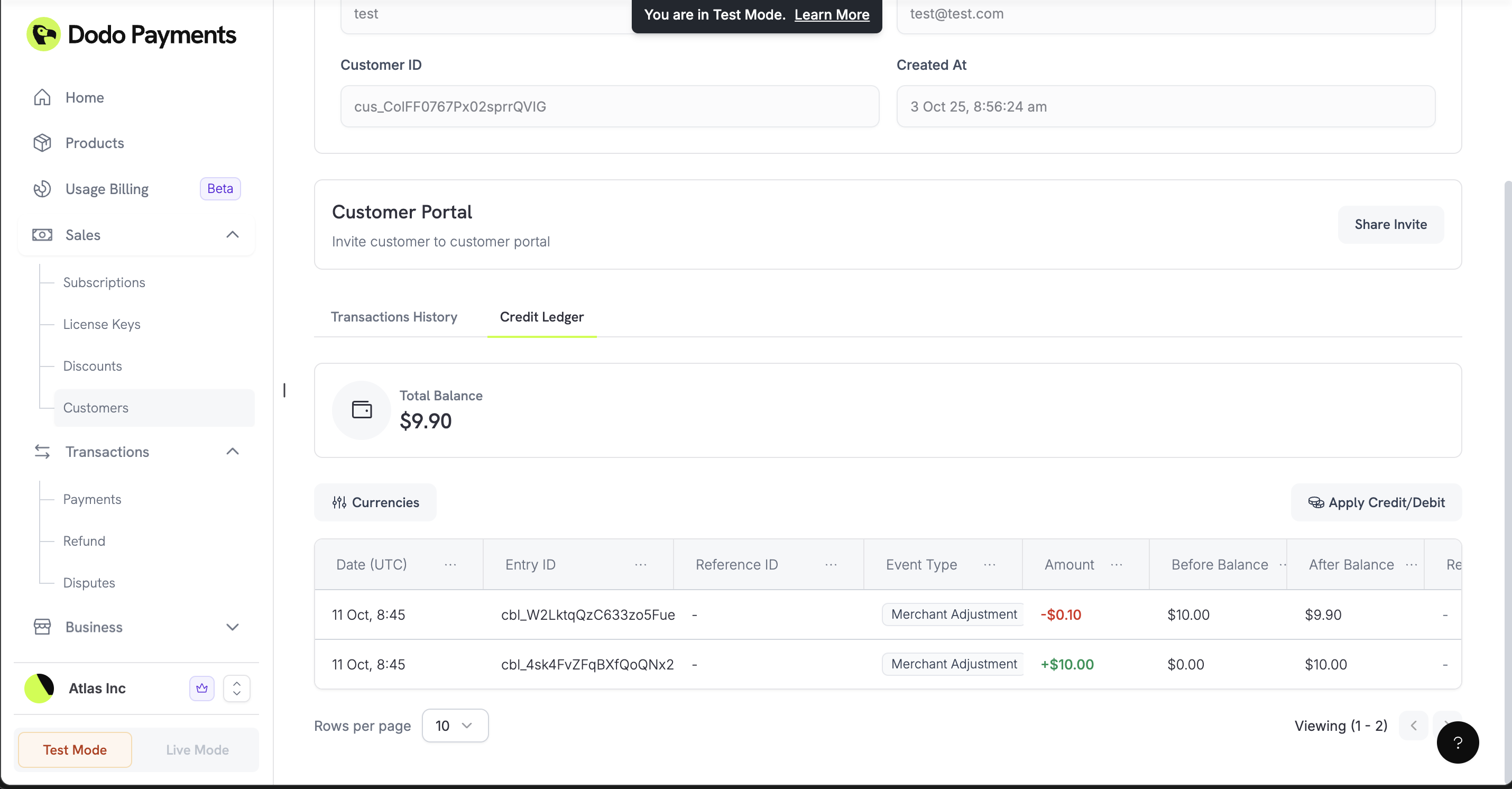 ## How It Works
When a subscription renews or a plan change creates a charge, Dodo Payments first applies the customer's wallet balance in that currency, then charges the payment method for the rest. If the balance covers only part of the charge, the wallet pays that part.
### Automatic Setup
You don't need to set anything up. Add a ledger entry through the API, or click **Apply Credit/Debit** on the customer's **Wallets** tab in the dashboard, and the wallet for that currency is ready to use.
### Multi-Currency Support
Each currency has its own balance. Each wallet in the [Get Customer Wallets](/api-reference/customers/get-customer-wallets) response has a `currency` and a `balance` in the smallest currency unit, and the response adds `total_balance_usd`, the sum of all balances converted to USD. Ledger entries accept these currencies:
Balance in US Dollars (stored in cents)
Balance in Euros (stored in cents)
Balance in Pounds Sterling (stored in pence)
Customer wallets hold USD, EUR, and GBP balances. The discontinued INR native wallet described in [Payout Structure](/features/payouts/payout-structure) is your merchant payout wallet, not a customer wallet. INR also remains supported as a transaction currency for UPI, RuPay, and Indian-card subscriptions.
## Working with Wallets
### Check Customer Balances
Get a customer's balance in every currency, for example to confirm the balance before a purchase or to show it in your app.
Get a customer's wallet balances in all currencies.
### Add or Deduct Funds
Add funds, such as a welcome bonus or a refund balance, or deduct funds, such as a manual charge. `entry_type`, `currency`, and `amount` are required. `amount` is a positive integer in the smallest currency unit. Add a `reason` (up to 500 characters) for your audit trail, and an `idempotency_key` to prevent duplicates. The response is the updated wallet.
`entry_type` is `'credit'` to add funds to the wallet and `'debit'` to subtract funds from it. A debit larger than the balance fails with `400`.
Add funds to or deduct funds from a customer's wallet.
### View Transaction History
List every credit and debit for a customer, with pagination and an optional `currency` filter. Each entry has an `event_type` (`payment`, `payment_reversal`, `refund`, `refund_reversal`, `dispute`, `dispute_reversal`, or `merchant_adjustment`), the `amount`, and the `before_balance` and `after_balance`. Use the ledger to reconcile accounts and to answer customer questions.
List every wallet transaction for a customer.
## Real-World Examples
The examples use the TypeScript SDK. `client` is a `DodoPayments` client, created as in the [Integration Guide](/developer-resources/integration-guide).
### Refund to Wallet
To refund a customer as wallet balance instead of back to their card, add the amount with a credit entry. The funds stay with your business for the customer's next purchase.
```javascript theme={null}
async function refundToWallet(customerId, refundAmount, originalPaymentId) {
await client.customers.wallets.ledgerEntries.create(customerId, {
amount: refundAmount, // Amount in cents
currency: 'USD',
entry_type: 'credit',
reason: `Refund for payment ${originalPaymentId}`,
idempotency_key: `refund_${originalPaymentId}`
});
}
```
A ledger credit doesn't refund the original payment. When you refund a payment through the Refunds API, Dodo Payments returns any part of it that the wallet paid to the wallet automatically.
### Welcome Bonus / Promotional Balance
Give new customers a welcome bonus to encourage their first purchase.
```javascript theme={null}
async function addWelcomeBonus(customerId) {
await client.customers.wallets.ledgerEntries.create(customerId, {
amount: 1000, // $10.00 promotional balance
currency: 'USD',
entry_type: 'credit',
reason: 'Welcome bonus - $10 promotional balance',
idempotency_key: `welcome_${customerId}`
});
}
```
### Subscription Payment from Wallet
Deduct funds from a wallet to pay for a charge you bill yourself. Renewals don't need this step, because Dodo Payments applies the balance to them automatically.
```javascript theme={null}
async function deductForPurchase(customerId, purchaseAmount, purchaseId) {
try {
await client.customers.wallets.ledgerEntries.create(customerId, {
amount: purchaseAmount,
currency: 'USD',
entry_type: 'debit',
reason: `Manual charge for purchase ${purchaseId}`,
idempotency_key: `charge_${purchaseId}`
});
} catch (error) {
if (error.status === 400) {
console.log('Insufficient wallet balance');
}
}
}
```
### Prepaid Billing System
Let customers fund their account up front and draw down that balance over time. `customerId`, `paymentId`, and `purchaseId` are your own identifiers for the customer, the deposit, and the purchase.
Add funds to the customer's wallet when they make a deposit.
```javascript theme={null}
await client.customers.wallets.ledgerEntries.create(customerId, {
amount: 5000, // $50.00 deposit
currency: 'USD',
entry_type: 'credit',
reason: 'Account funding - prepaid deposit',
idempotency_key: `deposit_${paymentId}`
});
```
Deduct from the balance as the customer uses your services.
```javascript theme={null}
await client.customers.wallets.ledgerEntries.create(customerId, {
amount: 1500, // $15.00 charge
currency: 'USD',
entry_type: 'debit',
reason: 'Service purchase - usage charge',
idempotency_key: `purchase_${purchaseId}`
});
```
Check whether a customer is running low on funds, and prompt a top-up.
```javascript theme={null}
const wallets = await client.customers.wallets.list(customerId);
const usdWallet = wallets.items.find(w => w.currency === 'USD');
const balance = usdWallet?.balance ?? 0; // no USD wallet yet means a zero balance
if (balance < 1000) { // Less than $10.00
// sendLowBalanceNotification is your own function, for example an email
await sendLowBalanceNotification(customerId, balance);
}
```
### Multi-Currency Support
Keep separate balances for customers in different regions.
Manage USD funds for US-based customers.
```javascript theme={null}
await client.customers.wallets.ledgerEntries.create(customerId, {
amount: 20000, // $200.00 in cents
currency: 'USD',
entry_type: 'credit',
reason: 'USD account funding',
idempotency_key: `usd_deposit_${paymentId}`
});
```
Manage EUR funds for Europe-based customers.
```javascript theme={null}
await client.customers.wallets.ledgerEntries.create(customerId, {
amount: 18000, // €180.00 in cents
currency: 'EUR',
entry_type: 'credit',
reason: 'EUR account funding',
idempotency_key: `eur_deposit_${paymentId}`
});
```
Manage GBP funds for UK-based customers.
```javascript theme={null}
await client.customers.wallets.ledgerEntries.create(customerId, {
amount: 15000, // £150.00 in pence
currency: 'GBP',
entry_type: 'credit',
reason: 'GBP account funding',
idempotency_key: `gbp_deposit_${paymentId}`
});
```
## Best Practices
### Prevent Duplicate Transactions
Pass an `idempotency_key` derived from the event that caused the entry, such as an order or payment ID, so a retry can't add or deduct the funds twice. If you repeat a request with the same key, Dodo Payments creates no new entry and returns the current wallet.
```javascript theme={null}
async function addFundsSafely(customerId, amount, reason, eventId) {
// Derive the key from the event, not from the time, so retries reuse it.
const idempotencyKey = `credit_${customerId}_${eventId}`;
try {
const result = await client.customers.wallets.ledgerEntries.create(customerId, {
amount: amount,
currency: 'USD',
entry_type: 'credit',
reason: reason,
idempotency_key: idempotencyKey
});
// Replaying the same idempotency_key creates no duplicate entry and
// returns the wallet, so no special duplicate handling is required.
return { success: true, wallet: result };
} catch (error) {
if (error.status === 400) {
// e.g. insufficient balance on a debit
return { success: false, reason: 'insufficient_balance' };
}
throw error;
}
}
```
### Check Balances Before Charging
Before you deduct a large amount from a wallet, confirm that the balance covers it.
```javascript theme={null}
async function checkBalanceBeforeOperation(customerId, requiredAmount) {
const wallets = await client.customers.wallets.list(customerId);
const usdWallet = wallets.items.find(w => w.currency === 'USD');
if (!usdWallet || usdWallet.balance < requiredAmount) {
throw new Error('Insufficient funds for this operation');
}
return usdWallet.balance;
}
```
## What's Coming Next
Customer wallets don't support these features:
* **Balance Expiration**: Wallet funds don't expire.
* **Analytics**: There are no spending reports or balance trends. Use the ledger to build your own.
* **Webhooks**: No webhook fires when a balance changes, and there are no low-balance alerts. To track changes, list the ledger entries.
Start with basic funding and deduction, then automate more of your billing workflow as your business grows.
This documentation is built and hosted on [Mintlify](https://mintlify.com), a developer documentation platform.
## How It Works
When a subscription renews or a plan change creates a charge, Dodo Payments first applies the customer's wallet balance in that currency, then charges the payment method for the rest. If the balance covers only part of the charge, the wallet pays that part.
### Automatic Setup
You don't need to set anything up. Add a ledger entry through the API, or click **Apply Credit/Debit** on the customer's **Wallets** tab in the dashboard, and the wallet for that currency is ready to use.
### Multi-Currency Support
Each currency has its own balance. Each wallet in the [Get Customer Wallets](/api-reference/customers/get-customer-wallets) response has a `currency` and a `balance` in the smallest currency unit, and the response adds `total_balance_usd`, the sum of all balances converted to USD. Ledger entries accept these currencies:
Balance in US Dollars (stored in cents)
Balance in Euros (stored in cents)
Balance in Pounds Sterling (stored in pence)
Customer wallets hold USD, EUR, and GBP balances. The discontinued INR native wallet described in [Payout Structure](/features/payouts/payout-structure) is your merchant payout wallet, not a customer wallet. INR also remains supported as a transaction currency for UPI, RuPay, and Indian-card subscriptions.
## Working with Wallets
### Check Customer Balances
Get a customer's balance in every currency, for example to confirm the balance before a purchase or to show it in your app.
Get a customer's wallet balances in all currencies.
### Add or Deduct Funds
Add funds, such as a welcome bonus or a refund balance, or deduct funds, such as a manual charge. `entry_type`, `currency`, and `amount` are required. `amount` is a positive integer in the smallest currency unit. Add a `reason` (up to 500 characters) for your audit trail, and an `idempotency_key` to prevent duplicates. The response is the updated wallet.
`entry_type` is `'credit'` to add funds to the wallet and `'debit'` to subtract funds from it. A debit larger than the balance fails with `400`.
Add funds to or deduct funds from a customer's wallet.
### View Transaction History
List every credit and debit for a customer, with pagination and an optional `currency` filter. Each entry has an `event_type` (`payment`, `payment_reversal`, `refund`, `refund_reversal`, `dispute`, `dispute_reversal`, or `merchant_adjustment`), the `amount`, and the `before_balance` and `after_balance`. Use the ledger to reconcile accounts and to answer customer questions.
List every wallet transaction for a customer.
## Real-World Examples
The examples use the TypeScript SDK. `client` is a `DodoPayments` client, created as in the [Integration Guide](/developer-resources/integration-guide).
### Refund to Wallet
To refund a customer as wallet balance instead of back to their card, add the amount with a credit entry. The funds stay with your business for the customer's next purchase.
```javascript theme={null}
async function refundToWallet(customerId, refundAmount, originalPaymentId) {
await client.customers.wallets.ledgerEntries.create(customerId, {
amount: refundAmount, // Amount in cents
currency: 'USD',
entry_type: 'credit',
reason: `Refund for payment ${originalPaymentId}`,
idempotency_key: `refund_${originalPaymentId}`
});
}
```
A ledger credit doesn't refund the original payment. When you refund a payment through the Refunds API, Dodo Payments returns any part of it that the wallet paid to the wallet automatically.
### Welcome Bonus / Promotional Balance
Give new customers a welcome bonus to encourage their first purchase.
```javascript theme={null}
async function addWelcomeBonus(customerId) {
await client.customers.wallets.ledgerEntries.create(customerId, {
amount: 1000, // $10.00 promotional balance
currency: 'USD',
entry_type: 'credit',
reason: 'Welcome bonus - $10 promotional balance',
idempotency_key: `welcome_${customerId}`
});
}
```
### Subscription Payment from Wallet
Deduct funds from a wallet to pay for a charge you bill yourself. Renewals don't need this step, because Dodo Payments applies the balance to them automatically.
```javascript theme={null}
async function deductForPurchase(customerId, purchaseAmount, purchaseId) {
try {
await client.customers.wallets.ledgerEntries.create(customerId, {
amount: purchaseAmount,
currency: 'USD',
entry_type: 'debit',
reason: `Manual charge for purchase ${purchaseId}`,
idempotency_key: `charge_${purchaseId}`
});
} catch (error) {
if (error.status === 400) {
console.log('Insufficient wallet balance');
}
}
}
```
### Prepaid Billing System
Let customers fund their account up front and draw down that balance over time. `customerId`, `paymentId`, and `purchaseId` are your own identifiers for the customer, the deposit, and the purchase.
Add funds to the customer's wallet when they make a deposit.
```javascript theme={null}
await client.customers.wallets.ledgerEntries.create(customerId, {
amount: 5000, // $50.00 deposit
currency: 'USD',
entry_type: 'credit',
reason: 'Account funding - prepaid deposit',
idempotency_key: `deposit_${paymentId}`
});
```
Deduct from the balance as the customer uses your services.
```javascript theme={null}
await client.customers.wallets.ledgerEntries.create(customerId, {
amount: 1500, // $15.00 charge
currency: 'USD',
entry_type: 'debit',
reason: 'Service purchase - usage charge',
idempotency_key: `purchase_${purchaseId}`
});
```
Check whether a customer is running low on funds, and prompt a top-up.
```javascript theme={null}
const wallets = await client.customers.wallets.list(customerId);
const usdWallet = wallets.items.find(w => w.currency === 'USD');
const balance = usdWallet?.balance ?? 0; // no USD wallet yet means a zero balance
if (balance < 1000) { // Less than $10.00
// sendLowBalanceNotification is your own function, for example an email
await sendLowBalanceNotification(customerId, balance);
}
```
### Multi-Currency Support
Keep separate balances for customers in different regions.
Manage USD funds for US-based customers.
```javascript theme={null}
await client.customers.wallets.ledgerEntries.create(customerId, {
amount: 20000, // $200.00 in cents
currency: 'USD',
entry_type: 'credit',
reason: 'USD account funding',
idempotency_key: `usd_deposit_${paymentId}`
});
```
Manage EUR funds for Europe-based customers.
```javascript theme={null}
await client.customers.wallets.ledgerEntries.create(customerId, {
amount: 18000, // €180.00 in cents
currency: 'EUR',
entry_type: 'credit',
reason: 'EUR account funding',
idempotency_key: `eur_deposit_${paymentId}`
});
```
Manage GBP funds for UK-based customers.
```javascript theme={null}
await client.customers.wallets.ledgerEntries.create(customerId, {
amount: 15000, // £150.00 in pence
currency: 'GBP',
entry_type: 'credit',
reason: 'GBP account funding',
idempotency_key: `gbp_deposit_${paymentId}`
});
```
## Best Practices
### Prevent Duplicate Transactions
Pass an `idempotency_key` derived from the event that caused the entry, such as an order or payment ID, so a retry can't add or deduct the funds twice. If you repeat a request with the same key, Dodo Payments creates no new entry and returns the current wallet.
```javascript theme={null}
async function addFundsSafely(customerId, amount, reason, eventId) {
// Derive the key from the event, not from the time, so retries reuse it.
const idempotencyKey = `credit_${customerId}_${eventId}`;
try {
const result = await client.customers.wallets.ledgerEntries.create(customerId, {
amount: amount,
currency: 'USD',
entry_type: 'credit',
reason: reason,
idempotency_key: idempotencyKey
});
// Replaying the same idempotency_key creates no duplicate entry and
// returns the wallet, so no special duplicate handling is required.
return { success: true, wallet: result };
} catch (error) {
if (error.status === 400) {
// e.g. insufficient balance on a debit
return { success: false, reason: 'insufficient_balance' };
}
throw error;
}
}
```
### Check Balances Before Charging
Before you deduct a large amount from a wallet, confirm that the balance covers it.
```javascript theme={null}
async function checkBalanceBeforeOperation(customerId, requiredAmount) {
const wallets = await client.customers.wallets.list(customerId);
const usdWallet = wallets.items.find(w => w.currency === 'USD');
if (!usdWallet || usdWallet.balance < requiredAmount) {
throw new Error('Insufficient funds for this operation');
}
return usdWallet.balance;
}
```
## What's Coming Next
Customer wallets don't support these features:
* **Balance Expiration**: Wallet funds don't expire.
* **Analytics**: There are no spending reports or balance trends. Use the ledger to build your own.
* **Webhooks**: No webhook fires when a balance changes, and there are no low-balance alerts. To track changes, list the ledger entries.
Start with basic funding and deduction, then automate more of your billing workflow as your business grows.
This documentation is built and hosted on [Mintlify](https://mintlify.com), a developer documentation platform.