> ## Documentation Index
> Fetch the complete documentation index at: https://docs.dodopayments.com/llms.txt
> Use this file to discover all available pages before exploring further.
# Discounts
> Create promotional codes to drive conversions, run campaigns, and reward customers with percentage discounts across one‑time and subscription purchases.
 Discount codes let you run targeted promotions and incentives. Create percentage-based discounts, set limits and expirations, restrict to products, and apply them at checkout.
Apply one or more stacked codes during hosted checkout with `discount_codes` and UI controls.
Retrieve a discount by its ID to inspect its status and restrictions.
Look up and validate a discount using its code name (e.g., "SAVE20").
Programmatically create new discount codes.
Browse and manage existing discounts; update or delete as needed.
Apply discount codes when upgrading or downgrading subscription plans.
## What Are Discount Codes?
Discount codes are promotional tokens that reduce order totals at checkout. Use them for seasonal campaigns, first-purchase incentives, win-back offers, or negotiated B2B pricing.
Codes are percentage-based (e.g., 15% off) or flat-amount (e.g., \$5 off). You can stack up to 20 codes per checkout, payment, or subscription, so a customer can redeem both a welcome offer and a campaign code in the same transaction. Restrict codes to specific products, limit how many times each customer can use them, set expiration dates, and control who's eligible to redeem.
## Key Benefits
* **Flexible discounts**: Percentage-based or flat-amount discounts
* **Stackable codes**: Apply up to 20 codes per checkout, payment, or subscription
* **Targeted control**: Restrict by product, subscription cycles, and customer eligibility
* **Campaign governance**: Scheduled start dates, expiration dates, overall and per-customer usage limits
* **Per-currency pricing**: Set the flat deduction, amount cap, and minimum subtotal per currency
## Creating Discount Codes
Create discount codes in your Dodo Payments dashboard, then apply them in hosted checkout or via API.
Discount codes let you run targeted promotions and incentives. Create percentage-based discounts, set limits and expirations, restrict to products, and apply them at checkout.
Apply one or more stacked codes during hosted checkout with `discount_codes` and UI controls.
Retrieve a discount by its ID to inspect its status and restrictions.
Look up and validate a discount using its code name (e.g., "SAVE20").
Programmatically create new discount codes.
Browse and manage existing discounts; update or delete as needed.
Apply discount codes when upgrading or downgrading subscription plans.
## What Are Discount Codes?
Discount codes are promotional tokens that reduce order totals at checkout. Use them for seasonal campaigns, first-purchase incentives, win-back offers, or negotiated B2B pricing.
Codes are percentage-based (e.g., 15% off) or flat-amount (e.g., \$5 off). You can stack up to 20 codes per checkout, payment, or subscription, so a customer can redeem both a welcome offer and a campaign code in the same transaction. Restrict codes to specific products, limit how many times each customer can use them, set expiration dates, and control who's eligible to redeem.
## Key Benefits
* **Flexible discounts**: Percentage-based or flat-amount discounts
* **Stackable codes**: Apply up to 20 codes per checkout, payment, or subscription
* **Targeted control**: Restrict by product, subscription cycles, and customer eligibility
* **Campaign governance**: Scheduled start dates, expiration dates, overall and per-customer usage limits
* **Per-currency pricing**: Set the flat deduction, amount cap, and minimum subtotal per currency
## Creating Discount Codes
Create discount codes in your Dodo Payments dashboard, then apply them in hosted checkout or via API.
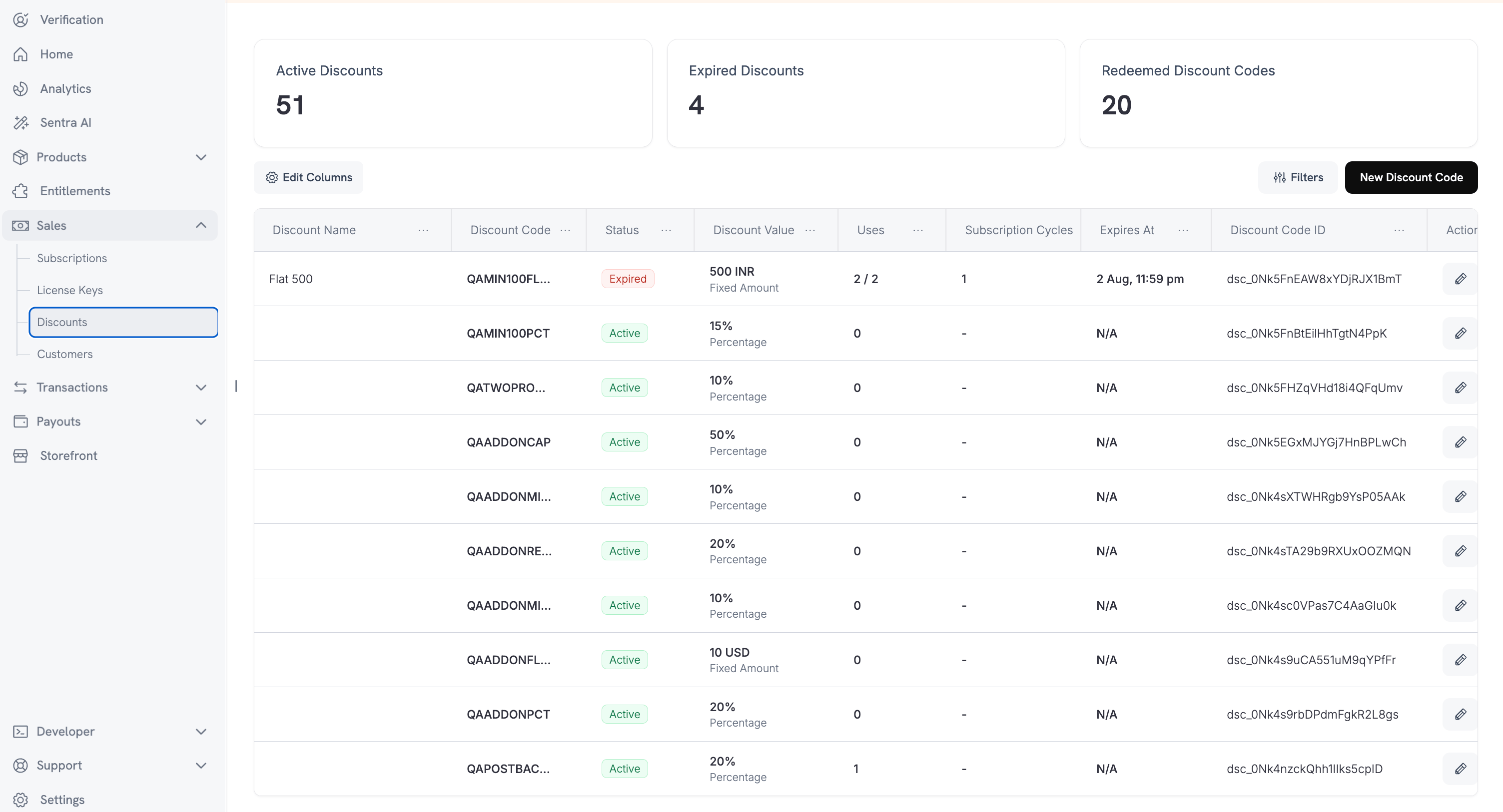 ### Dashboard Setup
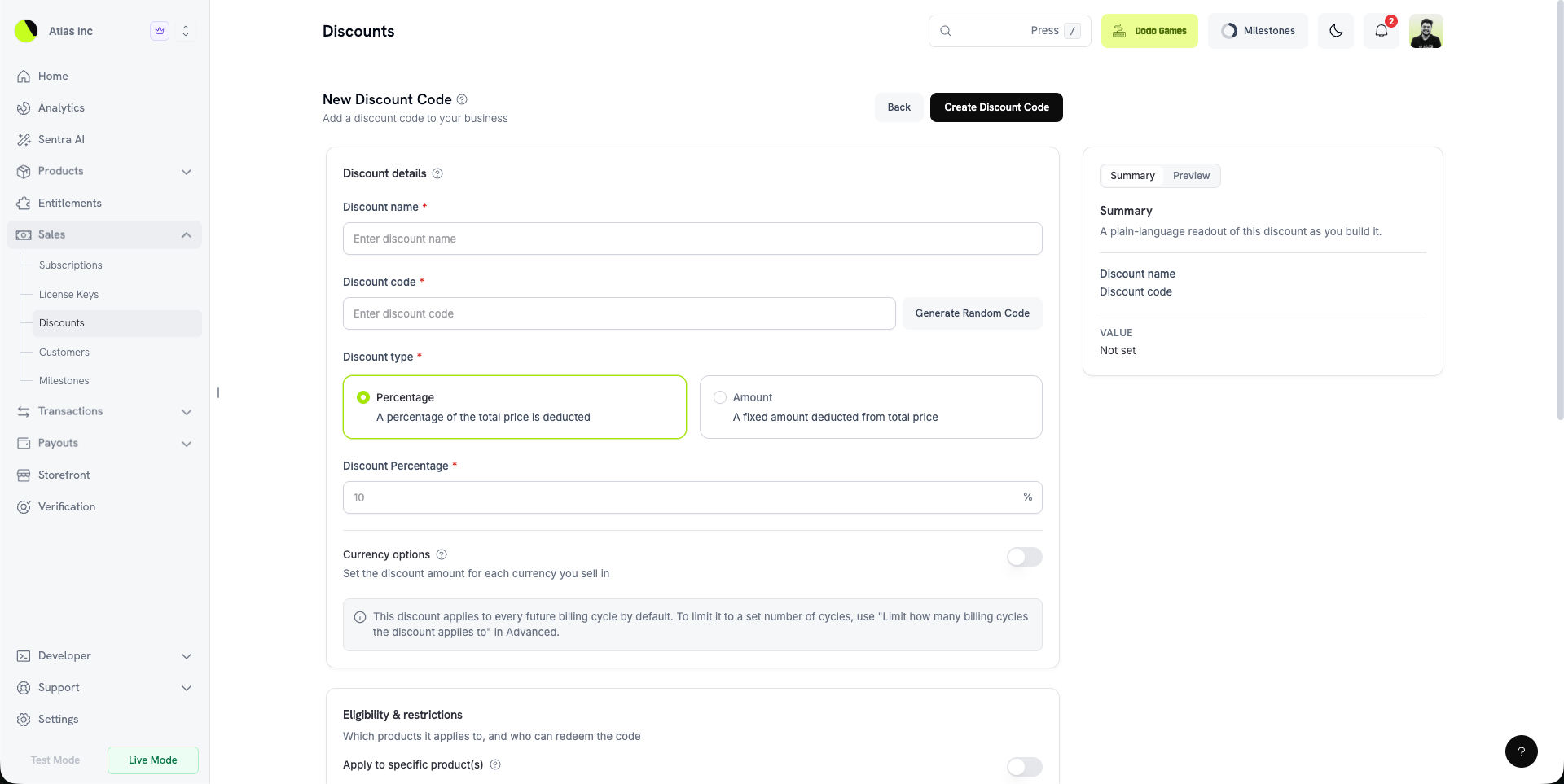
* **Discount Name** (required): Internal label for the dashboard.
* **Code** (required): The string customers enter at checkout. Generate a random code or enter your own (minimum 3 characters, uppercased automatically).
* **Type** (required): **Percentage** (a percent off) or **Amount** (a flat deduction).
* **Amount** (required): For percentage, the percent off in the dashboard (e.g., `15` for 15%). Over the API, the same value is in basis points (`1500`). For amount, the flat deduction in the code's default currency.
* **Start Date** (optional): Schedule the code to activate on a future date. Leave empty to activate immediately.
* **Expiration Date** (optional): Date after which the code is no longer redeemable.
* **Usage Limit** (optional, under **Advanced**): Maximum total redemptions across all customers. A [multi-subscription cart](/developer-resources/checkout-session#multi-subscription-cart) counts as one redemption.
* **Per-Customer Usage Limit** (optional, under **Advanced**): Maximum redemptions by any single customer. Must be less than or equal to the overall usage limit when both are set.
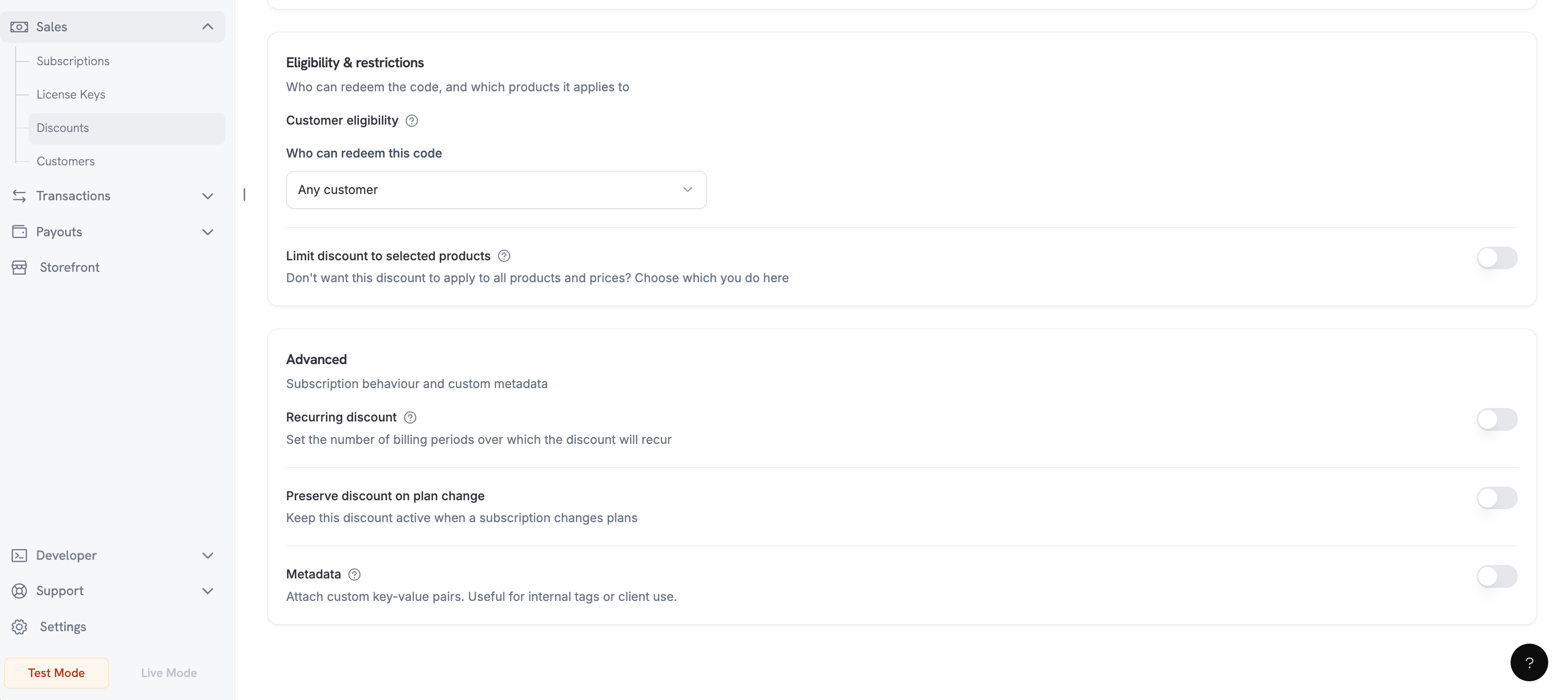
* **Customer Eligibility** (optional): Restrict who may redeem — all customers, first-time customers, existing customers, or a hand-picked list.
* **Currency Options** (optional): The discount amount for each currency you sell in. See [Per-Currency Options](#per-currency-options).
* **Product Restriction** (optional): Limit the code to specific products.
* **Subscription Cycle Limit** (optional, under **Advanced**): Number of billing cycles the discount applies to. Leave empty for indefinite.
* **Preserve on Plan Change** (optional): Keep the discount active when a subscription changes plans (`preserve_on_plan_change`).
* **Metadata** (optional): Attach custom key–value pairs for internal tracking.
* **Require a minimum order value** (optional, under **Advanced**): Minimum cart subtotal (per currency) for the code to apply.
The form shows a running **Summary** of the code you're building in a side panel. Switch to **Preview** to see how the discount appears at checkout:
### Dashboard Setup
* **Discount Name** (required): Internal label for the dashboard.
* **Code** (required): The string customers enter at checkout. Generate a random code or enter your own (minimum 3 characters, uppercased automatically).
* **Type** (required): **Percentage** (a percent off) or **Amount** (a flat deduction).
* **Amount** (required): For percentage, the percent off in the dashboard (e.g., `15` for 15%). Over the API, the same value is in basis points (`1500`). For amount, the flat deduction in the code's default currency.
* **Start Date** (optional): Schedule the code to activate on a future date. Leave empty to activate immediately.
* **Expiration Date** (optional): Date after which the code is no longer redeemable.
* **Usage Limit** (optional, under **Advanced**): Maximum total redemptions across all customers. A [multi-subscription cart](/developer-resources/checkout-session#multi-subscription-cart) counts as one redemption.
* **Per-Customer Usage Limit** (optional, under **Advanced**): Maximum redemptions by any single customer. Must be less than or equal to the overall usage limit when both are set.
* **Customer Eligibility** (optional): Restrict who may redeem — all customers, first-time customers, existing customers, or a hand-picked list.
* **Currency Options** (optional): The discount amount for each currency you sell in. See [Per-Currency Options](#per-currency-options).
* **Product Restriction** (optional): Limit the code to specific products.
* **Subscription Cycle Limit** (optional, under **Advanced**): Number of billing cycles the discount applies to. Leave empty for indefinite.
* **Preserve on Plan Change** (optional): Keep the discount active when a subscription changes plans (`preserve_on_plan_change`).
* **Metadata** (optional): Attach custom key–value pairs for internal tracking.
* **Require a minimum order value** (optional, under **Advanced**): Minimum cart subtotal (per currency) for the code to apply.
The form shows a running **Summary** of the code you're building in a side panel. Switch to **Preview** to see how the discount appears at checkout:
 Further down the form — eligibility, restrictions, and advanced options:
 Use cycle limits for introductory pricing on subscriptions (e.g., "50% off for 3 months").
A percentage `amount` is expressed in **basis points** over the API — `1500` means 15%. A flat `amount` is a money value and is denominated by the code's currency options.
## Discount Types
| Type | API value | Behavior |
| - | - | - |
| Percentage | `percentage` | Reduces the price by a percent. Optionally capped per currency with a maximum discount. |
| Amount | `flat` | Deducts a fixed amount. The deduction is pooled across the whole cart rather than applied per line item. |
Both types can be stacked in the same `discount_codes` array and are applied in array order.
Use cycle limits for introductory pricing on subscriptions (e.g., "50% off for 3 months").
A percentage `amount` is expressed in **basis points** over the API — `1500` means 15%. A flat `amount` is a money value and is denominated by the code's currency options.
## Discount Types
| Type | API value | Behavior |
| - | - | - |
| Percentage | `percentage` | Reduces the price by a percent. Optionally capped per currency with a maximum discount. |
| Amount | `flat` | Deducts a fixed amount. The deduction is pooled across the whole cart rather than applied per line item. |
Both types can be stacked in the same `discount_codes` array and are applied in array order.
 ## Customer Eligibility
Set `customer_eligibility` to control who may redeem a code:
| Value | Who can redeem |
| - | - |
| `any` | Any customer. This is the default. |
| `first_time` | Customers who have not purchased from you before. |
| `existing` | Customers who have purchased from you before. |
| `specific` | Only customers you attach to the code's allow list. |
## Customer Eligibility
Set `customer_eligibility` to control who may redeem a code:
| Value | Who can redeem |
| - | - |
| `any` | Any customer. This is the default. |
| `first_time` | Customers who have not purchased from you before. |
| `existing` | Customers who have purchased from you before. |
| `specific` | Only customers you attach to the code's allow list. |
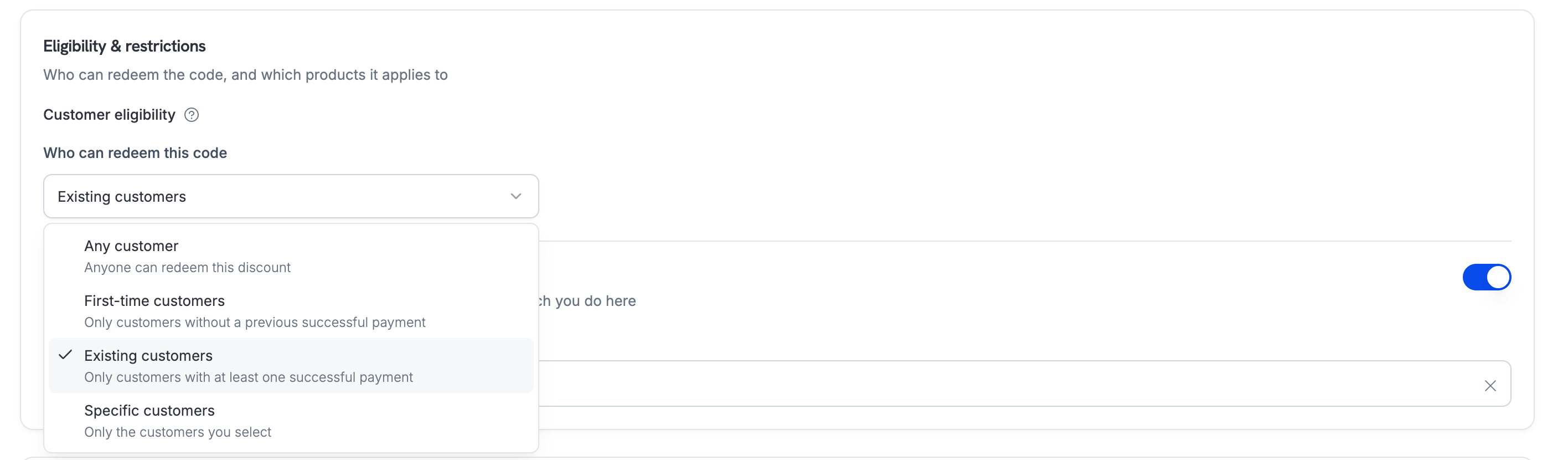 A `specific` code starts with **zero** eligible customers and rejects every redemption until you attach customers to it. Attach them in the dashboard, or with the discount customers API.
Pair eligibility with **Per-Customer Usage Limit** to cap how often each individual customer can redeem the code, independently of the overall usage limit.
## Per-Currency Options
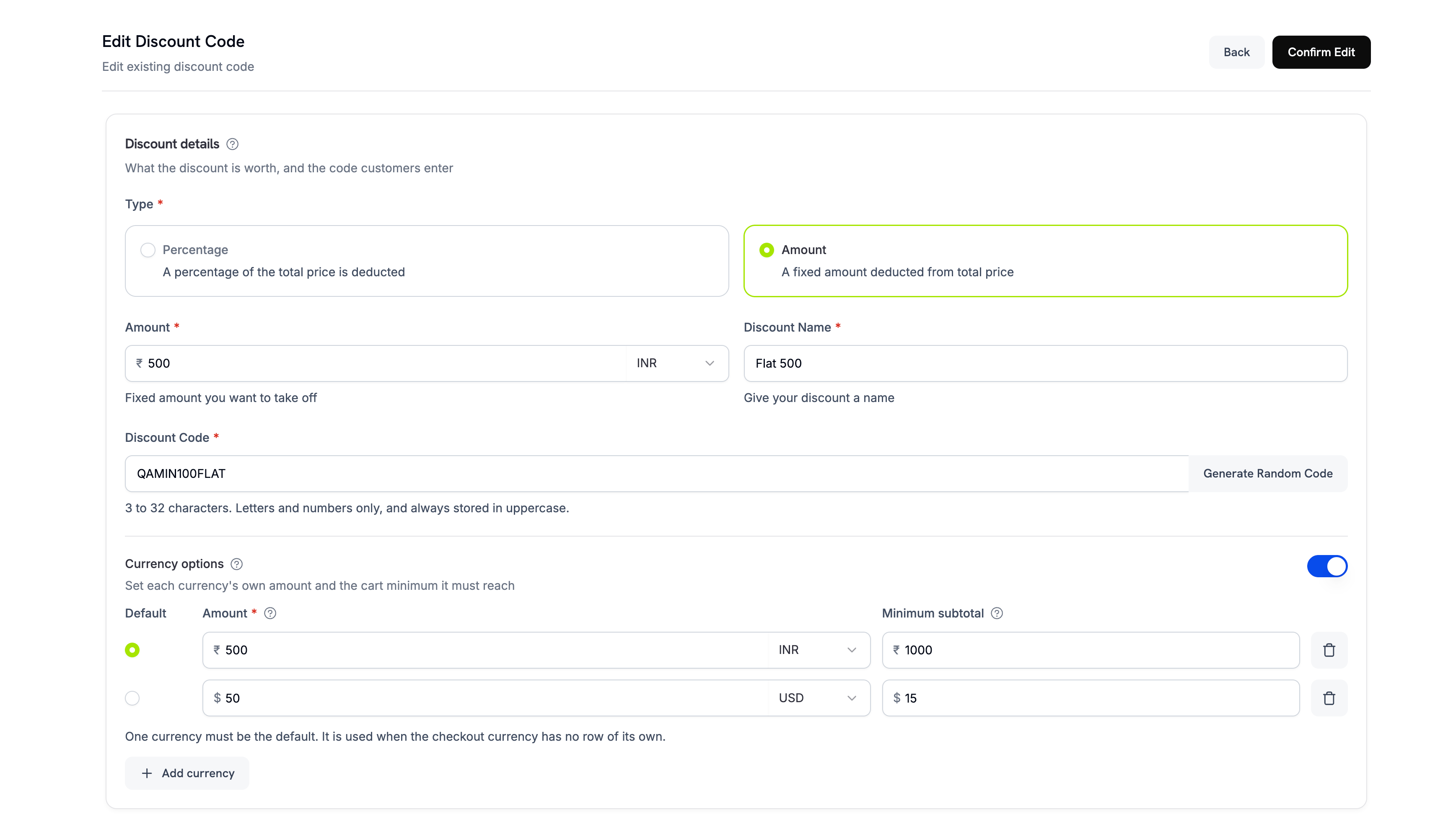
When you sell in multiple currencies, set per-currency behavior for each code. Under **Currency options**, each entry specifies:
* **Amount** — for an Amount discount, the flat deduction in that currency; for a Percentage discount, the maximum discount cap. Maps to `max_amount_possible` in the API.
* **Default** — mark one currency as the default. Unconfigured currencies convert from this default.
Set the per-currency minimum separately under **Require a minimum order value** in **Advanced**:
* **Minimum subtotal** — the code applies only when the cart reaches this subtotal in that currency. `0` means no minimum.
A `specific` code starts with **zero** eligible customers and rejects every redemption until you attach customers to it. Attach them in the dashboard, or with the discount customers API.
Pair eligibility with **Per-Customer Usage Limit** to cap how often each individual customer can redeem the code, independently of the overall usage limit.
## Per-Currency Options
When you sell in multiple currencies, set per-currency behavior for each code. Under **Currency options**, each entry specifies:
* **Amount** — for an Amount discount, the flat deduction in that currency; for a Percentage discount, the maximum discount cap. Maps to `max_amount_possible` in the API.
* **Default** — mark one currency as the default. Unconfigured currencies convert from this default.
Set the per-currency minimum separately under **Require a minimum order value** in **Advanced**:
* **Minimum subtotal** — the code applies only when the cart reaches this subtotal in that currency. `0` means no minimum.
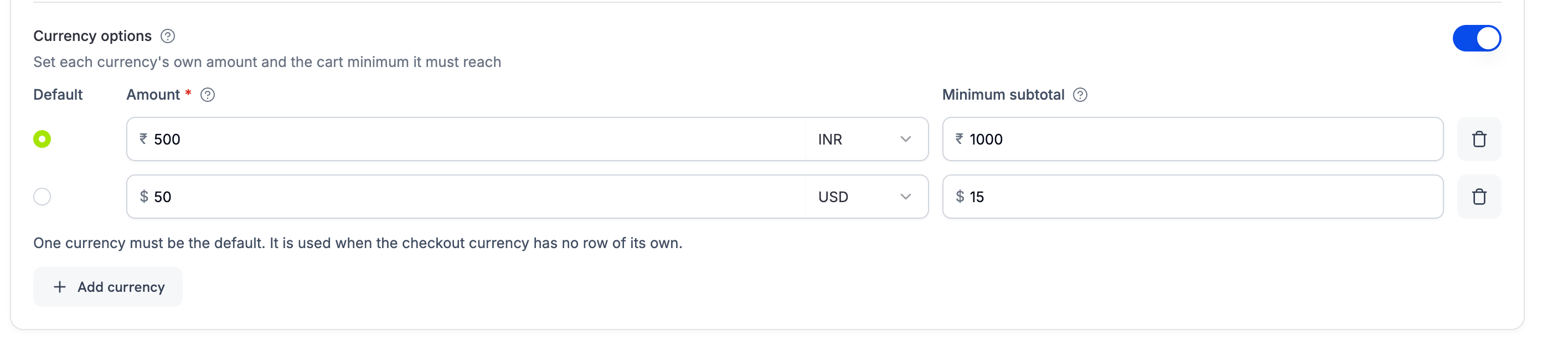 Amount discounts require at least one currency option with a resolvable default, since a flat deduction has no meaning without a currency. Percentage discounts don't require currency options.
The minimum subtotal is always measured against the cart's original prices, not the running total after earlier discounts in the stack. Stacking order never changes whether a minimum is met.
For a subscription, the minimum is checked once against the product and its add-ons together. For example, a \$0 product with a \$5 add-on meets a \$4 minimum. An Amount (`flat`) code still applies only to the subscription product, not to its add-ons.
## Checkout Experience
Customers enter discount codes in the checkout field. Eligible codes are applied immediately and totals update.
Amount discounts require at least one currency option with a resolvable default, since a flat deduction has no meaning without a currency. Percentage discounts don't require currency options.
The minimum subtotal is always measured against the cart's original prices, not the running total after earlier discounts in the stack. Stacking order never changes whether a minimum is met.
For a subscription, the minimum is checked once against the product and its add-ons together. For example, a \$0 product with a \$5 add-on meets a \$4 minimum. An Amount (`flat`) code still applies only to the subscription product, not to its add-ons.
## Checkout Experience
Customers enter discount codes in the checkout field. Eligible codes are applied immediately and totals update.
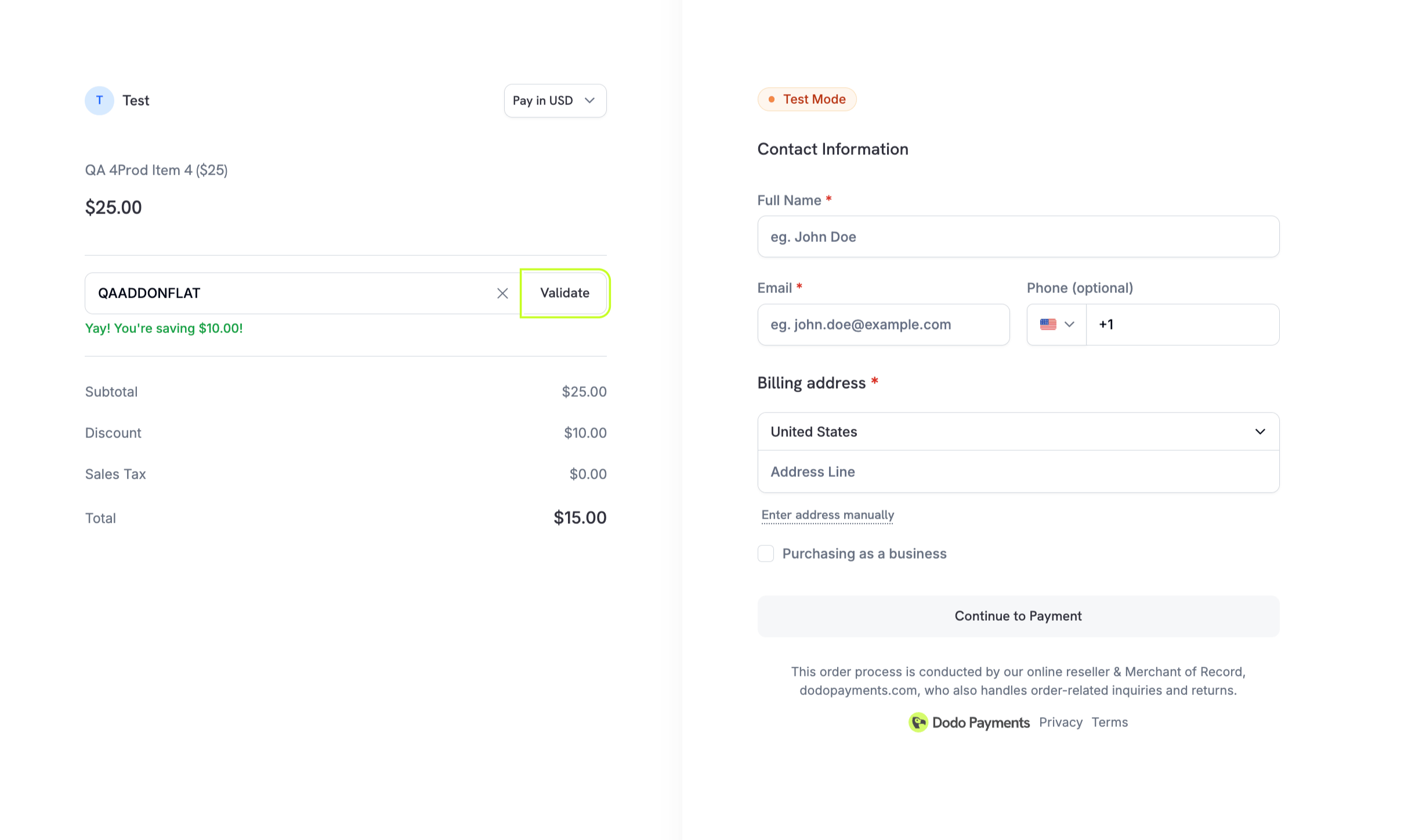 In Checkout Sessions, pass `discount_codes` (an array) to pre-apply one or more codes. The discount input field is shown by default. Set `feature_flags.allow_discount_code` to `false` to hide it. Codes are applied in array order, up to a maximum of 20.
## Stacking Discount Codes
Checkout sessions, payments, and subscriptions accept up to 20 stacked codes via the `discount_codes` array. Codes are applied in array order: the first eligible code reduces the starting price, the next reduces the already-discounted price, and so on. When [Purchasing Power Parity](/features/purchasing-power-parity) is enabled, the starting price is the PPP-adjusted amount. The response includes `discount_ids` (on payments/subscriptions) and `discounts` (richer per-discount detail, including position and remaining subscription cycles).
```typescript theme={null}
const session = await client.checkoutSessions.create({
product_cart: [{ product_id: 'pdt_abc', quantity: 1 }],
discount_codes: ['WELCOME10', 'BLACKFRIDAY20'], // applied in this order
customer: { email: 'user@example.com' },
return_url: 'https://yoursite.com/return'
});
```
The singular `discount_code` field is deprecated but fully supported for backward compatibility. It cannot be combined with `discount_codes` in the same request. Migrate to `discount_codes` (the array form) to take advantage of stacking and the richer response.
On a subscription price with [Card-Optional at Zero Price](/features/subscription#card-optional-at-zero-price) enabled, a stack of codes that reduces the amount due today all the way to `0` skips the card requirement too — the customer checks out with no payment method on file, the same as a native `0` price.
## API Management
Create discount codes programmatically with type and amount.
View the create discount API.
List all discounts or retrieve details for management and auditing.
Browse listing and retrieval APIs.
Look up a discount using its human-readable code (e.g., "SAVE20") instead of the internal ID.
Retrieve discount by code name.
Modify discount configuration such as amount, expiration, or restrictions.
Learn how to update discount details.
Fetch a discount by its ID to inspect its status, usage count, and restrictions before applying it.
Get a discount by ID.
Deactivate or remove discounts that are no longer needed.
Delete a discount.
For a discount with `customer_eligibility` set to `specific`, manage the customers that may redeem it:
* `GET /discounts/{discount_id}/customers` — list the attached customers (paginated, up to 100 per page).
* `POST /discounts/{discount_id}/customers` — attach customers by ID. The call is idempotent and accepts up to 1000 IDs, all of which must already exist in your business. The response echoes only the IDs submitted in that request, so list the endpoint to read the full allow list.
* `DELETE /discounts/{discount_id}/customers/{customer_id}` — detach a single customer.
## Common Use Cases
* **Intro offers**: Limited‑time launch promotions for new products
* **Bulk or B2B**: Contracted discounts for select product sets
* **Retention plays**: Win‑back codes in churn‑prevention workflows
* **Seasonal campaigns**: Holiday or event‑based promotions
## Integration Examples
### Create a Discount with Metadata
Attach custom key–value pairs for internal tracking.
```typescript theme={null}
const discount = await client.discounts.create({
type: 'percentage',
amount: 1500, // 15%
code: 'SUMMER2025',
metadata: {
campaign: 'summer_promo',
source: 'email_blast'
}
});
```
Use metadata to tag discounts by campaign, source, or internal reference ID so you can reconcile usage and measure ROI later.
### Apply Discounts in Checkout Sessions
Pre‑apply one or more stacked discounts and show the code input UI.
```typescript theme={null}
const session = await client.checkoutSessions.create({
product_cart: [
{ product_id: 'pdt_abc', quantity: 1 }
],
discount_codes: ['BLACKFRIDAY2024', 'NEWUSER5'], // stacked in array order
customer: { email: 'user@example.com', name: 'Jane Doe' },
return_url: 'https://yoursite.com/return'
});
```
### Apply Discounts During Plan Changes
Offer promotional pricing when customers upgrade or downgrade their subscription.
```typescript theme={null}
await client.subscriptions.changePlan('sub_123', {
product_id: 'pdt_pro',
quantity: 1,
proration_billing_mode: 'prorated_immediately',
discount_codes: ['UPGRADE20']
});
```
The `discount_codes` parameter controls how discounts are handled:
| Value | Behavior |
| - | - |
| Not provided (`undefined` / `null`) | Existing discounts with `preserve_on_plan_change=true` are preserved if applicable to the new product. |
| `[]` (empty array) | All existing discounts are removed. |
| `['CODE_A', 'CODE_B', ...]` | Replaces existing discounts with this stacked set, applied in array order. |
Read all applied discounts from the subscription's `discounts` array in the response. Each entry includes `discount_id`, `position`, `cycles_remaining`, and the original code.
### Hide the Discount Code Field
The discount input is shown by default. Set `allow_discount_code` to `false` to hide it.
```typescript theme={null}
const session = await client.checkoutSessions.create({
product_cart: [{ product_id: 'pdt_abc', quantity: 1 }],
feature_flags: {
allow_discount_code: false
},
return_url: 'https://yoursite.com/return'
});
```
## Best Practices
* **Name clearly**: Use recognizable codes that match campaign names.
* **Time-box**: Add expirations to drive urgency and prevent misuse.
* **Scope wisely**: Limit to specific products to avoid margin leakage.
* **Validate early**: Check code applicability before confirming checkout.
* **Monitor impact**: Track usage and conversion by campaign.
This documentation is built and hosted on [Mintlify](https://mintlify.com), a developer documentation platform.
In Checkout Sessions, pass `discount_codes` (an array) to pre-apply one or more codes. The discount input field is shown by default. Set `feature_flags.allow_discount_code` to `false` to hide it. Codes are applied in array order, up to a maximum of 20.
## Stacking Discount Codes
Checkout sessions, payments, and subscriptions accept up to 20 stacked codes via the `discount_codes` array. Codes are applied in array order: the first eligible code reduces the starting price, the next reduces the already-discounted price, and so on. When [Purchasing Power Parity](/features/purchasing-power-parity) is enabled, the starting price is the PPP-adjusted amount. The response includes `discount_ids` (on payments/subscriptions) and `discounts` (richer per-discount detail, including position and remaining subscription cycles).
```typescript theme={null}
const session = await client.checkoutSessions.create({
product_cart: [{ product_id: 'pdt_abc', quantity: 1 }],
discount_codes: ['WELCOME10', 'BLACKFRIDAY20'], // applied in this order
customer: { email: 'user@example.com' },
return_url: 'https://yoursite.com/return'
});
```
The singular `discount_code` field is deprecated but fully supported for backward compatibility. It cannot be combined with `discount_codes` in the same request. Migrate to `discount_codes` (the array form) to take advantage of stacking and the richer response.
On a subscription price with [Card-Optional at Zero Price](/features/subscription#card-optional-at-zero-price) enabled, a stack of codes that reduces the amount due today all the way to `0` skips the card requirement too — the customer checks out with no payment method on file, the same as a native `0` price.
## API Management
Create discount codes programmatically with type and amount.
View the create discount API.
List all discounts or retrieve details for management and auditing.
Browse listing and retrieval APIs.
Look up a discount using its human-readable code (e.g., "SAVE20") instead of the internal ID.
Retrieve discount by code name.
Modify discount configuration such as amount, expiration, or restrictions.
Learn how to update discount details.
Fetch a discount by its ID to inspect its status, usage count, and restrictions before applying it.
Get a discount by ID.
Deactivate or remove discounts that are no longer needed.
Delete a discount.
For a discount with `customer_eligibility` set to `specific`, manage the customers that may redeem it:
* `GET /discounts/{discount_id}/customers` — list the attached customers (paginated, up to 100 per page).
* `POST /discounts/{discount_id}/customers` — attach customers by ID. The call is idempotent and accepts up to 1000 IDs, all of which must already exist in your business. The response echoes only the IDs submitted in that request, so list the endpoint to read the full allow list.
* `DELETE /discounts/{discount_id}/customers/{customer_id}` — detach a single customer.
## Common Use Cases
* **Intro offers**: Limited‑time launch promotions for new products
* **Bulk or B2B**: Contracted discounts for select product sets
* **Retention plays**: Win‑back codes in churn‑prevention workflows
* **Seasonal campaigns**: Holiday or event‑based promotions
## Integration Examples
### Create a Discount with Metadata
Attach custom key–value pairs for internal tracking.
```typescript theme={null}
const discount = await client.discounts.create({
type: 'percentage',
amount: 1500, // 15%
code: 'SUMMER2025',
metadata: {
campaign: 'summer_promo',
source: 'email_blast'
}
});
```
Use metadata to tag discounts by campaign, source, or internal reference ID so you can reconcile usage and measure ROI later.
### Apply Discounts in Checkout Sessions
Pre‑apply one or more stacked discounts and show the code input UI.
```typescript theme={null}
const session = await client.checkoutSessions.create({
product_cart: [
{ product_id: 'pdt_abc', quantity: 1 }
],
discount_codes: ['BLACKFRIDAY2024', 'NEWUSER5'], // stacked in array order
customer: { email: 'user@example.com', name: 'Jane Doe' },
return_url: 'https://yoursite.com/return'
});
```
### Apply Discounts During Plan Changes
Offer promotional pricing when customers upgrade or downgrade their subscription.
```typescript theme={null}
await client.subscriptions.changePlan('sub_123', {
product_id: 'pdt_pro',
quantity: 1,
proration_billing_mode: 'prorated_immediately',
discount_codes: ['UPGRADE20']
});
```
The `discount_codes` parameter controls how discounts are handled:
| Value | Behavior |
| - | - |
| Not provided (`undefined` / `null`) | Existing discounts with `preserve_on_plan_change=true` are preserved if applicable to the new product. |
| `[]` (empty array) | All existing discounts are removed. |
| `['CODE_A', 'CODE_B', ...]` | Replaces existing discounts with this stacked set, applied in array order. |
Read all applied discounts from the subscription's `discounts` array in the response. Each entry includes `discount_id`, `position`, `cycles_remaining`, and the original code.
### Hide the Discount Code Field
The discount input is shown by default. Set `allow_discount_code` to `false` to hide it.
```typescript theme={null}
const session = await client.checkoutSessions.create({
product_cart: [{ product_id: 'pdt_abc', quantity: 1 }],
feature_flags: {
allow_discount_code: false
},
return_url: 'https://yoursite.com/return'
});
```
## Best Practices
* **Name clearly**: Use recognizable codes that match campaign names.
* **Time-box**: Add expirations to drive urgency and prevent misuse.
* **Scope wisely**: Limit to specific products to avoid margin leakage.
* **Validate early**: Check code applicability before confirming checkout.
* **Monitor impact**: Track usage and conversion by campaign.
This documentation is built and hosted on [Mintlify](https://mintlify.com), a developer documentation platform.