> ## Documentation Index
> Fetch the complete documentation index at: https://docs.dodopayments.com/llms.txt
> Use this file to discover all available pages before exploring further.
# GitHub Entitlement
> Grant customers collaborator access to a private GitHub repository at the permission level you choose, and revoke it automatically on cancellation.
The GitHub entitlement adds a paying customer as a collaborator on a private repository. You choose the permission level (`pull`, `push`, `triage`, `maintain`, or `admin`). Dodo Payments sends the collaborator invitation and removes the collaborator when the grant is revoked.
## What Gets Delivered
* The customer connects their GitHub account from the Customer Portal. This links their GitHub account to the purchase.
* Dodo Payments invites that account to your repository at the configured permission level. The customer gets access after they accept the invitation on GitHub. If the customer owns the repository, no invitation is needed.
* Cancellation, refund, or a manual revoke removes the collaborator and cancels any pending invitation.
Common uses include source-available products, paid templates, course code repositories, and gated client SDKs.
## Connect GitHub
In the Dodo Payments dashboard, go to **Entitlements** and click **+** to start a new entitlement.
Choose **GitHub Access** as the integration. If GitHub isn't connected yet, click **Connect GitHub**.
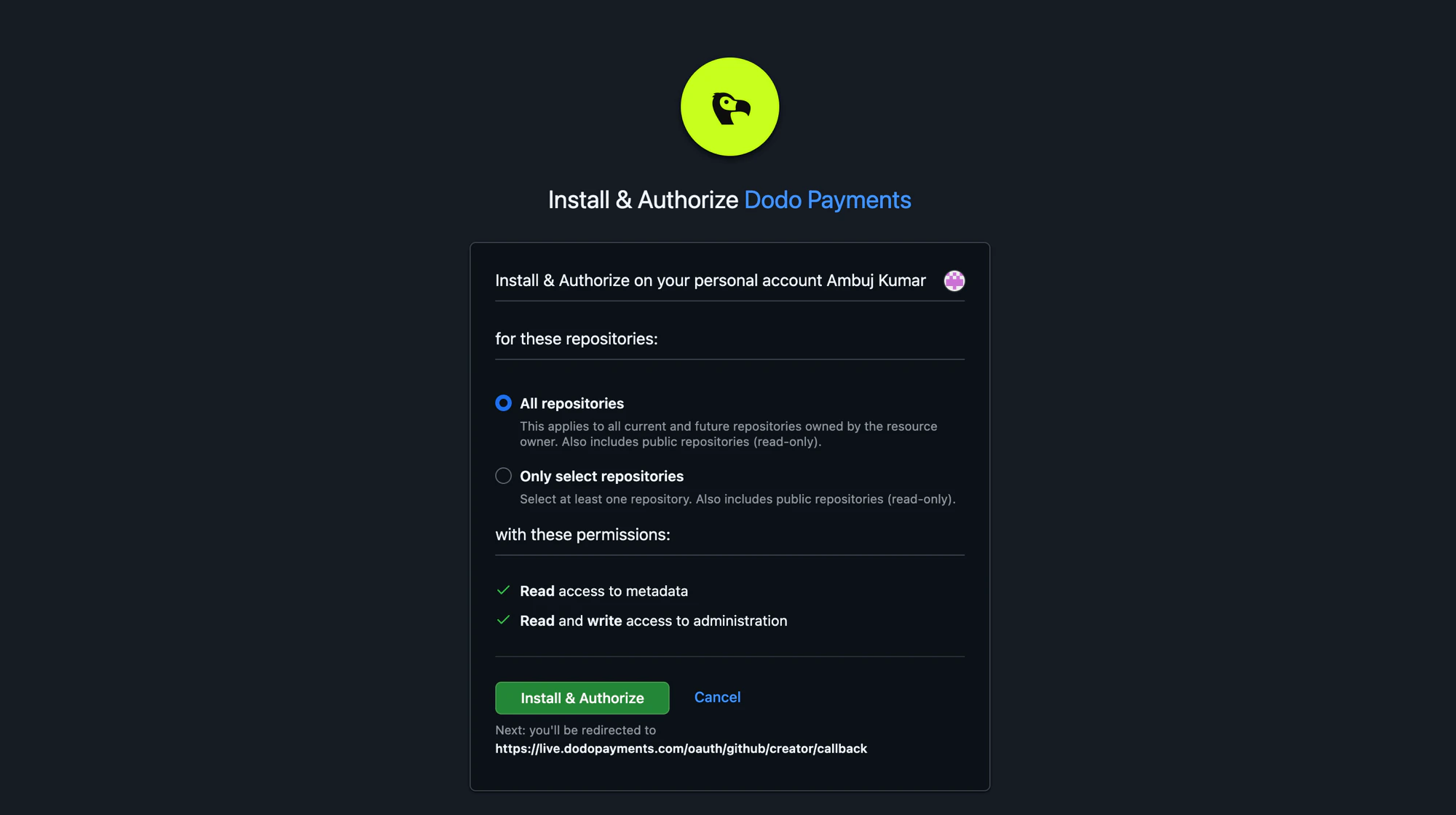
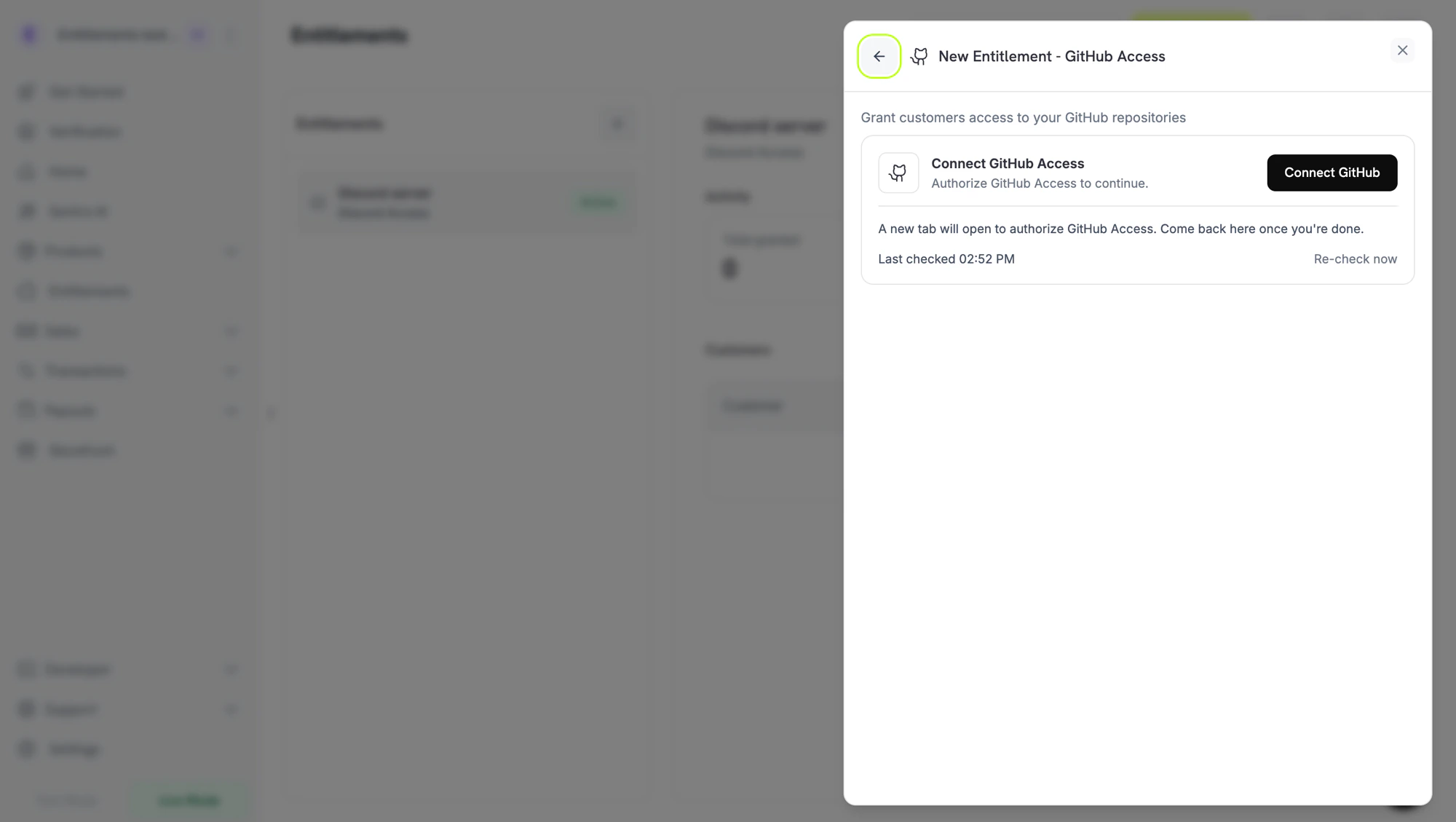 GitHub opens in a new tab. Sign in, then install the Dodo Payments GitHub App on the organization or user account that owns the repository. You can grant the app access to **All repositories** or **Only select repositories**. If you select repositories, include every repository you intend to gate.
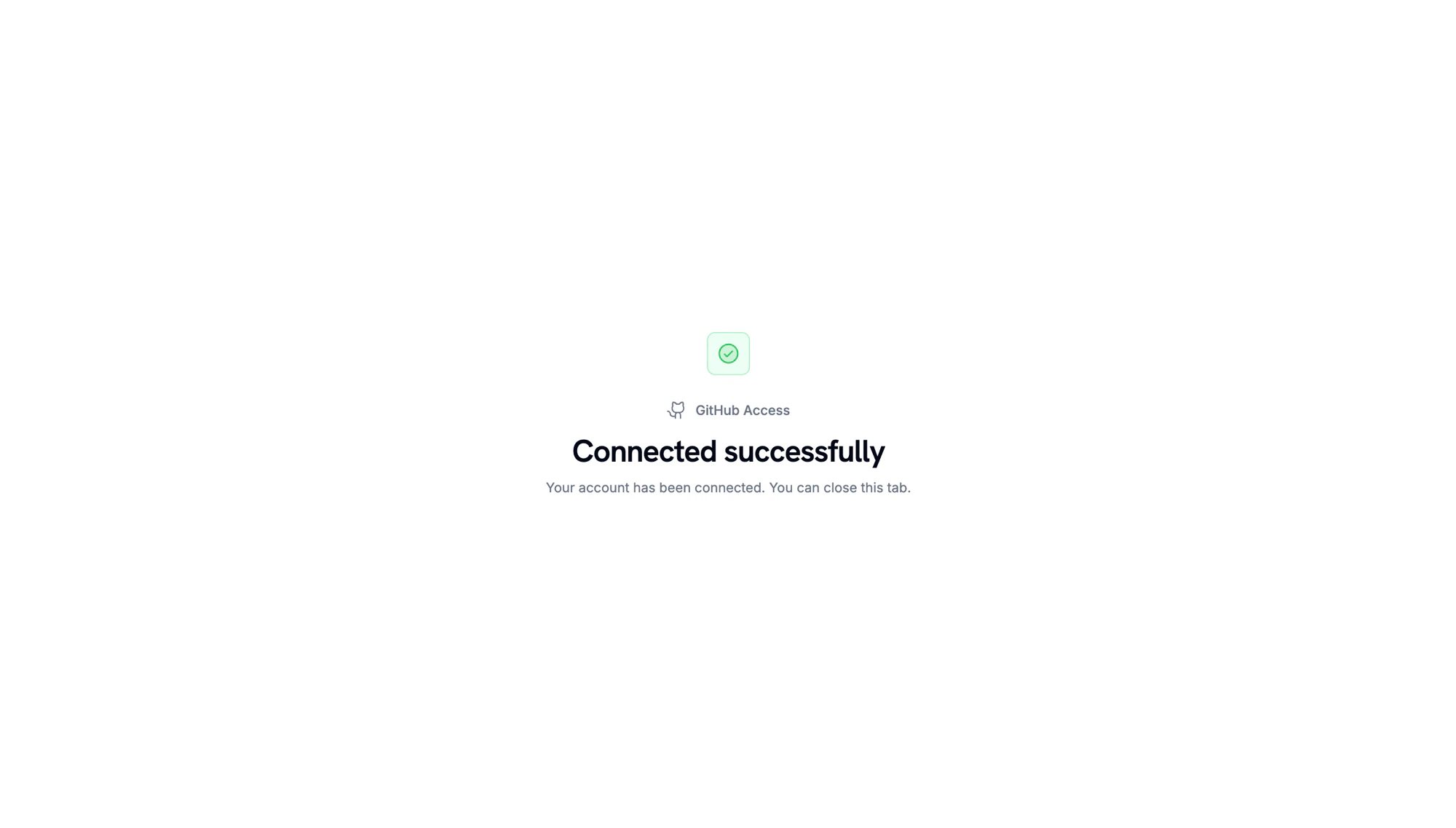
 When GitHub redirects back, a confirmation page shows that the account is connected.
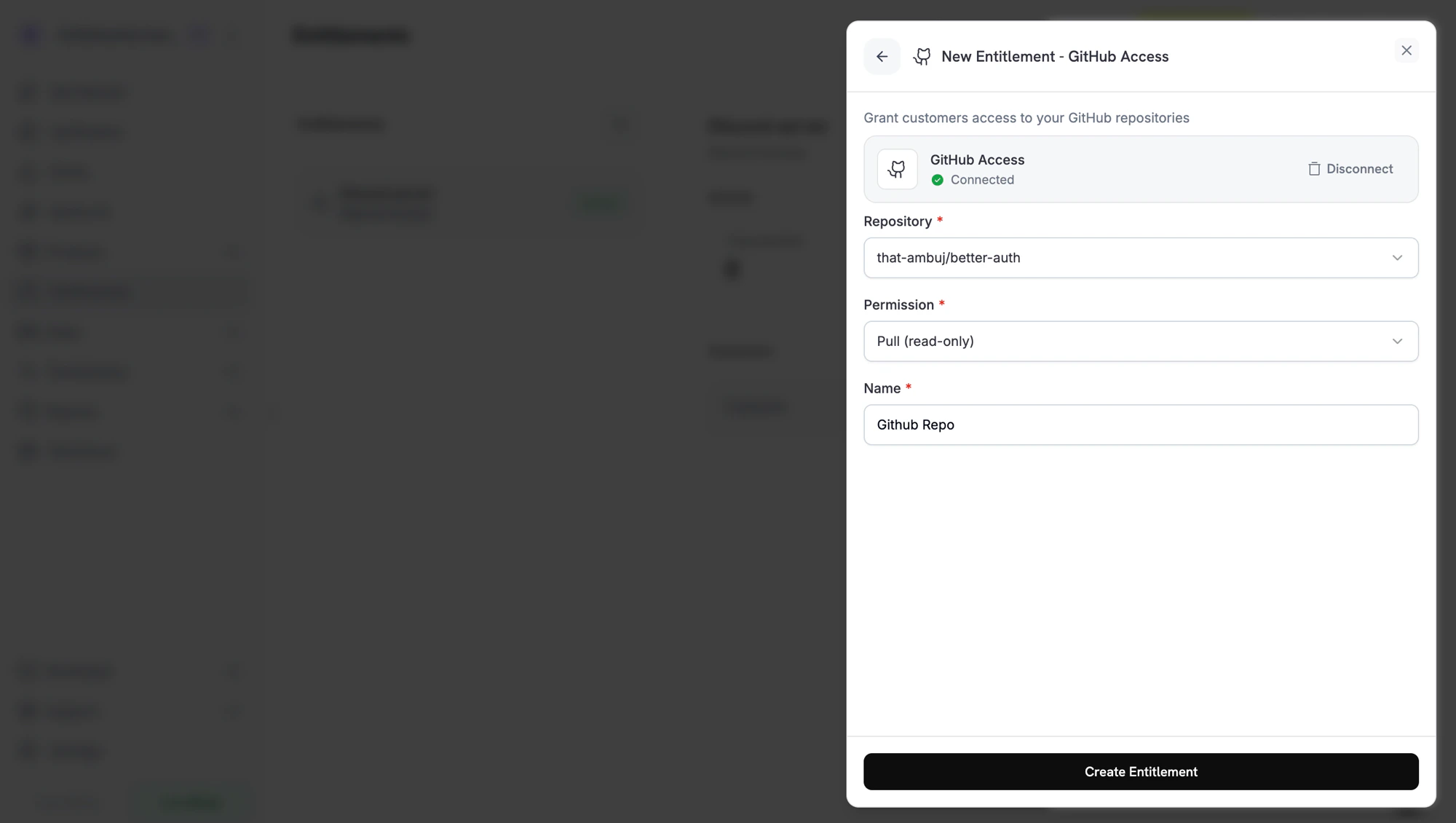
 Back in the dashboard, select the **Repository** the entitlement grants access to, then select the **Permission** level. The repository picker lists only repositories the GitHub App can access. Enter a **Name** for the entitlement and click **Create Entitlement**.
 Attach the entitlement to any product. Customers who buy that product receive a GitHub invitation after they connect their GitHub account.
## Permission Levels
The entitlement uses GitHub's standard repository permissions:
| Permission | Best for |
| - | - |
| `pull` | Read-only access. Customers can clone, fetch, and view the repository. |
| `triage` | Read access plus the ability to manage issues and pull requests. |
| `push` | Read and write access. Customers can push branches and open pull requests. |
| `maintain` | Push access plus management of repository settings, excluding sensitive ones. |
| `admin` | Full control of the repository. Use with caution. |
Grant the **least privilege** that fits your use case. Most paid-content products need only `pull`.
## Customer Flow
1. The customer completes checkout.
2. Dodo Payments creates a grant in `Pending` status. Dodo Payments tries to create a GitHub authorization URL right away and stores it in `oauth_url`. If that fails, `oauth_url` stays `null` until the customer starts the accept flow.
3. The payment confirmation email lists the entitlement as **Action Required** and links to the Customer Portal. In the portal, the customer clicks **Connect** and authorizes with GitHub. An authorization link expires after 30 minutes, and the Customer Portal generates a new one when the customer returns.
4. Dodo Payments invites the customer's GitHub account to the repository at the configured permission. The grant moves to `Delivered` once the invitation is created. If GitHub rejects the invitation, the grant isn't delivered.
5. If the subscription is cancelled, the payment is refunded, or the grant is revoked, Dodo Payments removes the customer as a collaborator and cancels any pending invitation.
## Required Configuration
| Field | Required | Description |
| - | - | - |
| `target_id` | Yes | The repository to invite the customer to, in `owner/repo` format. The dashboard's repository picker fills this in for you. |
| `permission` | Yes | One of `pull`, `push`, `triage`, `maintain`, `admin`. |
## Create via API
```typescript TypeScript expandable theme={null}
import DodoPayments from 'dodopayments';
const client = new DodoPayments({
bearerToken: process.env['DODO_PAYMENTS_API_KEY'],
environment: 'test_mode',
});
const entitlement = await client.entitlements.create({
name: 'Code Share Repository',
integration_type: 'github',
integration_config: {
target_id: 'acme/private-sdk',
permission: 'pull',
},
});
```
```python Python expandable theme={null}
import os
from dodopayments import DodoPayments
client = DodoPayments(
bearer_token=os.environ.get("DODO_PAYMENTS_API_KEY"),
environment="test_mode",
)
entitlement = client.entitlements.create(
name="Code Share Repository",
integration_type="github",
integration_config={
"target_id": "acme/private-sdk",
"permission": "pull",
},
)
```
```go Go expandable theme={null}
// client is a *dodopayments.Client, for example from
// dodopayments.NewClient(option.WithEnvironmentTestMode()); ctx is a context.Context.
client.Entitlements.New(ctx, dodopayments.EntitlementNewParams{
Name: dodopayments.F("Code Share Repository"),
IntegrationType: dodopayments.F(dodopayments.EntitlementIntegrationTypeGitHub),
IntegrationConfig: dodopayments.F[dodopayments.IntegrationConfigUnionParam](
dodopayments.IntegrationConfigGitHubConfigParam{
TargetID: dodopayments.F("acme/private-sdk"),
Permission: dodopayments.F(dodopayments.GitHubPermissionPull),
},
),
})
```
## Webhooks
The standard [`entitlement_grant.*` webhook events](/developer-resources/webhooks/intents/entitlement-grant) cover the GitHub flow:
* `entitlement_grant.created` fires with `status: "Pending"`. `oauth_url` may already hold the GitHub authorization URL. If it is `null`, it is populated once the customer starts the accept flow from the Customer Portal.
* `entitlement_grant.delivered` fires once the collaborator invitation is created.
* `entitlement_grant.revoked` fires when access is withdrawn. If you uninstall the GitHub App, Dodo Payments revokes that installation's pending and delivered grants with `revocation_reason: platform_external`.
* `entitlement_grant.failed` fires with `error_code: "GRANT_ACCESS_FAILED"` if Dodo Payments can't add the customer to the repository, for example because the GitHub App lost access to it.
## Troubleshooting
The Dodo Payments GitHub App must be installed on the organization or user that owns the repository. In the entitlement form, click **Disconnect** on the GitHub card, then click **Connect GitHub** to reinstall the app, and grant it access to the repositories you want to gate.
The GitHub App's installation no longer has access to the repository, or the repository was renamed or transferred. Grant the app access to the repository again, and the next regrant succeeds.
Customers accept the GitHub invitation from their GitHub notifications or from the link in GitHub's invitation email. Until they accept, they're invited but can't clone the repository. The grant is still `Delivered` in Dodo Payments, because the invitation is what Dodo Payments issues.
This documentation is built and hosted on [Mintlify](https://mintlify.com), a developer documentation platform.
Attach the entitlement to any product. Customers who buy that product receive a GitHub invitation after they connect their GitHub account.
## Permission Levels
The entitlement uses GitHub's standard repository permissions:
| Permission | Best for |
| - | - |
| `pull` | Read-only access. Customers can clone, fetch, and view the repository. |
| `triage` | Read access plus the ability to manage issues and pull requests. |
| `push` | Read and write access. Customers can push branches and open pull requests. |
| `maintain` | Push access plus management of repository settings, excluding sensitive ones. |
| `admin` | Full control of the repository. Use with caution. |
Grant the **least privilege** that fits your use case. Most paid-content products need only `pull`.
## Customer Flow
1. The customer completes checkout.
2. Dodo Payments creates a grant in `Pending` status. Dodo Payments tries to create a GitHub authorization URL right away and stores it in `oauth_url`. If that fails, `oauth_url` stays `null` until the customer starts the accept flow.
3. The payment confirmation email lists the entitlement as **Action Required** and links to the Customer Portal. In the portal, the customer clicks **Connect** and authorizes with GitHub. An authorization link expires after 30 minutes, and the Customer Portal generates a new one when the customer returns.
4. Dodo Payments invites the customer's GitHub account to the repository at the configured permission. The grant moves to `Delivered` once the invitation is created. If GitHub rejects the invitation, the grant isn't delivered.
5. If the subscription is cancelled, the payment is refunded, or the grant is revoked, Dodo Payments removes the customer as a collaborator and cancels any pending invitation.
## Required Configuration
| Field | Required | Description |
| - | - | - |
| `target_id` | Yes | The repository to invite the customer to, in `owner/repo` format. The dashboard's repository picker fills this in for you. |
| `permission` | Yes | One of `pull`, `push`, `triage`, `maintain`, `admin`. |
## Create via API
```typescript TypeScript expandable theme={null}
import DodoPayments from 'dodopayments';
const client = new DodoPayments({
bearerToken: process.env['DODO_PAYMENTS_API_KEY'],
environment: 'test_mode',
});
const entitlement = await client.entitlements.create({
name: 'Code Share Repository',
integration_type: 'github',
integration_config: {
target_id: 'acme/private-sdk',
permission: 'pull',
},
});
```
```python Python expandable theme={null}
import os
from dodopayments import DodoPayments
client = DodoPayments(
bearer_token=os.environ.get("DODO_PAYMENTS_API_KEY"),
environment="test_mode",
)
entitlement = client.entitlements.create(
name="Code Share Repository",
integration_type="github",
integration_config={
"target_id": "acme/private-sdk",
"permission": "pull",
},
)
```
```go Go expandable theme={null}
// client is a *dodopayments.Client, for example from
// dodopayments.NewClient(option.WithEnvironmentTestMode()); ctx is a context.Context.
client.Entitlements.New(ctx, dodopayments.EntitlementNewParams{
Name: dodopayments.F("Code Share Repository"),
IntegrationType: dodopayments.F(dodopayments.EntitlementIntegrationTypeGitHub),
IntegrationConfig: dodopayments.F[dodopayments.IntegrationConfigUnionParam](
dodopayments.IntegrationConfigGitHubConfigParam{
TargetID: dodopayments.F("acme/private-sdk"),
Permission: dodopayments.F(dodopayments.GitHubPermissionPull),
},
),
})
```
## Webhooks
The standard [`entitlement_grant.*` webhook events](/developer-resources/webhooks/intents/entitlement-grant) cover the GitHub flow:
* `entitlement_grant.created` fires with `status: "Pending"`. `oauth_url` may already hold the GitHub authorization URL. If it is `null`, it is populated once the customer starts the accept flow from the Customer Portal.
* `entitlement_grant.delivered` fires once the collaborator invitation is created.
* `entitlement_grant.revoked` fires when access is withdrawn. If you uninstall the GitHub App, Dodo Payments revokes that installation's pending and delivered grants with `revocation_reason: platform_external`.
* `entitlement_grant.failed` fires with `error_code: "GRANT_ACCESS_FAILED"` if Dodo Payments can't add the customer to the repository, for example because the GitHub App lost access to it.
## Troubleshooting
The Dodo Payments GitHub App must be installed on the organization or user that owns the repository. In the entitlement form, click **Disconnect** on the GitHub card, then click **Connect GitHub** to reinstall the app, and grant it access to the repositories you want to gate.
The GitHub App's installation no longer has access to the repository, or the repository was renamed or transferred. Grant the app access to the repository again, and the next regrant succeeds.
Customers accept the GitHub invitation from their GitHub notifications or from the link in GitHub's invitation email. Until they accept, they're invited but can't clone the repository. The grant is still `Delivered` in Dodo Payments, because the invitation is what Dodo Payments issues.
This documentation is built and hosted on [Mintlify](https://mintlify.com), a developer documentation platform.