> ## Documentation Index
> Fetch the complete documentation index at: https://docs.dodopayments.com/llms.txt
> Use this file to discover all available pages before exploring further.
# Introduction
> Deliver license keys, downloadable files, feature flags, and access to Discord, GitHub, Telegram, Framer, and Notion automatically when customers pay.
Entitlements turn a successful payment or active subscription into access: a license key in your customer's inbox, a feature flag your app checks, a Discord role, a GitHub repository, a Notion template, a Framer remix link, a Telegram chat invite, or a downloadable file bundle. Dodo Payments issues, tracks, and revokes that access automatically as the payment lifecycle changes.
 ## What Are Entitlements?
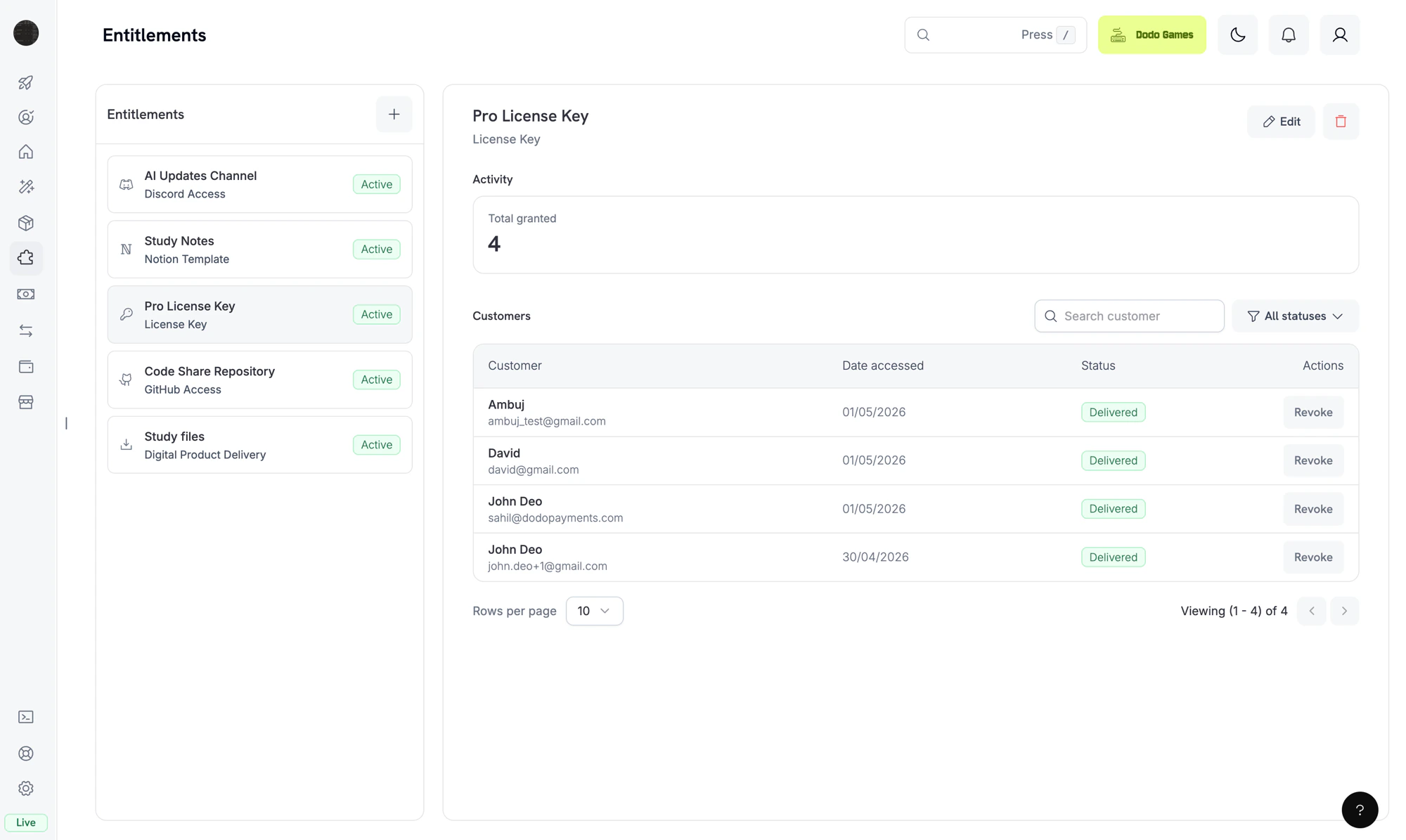
An **entitlement** is a reusable definition of something you deliver to a customer, such as a Pro license key, a "Patrons" Discord role, access to your private GitHub repository, or a downloadable e-book bundle. You attach entitlements to products, and Dodo Payments delivers them when a customer pays.
When a customer buys the product, Dodo Payments creates a **grant**: one customer's issuance of that entitlement. A grant has one of four statuses: `Pending` while delivery is in progress, `Delivered` once the customer has access, `Failed` if delivery couldn't complete, and `Revoked` when access is withdrawn.
Entitlements gate **fulfillment** (does the customer have access?). Credits gate **consumption** (how much of it can they use?). You can attach both to the same product. See [Credit-Based Billing](/features/credit-based-billing) for credits.
## Available Integrations
Each entitlement delivers through one integration. Pick the integration that matches what you sell.
Generate unique license keys with activation limits and expiry. Best for software, plugins, and CLIs.
Deliver downloadable files, such as e-books, templates, and media, with presigned download URLs and optional instructions.
Gate features in your own app on a purchase. Delivered on creation, checked through the API, and revoked on cancellation.
Give a customer a role in your Discord server when they buy. The role is removed automatically on cancellation.
Add customers as collaborators to a private repository at the permission level you choose.
Add customers to a private Telegram chat or channel after purchase.
Unlock a Framer template remix link for paying customers.
Duplicate a Notion template into the customer's workspace on purchase.
***
## How Grants Work
Grants follow the same payment and subscription events that you receive as webhooks. Dodo Payments creates and revokes grants for purchases automatically, based on the payment lifecycle, so you don't call the grant API yourself.
### Grant Lifecycle
A grant moves through these statuses:
Dodo Payments creates a grant when a payment completes or a subscription becomes active. Feature-flag grants start as `Delivered`. License-key grants also start as `Delivered` when the entitlement uses `fulfillment_mode: auto` (the default). Under `fulfillment_mode: manual`, the grant starts as `Pending` with no key until you supply one with [Fulfill License Key Grant](/api-reference/entitlements/fulfill-license-key). Every other integration starts as `Pending`.
OAuth-based integrations (Discord, GitHub, Notion) expose an `oauth_url` that the customer visits to give consent. Dodo Payments tries to generate this URL when it creates the grant. If that fails, the field stays `null` until the customer starts the accept flow from their delivery email or the Customer Portal. Platform-direct integrations (Telegram, Framer, Digital Files) stay `Pending` only while delivery is provisioned, then move to `Delivered`.
When delivery completes, the grant moves to `Delivered` and `delivered_at` is set. Delivery is complete when the license key is generated, the role is assigned, the repository access is granted, the file links are resolved, or the OAuth flow is finished.
If the integration call returns a non-retryable error, such as a revoked OAuth token, a denied permission, or a file that no longer exists, the grant moves to `Failed`. The `error_code` and `error_message` fields record the reason.
When access is withdrawn, for example because a subscription is cancelled, a refund is issued, or you revoke the grant, the grant moves to `Revoked`. The `revocation_reason` field records the trigger.
### Grant Behavior by Event
Each payment and subscription event changes grants as follows:
| Event | Behavior |
| - | - |
| `payment.succeeded` (one-time payment) | Issues one grant per attached entitlement. A License Key entitlement issues one grant per key. |
| `payment.succeeded` (subscription-linked payment) | No change. The subscription events below drive these grants. |
| `subscription.active` | Issues grants for any attached entitlements that don't have one yet, and re-grants grants previously revoked for the same subscription. Grants revoked with `manual`, `refund`, or `platform_external` aren't re-granted. |
| `subscription.renewed` | No change. Existing grants persist across renewals. |
| `subscription.past_due` | No change. Grants stay delivered for the whole [grace period](/features/subscription#grace-period). |
| `subscription.on_hold` | Revokes all delivered and pending grants with `revocation_reason: subscription_on_hold`. |
| `subscription.paused` | Revokes all delivered and pending grants with `revocation_reason: SubscriptionPaused`. Unlike the other subscription reasons, this value uses PascalCase, so match it exactly. |
| `subscription.unpaused` | Re-grants grants previously revoked for the same subscription, the same way `subscription.active` does. |
| `subscription.cancelled` | Revokes all grants with `revocation_reason: subscription_cancelled`. |
| `subscription.expired` | Revokes all grants with `revocation_reason: subscription_expired`. |
| `subscription.plan_changed` | Revokes all current grants with `revocation_reason: plan_changed`, then issues grants for the new plan's entitlements. |
| `refund.succeeded` (one-time payment) | Revokes the grants for that payment with `revocation_reason: refund`. |
| Manual API revoke | Revokes the grant with `revocation_reason: manual`. Manual revokes aren't re-granted automatically on subscription renewal. |
| License key disabled | For license-key grants, disabling the underlying key revokes the grant with `revocation_reason: license_key_disabled`. Re-enabling the key restores the grant automatically. |
| Platform drift detected | If the platform side of an integration drifts out of sync, such as a Discord role removed manually, the GitHub App losing repository access, or a reconciliation pass finding a missing target, Dodo Payments revokes the grant with `revocation_reason: platform_external`. It isn't re-granted automatically on subscription renewal until the platform issue is resolved. |
Subscription-driven grants are idempotent per `(entitlement, customer, subscription)`, so renewals and re-activations don't create duplicate grants. One-time grants are idempotent per `(entitlement, customer, payment)`.
***
## Create Your First Entitlement
Go to **Entitlements** in the dashboard and click **+** to create an entitlement.
Choose the integration type: License Key, Digital Files, Feature Flag, Discord, GitHub, Telegram, Figma, Framer, or Notion. For a platform integration, connect your account first if you haven't already.
Fill in the fields for the integration. For example, GitHub asks for a repository and a permission level, Discord asks for a server and an optional role, and License Key asks for an activations limit and a license length.
## What Are Entitlements?
An **entitlement** is a reusable definition of something you deliver to a customer, such as a Pro license key, a "Patrons" Discord role, access to your private GitHub repository, or a downloadable e-book bundle. You attach entitlements to products, and Dodo Payments delivers them when a customer pays.
When a customer buys the product, Dodo Payments creates a **grant**: one customer's issuance of that entitlement. A grant has one of four statuses: `Pending` while delivery is in progress, `Delivered` once the customer has access, `Failed` if delivery couldn't complete, and `Revoked` when access is withdrawn.
Entitlements gate **fulfillment** (does the customer have access?). Credits gate **consumption** (how much of it can they use?). You can attach both to the same product. See [Credit-Based Billing](/features/credit-based-billing) for credits.
## Available Integrations
Each entitlement delivers through one integration. Pick the integration that matches what you sell.
Generate unique license keys with activation limits and expiry. Best for software, plugins, and CLIs.
Deliver downloadable files, such as e-books, templates, and media, with presigned download URLs and optional instructions.
Gate features in your own app on a purchase. Delivered on creation, checked through the API, and revoked on cancellation.
Give a customer a role in your Discord server when they buy. The role is removed automatically on cancellation.
Add customers as collaborators to a private repository at the permission level you choose.
Add customers to a private Telegram chat or channel after purchase.
Unlock a Framer template remix link for paying customers.
Duplicate a Notion template into the customer's workspace on purchase.
***
## How Grants Work
Grants follow the same payment and subscription events that you receive as webhooks. Dodo Payments creates and revokes grants for purchases automatically, based on the payment lifecycle, so you don't call the grant API yourself.
### Grant Lifecycle
A grant moves through these statuses:
Dodo Payments creates a grant when a payment completes or a subscription becomes active. Feature-flag grants start as `Delivered`. License-key grants also start as `Delivered` when the entitlement uses `fulfillment_mode: auto` (the default). Under `fulfillment_mode: manual`, the grant starts as `Pending` with no key until you supply one with [Fulfill License Key Grant](/api-reference/entitlements/fulfill-license-key). Every other integration starts as `Pending`.
OAuth-based integrations (Discord, GitHub, Notion) expose an `oauth_url` that the customer visits to give consent. Dodo Payments tries to generate this URL when it creates the grant. If that fails, the field stays `null` until the customer starts the accept flow from their delivery email or the Customer Portal. Platform-direct integrations (Telegram, Framer, Digital Files) stay `Pending` only while delivery is provisioned, then move to `Delivered`.
When delivery completes, the grant moves to `Delivered` and `delivered_at` is set. Delivery is complete when the license key is generated, the role is assigned, the repository access is granted, the file links are resolved, or the OAuth flow is finished.
If the integration call returns a non-retryable error, such as a revoked OAuth token, a denied permission, or a file that no longer exists, the grant moves to `Failed`. The `error_code` and `error_message` fields record the reason.
When access is withdrawn, for example because a subscription is cancelled, a refund is issued, or you revoke the grant, the grant moves to `Revoked`. The `revocation_reason` field records the trigger.
### Grant Behavior by Event
Each payment and subscription event changes grants as follows:
| Event | Behavior |
| - | - |
| `payment.succeeded` (one-time payment) | Issues one grant per attached entitlement. A License Key entitlement issues one grant per key. |
| `payment.succeeded` (subscription-linked payment) | No change. The subscription events below drive these grants. |
| `subscription.active` | Issues grants for any attached entitlements that don't have one yet, and re-grants grants previously revoked for the same subscription. Grants revoked with `manual`, `refund`, or `platform_external` aren't re-granted. |
| `subscription.renewed` | No change. Existing grants persist across renewals. |
| `subscription.past_due` | No change. Grants stay delivered for the whole [grace period](/features/subscription#grace-period). |
| `subscription.on_hold` | Revokes all delivered and pending grants with `revocation_reason: subscription_on_hold`. |
| `subscription.paused` | Revokes all delivered and pending grants with `revocation_reason: SubscriptionPaused`. Unlike the other subscription reasons, this value uses PascalCase, so match it exactly. |
| `subscription.unpaused` | Re-grants grants previously revoked for the same subscription, the same way `subscription.active` does. |
| `subscription.cancelled` | Revokes all grants with `revocation_reason: subscription_cancelled`. |
| `subscription.expired` | Revokes all grants with `revocation_reason: subscription_expired`. |
| `subscription.plan_changed` | Revokes all current grants with `revocation_reason: plan_changed`, then issues grants for the new plan's entitlements. |
| `refund.succeeded` (one-time payment) | Revokes the grants for that payment with `revocation_reason: refund`. |
| Manual API revoke | Revokes the grant with `revocation_reason: manual`. Manual revokes aren't re-granted automatically on subscription renewal. |
| License key disabled | For license-key grants, disabling the underlying key revokes the grant with `revocation_reason: license_key_disabled`. Re-enabling the key restores the grant automatically. |
| Platform drift detected | If the platform side of an integration drifts out of sync, such as a Discord role removed manually, the GitHub App losing repository access, or a reconciliation pass finding a missing target, Dodo Payments revokes the grant with `revocation_reason: platform_external`. It isn't re-granted automatically on subscription renewal until the platform issue is resolved. |
Subscription-driven grants are idempotent per `(entitlement, customer, subscription)`, so renewals and re-activations don't create duplicate grants. One-time grants are idempotent per `(entitlement, customer, payment)`.
***
## Create Your First Entitlement
Go to **Entitlements** in the dashboard and click **+** to create an entitlement.
Choose the integration type: License Key, Digital Files, Feature Flag, Discord, GitHub, Telegram, Figma, Framer, or Notion. For a platform integration, connect your account first if you haven't already.
Fill in the fields for the integration. For example, GitHub asks for a repository and a permission level, Discord asks for a server and an optional role, and License Key asks for an activations limit and a license length.
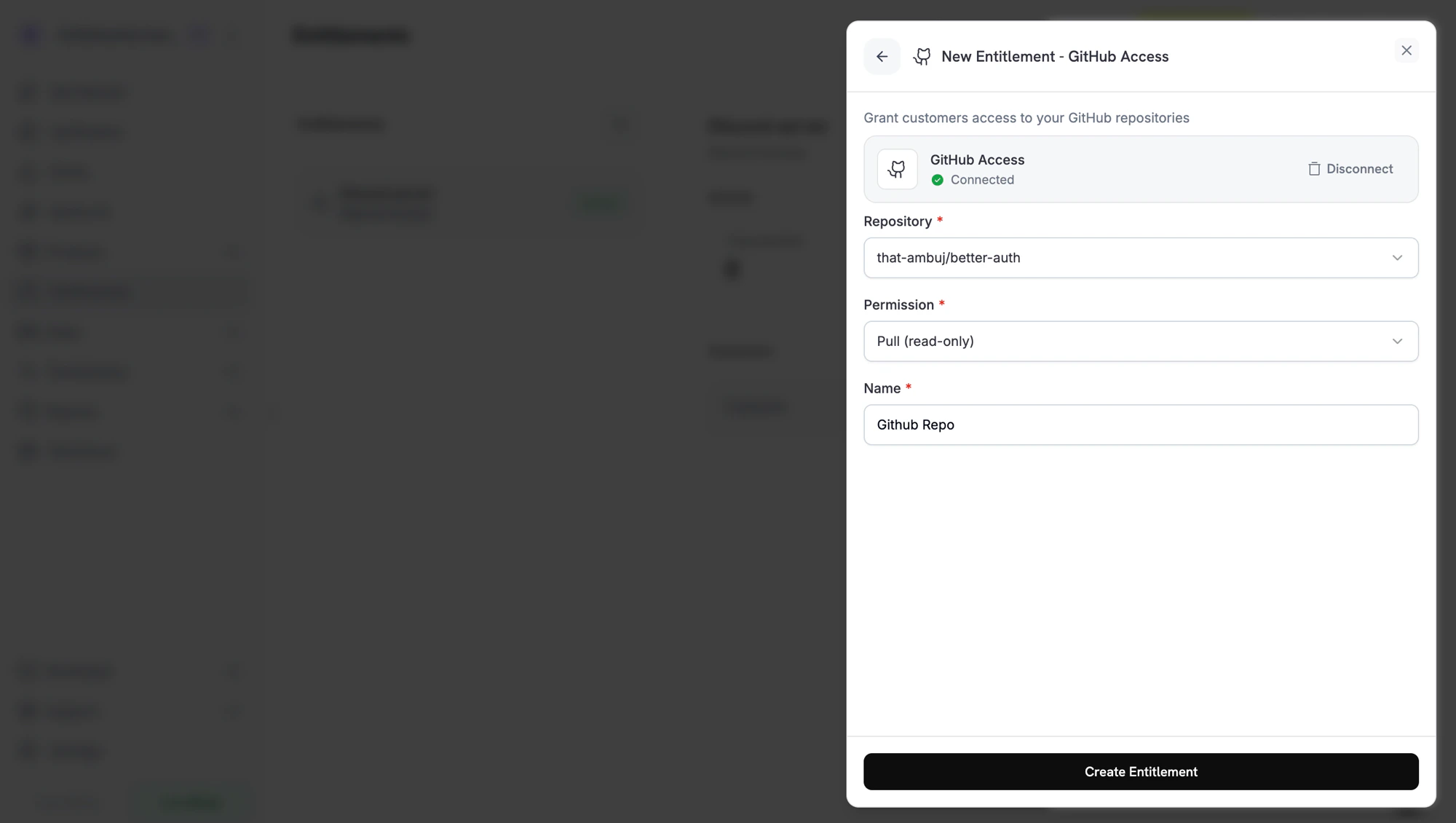 Click **Create Entitlement**. You can now attach the entitlement to any product.
## Attach Entitlements to Products
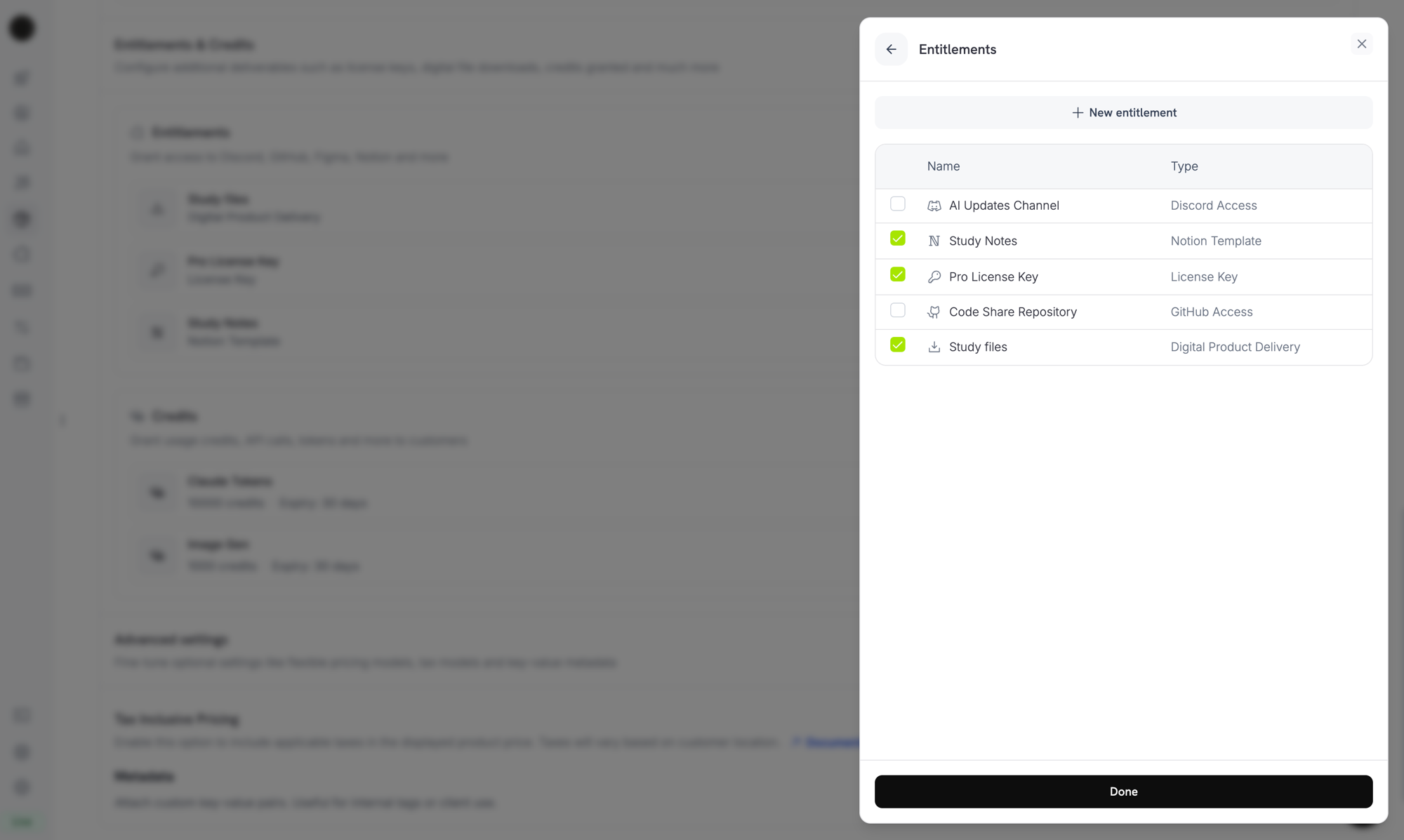
Open a product, go to its **Entitlements** section, and select the entitlements to deliver when the product is purchased. One product can deliver several entitlements at once. For example, a Pro plan can include a license key, GitHub access, and a Discord role.
Click **Create Entitlement**. You can now attach the entitlement to any product.
## Attach Entitlements to Products
Open a product, go to its **Entitlements** section, and select the entitlements to deliver when the product is purchased. One product can deliver several entitlements at once. For example, a Pro plan can include a license key, GitHub access, and a Discord role.
 ***
## Customer Experience
### Email and Customer Portal
After a purchase, the customer receives a delivery email with the license key, download links, OAuth invitation links, or platform invite that applies to the entitlements on the product. The same details stay available in the [Customer Portal](/features/customer-portal), under their order history, while the grant is active.
### OAuth-Based Delivery
Discord, GitHub, and Notion subscriber access requires the customer to authorize Dodo Payments to grant that access. These grants stay `Pending` until the customer completes the OAuth flow from the link in their email or the Customer Portal. After the customer authorizes, the grant moves to `Delivered` and Dodo Payments provisions the platform access.
### Revocation
When a grant is revoked, Dodo Payments removes the access on the platform: it removes the Discord role, removes the GitHub collaborator, or disables the license key. The customer sees the change in the Customer Portal.
For Digital Files, revocation stops new presigned download URLs, but it doesn't invalidate copies that a customer has already downloaded. Plan your content gating with this in mind.
***
## Manage Grants
Open any entitlement from the dashboard to see its grants. The detail panel shows the total granted, a status filter, and one row per grant with the customer, the date accessed, the status, and a **Revoke** action.
To manage grants programmatically, list them with the `status` filter and revoke a single grant by ID:
```typescript TypeScript expandable theme={null}
import DodoPayments from 'dodopayments';
const client = new DodoPayments({
bearerToken: process.env['DODO_PAYMENTS_API_KEY'],
});
// List grants for an entitlement
const grants = await client.entitlements.grants.list('ent_abc123', {
status: 'Delivered',
});
// Revoke a single grant
await client.entitlements.grants.revoke('entg_xyz789', {
id: 'ent_abc123',
});
```
```python Python expandable theme={null}
# Assumes client = DodoPayments(bearer_token=os.environ["DODO_PAYMENTS_API_KEY"])
grants = client.entitlements.grants.list(
"ent_abc123",
status="Delivered",
)
client.entitlements.grants.revoke(
"entg_xyz789",
id="ent_abc123",
)
```
```go Go expandable theme={null}
// Assumes client := dodopayments.NewClient() and ctx := context.Background().
grants, err := client.Entitlements.Grants.List(
ctx, "ent_abc123",
dodopayments.EntitlementGrantListParams{
Status: dodopayments.F(dodopayments.EntitlementGrantListParamsStatusDelivered),
},
)
if err != nil {
panic(err.Error())
}
fmt.Println(len(grants.Items))
_, err = client.Entitlements.Grants.Revoke(ctx, "ent_abc123", "entg_xyz789")
```
***
## API Management
Create an entitlement of any integration type.
List entitlements, filtered by integration type.
Retrieve an entitlement and its resolved configuration.
Update the name, description, or integration configuration.
Soft-delete an entitlement. Existing grants aren't revoked, but Dodo Payments no longer manages them.
Upload a file of up to 500 MiB to a Digital Files entitlement.
List an entitlement's grants, filtered by status and customer.
Revoke a single grant manually.
***
## Webhooks
Dodo Payments sends four webhook events for the grant lifecycle. Subscribe to them to keep your application in sync with what each customer can access.
| Event | Fires when |
| - | - |
| `entitlement_grant.created` | A grant is created. Auto-fulfilled license-key grants and feature-flag grants arrive `Delivered`. Manually fulfilled license-key grants and every other integration arrive `Pending`, then move to `Delivered` once the platform call succeeds or, for OAuth-based integrations, once the customer authorizes. |
| `entitlement_grant.delivered` | An existing grant moves to `Delivered`, so the customer now has access. A grant that is `Delivered` on creation fires only `created`. |
| `entitlement_grant.failed` | The grant couldn't be delivered. Inspect `error_code` and `error_message`. |
| `entitlement_grant.revoked` | Access has been withdrawn. Inspect `revocation_reason`. |
View the full payload schema, sample events, and `revocation_reason` reference.
***
## Best Practices
* **Use one entitlement per delivery channel.** Don't share one Discord entitlement across products with different role intentions. Create one entitlement per role, so revocation stays clean.
* **Test in test mode first.** Create the entitlement, attach it to a test product, run a checkout, and watch the grant move from `Pending` to `Delivered`. Then cancel the test subscription and confirm that the grant is revoked.
* **Listen to `entitlement_grant.delivered`, not `payment.succeeded`.** A payment can succeed before fulfillment finishes, especially for OAuth flows. Wait for the grant to reach `Delivered` before you unlock dependent features in your own systems. A grant that is delivered on creation, such as an auto-fulfilled license key or a feature flag, arrives as `entitlement_grant.created` with `status: "Delivered"` instead.
* **Treat `entitlement_grant.failed` as actionable.** A failed grant means a customer paid but didn't get access. Surface these grants to your support team or trigger a re-grant.
* **Map `revocation_reason` to your retention flows.** A `subscription_on_hold` revoke is recoverable, because the customer may update their card. A `manual` revoke is intentional. Treat them differently in customer messages.
* **Do not revoke access on `subscription.past_due`.** That event opens a [grace period](/features/subscription#grace-period), and the customer keeps access until the window ends. Wait for `subscription.on_hold` or `subscription.cancelled`.
This documentation is built and hosted on [Mintlify](https://mintlify.com), a developer documentation platform.
***
## Customer Experience
### Email and Customer Portal
After a purchase, the customer receives a delivery email with the license key, download links, OAuth invitation links, or platform invite that applies to the entitlements on the product. The same details stay available in the [Customer Portal](/features/customer-portal), under their order history, while the grant is active.
### OAuth-Based Delivery
Discord, GitHub, and Notion subscriber access requires the customer to authorize Dodo Payments to grant that access. These grants stay `Pending` until the customer completes the OAuth flow from the link in their email or the Customer Portal. After the customer authorizes, the grant moves to `Delivered` and Dodo Payments provisions the platform access.
### Revocation
When a grant is revoked, Dodo Payments removes the access on the platform: it removes the Discord role, removes the GitHub collaborator, or disables the license key. The customer sees the change in the Customer Portal.
For Digital Files, revocation stops new presigned download URLs, but it doesn't invalidate copies that a customer has already downloaded. Plan your content gating with this in mind.
***
## Manage Grants
Open any entitlement from the dashboard to see its grants. The detail panel shows the total granted, a status filter, and one row per grant with the customer, the date accessed, the status, and a **Revoke** action.
To manage grants programmatically, list them with the `status` filter and revoke a single grant by ID:
```typescript TypeScript expandable theme={null}
import DodoPayments from 'dodopayments';
const client = new DodoPayments({
bearerToken: process.env['DODO_PAYMENTS_API_KEY'],
});
// List grants for an entitlement
const grants = await client.entitlements.grants.list('ent_abc123', {
status: 'Delivered',
});
// Revoke a single grant
await client.entitlements.grants.revoke('entg_xyz789', {
id: 'ent_abc123',
});
```
```python Python expandable theme={null}
# Assumes client = DodoPayments(bearer_token=os.environ["DODO_PAYMENTS_API_KEY"])
grants = client.entitlements.grants.list(
"ent_abc123",
status="Delivered",
)
client.entitlements.grants.revoke(
"entg_xyz789",
id="ent_abc123",
)
```
```go Go expandable theme={null}
// Assumes client := dodopayments.NewClient() and ctx := context.Background().
grants, err := client.Entitlements.Grants.List(
ctx, "ent_abc123",
dodopayments.EntitlementGrantListParams{
Status: dodopayments.F(dodopayments.EntitlementGrantListParamsStatusDelivered),
},
)
if err != nil {
panic(err.Error())
}
fmt.Println(len(grants.Items))
_, err = client.Entitlements.Grants.Revoke(ctx, "ent_abc123", "entg_xyz789")
```
***
## API Management
Create an entitlement of any integration type.
List entitlements, filtered by integration type.
Retrieve an entitlement and its resolved configuration.
Update the name, description, or integration configuration.
Soft-delete an entitlement. Existing grants aren't revoked, but Dodo Payments no longer manages them.
Upload a file of up to 500 MiB to a Digital Files entitlement.
List an entitlement's grants, filtered by status and customer.
Revoke a single grant manually.
***
## Webhooks
Dodo Payments sends four webhook events for the grant lifecycle. Subscribe to them to keep your application in sync with what each customer can access.
| Event | Fires when |
| - | - |
| `entitlement_grant.created` | A grant is created. Auto-fulfilled license-key grants and feature-flag grants arrive `Delivered`. Manually fulfilled license-key grants and every other integration arrive `Pending`, then move to `Delivered` once the platform call succeeds or, for OAuth-based integrations, once the customer authorizes. |
| `entitlement_grant.delivered` | An existing grant moves to `Delivered`, so the customer now has access. A grant that is `Delivered` on creation fires only `created`. |
| `entitlement_grant.failed` | The grant couldn't be delivered. Inspect `error_code` and `error_message`. |
| `entitlement_grant.revoked` | Access has been withdrawn. Inspect `revocation_reason`. |
View the full payload schema, sample events, and `revocation_reason` reference.
***
## Best Practices
* **Use one entitlement per delivery channel.** Don't share one Discord entitlement across products with different role intentions. Create one entitlement per role, so revocation stays clean.
* **Test in test mode first.** Create the entitlement, attach it to a test product, run a checkout, and watch the grant move from `Pending` to `Delivered`. Then cancel the test subscription and confirm that the grant is revoked.
* **Listen to `entitlement_grant.delivered`, not `payment.succeeded`.** A payment can succeed before fulfillment finishes, especially for OAuth flows. Wait for the grant to reach `Delivered` before you unlock dependent features in your own systems. A grant that is delivered on creation, such as an auto-fulfilled license key or a feature flag, arrives as `entitlement_grant.created` with `status: "Delivered"` instead.
* **Treat `entitlement_grant.failed` as actionable.** A failed grant means a customer paid but didn't get access. Surface these grants to your support team or trigger a re-grant.
* **Map `revocation_reason` to your retention flows.** A `subscription_on_hold` revoke is recoverable, because the customer may update their card. A `manual` revoke is intentional. Treat them differently in customer messages.
* **Do not revoke access on `subscription.past_due`.** That event opens a [grace period](/features/subscription#grace-period), and the customer keeps access until the window ends. Wait for `subscription.on_hold` or `subscription.cancelled`.
This documentation is built and hosted on [Mintlify](https://mintlify.com), a developer documentation platform.