> ## Documentation Index
> Fetch the complete documentation index at: https://docs.dodopayments.com/llms.txt
> Use this file to discover all available pages before exploring further.
# Telegram Entitlement
> Add paying customers to a private Telegram group or channel when they subscribe or purchase, and remove them automatically when access ends.
The Telegram entitlement gives paying customers access to a private Telegram group or channel. The customer links their Telegram account in the Customer Portal, and the Dodo Payments Telegram bot sends them a join request link that it approves only for that account. When the grant is revoked, the bot removes the customer from the chat.
## What Gets Delivered
* The grant is created in `Pending`. It stays `Pending` after the customer links their Telegram account and the bot issues the join request link.
* In the Customer Portal, the customer clicks **Connect**, sends `/start` to the Dodo Payments bot to get their Telegram user ID, enters it, and clicks **Link account**.
* The bot sends the customer a join request link in Telegram. When the customer requests to join, the bot approves the request for their linked account only.
* On cancellation, refund, or manual revoke, the bot removes the customer from the chat and bans them. If they buy again, the bot lifts the ban before it sends a new link.
Common uses include private alpha channels, paid signal groups, and community-tier perks.
## Connect Telegram
In the Dodo Payments dashboard, go to **Entitlements** and click **+**, then choose **Telegram Access** as the integration. The dashboard asks for your Telegram user ID, which links the chats you add the bot to with your business.
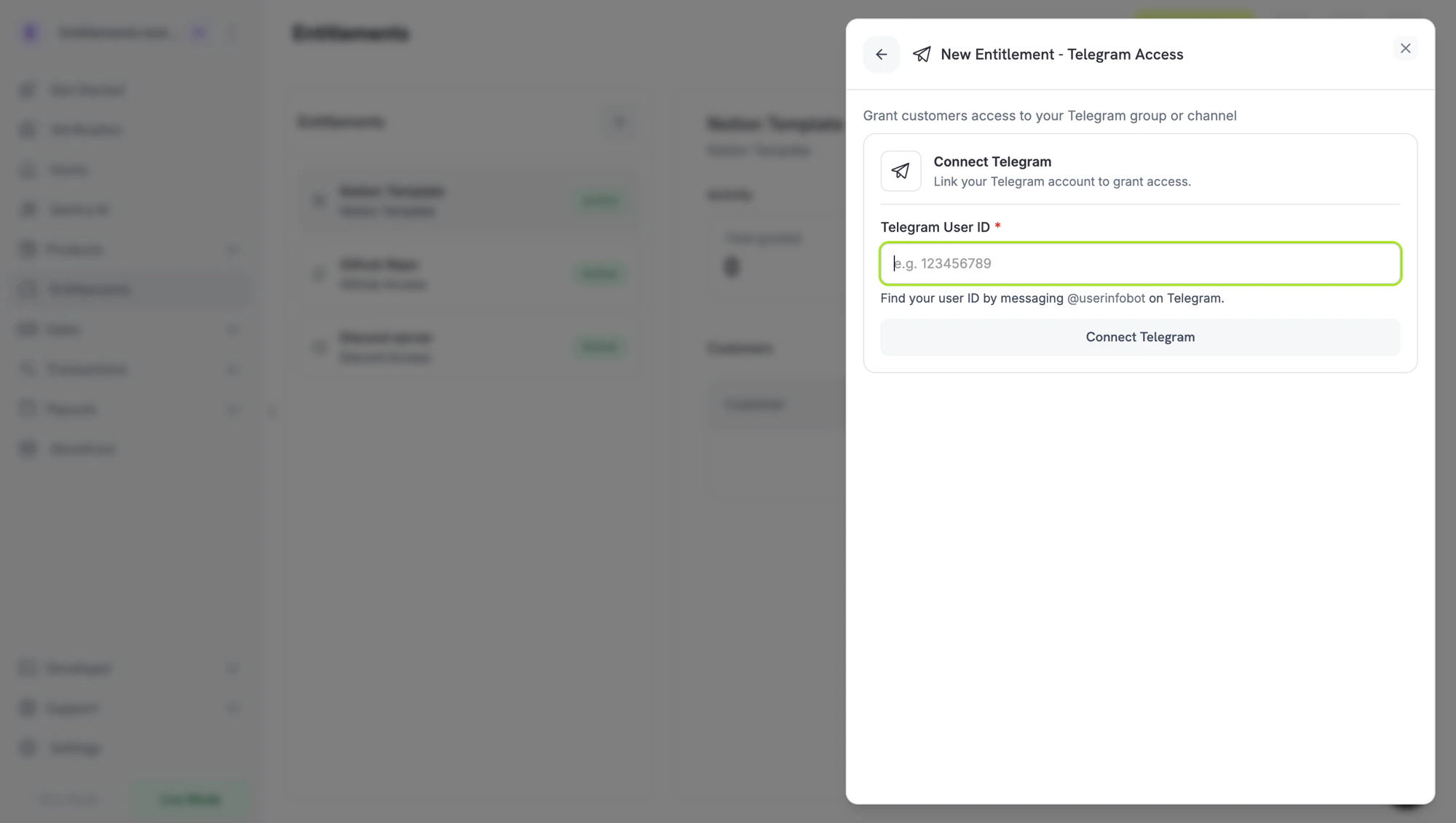 The next two steps happen in Telegram, and you can do them in either order: get your user ID, and add the bot to your chat as an admin. When both are done, return to the dashboard for the final step.
In Telegram, send **`/start`** to:
* **`@dodo_payments_bot`** if you're using **Live Mode**
* **`@DodoPaymentsTestBot`** if you're using **Test Mode**
The bot replies with your numeric Telegram user ID. Copy it. You paste it into the dashboard in the last step.
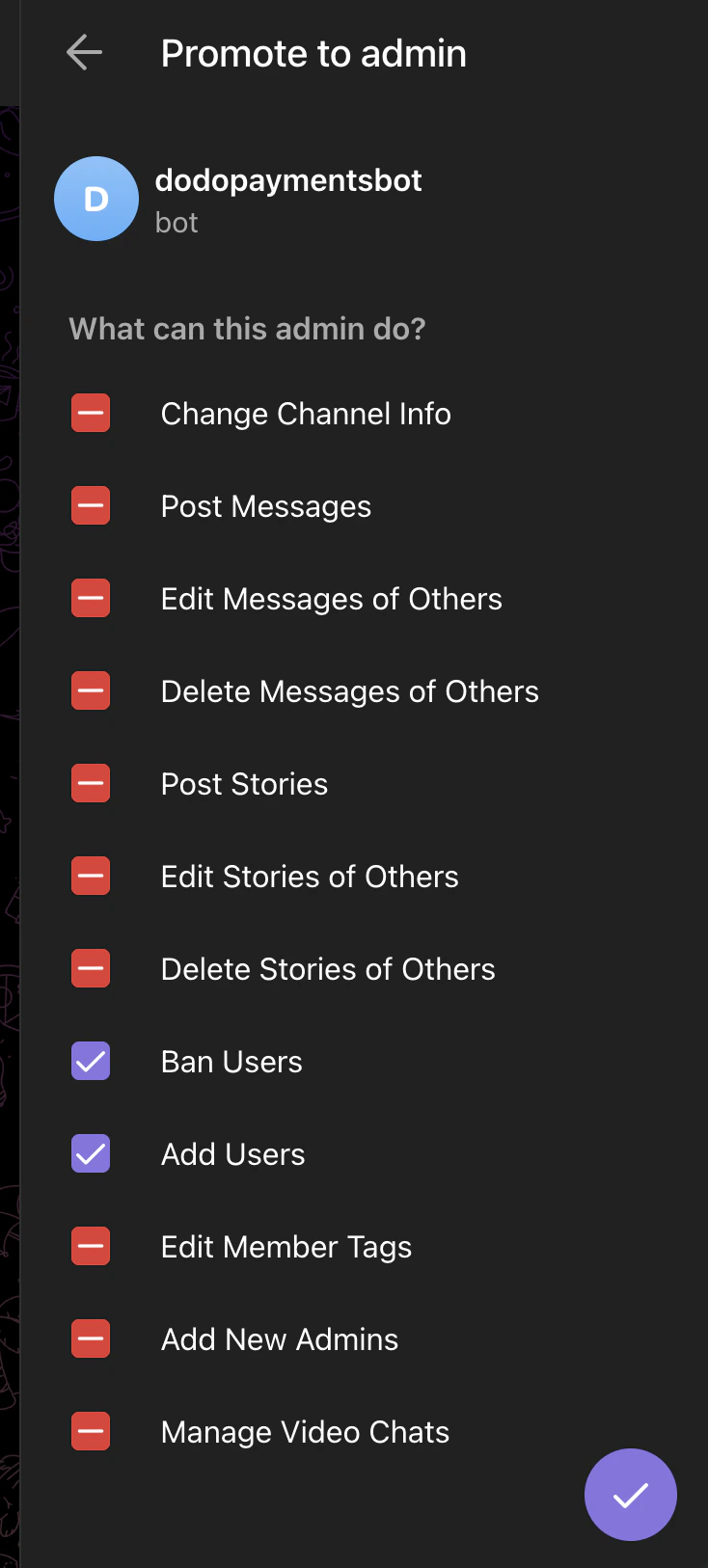
From the same Telegram account, open the group or channel you want to gate and **add the same bot as an admin** (`@dodo_payments_bot` for live mode, `@DodoPaymentsTestBot` for test mode). Enable these two permissions:
* **Ban Users**: required to remove members on revocation.
* **Add Users**: required to invite paying customers.
Leave every other admin permission off.
The next two steps happen in Telegram, and you can do them in either order: get your user ID, and add the bot to your chat as an admin. When both are done, return to the dashboard for the final step.
In Telegram, send **`/start`** to:
* **`@dodo_payments_bot`** if you're using **Live Mode**
* **`@DodoPaymentsTestBot`** if you're using **Test Mode**
The bot replies with your numeric Telegram user ID. Copy it. You paste it into the dashboard in the last step.
From the same Telegram account, open the group or channel you want to gate and **add the same bot as an admin** (`@dodo_payments_bot` for live mode, `@DodoPaymentsTestBot` for test mode). Enable these two permissions:
* **Ban Users**: required to remove members on revocation.
* **Add Users**: required to invite paying customers.
Leave every other admin permission off.
 Back in the dashboard, paste the user ID from step 2 into **Telegram User ID** and click **Connect Telegram**. The **Chat** picker lists the groups and channels you added the bot to from that account. Pick the chat you want to gate, enter a **Name** for the entitlement, and click **Create Entitlement**.
## Customer Flow
1. The customer completes checkout.
2. Dodo Payments creates a `Pending` grant. No invite link exists yet.
3. The payment confirmation email lists the entitlement as **Action Required** and links to the Customer Portal. In the portal, the customer clicks **Connect**, sends `/start` to the bot, enters their Telegram user ID, and clicks **Link account**.
4. The bot sends the customer a join request link in Telegram. The customer opens the link and requests to join, and the bot approves the request.
5. On revocation, the bot removes the customer from the chat.
The bot approves join requests only from the Telegram account the customer linked. A forwarded link doesn't give anyone else access. The linked account can't be changed on an existing grant.
## Required Configuration
| Field | Required | Description |
| - | - | - |
| `chat_id` | Yes | The Telegram chat ID (numeric, and often negative for groups and channels). The dashboard's chat picker fills this in for you. |
## Create via API
```typescript TypeScript expandable theme={null}
import DodoPayments from 'dodopayments';
const client = new DodoPayments({
bearerToken: process.env['DODO_PAYMENTS_API_KEY'],
environment: 'test_mode',
});
const entitlement = await client.entitlements.create({
name: 'Premium Signals Group',
integration_type: 'telegram',
integration_config: {
chat_id: '-1001234567890',
},
});
```
```python Python expandable theme={null}
import os
from dodopayments import DodoPayments
client = DodoPayments(
bearer_token=os.environ.get("DODO_PAYMENTS_API_KEY"),
environment="test_mode",
)
entitlement = client.entitlements.create(
name="Premium Signals Group",
integration_type="telegram",
integration_config={"chat_id": "-1001234567890"},
)
```
```go Go expandable theme={null}
// client is a *dodopayments.Client, for example from
// dodopayments.NewClient(option.WithEnvironmentTestMode()); ctx is a context.Context.
client.Entitlements.New(ctx, dodopayments.EntitlementNewParams{
Name: dodopayments.F("Premium Signals Group"),
IntegrationType: dodopayments.F(dodopayments.EntitlementIntegrationTypeTelegram),
IntegrationConfig: dodopayments.F[dodopayments.IntegrationConfigUnionParam](
dodopayments.IntegrationConfigTelegramConfigParam{
ChatID: dodopayments.F("-1001234567890"),
},
),
})
```
## Webhooks
See [`entitlement_grant.*` webhook events](/developer-resources/webhooks/intents/entitlement-grant). Telegram grants arrive `Pending` and stay `Pending` after the customer links their Telegram account. If a customer with a delivered grant leaves the chat, Dodo Payments revokes the grant with `revocation_reason: platform_external`.
## Troubleshooting
Add the Dodo Payments bot to the chat **as an admin** with **Add Users** enabled, from the Telegram account whose user ID you entered in the dashboard. The chat appears in the picker once the bot is an admin.
The bot approves join requests only from the linked Telegram account. Ask the customer to open the link from that account.
Revoking a grant is final. You can't reissue a revoked grant, so the customer needs a new purchase to get a new grant.
The bot needs the **Ban Users** admin permission to remove members. Open the chat settings and confirm that both **Ban Users** and **Add Users** are enabled for the Dodo Payments bot.
This documentation is built and hosted on [Mintlify](https://mintlify.com), a developer documentation platform.
Back in the dashboard, paste the user ID from step 2 into **Telegram User ID** and click **Connect Telegram**. The **Chat** picker lists the groups and channels you added the bot to from that account. Pick the chat you want to gate, enter a **Name** for the entitlement, and click **Create Entitlement**.
## Customer Flow
1. The customer completes checkout.
2. Dodo Payments creates a `Pending` grant. No invite link exists yet.
3. The payment confirmation email lists the entitlement as **Action Required** and links to the Customer Portal. In the portal, the customer clicks **Connect**, sends `/start` to the bot, enters their Telegram user ID, and clicks **Link account**.
4. The bot sends the customer a join request link in Telegram. The customer opens the link and requests to join, and the bot approves the request.
5. On revocation, the bot removes the customer from the chat.
The bot approves join requests only from the Telegram account the customer linked. A forwarded link doesn't give anyone else access. The linked account can't be changed on an existing grant.
## Required Configuration
| Field | Required | Description |
| - | - | - |
| `chat_id` | Yes | The Telegram chat ID (numeric, and often negative for groups and channels). The dashboard's chat picker fills this in for you. |
## Create via API
```typescript TypeScript expandable theme={null}
import DodoPayments from 'dodopayments';
const client = new DodoPayments({
bearerToken: process.env['DODO_PAYMENTS_API_KEY'],
environment: 'test_mode',
});
const entitlement = await client.entitlements.create({
name: 'Premium Signals Group',
integration_type: 'telegram',
integration_config: {
chat_id: '-1001234567890',
},
});
```
```python Python expandable theme={null}
import os
from dodopayments import DodoPayments
client = DodoPayments(
bearer_token=os.environ.get("DODO_PAYMENTS_API_KEY"),
environment="test_mode",
)
entitlement = client.entitlements.create(
name="Premium Signals Group",
integration_type="telegram",
integration_config={"chat_id": "-1001234567890"},
)
```
```go Go expandable theme={null}
// client is a *dodopayments.Client, for example from
// dodopayments.NewClient(option.WithEnvironmentTestMode()); ctx is a context.Context.
client.Entitlements.New(ctx, dodopayments.EntitlementNewParams{
Name: dodopayments.F("Premium Signals Group"),
IntegrationType: dodopayments.F(dodopayments.EntitlementIntegrationTypeTelegram),
IntegrationConfig: dodopayments.F[dodopayments.IntegrationConfigUnionParam](
dodopayments.IntegrationConfigTelegramConfigParam{
ChatID: dodopayments.F("-1001234567890"),
},
),
})
```
## Webhooks
See [`entitlement_grant.*` webhook events](/developer-resources/webhooks/intents/entitlement-grant). Telegram grants arrive `Pending` and stay `Pending` after the customer links their Telegram account. If a customer with a delivered grant leaves the chat, Dodo Payments revokes the grant with `revocation_reason: platform_external`.
## Troubleshooting
Add the Dodo Payments bot to the chat **as an admin** with **Add Users** enabled, from the Telegram account whose user ID you entered in the dashboard. The chat appears in the picker once the bot is an admin.
The bot approves join requests only from the linked Telegram account. Ask the customer to open the link from that account.
Revoking a grant is final. You can't reissue a revoked grant, so the customer needs a new purchase to get a new grant.
The bot needs the **Ban Users** admin permission to remove members. Open the chat settings and confirm that both **Ban Users** and **Add Users** are enabled for the Dodo Payments bot.
This documentation is built and hosted on [Mintlify](https://mintlify.com), a developer documentation platform.