> ## Documentation Index
> Fetch the complete documentation index at: https://docs.dodopayments.com/llms.txt
> Use this file to discover all available pages before exploring further.
# Feature Request and Roadmap
> Submit feature requests, vote on ideas from other merchants, and follow the Dodo Payments public roadmap on the feedback portal.
Submit feature requests, vote on ideas from other merchants, and track what Dodo Payments is building on the [feedback portal](https://feedback.dodopayments.com/). The portal hosts the public roadmap and a **Bug Reports** board for reporting issues. To open it from the dashboard, select the support icon in the dashboard header, then select **Feature Requests**.
View all feature requests, vote on ideas, and track the product roadmap on the feedback portal.
## **Request a New Feature**
To suggest a feature that would improve your experience with Dodo Payments, submit a feature request on the feedback portal.
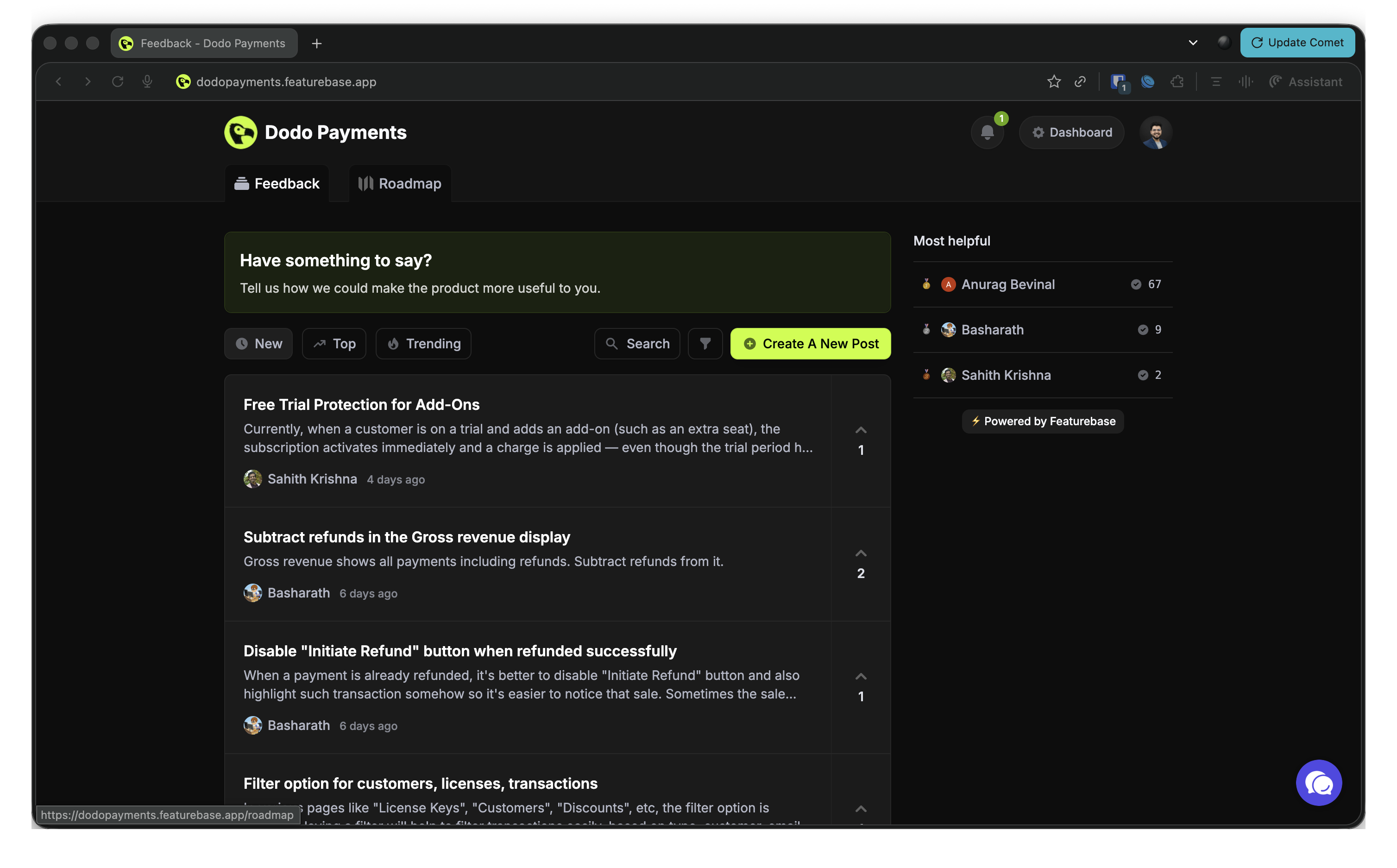 To submit a request:
1. Go to the [feedback portal](https://feedback.dodopayments.com/).
2. Select the **What's your idea?** field at the top of the board and enter a short title for your idea.
3. In **Add more details...**, explain what the feature does, why it matters, and how it helps your business.
4. Select **Submit**. Other merchants can then find it and vote for it.
To make your request easier to evaluate:
* Keep it clear and concise.
* Describe the business impact of the feature.
* Add examples where they help.
* Include use cases that show the value.
## **Vote for Existing Feature Requests**
Dodo Payments prioritizes the features that benefit the most merchants. Before you post a new idea, browse the existing requests and vote for the ones you find valuable:
1. Go to the [feedback portal](https://feedback.dodopayments.com/).
2. Browse the submitted requests, or sort them by **Trending**, **Top**, or **New**.
3. Select the upvote button next to each request you support.
Voting helps you:
* Influence the development priority of the features you care about.
* Show the team which features have widespread demand.
* Get notified when a feature you voted for changes status, including when it's released.
## **View the Product Roadmap**
The public roadmap shows the development status of each feature. Features appear in these status columns:
* **Planned**: Features that are approved and scheduled for development.
* **In Progress**: Features the team is working on.
* **Complete**: Features that are implemented and live.
* **Closed**: Requests the team closed without marking them complete.
To view the roadmap:
1. Go to the [feedback portal](https://feedback.dodopayments.com/).
2. Open the **Roadmap** tab to see features by status.
3. Browse the feature categories and their statuses.
4. Use **Search** and **Filter** to find specific features, or narrow the list by status or category.
Bookmark the [feedback portal](https://feedback.dodopayments.com/) to follow new features and vote on the ideas that matter to you.
This documentation is built and hosted on [Mintlify](https://mintlify.com), a developer documentation platform.
To submit a request:
1. Go to the [feedback portal](https://feedback.dodopayments.com/).
2. Select the **What's your idea?** field at the top of the board and enter a short title for your idea.
3. In **Add more details...**, explain what the feature does, why it matters, and how it helps your business.
4. Select **Submit**. Other merchants can then find it and vote for it.
To make your request easier to evaluate:
* Keep it clear and concise.
* Describe the business impact of the feature.
* Add examples where they help.
* Include use cases that show the value.
## **Vote for Existing Feature Requests**
Dodo Payments prioritizes the features that benefit the most merchants. Before you post a new idea, browse the existing requests and vote for the ones you find valuable:
1. Go to the [feedback portal](https://feedback.dodopayments.com/).
2. Browse the submitted requests, or sort them by **Trending**, **Top**, or **New**.
3. Select the upvote button next to each request you support.
Voting helps you:
* Influence the development priority of the features you care about.
* Show the team which features have widespread demand.
* Get notified when a feature you voted for changes status, including when it's released.
## **View the Product Roadmap**
The public roadmap shows the development status of each feature. Features appear in these status columns:
* **Planned**: Features that are approved and scheduled for development.
* **In Progress**: Features the team is working on.
* **Complete**: Features that are implemented and live.
* **Closed**: Requests the team closed without marking them complete.
To view the roadmap:
1. Go to the [feedback portal](https://feedback.dodopayments.com/).
2. Open the **Roadmap** tab to see features by status.
3. Browse the feature categories and their statuses.
4. Use **Search** and **Filter** to find specific features, or narrow the list by status or category.
Bookmark the [feedback portal](https://feedback.dodopayments.com/) to follow new features and vote on the ideas that matter to you.
This documentation is built and hosted on [Mintlify](https://mintlify.com), a developer documentation platform.