> ## Documentation Index
> Fetch the complete documentation index at: https://docs.dodopayments.com/llms.txt
> Use this file to discover all available pages before exploring further.
# Manual Payment Retry
> Retry a failed subscription renewal payment on demand from the dashboard or the API instead of waiting for the next automatic retry.
Manual Retry re-attempts a failed subscription **renewal** payment when you ask, from the payment's detail page or through the API. It charges the payment method saved on the subscription, and it runs independently of the automatic [Payment Retries](/features/recovery/payment-retries) schedule.
## What Is Manual Retry?
When a renewal payment fails, the subscription moves to `on_hold`. If you turned on [Payment Retries](/features/recovery/payment-retries), they re-attempt the charge on a back-off schedule. Sometimes you know the payment will go through now: the customer has confirmed they topped up their account, or your support team is on a call with them. Manual Retry sends one attempt immediately, instead of waiting hours or days for the next scheduled one.
* **Renewal payments only**: Manual Retry applies to subscription renewal invoices while the subscription is `on_hold`. First payments, one-time payments, plan-change charges, and on-demand charges are not eligible.
* **No customer action**: The charge goes to the payment method already saved on the subscription.
* **Independent of automatic retries**: A manual retry doesn't use up an attempt from the automatic schedule, doesn't move the next scheduled retry, and works even when Payment Retries are off.
* **Retries the invoice, not the payment**: The failed payment is only the entry point. Dodo Payments finds the open renewal invoice behind it and charges that debt, so it doesn't matter which failed payment on the invoice you retry from.
## Retrying from the Dashboard
Only users with the Owner or Editor role can send a manual retry.
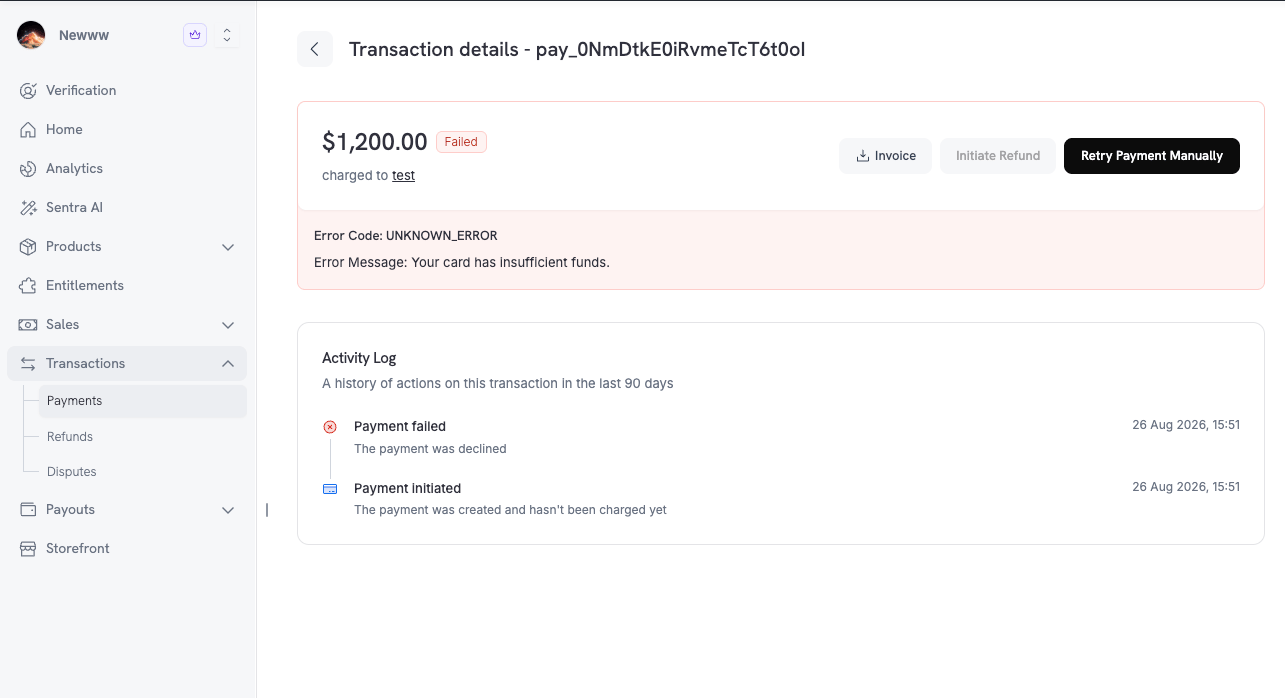
Go to **Transactions → Payments** and click the failed renewal payment to open its **Transaction details** page.
Click **Retry Payment Manually** in the top-right corner. The button is available only while the payment is [eligible](#eligibility).
Dodo Payments creates a new payment for the attempt, and it appears in the **Activity Log**. If the charge succeeds, the subscription returns to `active`, and the next billing date moves to one billing period after the successful retry. If the payment processor hasn't settled the charge yet, the payment shows as in progress until the `payment.succeeded` or `payment.failed` webhook reports the outcome.
 ## Eligibility
Dodo Payments sends a manual retry only when every check in this table passes. The **Reason code** column is what the API returns: in `reason` on `GET /payments/{payment_id}/retry`, and as the error `code` on `POST /payments/{payment_id}/retry`.
| Check | Requirement | Reason code |
| - | - | - |
| Payment type | A subscription **renewal** payment whose invoice is still open. Payments with no invoice, first payments, one-time payments, plan-change charges, and on-demand charges cannot be retried. | `PAYMENT_NOT_RETRYABLE` |
| Subscription status | `on_hold` | `SUBSCRIPTION_INACTIVE` |
| Scheduled cancellation | The subscription is not scheduled to cancel at the next billing date. | `CHARGE_NOT_ALLOWED_FOR_SCHEDULED_CANCELLATION` |
| Saved payment method | The subscription has a saved payment method to charge. | `SUBSCRIPTION_HAS_NO_PAYMENT_METHOD` |
| Last failure | The most recent failure is a **soft decline**. A hard decline, or a failure with no classified error code, cannot be retried. | `MANUAL_RETRY_HARD_DECLINE` |
| Nothing in flight | No payment on the invoice is `processing` or still has no recorded status. Such a payment is an attempt, manual or automatic, that was just sent and hasn't reported back. Wait for its outcome first. | `MANUAL_RETRY_IN_FLIGHT` |
| Newest payment failed | The most recent payment on the invoice has `failed` status. Any other status, such as `requires_customer_action`, `requires_payment_method`, or `cancelled`, blocks the retry even when nothing is in flight. | `PREVIOUS_PAYMENT_PENDING` |
| Not already paid | No payment on the invoice has succeeded. | `MANUAL_RETRY_ALREADY_PAID` |
| Retry limit | Fewer than 3 manual retries were sent on the invoice, and the cooldown has passed. See [Retry Limits](#retry-limits). | `MANUAL_RETRY_LIMIT_REACHED` |
| Customer | The customer is not on your [blocklist](/features/customer-blocklist). | `PAYMENT_NOT_RETRYABLE` |
| Payment connector | For [BYOP](/features/byop) subscriptions, the connector is enabled. | `BYOP_CONNECTOR_DISABLED` |
| Live mode | In live mode, your business has live payments enabled. | `MERCHANT_NOT_LIVE` |
Manual Retry is narrower than automatic retries in one place: it requires the subscription to be `on_hold`. A `past_due` subscription in a grace period fails this check. Automatic retries keep running for other non-active statuses. See [Subscription Status Transitions](/features/recovery/payment-retries#subscription-status-transitions).
Retrying a hard decline against the same card can't succeed, and repeated declines hurt your authorization rate. When the reason is `MANUAL_RETRY_HARD_DECLINE`, ask the customer to update their payment method instead. [Subscription Dunning](/features/recovery/subscription-dunning) does this automatically.
## Retry Limits
Each renewal invoice allows **3** manual retries, with a cooldown between them:
| Manual retry | Available |
| - | - |
| 1 | As soon as the payment is eligible |
| 2 | 1 hour after the first |
| 3 | 3 hours after the second |
The limits apply in both test mode and live mode. When the limit refuses a retry, the API returns `MANUAL_RETRY_LIMIT_REACHED` (HTTP `429`), and the error body carries only `code` and `message`. To learn when the next retry opens, [check the retry state](#check-whether-a-payment-can-be-retried) and read `retry_available_at`. It is `null` once all three retries are spent.
Automatic retries don't count toward this limit, and manual retries don't count toward the 8 attempts of the automatic schedule.
## Manual vs. Automatic Retries
The two retry paths differ in these ways:
| | Manual Retry | Payment Retries |
| - | - | - |
| **Trigger** | You, from the dashboard or the API | Dodo Payments, on a back-off schedule |
| **Timing** | Immediately | 12 hours after the failure, then progressively later |
| **Attempts** | 3 per invoice, with a 1-hour and then a 3-hour cooldown | Up to 8 per invoice, inside your recovery window |
| **Needs Payment Retries enabled** | No | Yes |
| **Effect on the other** | None. A manual failure doesn't schedule or move an automatic attempt. | None. The automatic chain continues regardless of manual sends. |
| **Analytics** | Counted in the **Payment Retries** metrics under **Analytics → Recovery** | Counted in the same metrics |
## Retrying via the API
Check eligibility first, then send the retry. Both endpoints take the ID of a failed payment.
### Check Whether a Payment Can Be Retried
`GET /payments/{payment_id}/retry` doesn't return an error for an ineligible payment. It returns `can_retry: false` with the `reason` code instead, so your own dashboard or support tooling can show the same state as the Dodo Payments dashboard. It requires the **Viewer** role.
```typescript Node.js theme={null}
import DodoPayments from 'dodopayments';
const client = new DodoPayments({
bearerToken: process.env.DODO_PAYMENTS_API_KEY,
});
const state = await client.payments.retrieveRetryState('pay_0NmDtkE0iRvmeTcT6t0ol');
if (state.can_retry) {
console.log(`Retry available. ${state.sends_used}/${state.sends_allowed} used.`);
} else {
console.log(`Cannot retry: ${state.reason}. Next window: ${state.retry_available_at}`);
}
```
```python Python theme={null}
import os
from dodopayments import DodoPayments
client = DodoPayments(bearer_token=os.environ["DODO_PAYMENTS_API_KEY"])
state = client.payments.retrieve_retry_state("pay_0NmDtkE0iRvmeTcT6t0ol")
if state.can_retry:
print(f"Retry available. {state.sends_used}/{state.sends_allowed} used.")
else:
print(f"Cannot retry: {state.reason}. Next window: {state.retry_available_at}")
```
```bash cURL theme={null}
curl https://live.dodopayments.com/payments/pay_0NmDtkE0iRvmeTcT6t0ol/retry \
-H "Authorization: Bearer $DODO_PAYMENTS_API_KEY"
```
```json Response theme={null}
{
"can_retry": false,
"reason": "MANUAL_RETRY_LIMIT_REACHED",
"sends_used": 1,
"sends_allowed": 3,
"retry_available_at": "2026-08-26T16:51:00Z"
}
```
| Field | Description |
| - | - |
| `can_retry` | `true` when a retry would be sent right now. |
| `reason` | The code the retry would fail with. `null` when `can_retry` is `true`. |
| `sends_used` | Manual retries already sent on this invoice. |
| `sends_allowed` | Always `3`. |
| `retry_available_at` | When the next manual retry opens. `null` when no retry is left, or when the refusal has nothing to do with the cooldown. |
### Send a Manual Retry
`POST /payments/{payment_id}/retry` creates a new payment and charges the saved payment method. It requires the **Editor** role. The SDK examples reuse the `client` from the previous example.
```typescript Node.js theme={null}
// `client` is the DodoPayments instance from the previous example.
const retry = await client.payments.retry('pay_0NmDtkE0iRvmeTcT6t0ol');
console.log(retry.payment_id, retry.status);
```
```python Python theme={null}
# `client` is the DodoPayments instance from the previous example.
retry = client.payments.retry("pay_0NmDtkE0iRvmeTcT6t0ol")
print(retry.payment_id, retry.status)
```
```bash cURL theme={null}
curl -X POST https://live.dodopayments.com/payments/pay_0NmDtkE0iRvmeTcT6t0ol/retry \
-H "Authorization: Bearer $DODO_PAYMENTS_API_KEY"
```
```json Response theme={null}
{
"payment_id": "pay_2IjeQm4hqU6RA4Z4kwDee",
"invoice_id": "inv_9Kp2mQ7vRt4LxYw3",
"status": "processing",
"retry_attempt": 1,
"is_manual_retry": true,
"sends_used": 1,
"sends_allowed": 3,
"retry_available_at": "2026-08-26T16:51:00Z"
}
```
| Field | Description |
| - | - |
| `payment_id` | The new payment created for this attempt. |
| `invoice_id` | The renewal invoice that was charged. |
| `status` | Outcome of the charge. `processing` means the processor hasn't settled it yet. `null` means no outcome was recorded before the response was returned. In both cases the payment webhooks report the final result. |
| `retry_attempt` | Position of this attempt among the manual retries on the invoice, starting at `1`. |
| `is_manual_retry` | Always `true` on this endpoint. |
| `sends_used`, `sends_allowed`, `retry_available_at` | Retry limit state after this send. `retry_available_at` is the cooldown clock only. It is set even when this charge succeeds, in which case the invoice is paid and no further retry opens. |
### Error Responses
When a retry is not allowed, `POST` returns one of these HTTP statuses:
| HTTP status | Codes | What to do |
| - | - | - |
| `404` | `NOT_FOUND` | The payment doesn't belong to your business. |
| `409` | `MANUAL_RETRY_IN_FLIGHT`, `PREVIOUS_PAYMENT_PENDING`, `CHARGE_NOT_ALLOWED_FOR_SCHEDULED_CANCELLATION` | The block is temporary, or something else must change first. Wait for the in-flight or pending payment to reach a final state, or clear the scheduled cancellation. |
| `422` | `PAYMENT_NOT_RETRYABLE`, `SUBSCRIPTION_INACTIVE`, `SUBSCRIPTION_HAS_NO_PAYMENT_METHOD`, `MANUAL_RETRY_HARD_DECLINE`, `MANUAL_RETRY_ALREADY_PAID`, `BYOP_CONNECTOR_DISABLED`, `MERCHANT_NOT_LIVE` | This payment can't be retried. Don't repeat the call. |
| `429` | `MANUAL_RETRY_LIMIT_REACHED` | [Check the retry state](#check-whether-a-payment-can-be-retried) and wait until its `retry_available_at`, or stop once all three retries are spent. |
The [Error Codes](/api-reference/error-codes) reference describes every code.
## Webhooks
A manual retry creates an ordinary payment, so the same webhooks fire as for any renewal attempt:
| Event | Fires when |
| - | - |
| `payment.succeeded` | The retry was charged. `subscription.active` follows when the subscription is reactivated. |
| `payment.failed` | The retry was declined. The subscription stays `on_hold`, and a manual failure doesn't schedule an automatic retry. |
| `payment.processing` | The processor has accepted the charge but hasn't settled it yet. |
On the payment object in these events, `retry_attempt` is `1` or higher and `subscription_id` is set, the same as for an automatic retry. The payment object has no field that marks a manual attempt, so keep the `payment_id` from the retry response if you need to tell a manual attempt apart from a scheduled one.
Full payload schemas for payment events.
## Related
The automatic back-off schedule that runs alongside manual retries.
Email the customer to update their payment method after a hard decline.
Read decline codes and decide when a retry is worthwhile.
Every `MANUAL_RETRY_*` code, its trigger, and its message.
This documentation is built and hosted on [Mintlify](https://mintlify.com), a developer documentation platform.
## Eligibility
Dodo Payments sends a manual retry only when every check in this table passes. The **Reason code** column is what the API returns: in `reason` on `GET /payments/{payment_id}/retry`, and as the error `code` on `POST /payments/{payment_id}/retry`.
| Check | Requirement | Reason code |
| - | - | - |
| Payment type | A subscription **renewal** payment whose invoice is still open. Payments with no invoice, first payments, one-time payments, plan-change charges, and on-demand charges cannot be retried. | `PAYMENT_NOT_RETRYABLE` |
| Subscription status | `on_hold` | `SUBSCRIPTION_INACTIVE` |
| Scheduled cancellation | The subscription is not scheduled to cancel at the next billing date. | `CHARGE_NOT_ALLOWED_FOR_SCHEDULED_CANCELLATION` |
| Saved payment method | The subscription has a saved payment method to charge. | `SUBSCRIPTION_HAS_NO_PAYMENT_METHOD` |
| Last failure | The most recent failure is a **soft decline**. A hard decline, or a failure with no classified error code, cannot be retried. | `MANUAL_RETRY_HARD_DECLINE` |
| Nothing in flight | No payment on the invoice is `processing` or still has no recorded status. Such a payment is an attempt, manual or automatic, that was just sent and hasn't reported back. Wait for its outcome first. | `MANUAL_RETRY_IN_FLIGHT` |
| Newest payment failed | The most recent payment on the invoice has `failed` status. Any other status, such as `requires_customer_action`, `requires_payment_method`, or `cancelled`, blocks the retry even when nothing is in flight. | `PREVIOUS_PAYMENT_PENDING` |
| Not already paid | No payment on the invoice has succeeded. | `MANUAL_RETRY_ALREADY_PAID` |
| Retry limit | Fewer than 3 manual retries were sent on the invoice, and the cooldown has passed. See [Retry Limits](#retry-limits). | `MANUAL_RETRY_LIMIT_REACHED` |
| Customer | The customer is not on your [blocklist](/features/customer-blocklist). | `PAYMENT_NOT_RETRYABLE` |
| Payment connector | For [BYOP](/features/byop) subscriptions, the connector is enabled. | `BYOP_CONNECTOR_DISABLED` |
| Live mode | In live mode, your business has live payments enabled. | `MERCHANT_NOT_LIVE` |
Manual Retry is narrower than automatic retries in one place: it requires the subscription to be `on_hold`. A `past_due` subscription in a grace period fails this check. Automatic retries keep running for other non-active statuses. See [Subscription Status Transitions](/features/recovery/payment-retries#subscription-status-transitions).
Retrying a hard decline against the same card can't succeed, and repeated declines hurt your authorization rate. When the reason is `MANUAL_RETRY_HARD_DECLINE`, ask the customer to update their payment method instead. [Subscription Dunning](/features/recovery/subscription-dunning) does this automatically.
## Retry Limits
Each renewal invoice allows **3** manual retries, with a cooldown between them:
| Manual retry | Available |
| - | - |
| 1 | As soon as the payment is eligible |
| 2 | 1 hour after the first |
| 3 | 3 hours after the second |
The limits apply in both test mode and live mode. When the limit refuses a retry, the API returns `MANUAL_RETRY_LIMIT_REACHED` (HTTP `429`), and the error body carries only `code` and `message`. To learn when the next retry opens, [check the retry state](#check-whether-a-payment-can-be-retried) and read `retry_available_at`. It is `null` once all three retries are spent.
Automatic retries don't count toward this limit, and manual retries don't count toward the 8 attempts of the automatic schedule.
## Manual vs. Automatic Retries
The two retry paths differ in these ways:
| | Manual Retry | Payment Retries |
| - | - | - |
| **Trigger** | You, from the dashboard or the API | Dodo Payments, on a back-off schedule |
| **Timing** | Immediately | 12 hours after the failure, then progressively later |
| **Attempts** | 3 per invoice, with a 1-hour and then a 3-hour cooldown | Up to 8 per invoice, inside your recovery window |
| **Needs Payment Retries enabled** | No | Yes |
| **Effect on the other** | None. A manual failure doesn't schedule or move an automatic attempt. | None. The automatic chain continues regardless of manual sends. |
| **Analytics** | Counted in the **Payment Retries** metrics under **Analytics → Recovery** | Counted in the same metrics |
## Retrying via the API
Check eligibility first, then send the retry. Both endpoints take the ID of a failed payment.
### Check Whether a Payment Can Be Retried
`GET /payments/{payment_id}/retry` doesn't return an error for an ineligible payment. It returns `can_retry: false` with the `reason` code instead, so your own dashboard or support tooling can show the same state as the Dodo Payments dashboard. It requires the **Viewer** role.
```typescript Node.js theme={null}
import DodoPayments from 'dodopayments';
const client = new DodoPayments({
bearerToken: process.env.DODO_PAYMENTS_API_KEY,
});
const state = await client.payments.retrieveRetryState('pay_0NmDtkE0iRvmeTcT6t0ol');
if (state.can_retry) {
console.log(`Retry available. ${state.sends_used}/${state.sends_allowed} used.`);
} else {
console.log(`Cannot retry: ${state.reason}. Next window: ${state.retry_available_at}`);
}
```
```python Python theme={null}
import os
from dodopayments import DodoPayments
client = DodoPayments(bearer_token=os.environ["DODO_PAYMENTS_API_KEY"])
state = client.payments.retrieve_retry_state("pay_0NmDtkE0iRvmeTcT6t0ol")
if state.can_retry:
print(f"Retry available. {state.sends_used}/{state.sends_allowed} used.")
else:
print(f"Cannot retry: {state.reason}. Next window: {state.retry_available_at}")
```
```bash cURL theme={null}
curl https://live.dodopayments.com/payments/pay_0NmDtkE0iRvmeTcT6t0ol/retry \
-H "Authorization: Bearer $DODO_PAYMENTS_API_KEY"
```
```json Response theme={null}
{
"can_retry": false,
"reason": "MANUAL_RETRY_LIMIT_REACHED",
"sends_used": 1,
"sends_allowed": 3,
"retry_available_at": "2026-08-26T16:51:00Z"
}
```
| Field | Description |
| - | - |
| `can_retry` | `true` when a retry would be sent right now. |
| `reason` | The code the retry would fail with. `null` when `can_retry` is `true`. |
| `sends_used` | Manual retries already sent on this invoice. |
| `sends_allowed` | Always `3`. |
| `retry_available_at` | When the next manual retry opens. `null` when no retry is left, or when the refusal has nothing to do with the cooldown. |
### Send a Manual Retry
`POST /payments/{payment_id}/retry` creates a new payment and charges the saved payment method. It requires the **Editor** role. The SDK examples reuse the `client` from the previous example.
```typescript Node.js theme={null}
// `client` is the DodoPayments instance from the previous example.
const retry = await client.payments.retry('pay_0NmDtkE0iRvmeTcT6t0ol');
console.log(retry.payment_id, retry.status);
```
```python Python theme={null}
# `client` is the DodoPayments instance from the previous example.
retry = client.payments.retry("pay_0NmDtkE0iRvmeTcT6t0ol")
print(retry.payment_id, retry.status)
```
```bash cURL theme={null}
curl -X POST https://live.dodopayments.com/payments/pay_0NmDtkE0iRvmeTcT6t0ol/retry \
-H "Authorization: Bearer $DODO_PAYMENTS_API_KEY"
```
```json Response theme={null}
{
"payment_id": "pay_2IjeQm4hqU6RA4Z4kwDee",
"invoice_id": "inv_9Kp2mQ7vRt4LxYw3",
"status": "processing",
"retry_attempt": 1,
"is_manual_retry": true,
"sends_used": 1,
"sends_allowed": 3,
"retry_available_at": "2026-08-26T16:51:00Z"
}
```
| Field | Description |
| - | - |
| `payment_id` | The new payment created for this attempt. |
| `invoice_id` | The renewal invoice that was charged. |
| `status` | Outcome of the charge. `processing` means the processor hasn't settled it yet. `null` means no outcome was recorded before the response was returned. In both cases the payment webhooks report the final result. |
| `retry_attempt` | Position of this attempt among the manual retries on the invoice, starting at `1`. |
| `is_manual_retry` | Always `true` on this endpoint. |
| `sends_used`, `sends_allowed`, `retry_available_at` | Retry limit state after this send. `retry_available_at` is the cooldown clock only. It is set even when this charge succeeds, in which case the invoice is paid and no further retry opens. |
### Error Responses
When a retry is not allowed, `POST` returns one of these HTTP statuses:
| HTTP status | Codes | What to do |
| - | - | - |
| `404` | `NOT_FOUND` | The payment doesn't belong to your business. |
| `409` | `MANUAL_RETRY_IN_FLIGHT`, `PREVIOUS_PAYMENT_PENDING`, `CHARGE_NOT_ALLOWED_FOR_SCHEDULED_CANCELLATION` | The block is temporary, or something else must change first. Wait for the in-flight or pending payment to reach a final state, or clear the scheduled cancellation. |
| `422` | `PAYMENT_NOT_RETRYABLE`, `SUBSCRIPTION_INACTIVE`, `SUBSCRIPTION_HAS_NO_PAYMENT_METHOD`, `MANUAL_RETRY_HARD_DECLINE`, `MANUAL_RETRY_ALREADY_PAID`, `BYOP_CONNECTOR_DISABLED`, `MERCHANT_NOT_LIVE` | This payment can't be retried. Don't repeat the call. |
| `429` | `MANUAL_RETRY_LIMIT_REACHED` | [Check the retry state](#check-whether-a-payment-can-be-retried) and wait until its `retry_available_at`, or stop once all three retries are spent. |
The [Error Codes](/api-reference/error-codes) reference describes every code.
## Webhooks
A manual retry creates an ordinary payment, so the same webhooks fire as for any renewal attempt:
| Event | Fires when |
| - | - |
| `payment.succeeded` | The retry was charged. `subscription.active` follows when the subscription is reactivated. |
| `payment.failed` | The retry was declined. The subscription stays `on_hold`, and a manual failure doesn't schedule an automatic retry. |
| `payment.processing` | The processor has accepted the charge but hasn't settled it yet. |
On the payment object in these events, `retry_attempt` is `1` or higher and `subscription_id` is set, the same as for an automatic retry. The payment object has no field that marks a manual attempt, so keep the `payment_id` from the retry response if you need to tell a manual attempt apart from a scheduled one.
Full payload schemas for payment events.
## Related
The automatic back-off schedule that runs alongside manual retries.
Email the customer to update their payment method after a hard decline.
Read decline codes and decide when a retry is worthwhile.
Every `MANUAL_RETRY_*` code, its trigger, and its message.
This documentation is built and hosted on [Mintlify](https://mintlify.com), a developer documentation platform.