> ## Documentation Index
> Fetch the complete documentation index at: https://docs.dodopayments.com/llms.txt
> Use this file to discover all available pages before exploring further.
# Subscription Payment Retries
> Retry failed subscription renewal payments automatically on a back-off schedule, and recover revenue with no integration work.
Payment Retries re-charge failed subscription **renewal** payments automatically on a back-off schedule. When a retry succeeds, the subscription returns to `active`, with no customer action and no integration work.
## What Are Payment Retries?
When a subscription renewal payment fails, the subscription moves to `on_hold`, or to `past_due` if you set a [grace period](/features/subscription#grace-period). With Payment Retries on, Dodo Payments re-charges the customer's saved payment method on a schedule until a charge succeeds or the recovery window closes.
Retries recover revenue lost to temporary failures, such as a temporary hold on the card, insufficient funds that the customer tops up later, or a transient network error. The customer gets no email and doesn't need to change anything.
Payment Retries apply only to subscription **renewal** payments. The first payment of a subscription (mandate setup), one-time payments, plan-change charges, and on-demand charges are not retried.
## How Payment Retries Work
A subscription renewal payment fails, and the subscription moves to `on_hold`, or to `past_due` during a grace period.
Dodo Payments checks the failure's error code. **Soft declines**, such as insufficient funds, a generic decline, or a processing or network error, are retryable. **Hard declines** end the retry chain, because another attempt won't change the outcome. A failure without an error code counts as a hard decline.
If the decline is retryable and the next attempt fits in the recovery window, Dodo Payments schedules it. Each retry is an off-session charge to the customer's saved payment method, and each delay counts from the previous failure.
On the first successful retry, the subscription returns to `active`, and the next billing date moves to one billing period after the successful retry. If the window closes before any retry succeeds, retries stop and the subscription keeps its status, such as `on_hold`.
## Configuring Payment Retries
Turn on and configure Payment Retries in **Settings → Recovery** in your dashboard.
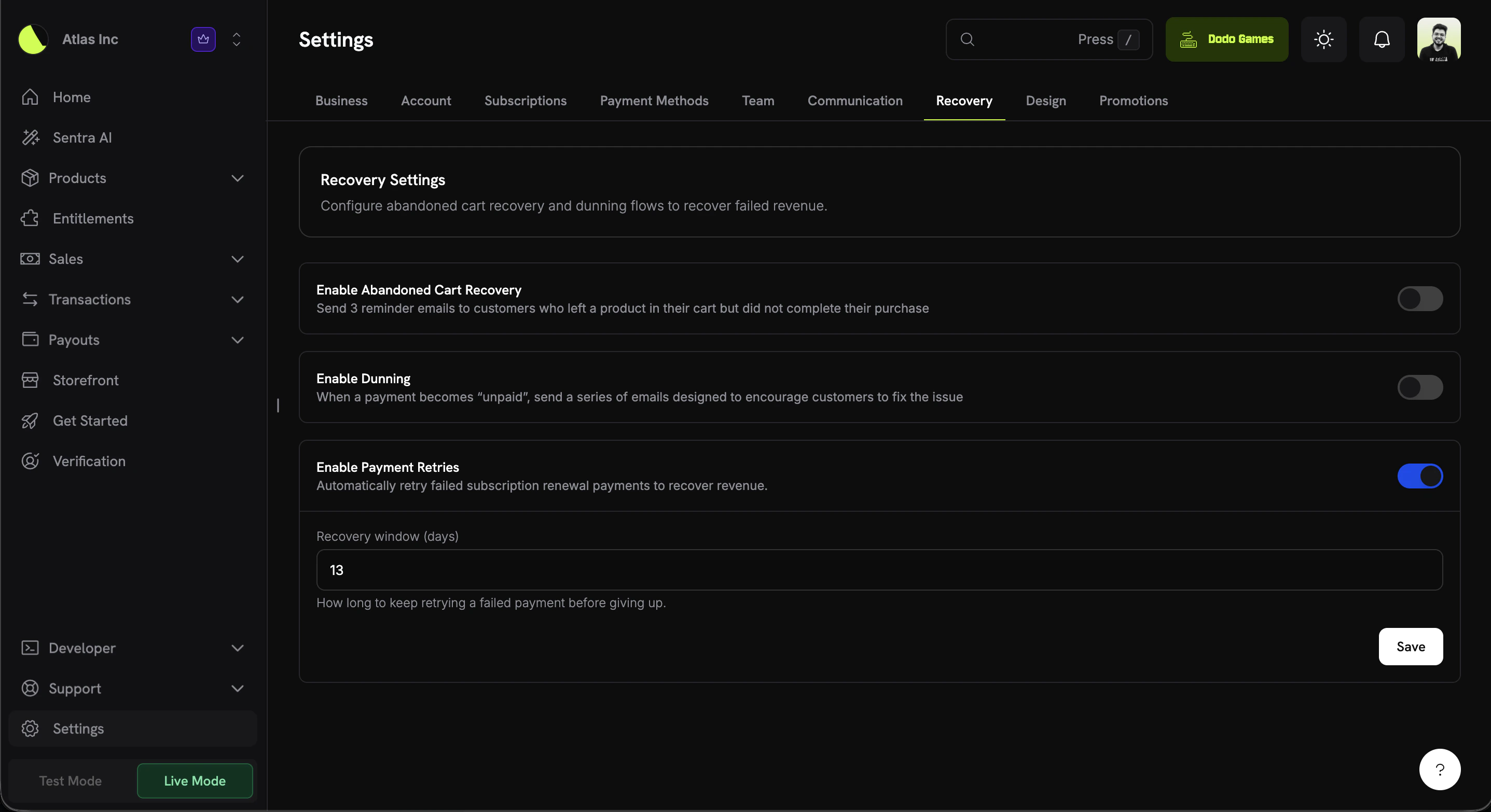 The page has two settings:
| Setting | Description | Default |
| - | - | - |
| **Enable Payment Retries** | Automatically retry failed subscription renewal payments to recover revenue. | Off |
| **Recovery window (days)** | How long to keep retrying a failed payment before giving up. From **1** to **30** days. | 13 |
The recovery window starts when the invoice for the failed renewal is created. Dodo Payments schedules an attempt only if the sum of all delays up to that attempt fits inside the window, and only while the window is still open.
## Retry Schedule
Retries back off progressively. Dodo Payments makes up to **8 attempts**, as long as each one fits in your recovery window:
| Attempt | Delay after previous attempt | Approx. time since failure |
| - | - | - |
| 1 | 12 hours | 12 hours |
| 2 | 24 hours | 36 hours |
| 3 | 48 hours | \~3.5 days |
| 4 | 72 hours | \~6.5 days |
| 5 | 96 hours | \~10.5 days |
| 6 | 120 hours | \~15.5 days |
| 7 | 7 days | \~22.5 days |
| 8 | 7 days | \~29.5 days |
The default window of **13 days** covers attempts 1 through 5, because attempt 5 fires about 10.5 days after the failure. To run the later, more widely spaced attempts, increase the window: attempt 6 needs at least 16 days, attempt 7 at least 23 days, and attempt 8 the 30-day maximum.
## Subscription Status Transitions
Retries move the subscription between these statuses:
| Event | Subscription status |
| - | - |
| Renewal payment fails | `active` → `on_hold`, or `active` → `past_due` during a grace period |
| Retry attempt fails | Unchanged. The next retry is scheduled if the window allows it. |
| Retry attempt succeeds | `on_hold` or `past_due` → `active`, and the next billing date moves |
| Recovery window exhausted | Unchanged, for example `on_hold` |
| Subscription cancelled | Scheduled retries stop, and no further attempts are made |
When a subscription is cancelled, its retry chain ends and no further attempts are made. Every other status (`on_hold`, `past_due`, `expired`, `pending`, `failed`) keeps retrying, because the open renewal invoice is a debt for a period the customer already used. Retries also stop when the invoice is paid another way, for example after the customer updates their payment method, or when you add the customer to your [blocklist](/features/customer-blocklist).
These transitions emit the standard subscription webhook events, so your entitlement logic needs no retry-specific handling:
| Event | Fires when |
| - | - |
| `subscription.on_hold` | A renewal fails and the subscription is placed on hold |
| `subscription.past_due` | A renewal fails while a grace period applies |
| `subscription.active` | A retry succeeds and the subscription is reactivated |
View the full webhook payload schemas for subscription lifecycle events.
## Retryable vs. Non-Retryable Failures
The error code of the most recent failure decides whether the chain continues:
| Failure type | Examples | Retried? |
| - | - | - |
| **Soft decline** | Insufficient funds, generic decline, card velocity exceeded, processing error, network error or timeout, try again later | Yes |
| **Hard decline** | Stolen or lost card, invalid card, do-not-honor, account closed, and other terminal declines | No. The chain ends immediately. |
Retrying a hard decline won't change the outcome, so the chain ends as soon as a hard decline occurs. Pair Payment Retries with [Subscription Dunning](/features/recovery/subscription-dunning) to ask the customer for a new payment method in those cases. For the type of every code, see [Transaction Failures](/api-reference/transaction-failures).
## Retrying on Demand
You don't have to wait for the next scheduled attempt. While a subscription is `on_hold`, you can send a retry from the failed payment's detail page in the dashboard, or with `POST /payments/{payment_id}/retry`. Manual retries run independently of the schedule: they don't use up or move an automatic attempt, and they work even when Payment Retries are off. See [Manual Payment Retry](/features/recovery/manual-retry).
## Payment Retries vs. Dunning
Payment Retries and [Subscription Dunning](/features/recovery/subscription-dunning) recover different kinds of failure:
| | Payment Retries | Subscription Dunning |
| - | - | - |
| **Mechanism** | Re-charges the saved payment method, with no email | Emails the customer to update their payment method |
| **Customer action** | None required | Customer updates the payment method in the Customer Portal |
| **Best for** | Temporary or soft declines that resolve on their own | Expired or invalid cards that need replacing |
Turn on both for the widest coverage: automatic retries catch transient failures, and dunning brings back customers whose payment method needs replacing.
## Related
Send a retry right away instead of waiting for the next scheduled attempt.
Email sequences that ask customers to update their payment method.
Recover abandoned or failed checkouts with recovery emails.
The subscription states that recovery flows move between.
React to `subscription.on_hold` and `subscription.active` events.
This documentation is built and hosted on [Mintlify](https://mintlify.com), a developer documentation platform.
The page has two settings:
| Setting | Description | Default |
| - | - | - |
| **Enable Payment Retries** | Automatically retry failed subscription renewal payments to recover revenue. | Off |
| **Recovery window (days)** | How long to keep retrying a failed payment before giving up. From **1** to **30** days. | 13 |
The recovery window starts when the invoice for the failed renewal is created. Dodo Payments schedules an attempt only if the sum of all delays up to that attempt fits inside the window, and only while the window is still open.
## Retry Schedule
Retries back off progressively. Dodo Payments makes up to **8 attempts**, as long as each one fits in your recovery window:
| Attempt | Delay after previous attempt | Approx. time since failure |
| - | - | - |
| 1 | 12 hours | 12 hours |
| 2 | 24 hours | 36 hours |
| 3 | 48 hours | \~3.5 days |
| 4 | 72 hours | \~6.5 days |
| 5 | 96 hours | \~10.5 days |
| 6 | 120 hours | \~15.5 days |
| 7 | 7 days | \~22.5 days |
| 8 | 7 days | \~29.5 days |
The default window of **13 days** covers attempts 1 through 5, because attempt 5 fires about 10.5 days after the failure. To run the later, more widely spaced attempts, increase the window: attempt 6 needs at least 16 days, attempt 7 at least 23 days, and attempt 8 the 30-day maximum.
## Subscription Status Transitions
Retries move the subscription between these statuses:
| Event | Subscription status |
| - | - |
| Renewal payment fails | `active` → `on_hold`, or `active` → `past_due` during a grace period |
| Retry attempt fails | Unchanged. The next retry is scheduled if the window allows it. |
| Retry attempt succeeds | `on_hold` or `past_due` → `active`, and the next billing date moves |
| Recovery window exhausted | Unchanged, for example `on_hold` |
| Subscription cancelled | Scheduled retries stop, and no further attempts are made |
When a subscription is cancelled, its retry chain ends and no further attempts are made. Every other status (`on_hold`, `past_due`, `expired`, `pending`, `failed`) keeps retrying, because the open renewal invoice is a debt for a period the customer already used. Retries also stop when the invoice is paid another way, for example after the customer updates their payment method, or when you add the customer to your [blocklist](/features/customer-blocklist).
These transitions emit the standard subscription webhook events, so your entitlement logic needs no retry-specific handling:
| Event | Fires when |
| - | - |
| `subscription.on_hold` | A renewal fails and the subscription is placed on hold |
| `subscription.past_due` | A renewal fails while a grace period applies |
| `subscription.active` | A retry succeeds and the subscription is reactivated |
View the full webhook payload schemas for subscription lifecycle events.
## Retryable vs. Non-Retryable Failures
The error code of the most recent failure decides whether the chain continues:
| Failure type | Examples | Retried? |
| - | - | - |
| **Soft decline** | Insufficient funds, generic decline, card velocity exceeded, processing error, network error or timeout, try again later | Yes |
| **Hard decline** | Stolen or lost card, invalid card, do-not-honor, account closed, and other terminal declines | No. The chain ends immediately. |
Retrying a hard decline won't change the outcome, so the chain ends as soon as a hard decline occurs. Pair Payment Retries with [Subscription Dunning](/features/recovery/subscription-dunning) to ask the customer for a new payment method in those cases. For the type of every code, see [Transaction Failures](/api-reference/transaction-failures).
## Retrying on Demand
You don't have to wait for the next scheduled attempt. While a subscription is `on_hold`, you can send a retry from the failed payment's detail page in the dashboard, or with `POST /payments/{payment_id}/retry`. Manual retries run independently of the schedule: they don't use up or move an automatic attempt, and they work even when Payment Retries are off. See [Manual Payment Retry](/features/recovery/manual-retry).
## Payment Retries vs. Dunning
Payment Retries and [Subscription Dunning](/features/recovery/subscription-dunning) recover different kinds of failure:
| | Payment Retries | Subscription Dunning |
| - | - | - |
| **Mechanism** | Re-charges the saved payment method, with no email | Emails the customer to update their payment method |
| **Customer action** | None required | Customer updates the payment method in the Customer Portal |
| **Best for** | Temporary or soft declines that resolve on their own | Expired or invalid cards that need replacing |
Turn on both for the widest coverage: automatic retries catch transient failures, and dunning brings back customers whose payment method needs replacing.
## Related
Send a retry right away instead of waiting for the next scheduled attempt.
Email sequences that ask customers to update their payment method.
Recover abandoned or failed checkouts with recovery emails.
The subscription states that recovery flows move between.
React to `subscription.on_hold` and `subscription.active` events.
This documentation is built and hosted on [Mintlify](https://mintlify.com), a developer documentation platform.