> ## Documentation Index
> Fetch the complete documentation index at: https://docs.dodopayments.com/llms.txt
> Use this file to discover all available pages before exploring further.
# Subscriptions
> Recurring billing for SaaS, memberships, and services. Flexible cycles, trials, proration, add-ons, and on-demand charges.
Subscriptions automate recurring revenue. Create flexible billing cycles, free or paid trials, plan changes with proration, and add-ons. Customers renew automatically until they cancel or the term ends.
Control plan changes with proration and quantity updates.
Authorize a mandate now and charge later with custom amounts.
Let customers manage plans, billing, and cancellations.
React to lifecycle events like created, renewed, and canceled.
## What Are Subscriptions?
A subscription is a recurring product that charges customers on a schedule. Ideal for SaaS, memberships, digital content, and support plans.
* **SaaS licenses**: Apps, APIs, or platform access
* **Memberships**: Communities, programs, or clubs
* **Digital content**: Courses, media, or premium content
* **Support plans**: SLAs, success packages, or maintenance
## Key Benefits
* **Predictable revenue**: Recurring billing with automated renewals
* **Flexible cycles**: Monthly, annual, custom intervals, and trials
* **Plan agility**: Proration for upgrades and downgrades
* **Add-ons and seats**: Attach optional, quantifiable upgrades
* **Hosted checkout**: Checkout pages and Customer Portal
* **Developer-first**: Clear APIs for creation, changes, and usage tracking
## Creating Subscriptions
Create subscription products in your Dodo Payments dashboard, then sell them through checkout or your API. Separating products from active subscriptions lets you version pricing, attach add-ons, and track performance independently.
### Subscription Product Creation
Configure the fields in the dashboard to define how your subscription sells, renews, and bills. The sections below map directly to what you see in the creation form.
#### Product Details
* **Product Name** (required): The display name shown in checkout, customer portal, and invoices.
* **Product Description** (optional): A clear value statement that appears in checkout and invoices.
* **Product Image** (optional): PNG/JPG/WebP up to 3 MB. Used on checkout and invoices.
* **Brand**: Associate the product with a specific brand for theming and emails.
* **Tax Category** (required): Choose the category (for example, SaaS) to determine tax rules.
Pick the most accurate tax category to ensure correct tax collection per region.
#### Pricing
* **Pricing Type**: Choose **Subscription** (this guide). Alternatives are Single Payment and Usage Based Billing.
* **Price** (required): Base recurring price with currency. A non-zero price must meet the subscription minimum for the currency the customer pays in: **\$1.00** for USD. In currencies other than USD, EUR, and GBP, the price must also be worth at least \$1.00. For example, an AED subscription needs about 3.70 AED, not the listed 2.00 AED minimum. EUR and GBP use their own listed minimums. See [Minimum Amounts](/features/adaptive-currency#minimum-amounts). Amounts below the minimum are not supported. A price of exactly **\$0** is a separate, supported case; see [Card-Optional at Zero Price](#card-optional-at-zero-price).
* **Discount Applicable (%)**: Optional percentage discount applied to the base price; reflected in checkout and invoices. You can enter up to two decimal places, such as `10.5`. In the API, use `discount_bps` (basis points, so `1050` is 10.5%).
* **Repeat payment every** (required): Interval for renewals, e.g., every 1 Month. Select the cadence (months or years) and quantity.
* **Subscription Period** (required): Total term for which the subscription remains active (e.g., 10 Years). After this period ends, renewals stop unless extended.
* **Trial Period Days** (required): Set trial length in days. Use 0 to disable trials. The first charge occurs automatically when the trial ends.
* **Trial Amount**: Optional upfront charge for a paid trial. Leave it unset for a free trial. See [Paid Trials](#paid-trials).
* **Card-optional at \$0 Price**: Let customers start the subscription without adding a card when a \$0 price or a discount leaves nothing due today. A free trial has its own **Start the trial without a card** checkbox. See [Card-Optional at Zero Price](#card-optional-at-zero-price).
* **Select add-on**: Attach up to 10 add-ons that customers can purchase alongside the base plan.
Editing the price of an active product changes what **new** customers pay. Existing subscriptions are never repriced — each one keeps the price it was created with and renews at that price for as long as it stays active.
To move an existing subscriber onto a different price, change their plan explicitly with [Change Plan](/api-reference/subscriptions/change-plan), or let them switch through the [Customer Portal](/features/customer-portal) if you have enabled self-service plan changes. Your proration settings apply to that plan change, not to product price edits.
Add-ons are ideal for quantifiable extras such as seats or storage. You can control allowed quantities and proration behavior when customers change them.
#### Advanced Settings
* **Tax Inclusive Pricing**: Display prices inclusive of applicable taxes. Final tax calculation still varies by customer location.
* **License key** (in **Entitlements**): Issue a unique key to each customer after purchase. See the License Keys guide.
* **Digital Files** (in **Entitlements**): Deliver files or content automatically after purchase. Learn more in Digital Product Delivery.
* **Metadata**: Attach custom key–value pairs for internal tagging or client integrations. See Metadata.
Use metadata to store identifiers from your system (e.g., accountId) so you can reconcile events and invoices later.
## Subscription Trials
Trials let customers evaluate a subscription before paying the full recurring price. A trial can be free (no charge until it ends) or paid (a reduced amount charged upfront). After the trial, the full price charges at the first renewal.
### Configuring Trials
Set **Trial Period Days** in the product's pricing section (use `0` to disable). Override it when creating a subscription:
```typescript theme={null}
// Via checkout session (recommended)
const session = await client.checkoutSessions.create({
product_cart: [{ product_id: 'pdt_monthly', quantity: 1 }],
subscription_data: { trial_period_days: 14 }
});
// Via subscription creation (deprecated)
// Note: POST /subscriptions is deprecated — prefer checkout sessions
const subscription = await client.subscriptions.create({
customer: { customer_id: 'cus_123' },
billing: { country: 'US' },
product_id: 'pdt_monthly',
quantity: 1,
trial_period_days: 14
});
```
`trial_period_days` must be between 0 and 10,000 days.
### Paid Trials
Charge a reduced amount upfront for the trial window. Set **Trial Amount** on the product's price. The full recurring price charges at the first renewal.
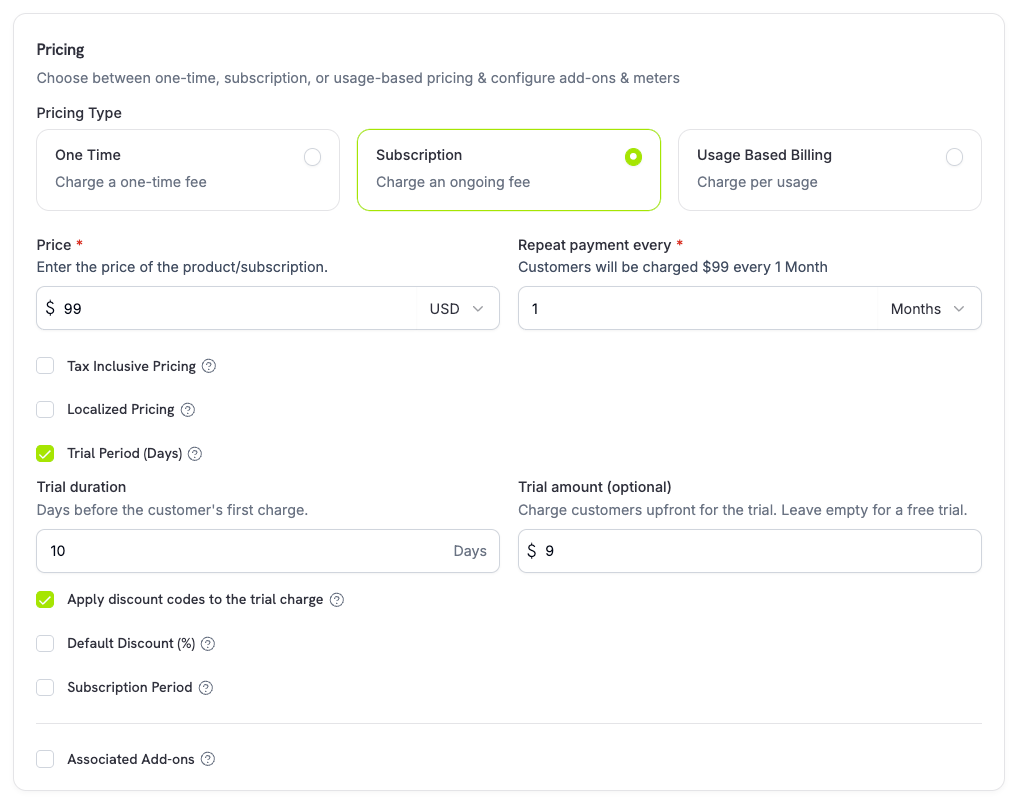 Paid trials are configured on the product's price, not per subscription or per checkout session:
| Field | Type | Description |
| - | - | - |
| `trial_amount` | integer | Amount charged today for the trial, in the price currency's minor units (for example, `500` for \$5.00). Requires `trial_period_days > 0`. Omit or set to `null` for a free trial. |
| `trial_apply_discounts` | boolean | Whether checkout discount codes reduce the trial charge. Defaults to `false`, so the trial amount is charged in full even when a discount applies to the recurring price. |
```typescript theme={null}
const product = await client.products.create({
name: 'Pro Plan',
tax_category: 'saas',
price: {
type: 'recurring_price',
price: 2900, // $29.00 per month after the trial
currency: 'USD',
discount_bps: 0,
purchasing_power_parity: false,
payment_frequency_count: 1,
payment_frequency_interval: 'Month',
subscription_period_count: 1,
subscription_period_interval: 'Year',
trial_period_days: 14,
trial_amount: 500, // $5.00 charged today
trial_apply_discounts: false
}
});
```
The trial amount is taxed and included in checkout calculations and payment link pricing. Adaptive Currency markup applies per currency. The [preview endpoint](/developer-resources/checkout-session) returns `trial_amount` and `trial_period_days` so you can show the amount due today before creating the subscription.
### Card-Optional at Zero Price
Let customers start a subscription without adding a payment method when nothing is due today. Enable it per price in the product's pricing section, with one checkbox for each case below.
Paid trials are configured on the product's price, not per subscription or per checkout session:
| Field | Type | Description |
| - | - | - |
| `trial_amount` | integer | Amount charged today for the trial, in the price currency's minor units (for example, `500` for \$5.00). Requires `trial_period_days > 0`. Omit or set to `null` for a free trial. |
| `trial_apply_discounts` | boolean | Whether checkout discount codes reduce the trial charge. Defaults to `false`, so the trial amount is charged in full even when a discount applies to the recurring price. |
```typescript theme={null}
const product = await client.products.create({
name: 'Pro Plan',
tax_category: 'saas',
price: {
type: 'recurring_price',
price: 2900, // $29.00 per month after the trial
currency: 'USD',
discount_bps: 0,
purchasing_power_parity: false,
payment_frequency_count: 1,
payment_frequency_interval: 'Month',
subscription_period_count: 1,
subscription_period_interval: 'Year',
trial_period_days: 14,
trial_amount: 500, // $5.00 charged today
trial_apply_discounts: false
}
});
```
The trial amount is taxed and included in checkout calculations and payment link pricing. Adaptive Currency markup applies per currency. The [preview endpoint](/developer-resources/checkout-session) returns `trial_amount` and `trial_period_days` so you can show the amount due today before creating the subscription.
### Card-Optional at Zero Price
Let customers start a subscription without adding a payment method when nothing is due today. Enable it per price in the product's pricing section, with one checkbox for each case below.
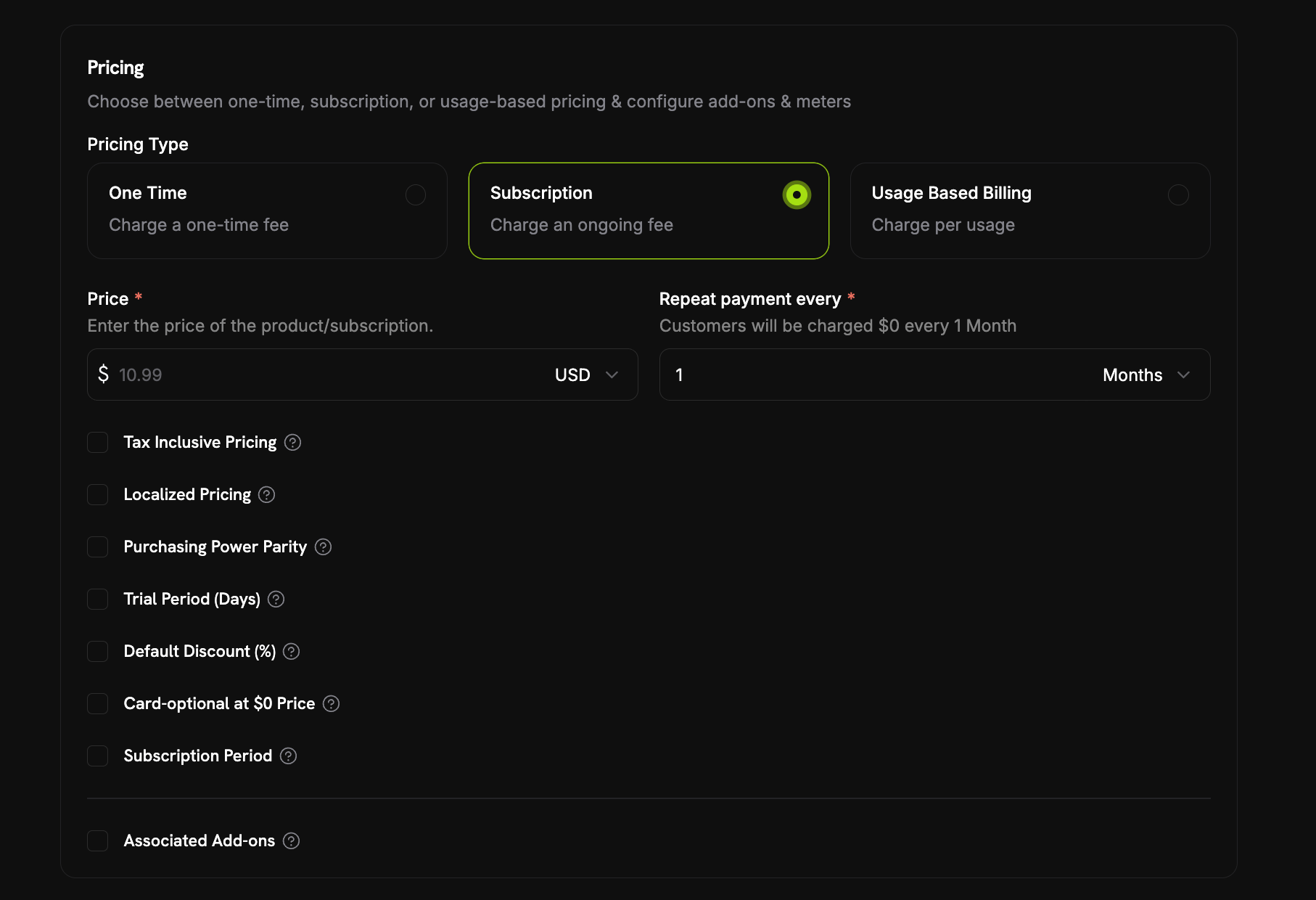 Nothing due today happens in two cases:
* **A free trial**: `trial_period_days` is set with no `trial_amount`, so the first charge is \$0 while the trial runs. Check **Start the trial without a card** under **Trial Period (Days)**.
* **A \$0 recurring price**: Either the price itself is \$0, or a discount brings it to \$0 (the product's **Default Discount (%)** or a [discount code](/features/discount-codes) stacked at checkout). Check **Card-optional at \$0 Price**.
A [paid trial](#paid-trials) always requires a card. Setting a **Trial Amount** means something is due, so the card requirement stays on.
Each checkbox maps to its own API field: `trial_payment_method_optional` (free trial case) and `zero_amount_payment_method_optional` (\$0 price case). You can enable either one on its own.
#### What Happens Without a Card
A card-optional subscription is created and activated immediately with no payment method on file. The create response returns `payment_method_required: false`, and the subscription object shows `has_payment_method: false`. Then:
1. **A reminder email goes out before billing starts.** The number of days is set in **Settings → Subscriptions → Payment Method Reminder** (see [Subscription Settings](/features/product-collections#subscription-settings)). The **Add Payment Method Reminder** email (see [Customer Emails](/features/communication-preferences#customer-emails)) links the customer to the Customer Portal to add a card.
2. **If no card is added in time, the subscription goes `on_hold`** when the trial ends or the discounted period runs out and a real charge is due. The customer receives the **Subscription On Hold, No Payment Method** email.
3. **Adding a payment method reactivates the subscription** (see [Reactivating from On Hold](#reactivating-from-on-hold)). A charge is created for the amount now due, and the subscription returns to `active` on success.
Nothing due today happens in two cases:
* **A free trial**: `trial_period_days` is set with no `trial_amount`, so the first charge is \$0 while the trial runs. Check **Start the trial without a card** under **Trial Period (Days)**.
* **A \$0 recurring price**: Either the price itself is \$0, or a discount brings it to \$0 (the product's **Default Discount (%)** or a [discount code](/features/discount-codes) stacked at checkout). Check **Card-optional at \$0 Price**.
A [paid trial](#paid-trials) always requires a card. Setting a **Trial Amount** means something is due, so the card requirement stays on.
Each checkbox maps to its own API field: `trial_payment_method_optional` (free trial case) and `zero_amount_payment_method_optional` (\$0 price case). You can enable either one on its own.
#### What Happens Without a Card
A card-optional subscription is created and activated immediately with no payment method on file. The create response returns `payment_method_required: false`, and the subscription object shows `has_payment_method: false`. Then:
1. **A reminder email goes out before billing starts.** The number of days is set in **Settings → Subscriptions → Payment Method Reminder** (see [Subscription Settings](/features/product-collections#subscription-settings)). The **Add Payment Method Reminder** email (see [Customer Emails](/features/communication-preferences#customer-emails)) links the customer to the Customer Portal to add a card.
2. **If no card is added in time, the subscription goes `on_hold`** when the trial ends or the discounted period runs out and a real charge is due. The customer receives the **Subscription On Hold, No Payment Method** email.
3. **Adding a payment method reactivates the subscription** (see [Reactivating from On Hold](#reactivating-from-on-hold)). A charge is created for the amount now due, and the subscription returns to `active` on success.
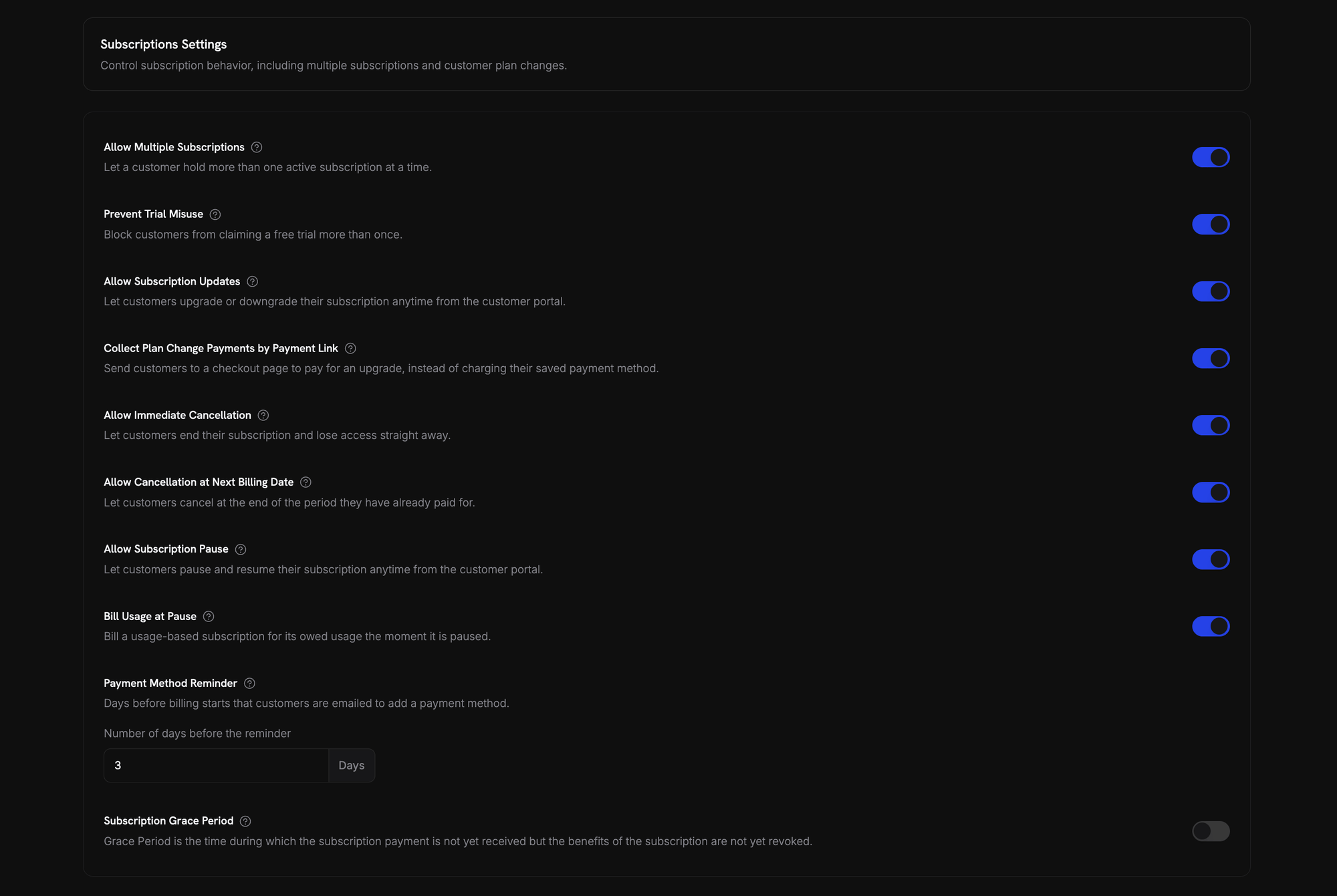 A card added before the trial or discounted period ends prevents the hold. The next renewal charges that card.
### Preventing Trial Misuse
Stop customers from repeatedly claiming trials of the same product. When enabled, a customer who has already redeemed a trial of a product gets a paid subscription instead of a fresh trial of that product.
A card added before the trial or discounted period ends prevents the hold. The next renewal charges that card.
### Preventing Trial Misuse
Stop customers from repeatedly claiming trials of the same product. When enabled, a customer who has already redeemed a trial of a product gets a paid subscription instead of a fresh trial of that product.
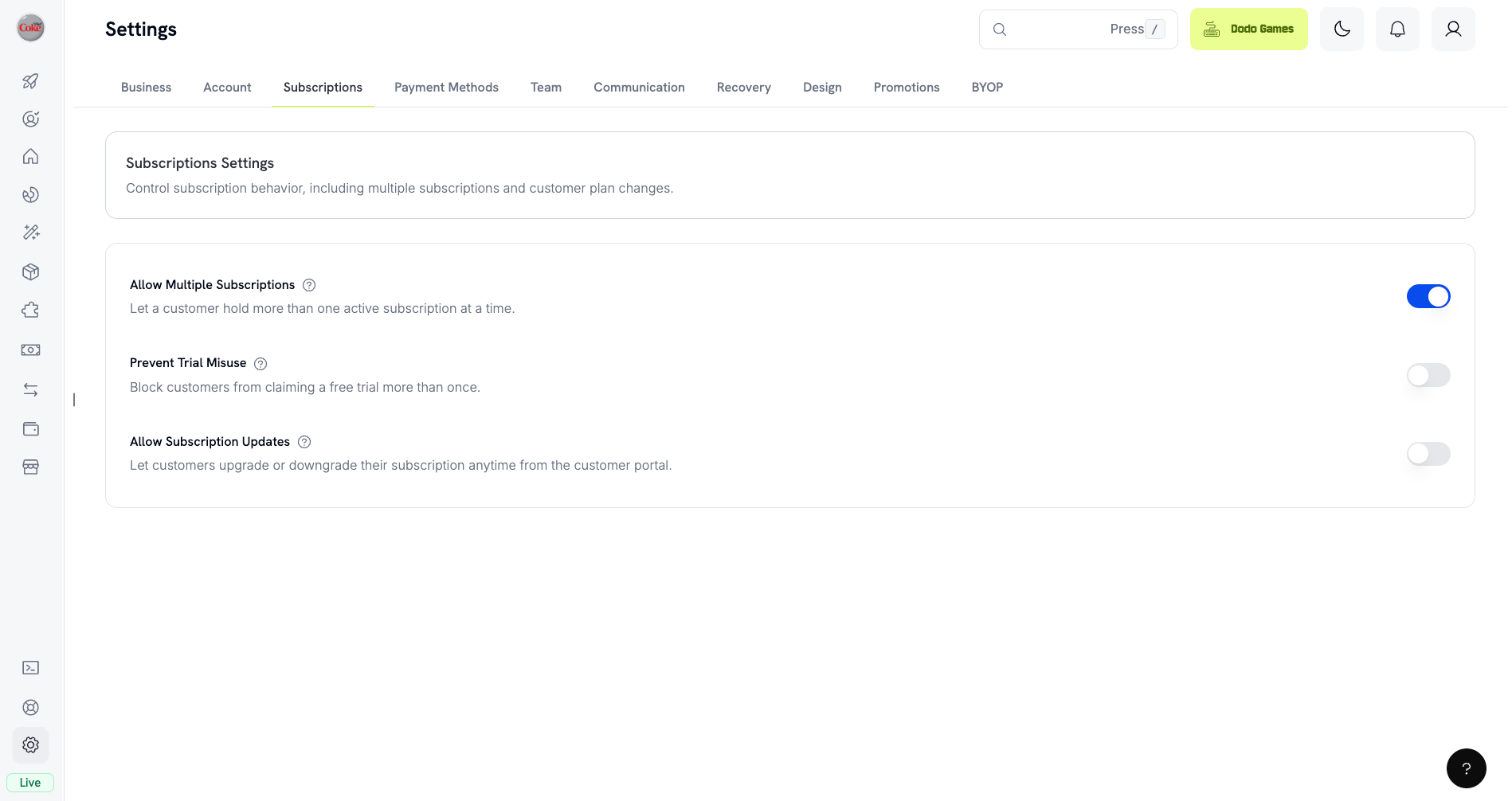 Enable it from **Settings → Subscriptions**. Once enabled:
* Customers are matched by normalized email (plus-aliases stripped), so `user+trial@example.com` and `user@example.com` count as the same person.
* Redemptions are recorded at trial activation, so a customer who cancels the same day has still consumed their trial.
* Existing customers are backfilled from historical trials by email, so past trial users are recognized immediately.
* Passing `trial_period_days` explicitly on a checkout session or subscription skips the check and grants that trial.
Off by default. See [Subscription Settings](/features/product-collections#subscription-settings) for all business-level subscription controls.
### Detecting Trial Status
The subscription object has no trial status field. For a free trial, retrieve the subscription's payments: if there is exactly one payment with a `total_amount` of 0, the subscription is in trial. This check doesn't work for paid trials, where the first payment is the `trial_amount`.
```typescript theme={null}
const subscription = await client.subscriptions.retrieve('sub_123');
const payments = await client.payments.list({
subscription_id: subscription.subscription_id
});
const isInTrial = payments.items.length === 1 &&
payments.items[0].total_amount === 0;
```
This check only works for free trials. For a [paid trial](#paid-trials), the first payment equals the trial amount. Compare the first payment against the subscription's `trial_amount`, or check whether `next_billing_date` is still within the trial window.
### Updating Trial Period
Extend the trial by updating `next_billing_date`:
```typescript theme={null}
await client.subscriptions.update('sub_123', {
next_billing_date: '2025-02-15T00:00:00Z' // New trial end date
});
```
You cannot set `next_billing_date` to a past time. The date must be in the future.
## Subscription Plan Changes
Upgrade or downgrade subscriptions, adjust quantities, or migrate to different products. Proration mode controls whether the change triggers an immediate charge, creates credit, or applies no billing adjustment.
You can change plans and update the next billing date from the dashboard, or change plans with the API. To let customers change plans themselves, add subscription products to a Product Collection and enable **Allow Subscription Updates** in **Settings → Subscriptions**.
```mermaid theme={null}
sequenceDiagram
participant C as Customer
participant A as Your App
participant D as Dodo Payments
C->>A: Request plan change
A->>D: Preview change (optional)
D-->>A: Charge breakdown
A->>C: Show cost
C->>A: Confirm
A->>D: changePlan API
D->>D: Prorate & charge
D-->>A: Result
D->>A: Webhook: plan_changed
A->>C: Access updated
```
Group related products to enable upgrade/downgrade paths in the Customer Portal.
### Proration Modes
Choose how customers are billed when changing plans:
| Mode | Upgrade | Downgrade | Billing Cycle | Best For |
| - | - | - | - | - |
| `prorated_immediately` | Credit unused time, charge full new cycle | Credit unused time, charge full new cycle | Resets to today | Fair time-based billing |
| `difference_immediately` | Charge price difference | Credit price difference | Resets to today | Simple tier changes |
| `full_immediately` | Charge full new plan price | Charge full new plan price | Resets to today | Billing cycle resets |
| `do_not_bill` | Switch immediately, no charge | Switch immediately, no charge | Stays the same | Free migrations |
#### `prorated_immediately`
Credits the unused portion of the current billing cycle, then charges a full cycle at the new plan. The new plan is never charged at a fraction of its price.
Net immediate charge = (full new cycle) minus (remaining fraction × full old cycle). If the credit exceeds the new cycle charge, the difference is held as subscription-scoped credit for future renewals. The billing cycle re-anchors to the change date.
```typescript theme={null}
await client.subscriptions.changePlan('sub_123', {
product_id: 'pdt_pro',
quantity: 1,
proration_billing_mode: 'prorated_immediately'
});
```
#### `difference_immediately`
Charges the price difference immediately (upgrade) or adds credit for future renewals (downgrade).
```typescript theme={null}
// Upgrade: charges $50 (difference between $30 and $80)
// Downgrade: credits the price difference, auto-applied to renewals
await client.subscriptions.changePlan('sub_123', {
product_id: 'pdt_pro',
quantity: 1,
proration_billing_mode: 'difference_immediately'
});
```
Credits from downgrades are subscription-scoped and auto-applied to future renewals. They're distinct from [Credit-Based Billing](/features/credit-based-billing) entitlements.
When a customer downgrades with `difference_immediately`, the unused value becomes a subscription-scoped credit that automatically offsets future renewals:
```mermaid theme={null}
flowchart LR
A[Downgrade] --> B[Calculate Credit]
B --> C[Credit Added]
C --> D[Next Renewal]
D --> E{Credit Left?}
E -->|Yes| F[Apply to invoice]
F --> D
E -->|No| G[Full price charged]
```
#### `full_immediately`
Charges the full new plan amount immediately, ignoring remaining time. Best for resetting billing cycles.
```typescript theme={null}
await client.subscriptions.changePlan('sub_123', {
product_id: 'pdt_monthly',
quantity: 1,
proration_billing_mode: 'full_immediately'
});
```
#### `do_not_bill`
Switches to the new plan immediately without any billing adjustment. No charges, no credits. The new plan is active as soon as the call succeeds but is not charged until the next renewal. The customer keeps the upgraded plan free for the rest of the current cycle. The original renewal date is preserved, and the new plan price applies at that renewal.
```typescript theme={null}
await client.subscriptions.changePlan('sub_123', {
product_id: 'pdt_new_plan',
quantity: 1,
proration_billing_mode: 'do_not_bill'
});
```
**Scenario**: Customer on Basic (\$30/month) upgrades to Pro (\$80/month) on day 16 of a 30-day cycle using `prorated_immediately`.
```
Credit for unused time on Basic = $30 × (15 remaining / 30 total) = $15.00
Full cycle of Pro = $80.00 (never prorated)
────────────────────────────────────────────────────────────────────
Immediate charge = $80.00 − $15.00 = $65.00
```
The customer starts a full new month of Pro today, so Pro is charged in full and only the unused time on Basic is credited.
Next renewal on **February 15** (January 16 + 30 days): **\$80.00/month**.
For more detailed calculation examples and edge cases, see our full [Upgrade & Downgrade Guide](/developer-resources/subscription-upgrade-downgrade).
**Scenario**: Customer on Pro (\$80/month) downgrades to Starter (\$20/month) using `difference_immediately`.
```
Credit = Old plan − New plan = $80 − $20 = $60.00
```
The \$60 credit auto-applies to future renewals:
* Renewal 1: \$20 − \$20 (credit) = **\$0.00** (\$40 credit remaining)
* Renewal 2: \$20 − \$20 (credit) = **\$0.00** (\$20 credit remaining)
* Renewal 3: \$20 − \$20 (credit) = **\$0.00** (credit exhausted)
* Renewal 4: **\$20.00** (full price)
Learn more about how credits are managed in the [Upgrade & Downgrade Guide](/developer-resources/subscription-upgrade-downgrade).
### Changing Plans with Add-ons
Modify add-ons when changing plans. Add-ons are included in proration calculations:
```typescript theme={null}
await client.subscriptions.changePlan('sub_123', {
product_id: 'pdt_pro',
quantity: 1,
proration_billing_mode: 'difference_immediately',
addons: [{ addon_id: 'addon_extra_seats', quantity: 2 }]
// addons: [] // Empty array removes all existing add-ons
});
```
By default (`effective_at: 'immediately'`) plan changes trigger immediate charges. Pass `effective_at: 'next_billing_date'` to schedule the change for the next billing date instead — the pending change is returned on the subscription as `scheduled_change`, and you can cancel it with [Cancel Scheduled Plan Change](/api-reference/subscriptions/cancel-change-plan). Failed charges may move the subscription to `on_hold` status, unless you pass `on_payment_failure: 'prevent_change'`, which keeps the subscription on its current plan until payment succeeds. Track changes via `subscription.plan_changed` webhook events. Plan changes are rejected while a subscription is `past_due` — see [Grace Period](#grace-period).
### Previewing Plan Changes
Preview the exact charge before committing:
```typescript theme={null}
const preview = await client.subscriptions.previewChangePlan('sub_123', {
product_id: 'pdt_pro',
quantity: 1,
proration_billing_mode: 'prorated_immediately'
});
console.log('You will be charged:', preview.immediate_charge.summary.total_amount, preview.immediate_charge.summary.currency);
```
Preview plan changes before committing.
## Pausing and Resuming Subscriptions
Pause a subscription to freeze it instead of ending it. Billing stops, access is revoked, and the subscription keeps its plan and history. Use it as a retention alternative to cancellation.
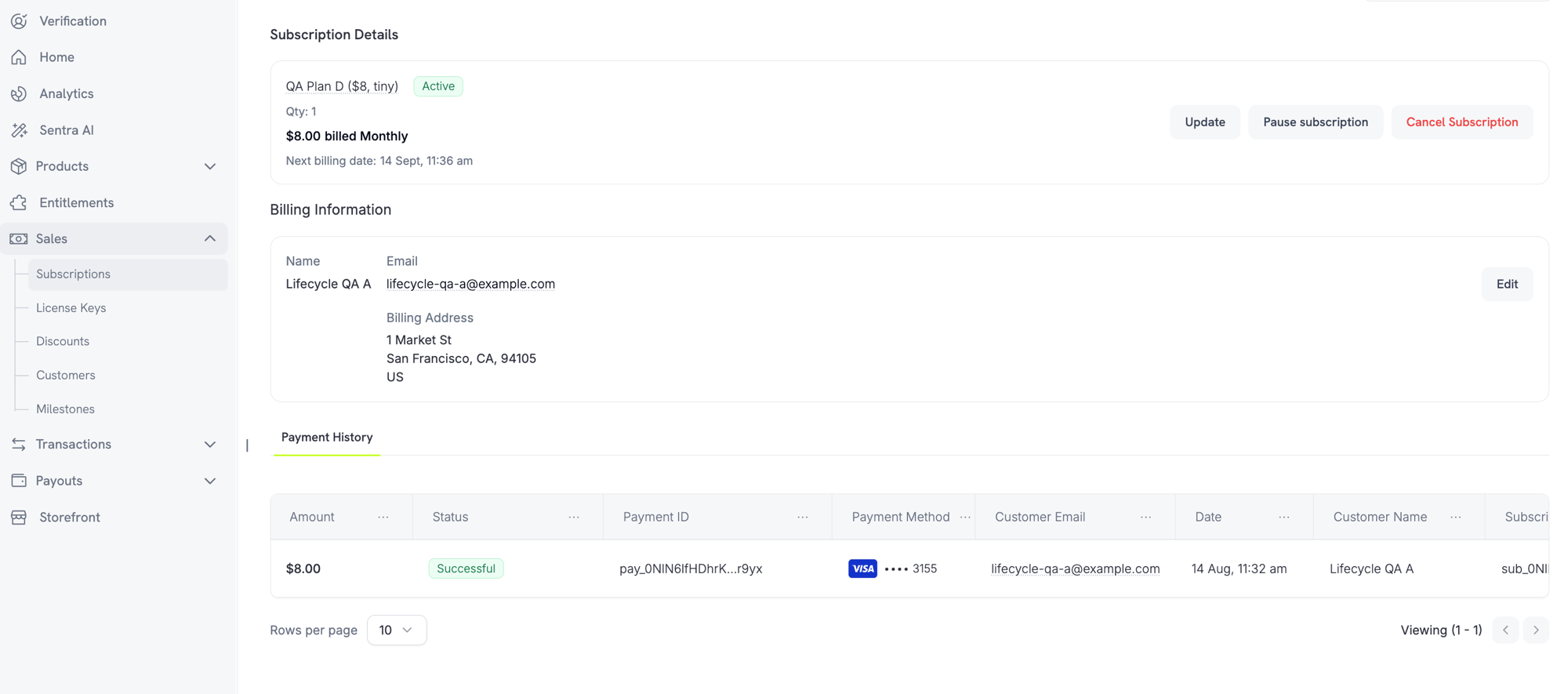
Open any active subscription under **Sales → Subscriptions** and click **Pause subscription**. The status changes to `paused` and renewals stop until resumed.
Enable it from **Settings → Subscriptions**. Once enabled:
* Customers are matched by normalized email (plus-aliases stripped), so `user+trial@example.com` and `user@example.com` count as the same person.
* Redemptions are recorded at trial activation, so a customer who cancels the same day has still consumed their trial.
* Existing customers are backfilled from historical trials by email, so past trial users are recognized immediately.
* Passing `trial_period_days` explicitly on a checkout session or subscription skips the check and grants that trial.
Off by default. See [Subscription Settings](/features/product-collections#subscription-settings) for all business-level subscription controls.
### Detecting Trial Status
The subscription object has no trial status field. For a free trial, retrieve the subscription's payments: if there is exactly one payment with a `total_amount` of 0, the subscription is in trial. This check doesn't work for paid trials, where the first payment is the `trial_amount`.
```typescript theme={null}
const subscription = await client.subscriptions.retrieve('sub_123');
const payments = await client.payments.list({
subscription_id: subscription.subscription_id
});
const isInTrial = payments.items.length === 1 &&
payments.items[0].total_amount === 0;
```
This check only works for free trials. For a [paid trial](#paid-trials), the first payment equals the trial amount. Compare the first payment against the subscription's `trial_amount`, or check whether `next_billing_date` is still within the trial window.
### Updating Trial Period
Extend the trial by updating `next_billing_date`:
```typescript theme={null}
await client.subscriptions.update('sub_123', {
next_billing_date: '2025-02-15T00:00:00Z' // New trial end date
});
```
You cannot set `next_billing_date` to a past time. The date must be in the future.
## Subscription Plan Changes
Upgrade or downgrade subscriptions, adjust quantities, or migrate to different products. Proration mode controls whether the change triggers an immediate charge, creates credit, or applies no billing adjustment.
You can change plans and update the next billing date from the dashboard, or change plans with the API. To let customers change plans themselves, add subscription products to a Product Collection and enable **Allow Subscription Updates** in **Settings → Subscriptions**.
```mermaid theme={null}
sequenceDiagram
participant C as Customer
participant A as Your App
participant D as Dodo Payments
C->>A: Request plan change
A->>D: Preview change (optional)
D-->>A: Charge breakdown
A->>C: Show cost
C->>A: Confirm
A->>D: changePlan API
D->>D: Prorate & charge
D-->>A: Result
D->>A: Webhook: plan_changed
A->>C: Access updated
```
Group related products to enable upgrade/downgrade paths in the Customer Portal.
### Proration Modes
Choose how customers are billed when changing plans:
| Mode | Upgrade | Downgrade | Billing Cycle | Best For |
| - | - | - | - | - |
| `prorated_immediately` | Credit unused time, charge full new cycle | Credit unused time, charge full new cycle | Resets to today | Fair time-based billing |
| `difference_immediately` | Charge price difference | Credit price difference | Resets to today | Simple tier changes |
| `full_immediately` | Charge full new plan price | Charge full new plan price | Resets to today | Billing cycle resets |
| `do_not_bill` | Switch immediately, no charge | Switch immediately, no charge | Stays the same | Free migrations |
#### `prorated_immediately`
Credits the unused portion of the current billing cycle, then charges a full cycle at the new plan. The new plan is never charged at a fraction of its price.
Net immediate charge = (full new cycle) minus (remaining fraction × full old cycle). If the credit exceeds the new cycle charge, the difference is held as subscription-scoped credit for future renewals. The billing cycle re-anchors to the change date.
```typescript theme={null}
await client.subscriptions.changePlan('sub_123', {
product_id: 'pdt_pro',
quantity: 1,
proration_billing_mode: 'prorated_immediately'
});
```
#### `difference_immediately`
Charges the price difference immediately (upgrade) or adds credit for future renewals (downgrade).
```typescript theme={null}
// Upgrade: charges $50 (difference between $30 and $80)
// Downgrade: credits the price difference, auto-applied to renewals
await client.subscriptions.changePlan('sub_123', {
product_id: 'pdt_pro',
quantity: 1,
proration_billing_mode: 'difference_immediately'
});
```
Credits from downgrades are subscription-scoped and auto-applied to future renewals. They're distinct from [Credit-Based Billing](/features/credit-based-billing) entitlements.
When a customer downgrades with `difference_immediately`, the unused value becomes a subscription-scoped credit that automatically offsets future renewals:
```mermaid theme={null}
flowchart LR
A[Downgrade] --> B[Calculate Credit]
B --> C[Credit Added]
C --> D[Next Renewal]
D --> E{Credit Left?}
E -->|Yes| F[Apply to invoice]
F --> D
E -->|No| G[Full price charged]
```
#### `full_immediately`
Charges the full new plan amount immediately, ignoring remaining time. Best for resetting billing cycles.
```typescript theme={null}
await client.subscriptions.changePlan('sub_123', {
product_id: 'pdt_monthly',
quantity: 1,
proration_billing_mode: 'full_immediately'
});
```
#### `do_not_bill`
Switches to the new plan immediately without any billing adjustment. No charges, no credits. The new plan is active as soon as the call succeeds but is not charged until the next renewal. The customer keeps the upgraded plan free for the rest of the current cycle. The original renewal date is preserved, and the new plan price applies at that renewal.
```typescript theme={null}
await client.subscriptions.changePlan('sub_123', {
product_id: 'pdt_new_plan',
quantity: 1,
proration_billing_mode: 'do_not_bill'
});
```
**Scenario**: Customer on Basic (\$30/month) upgrades to Pro (\$80/month) on day 16 of a 30-day cycle using `prorated_immediately`.
```
Credit for unused time on Basic = $30 × (15 remaining / 30 total) = $15.00
Full cycle of Pro = $80.00 (never prorated)
────────────────────────────────────────────────────────────────────
Immediate charge = $80.00 − $15.00 = $65.00
```
The customer starts a full new month of Pro today, so Pro is charged in full and only the unused time on Basic is credited.
Next renewal on **February 15** (January 16 + 30 days): **\$80.00/month**.
For more detailed calculation examples and edge cases, see our full [Upgrade & Downgrade Guide](/developer-resources/subscription-upgrade-downgrade).
**Scenario**: Customer on Pro (\$80/month) downgrades to Starter (\$20/month) using `difference_immediately`.
```
Credit = Old plan − New plan = $80 − $20 = $60.00
```
The \$60 credit auto-applies to future renewals:
* Renewal 1: \$20 − \$20 (credit) = **\$0.00** (\$40 credit remaining)
* Renewal 2: \$20 − \$20 (credit) = **\$0.00** (\$20 credit remaining)
* Renewal 3: \$20 − \$20 (credit) = **\$0.00** (credit exhausted)
* Renewal 4: **\$20.00** (full price)
Learn more about how credits are managed in the [Upgrade & Downgrade Guide](/developer-resources/subscription-upgrade-downgrade).
### Changing Plans with Add-ons
Modify add-ons when changing plans. Add-ons are included in proration calculations:
```typescript theme={null}
await client.subscriptions.changePlan('sub_123', {
product_id: 'pdt_pro',
quantity: 1,
proration_billing_mode: 'difference_immediately',
addons: [{ addon_id: 'addon_extra_seats', quantity: 2 }]
// addons: [] // Empty array removes all existing add-ons
});
```
By default (`effective_at: 'immediately'`) plan changes trigger immediate charges. Pass `effective_at: 'next_billing_date'` to schedule the change for the next billing date instead — the pending change is returned on the subscription as `scheduled_change`, and you can cancel it with [Cancel Scheduled Plan Change](/api-reference/subscriptions/cancel-change-plan). Failed charges may move the subscription to `on_hold` status, unless you pass `on_payment_failure: 'prevent_change'`, which keeps the subscription on its current plan until payment succeeds. Track changes via `subscription.plan_changed` webhook events. Plan changes are rejected while a subscription is `past_due` — see [Grace Period](#grace-period).
### Previewing Plan Changes
Preview the exact charge before committing:
```typescript theme={null}
const preview = await client.subscriptions.previewChangePlan('sub_123', {
product_id: 'pdt_pro',
quantity: 1,
proration_billing_mode: 'prorated_immediately'
});
console.log('You will be charged:', preview.immediate_charge.summary.total_amount, preview.immediate_charge.summary.currency);
```
Preview plan changes before committing.
## Pausing and Resuming Subscriptions
Pause a subscription to freeze it instead of ending it. Billing stops, access is revoked, and the subscription keeps its plan and history. Use it as a retention alternative to cancellation.
Open any active subscription under **Sales → Subscriptions** and click **Pause subscription**. The status changes to `paused` and renewals stop until resumed.
 ### What Happens When You Pause
* **Renewals stop.** No invoice is generated and no renewal charge is attempted while paused.
* **Access is revoked immediately.** Pausing revokes every delivered and pending [entitlement grant](/features/entitlements/introduction), which disables [license keys](/features/license-keys) and stops new [digital product](/features/digital-product-delivery) download URLs. Resuming re-grants them.
* **The billing clock freezes.** `next_billing_date` and `expires_at` both move forward by the exact length of the pause, so the customer keeps the time they already paid for.
* **No pause duration limit.** A paused subscription stays paused until resumed. You don't set a pause length upfront.
Pausing revokes access immediately, not at the end of the billing period. Make that clear to the customer before they confirm.
Resuming returns the subscription to `active` and restores entitlements. Because the clock was frozen, the next renewal lands the paused duration later than originally scheduled.
### Pausing Usage-Based Subscriptions
A [usage-based](/features/usage-based-billing/introduction) subscription can have usage recorded but not yet billed when paused. **Bill Usage at Pause** under **Settings → Subscriptions** controls what happens:
| Setting | Behavior |
| - | - |
| **On** (default) | Dodo Payments raises an invoice for accrued usage since the last billing date and collects it immediately. |
| **Off** | Owed usage is carried forward and billed on the next regular invoice. |
Only metered usage is settled this way. The recurring base fee is never charged at pause time. Standard and on-demand subscriptions have nothing to settle.
**Bill Usage at Pause** is recorded per billing cycle. Changing it mid-cycle doesn't affect the cycle already in progress; the new value applies from the next cycle onward.
The settlement invoice is collected like any other invoice, so it can fail. If it goes unpaid past the [dunning](/features/recovery/subscription-dunning) grace period, the subscription moves to `on_hold` while remaining flagged as paused.
A subscription in that state has two exits:
| Exit | Result |
| - | - |
| The settlement invoice is paid | The subscription returns to `paused`, not `active`. Resume it explicitly when the customer is ready. |
| You resume it directly | The subscription goes straight to `active` and the unpaid settlement invoice is voided, along with its pending retries. The owed usage is written off. |
Resuming is a valid exit from this hold. You don't have to collect the settlement invoice first. Resuming forgives the outstanding usage rather than deferring it.
### Letting Customers Pause Their Own Subscriptions
**Allow Subscription Pause** under **Settings → Subscriptions** controls whether customers can pause and resume from the Customer Portal. Off by default, so self-service pause is opt-in.
### What Happens When You Pause
* **Renewals stop.** No invoice is generated and no renewal charge is attempted while paused.
* **Access is revoked immediately.** Pausing revokes every delivered and pending [entitlement grant](/features/entitlements/introduction), which disables [license keys](/features/license-keys) and stops new [digital product](/features/digital-product-delivery) download URLs. Resuming re-grants them.
* **The billing clock freezes.** `next_billing_date` and `expires_at` both move forward by the exact length of the pause, so the customer keeps the time they already paid for.
* **No pause duration limit.** A paused subscription stays paused until resumed. You don't set a pause length upfront.
Pausing revokes access immediately, not at the end of the billing period. Make that clear to the customer before they confirm.
Resuming returns the subscription to `active` and restores entitlements. Because the clock was frozen, the next renewal lands the paused duration later than originally scheduled.
### Pausing Usage-Based Subscriptions
A [usage-based](/features/usage-based-billing/introduction) subscription can have usage recorded but not yet billed when paused. **Bill Usage at Pause** under **Settings → Subscriptions** controls what happens:
| Setting | Behavior |
| - | - |
| **On** (default) | Dodo Payments raises an invoice for accrued usage since the last billing date and collects it immediately. |
| **Off** | Owed usage is carried forward and billed on the next regular invoice. |
Only metered usage is settled this way. The recurring base fee is never charged at pause time. Standard and on-demand subscriptions have nothing to settle.
**Bill Usage at Pause** is recorded per billing cycle. Changing it mid-cycle doesn't affect the cycle already in progress; the new value applies from the next cycle onward.
The settlement invoice is collected like any other invoice, so it can fail. If it goes unpaid past the [dunning](/features/recovery/subscription-dunning) grace period, the subscription moves to `on_hold` while remaining flagged as paused.
A subscription in that state has two exits:
| Exit | Result |
| - | - |
| The settlement invoice is paid | The subscription returns to `paused`, not `active`. Resume it explicitly when the customer is ready. |
| You resume it directly | The subscription goes straight to `active` and the unpaid settlement invoice is voided, along with its pending retries. The owed usage is written off. |
Resuming is a valid exit from this hold. You don't have to collect the settlement invoice first. Resuming forgives the outstanding usage rather than deferring it.
### Letting Customers Pause Their Own Subscriptions
**Allow Subscription Pause** under **Settings → Subscriptions** controls whether customers can pause and resume from the Customer Portal. Off by default, so self-service pause is opt-in.
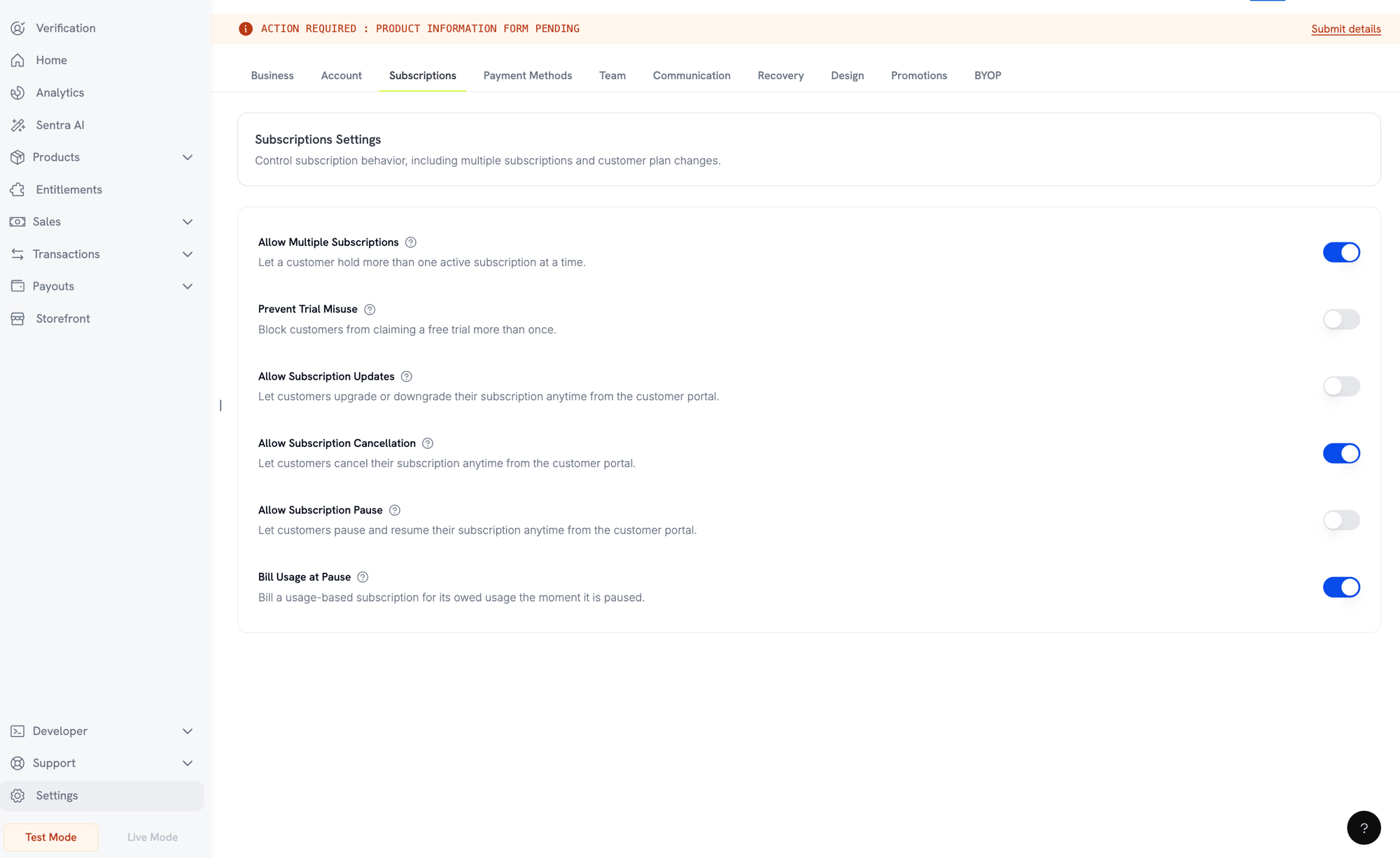 This setting only governs the Customer Portal. You can always pause and resume from the dashboard or the API.
Turning it off stops new customer pauses, but doesn't trap a customer who is already paused. They can still resume a pause they started. Pauses you started stay under your control.
See what the customer sees, including the confirmation dialog.
### Pausing via API
Pause and resume run through the `status` field on the update subscription endpoint:
```typescript theme={null}
// Pause
await client.subscriptions.update('sub_123', { status: 'paused' });
// Resume
await client.subscriptions.update('sub_123', { status: 'active' });
```
Send `paused` or `active` on its own. Combining either with any other field is rejected with `422`. The older boolean `pause` field is removed and always fails with `422`, so a caller still on it gets a loud error instead of a silent no-op.
Pausing emits `subscription.paused` and resuming emits `subscription.unpaused`. Both carry the full subscription object, with `paused_at` set while paused and `null` once resumed.
### Pause and Other Subscription Actions
* **Cancellation still works.** You can cancel a paused subscription exactly as you would an active one. Any open settlement invoice from the pause is voided.
* **Scheduled plan changes are delayed, not dropped.** A [plan change](#subscription-plan-changes) scheduled for the next billing date sits untouched while paused, then applies at the shifted billing date once resumed. Its `scheduled_change.effective_at` is a snapshot from when it was scheduled and is not adjusted for the pause. To drop the change, use [Cancel Scheduled Plan Change](/api-reference/subscriptions/cancel-change-plan).
## Subscription States
A subscription moves through defined statuses over its lifetime:
| Status | Meaning | Recoverable? | Recovery |
| - | - | - | - |
| `pending` | Being created or processed | — | Wait for `subscription.active` or `subscription.failed` |
| `active` | Active and will renew automatically | — | No action needed |
| `past_due` | Renewal payment failed and [grace period](#grace-period) is open; customer keeps full access | **Yes** | Settle renewal debt before deadline (see [Grace Period](#grace-period)) |
| `on_hold` | Renewal or plan-change charge failed; renewals stopped, access revoked | **Yes** | Recover automatically via [Payment Retries](/features/recovery/payment-retries) and [Dunning](/features/recovery/subscription-dunning), or update the payment method (see [Reactivating from On Hold](#reactivating-from-on-hold)) |
| `paused` | Deliberately paused by you or customer; billing frozen, access revoked | **Yes** | Resume with `status: active` or from Customer Portal (see [Pausing and Resuming Subscriptions](#pausing-and-resuming-subscriptions)) |
| `cancelled` | Cancelled and will not renew | Re-purchase only | Customer must start a new subscription; [Dunning](/features/recovery/subscription-dunning) can prompt a re-purchase |
| `failed` | Creation failed (initial mandate or payment did not succeed) | **No — terminal** | Customer must create a new subscription with a working payment method |
| `expired` | Reached the end of its term | — | Customer must start a new subscription if desired |
`on_hold` and `failed` are often confused. `on_hold` is recoverable for an already-active subscription whose renewal failed. `failed` is terminal and only occurs when initial subscription creation fails.
`past_due` and `on_hold` are both involuntary but differ in one way: `past_due` keeps the customer's access, `on_hold` removes it. A subscription reaches `past_due` only when you enable a [grace period](#grace-period). Without one, a failed renewal goes straight to `on_hold`.
`on_hold` and `paused` are distinct. `on_hold` is involuntary (payment failed). `paused` is deliberate (you or the customer chose to freeze it). A usage-based subscription can still owe a settlement invoice at the moment it is paused (see [Pausing Usage-Based Subscriptions](#pausing-usage-based-subscriptions)).
### State Machine
```mermaid theme={null}
stateDiagram-v2
[*] --> pending
pending --> active: Creation succeeds
pending --> failed: Mandate creation fails
active --> on_hold: Renewal fails (no grace period), or plan-change charge fails
active --> past_due: Renewal fails and a grace period is set
past_due --> active: Renewal debt settled
past_due --> on_hold: Grace period ends (on_hold)
past_due --> cancelled: Grace period ends (cancel_subscription)
past_due --> cancelled: Cancelled
on_hold --> active: Payment method updated / retry succeeds
active --> paused: Paused
paused --> active: Resumed
paused --> on_hold: Pause settlement invoice unpaid (usage-based)
on_hold --> paused: Pause settlement invoice paid
active --> cancelled: Cancelled
on_hold --> cancelled: Cancelled
paused --> cancelled: Cancelled
active --> expired: Term ends
failed --> [*]
cancelled --> [*]
expired --> [*]
```
### On Hold State
A subscription enters `on_hold` when:
* A renewal payment fails (insufficient funds, expired card, etc.)
* A plan change charge fails
* Payment method authorization fails
* A [pause settlement invoice](#pausing-usage-based-subscriptions) for a usage-based subscription goes unpaid
* A [grace period](#grace-period) ends with renewal debt unpaid and expiry action is `on_hold`
* A [Card-Optional at Zero Price](#card-optional-at-zero-price) subscription's free trial or \$0 period ends with no payment method ever added
If you set a grace period, a failed renewal moves the subscription to `past_due` first. It reaches `on_hold` only when the window ends.
When a subscription is in `on_hold`, it will not renew automatically. You must update the payment method to reactivate it.
### Reactivating from On Hold
Update the payment method to reactivate a subscription from `on_hold`. This automatically:
1. Creates a charge for remaining dues
2. Generates an invoice
3. Processes the payment using the new payment method
4. Reactivates the subscription to `active` on successful payment
The one exception is a hold caused by an unpaid pause settlement invoice. Clearing that invoice returns the subscription to `paused`, not `active`, because pause is where it was before the payment failed. Resume it explicitly once the invoice is settled.
```typescript theme={null}
const response = await client.subscriptions.updatePaymentMethod('sub_123', {
payment_method: {
type: 'new',
return_url: 'https://example.com/return'
}
});
if (response.payment_id) {
console.log('Charge created:', response.payment_id);
// Redirect customer to response.payment_link to complete payment
// Monitor webhooks for payment.succeeded and subscription.active
}
```
After successfully updating the payment method for an `on_hold` subscription, you'll receive `payment.succeeded` followed by `subscription.active` webhook events.
### Grace Period
A grace period is a window between a failed renewal and loss of access. The subscription moves to `past_due` instead of `on_hold`, and the customer keeps everything they bought until the window ends. This gives them time to fix a card without losing your product.
Off by default. Enable one from **Settings → Subscriptions → Subscription Grace Period**.
This setting only governs the Customer Portal. You can always pause and resume from the dashboard or the API.
Turning it off stops new customer pauses, but doesn't trap a customer who is already paused. They can still resume a pause they started. Pauses you started stay under your control.
See what the customer sees, including the confirmation dialog.
### Pausing via API
Pause and resume run through the `status` field on the update subscription endpoint:
```typescript theme={null}
// Pause
await client.subscriptions.update('sub_123', { status: 'paused' });
// Resume
await client.subscriptions.update('sub_123', { status: 'active' });
```
Send `paused` or `active` on its own. Combining either with any other field is rejected with `422`. The older boolean `pause` field is removed and always fails with `422`, so a caller still on it gets a loud error instead of a silent no-op.
Pausing emits `subscription.paused` and resuming emits `subscription.unpaused`. Both carry the full subscription object, with `paused_at` set while paused and `null` once resumed.
### Pause and Other Subscription Actions
* **Cancellation still works.** You can cancel a paused subscription exactly as you would an active one. Any open settlement invoice from the pause is voided.
* **Scheduled plan changes are delayed, not dropped.** A [plan change](#subscription-plan-changes) scheduled for the next billing date sits untouched while paused, then applies at the shifted billing date once resumed. Its `scheduled_change.effective_at` is a snapshot from when it was scheduled and is not adjusted for the pause. To drop the change, use [Cancel Scheduled Plan Change](/api-reference/subscriptions/cancel-change-plan).
## Subscription States
A subscription moves through defined statuses over its lifetime:
| Status | Meaning | Recoverable? | Recovery |
| - | - | - | - |
| `pending` | Being created or processed | — | Wait for `subscription.active` or `subscription.failed` |
| `active` | Active and will renew automatically | — | No action needed |
| `past_due` | Renewal payment failed and [grace period](#grace-period) is open; customer keeps full access | **Yes** | Settle renewal debt before deadline (see [Grace Period](#grace-period)) |
| `on_hold` | Renewal or plan-change charge failed; renewals stopped, access revoked | **Yes** | Recover automatically via [Payment Retries](/features/recovery/payment-retries) and [Dunning](/features/recovery/subscription-dunning), or update the payment method (see [Reactivating from On Hold](#reactivating-from-on-hold)) |
| `paused` | Deliberately paused by you or customer; billing frozen, access revoked | **Yes** | Resume with `status: active` or from Customer Portal (see [Pausing and Resuming Subscriptions](#pausing-and-resuming-subscriptions)) |
| `cancelled` | Cancelled and will not renew | Re-purchase only | Customer must start a new subscription; [Dunning](/features/recovery/subscription-dunning) can prompt a re-purchase |
| `failed` | Creation failed (initial mandate or payment did not succeed) | **No — terminal** | Customer must create a new subscription with a working payment method |
| `expired` | Reached the end of its term | — | Customer must start a new subscription if desired |
`on_hold` and `failed` are often confused. `on_hold` is recoverable for an already-active subscription whose renewal failed. `failed` is terminal and only occurs when initial subscription creation fails.
`past_due` and `on_hold` are both involuntary but differ in one way: `past_due` keeps the customer's access, `on_hold` removes it. A subscription reaches `past_due` only when you enable a [grace period](#grace-period). Without one, a failed renewal goes straight to `on_hold`.
`on_hold` and `paused` are distinct. `on_hold` is involuntary (payment failed). `paused` is deliberate (you or the customer chose to freeze it). A usage-based subscription can still owe a settlement invoice at the moment it is paused (see [Pausing Usage-Based Subscriptions](#pausing-usage-based-subscriptions)).
### State Machine
```mermaid theme={null}
stateDiagram-v2
[*] --> pending
pending --> active: Creation succeeds
pending --> failed: Mandate creation fails
active --> on_hold: Renewal fails (no grace period), or plan-change charge fails
active --> past_due: Renewal fails and a grace period is set
past_due --> active: Renewal debt settled
past_due --> on_hold: Grace period ends (on_hold)
past_due --> cancelled: Grace period ends (cancel_subscription)
past_due --> cancelled: Cancelled
on_hold --> active: Payment method updated / retry succeeds
active --> paused: Paused
paused --> active: Resumed
paused --> on_hold: Pause settlement invoice unpaid (usage-based)
on_hold --> paused: Pause settlement invoice paid
active --> cancelled: Cancelled
on_hold --> cancelled: Cancelled
paused --> cancelled: Cancelled
active --> expired: Term ends
failed --> [*]
cancelled --> [*]
expired --> [*]
```
### On Hold State
A subscription enters `on_hold` when:
* A renewal payment fails (insufficient funds, expired card, etc.)
* A plan change charge fails
* Payment method authorization fails
* A [pause settlement invoice](#pausing-usage-based-subscriptions) for a usage-based subscription goes unpaid
* A [grace period](#grace-period) ends with renewal debt unpaid and expiry action is `on_hold`
* A [Card-Optional at Zero Price](#card-optional-at-zero-price) subscription's free trial or \$0 period ends with no payment method ever added
If you set a grace period, a failed renewal moves the subscription to `past_due` first. It reaches `on_hold` only when the window ends.
When a subscription is in `on_hold`, it will not renew automatically. You must update the payment method to reactivate it.
### Reactivating from On Hold
Update the payment method to reactivate a subscription from `on_hold`. This automatically:
1. Creates a charge for remaining dues
2. Generates an invoice
3. Processes the payment using the new payment method
4. Reactivates the subscription to `active` on successful payment
The one exception is a hold caused by an unpaid pause settlement invoice. Clearing that invoice returns the subscription to `paused`, not `active`, because pause is where it was before the payment failed. Resume it explicitly once the invoice is settled.
```typescript theme={null}
const response = await client.subscriptions.updatePaymentMethod('sub_123', {
payment_method: {
type: 'new',
return_url: 'https://example.com/return'
}
});
if (response.payment_id) {
console.log('Charge created:', response.payment_id);
// Redirect customer to response.payment_link to complete payment
// Monitor webhooks for payment.succeeded and subscription.active
}
```
After successfully updating the payment method for an `on_hold` subscription, you'll receive `payment.succeeded` followed by `subscription.active` webhook events.
### Grace Period
A grace period is a window between a failed renewal and loss of access. The subscription moves to `past_due` instead of `on_hold`, and the customer keeps everything they bought until the window ends. This gives them time to fix a card without losing your product.
Off by default. Enable one from **Settings → Subscriptions → Subscription Grace Period**.
 #### Settings
| Setting | Values | Description |
| - | - | - |
| Subscription Grace Period | on / off | Enable grace period for the business. Off by default. |
| Number of days of grace period | 1 to 30 days | Window length. Default is 3 days. |
| Status of subscription after grace period | `on_hold` or `cancel_subscription` | What happens when the window ends unpaid. |
#### What Happens During the Window
While a subscription is `past_due`:
* The customer keeps access. Entitlement grants, license keys, and digital product downloads all stay live.
* Usage-based billing keeps recording usage.
* The subscription does not renew.
* The subscription cannot be paused.
* [Dunning](/features/recovery/subscription-dunning) emails go out, and [payment retries](/features/recovery/payment-retries) continue.
* `subscription.past_due` is emitted at entry.
The `subscription.past_due` webhook carries the deadline as `past_due_ends_at`. Store it when the event arrives — the subscription API does not return this field. Every subscription webhook while the window is open carries the same value, next to a `status` of `past_due`.
The window is fixed when the subscription enters it. If you change the length or expiry action later, a window already open keeps its original values. New values apply to the next subscription that enters a window.
#### Recovery
The window closes when the renewal debt is settled through a successful retry or when the customer updates the payment method. The subscription returns to `active`, and a `subscription.active` webhook is sent.
Only the failed renewal opens a window. An unrelated merchant charge that goes unpaid does not move a subscription to `past_due`.
#### When the Window Ends
If the renewal debt is still unpaid at the deadline, the subscription moves to `on_hold` or to `cancelled`, as you configured. At the same time:
* A scheduled plan change on the subscription is cancelled.
* A pending plan change whose invoice is still unpaid is cancelled.
If the expiry action is `cancel_subscription`, open invoices are also voided, and their payment retries stop.
A pending plan change whose invoice was paid is applied while the window is still open, not at the deadline. A paid invoice settles the change whatever the subscription status.
Plan changes are rejected while a subscription is `past_due`. Settle the renewal debt first.
### Webhook Events by Transition
Each transition emits a webhook so you can drive entitlement logic without polling:
| Transition | Event |
| - | - |
| Subscription activated | `subscription.active` |
| Renewal succeeds | `subscription.renewed` |
| Renewal fails, grace period opens | `subscription.past_due` |
| Renewal fails → on hold | `subscription.on_hold` |
| Subscription paused | `subscription.paused` |
| Paused subscription resumed | `subscription.unpaused` |
| Creation fails | `subscription.failed` |
| Plan upgraded/downgraded | `subscription.plan_changed` |
| Cancelled | `subscription.cancelled` |
| Term ended | `subscription.expired` |
| Any field changes | `subscription.updated` |
View the full payload schema for subscription lifecycle events.
## API Management
Use `POST /checkouts` to create subscriptions programmatically from products, with optional trials (`subscription_data.trial_period_days`) and add-ons (`product_cart[].addons`).
`POST /subscriptions` is deprecated. Existing integrations keep working, but new integrations should use [Checkout Sessions](/api-reference/checkout-sessions/create).
View the create checkout session API.
Use `PATCH /subscriptions/{subscription_id}` to cancel at the next billing date, extend the subscription period, update billing details, or modify metadata. To change quantity, use the [Change Plan API](/api-reference/subscriptions/change-plan) instead.
Learn how to update subscription details.
Pause and resume run through the `status` field on `PATCH /subscriptions/{subscription_id}`: `status: paused` pauses an active subscription and `status: active` resumes it. Neither value can be combined with any other field in the same request. See [Pausing and Resuming Subscriptions](#pausing-and-resuming-subscriptions) for full behavior and billing effects.
View the update subscription API, including the `status` field.
Change the active product and quantities with proration controls.
Review plan change options.
For on-demand subscriptions, charge specific amounts on demand.
Charge an on-demand subscription.
Use `GET /subscriptions` to list all subscriptions and `GET /subscriptions/{id}` to retrieve one.
Browse listing and retrieval APIs.
Fetch recorded usage for metered or hybrid pricing models.
See usage history API.
Update the payment method for a subscription. For active subscriptions, this updates the payment method for future renewals. For subscriptions in `on_hold`, this reactivates the subscription by creating a charge for remaining dues.
When generating a new payment-method link, you can pass `allowed_payment_method_types` to restrict which payment methods the customer sees. Customers will never see a method that isn't in the list, though including a method does not guarantee it appears (availability depends on factors like customer location and your business settings).
Learn how to update payment methods and reactivate subscriptions.
## Common Use Cases
* **SaaS and APIs**: Tiered access with add-ons for seats or usage
* **Content and media**: Monthly access with introductory trials
* **B2B support plans**: Annual contracts with premium support add-ons
* **Tools and plugins**: License keys and versioned releases
## Integration Examples
### Checkout Sessions (Subscriptions)
Create a checkout session with a subscription product and optional add-ons:
```typescript theme={null}
const session = await client.checkoutSessions.create({
product_cart: [
{
product_id: 'pdt_subscription',
quantity: 1
}
]
});
```
### Plan Changes with Proration
Upgrade or downgrade a subscription and control proration behavior:
```typescript theme={null}
await client.subscriptions.changePlan('sub_123', {
product_id: 'pdt_new',
quantity: 1,
proration_billing_mode: 'difference_immediately'
});
```
### Cancel at Next Billing Date
Schedule a cancellation that takes effect at the end of the current billing period:
```typescript theme={null}
await client.subscriptions.update('sub_123', {
cancel_at_next_billing_date: true
});
```
### Extend the Subscription Period
Extend how long a subscription runs by passing a new `subscription_period_count` and `subscription_period_interval` to `PATCH /subscriptions/{subscription_id}`. The subscription's expiry is recomputed from the new count and interval:
```typescript theme={null}
await client.subscriptions.update('sub_123', {
subscription_period_count: 5,
subscription_period_interval: 'Month'
});
```
A subscription's period can only be increased, never shortened.
### On‑Demand Subscriptions
Create an on‑demand subscription and charge later as needed:
```typescript theme={null}
// Note: POST /subscriptions is deprecated — prefer checkout sessions
const onDemand = await client.subscriptions.create({
customer: { customer_id: 'cus_123' },
billing: { country: 'US' },
product_id: 'pdt_on_demand',
quantity: 1,
on_demand: { mandate_only: true }
});
await client.subscriptions.charge(onDemand.subscription_id, {
product_price: 4900,
product_currency: 'USD',
product_description: 'Extra usage for September'
});
```
### Update Payment Method for Active Subscription
Update the payment method for an active subscription:
```typescript theme={null}
const response = await client.subscriptions.updatePaymentMethod('sub_123', {
payment_method: {
type: 'new',
return_url: 'https://example.com/return'
}
});
// Or use existing payment method
await client.subscriptions.updatePaymentMethod('sub_123', {
payment_method: {
type: 'existing',
payment_method_id: 'pm_abc123'
}
});
```
For a subscription from a [multi-subscription cart](/developer-resources/checkout-session#multi-subscription-cart), the new payment method also moves to the other subscriptions from that cart that have the same settlement currency and billing currency. Every subscription from a cart starts with the same pair. If a later change, such as a plan change, moved one of them to another settlement currency or billing currency, update that subscription separately.
### Reactivate Subscription from on\_hold
Reactivate a subscription that went on hold due to failed payment:
```typescript theme={null}
const response = await client.subscriptions.updatePaymentMethod('sub_123', {
payment_method: {
type: 'new',
return_url: 'https://example.com/return'
}
});
if (response.payment_id) {
// Charge created for remaining dues
// Redirect customer to response.payment_link
// Monitor webhooks: payment.succeeded → subscription.active
}
```
## Subscriptions with RBI-Compliant Mandates
UPI and Indian card subscriptions operate under RBI (Reserve Bank of India) regulations with specific mandate requirements.
### Mandate Limits
The mandate type and amount depend on your subscription's recurring charge:
* **Charges below the mandate floor (default ₹15,000)**: We create an on-demand mandate for the floor amount. The subscription amount is charged periodically according to your subscription frequency, up to the mandate limit.
* **Charges at or above the mandate floor**: We create a subscription mandate (or on-demand mandate) for the exact subscription amount.
The mandate floor is configurable per merchant or per request via `mandate_min_amount_inr_paise` (INR paise). The amount registered with the bank is `max(mandate_floor, billing_amount)` — so the floor effectively becomes the customer-facing authorization ceiling whenever billing is lower.
See [India Payment Methods](/features/payment-methods/india#configurable-mandate-floor) for detailed information about RBI-compliant mandates and the configurable mandate floor.
### Upgrade and Downgrade Considerations
When upgrading or downgrading subscriptions, consider the mandate limits:
* If an upgrade/downgrade results in a charge amount that exceeds the mandate floor (default ₹15,000) and goes beyond the existing on-demand payment limit, the transaction charge may fail.
* The customer may need to update their payment method or change the subscription again to establish a new mandate with the correct limit.
### Authorization for High-Value Charges
For subscription charges of ₹15,000 or more:
* The customer will be prompted by their bank to authorize the transaction.
* If the customer fails to authorize, the transaction fails and the subscription goes on hold.
### 48-Hour Processing Delay
Recurring charges on Indian cards and UPI subscriptions follow a unique processing pattern:
* Charges are initiated on the scheduled date according to your subscription frequency.
* The actual deduction from the customer's account occurs only after 48 hours from payment initiation.
* This 48-hour window may extend up to 2-3 additional hours depending on bank API responses.
### Mandate Cancellation Window
During the 48-hour processing window:
* Customers can cancel the mandate via their banking apps.
* If a customer cancels the mandate during this period, the subscription will remain active (edge case specific to Indian card and UPI AutoPay subscriptions).
* However, the actual deduction may fail, and in that case, we will put the subscription on hold.
If you provide benefits, credits, or subscription usage to customers immediately upon charge initiation, handle this 48-hour window appropriately:
* Delay benefit activation until payment confirmation
* Implement grace periods or temporary access
* Monitor subscription status for mandate cancellations
* Handle subscription hold states in your application logic
Monitor subscription webhooks to track payment status changes and handle edge cases where mandates are cancelled during the 48-hour window.
## Best Practices
* **Start with clear tiers**: 2-3 plans with obvious differences
* **Communicate pricing**: Show totals, proration, and next renewal date
* **Use trials thoughtfully**: Convert with onboarding, not just time
* **Leverage add-ons**: Keep base plans simple and upsell extras
* **Test changes**: Validate plan changes and proration in test mode
Subscriptions are a flexible foundation for recurring revenue. Start simple, test thoroughly, and iterate based on adoption, churn, and expansion metrics.
This documentation is built and hosted on [Mintlify](https://mintlify.com), a developer documentation platform.
#### Settings
| Setting | Values | Description |
| - | - | - |
| Subscription Grace Period | on / off | Enable grace period for the business. Off by default. |
| Number of days of grace period | 1 to 30 days | Window length. Default is 3 days. |
| Status of subscription after grace period | `on_hold` or `cancel_subscription` | What happens when the window ends unpaid. |
#### What Happens During the Window
While a subscription is `past_due`:
* The customer keeps access. Entitlement grants, license keys, and digital product downloads all stay live.
* Usage-based billing keeps recording usage.
* The subscription does not renew.
* The subscription cannot be paused.
* [Dunning](/features/recovery/subscription-dunning) emails go out, and [payment retries](/features/recovery/payment-retries) continue.
* `subscription.past_due` is emitted at entry.
The `subscription.past_due` webhook carries the deadline as `past_due_ends_at`. Store it when the event arrives — the subscription API does not return this field. Every subscription webhook while the window is open carries the same value, next to a `status` of `past_due`.
The window is fixed when the subscription enters it. If you change the length or expiry action later, a window already open keeps its original values. New values apply to the next subscription that enters a window.
#### Recovery
The window closes when the renewal debt is settled through a successful retry or when the customer updates the payment method. The subscription returns to `active`, and a `subscription.active` webhook is sent.
Only the failed renewal opens a window. An unrelated merchant charge that goes unpaid does not move a subscription to `past_due`.
#### When the Window Ends
If the renewal debt is still unpaid at the deadline, the subscription moves to `on_hold` or to `cancelled`, as you configured. At the same time:
* A scheduled plan change on the subscription is cancelled.
* A pending plan change whose invoice is still unpaid is cancelled.
If the expiry action is `cancel_subscription`, open invoices are also voided, and their payment retries stop.
A pending plan change whose invoice was paid is applied while the window is still open, not at the deadline. A paid invoice settles the change whatever the subscription status.
Plan changes are rejected while a subscription is `past_due`. Settle the renewal debt first.
### Webhook Events by Transition
Each transition emits a webhook so you can drive entitlement logic without polling:
| Transition | Event |
| - | - |
| Subscription activated | `subscription.active` |
| Renewal succeeds | `subscription.renewed` |
| Renewal fails, grace period opens | `subscription.past_due` |
| Renewal fails → on hold | `subscription.on_hold` |
| Subscription paused | `subscription.paused` |
| Paused subscription resumed | `subscription.unpaused` |
| Creation fails | `subscription.failed` |
| Plan upgraded/downgraded | `subscription.plan_changed` |
| Cancelled | `subscription.cancelled` |
| Term ended | `subscription.expired` |
| Any field changes | `subscription.updated` |
View the full payload schema for subscription lifecycle events.
## API Management
Use `POST /checkouts` to create subscriptions programmatically from products, with optional trials (`subscription_data.trial_period_days`) and add-ons (`product_cart[].addons`).
`POST /subscriptions` is deprecated. Existing integrations keep working, but new integrations should use [Checkout Sessions](/api-reference/checkout-sessions/create).
View the create checkout session API.
Use `PATCH /subscriptions/{subscription_id}` to cancel at the next billing date, extend the subscription period, update billing details, or modify metadata. To change quantity, use the [Change Plan API](/api-reference/subscriptions/change-plan) instead.
Learn how to update subscription details.
Pause and resume run through the `status` field on `PATCH /subscriptions/{subscription_id}`: `status: paused` pauses an active subscription and `status: active` resumes it. Neither value can be combined with any other field in the same request. See [Pausing and Resuming Subscriptions](#pausing-and-resuming-subscriptions) for full behavior and billing effects.
View the update subscription API, including the `status` field.
Change the active product and quantities with proration controls.
Review plan change options.
For on-demand subscriptions, charge specific amounts on demand.
Charge an on-demand subscription.
Use `GET /subscriptions` to list all subscriptions and `GET /subscriptions/{id}` to retrieve one.
Browse listing and retrieval APIs.
Fetch recorded usage for metered or hybrid pricing models.
See usage history API.
Update the payment method for a subscription. For active subscriptions, this updates the payment method for future renewals. For subscriptions in `on_hold`, this reactivates the subscription by creating a charge for remaining dues.
When generating a new payment-method link, you can pass `allowed_payment_method_types` to restrict which payment methods the customer sees. Customers will never see a method that isn't in the list, though including a method does not guarantee it appears (availability depends on factors like customer location and your business settings).
Learn how to update payment methods and reactivate subscriptions.
## Common Use Cases
* **SaaS and APIs**: Tiered access with add-ons for seats or usage
* **Content and media**: Monthly access with introductory trials
* **B2B support plans**: Annual contracts with premium support add-ons
* **Tools and plugins**: License keys and versioned releases
## Integration Examples
### Checkout Sessions (Subscriptions)
Create a checkout session with a subscription product and optional add-ons:
```typescript theme={null}
const session = await client.checkoutSessions.create({
product_cart: [
{
product_id: 'pdt_subscription',
quantity: 1
}
]
});
```
### Plan Changes with Proration
Upgrade or downgrade a subscription and control proration behavior:
```typescript theme={null}
await client.subscriptions.changePlan('sub_123', {
product_id: 'pdt_new',
quantity: 1,
proration_billing_mode: 'difference_immediately'
});
```
### Cancel at Next Billing Date
Schedule a cancellation that takes effect at the end of the current billing period:
```typescript theme={null}
await client.subscriptions.update('sub_123', {
cancel_at_next_billing_date: true
});
```
### Extend the Subscription Period
Extend how long a subscription runs by passing a new `subscription_period_count` and `subscription_period_interval` to `PATCH /subscriptions/{subscription_id}`. The subscription's expiry is recomputed from the new count and interval:
```typescript theme={null}
await client.subscriptions.update('sub_123', {
subscription_period_count: 5,
subscription_period_interval: 'Month'
});
```
A subscription's period can only be increased, never shortened.
### On‑Demand Subscriptions
Create an on‑demand subscription and charge later as needed:
```typescript theme={null}
// Note: POST /subscriptions is deprecated — prefer checkout sessions
const onDemand = await client.subscriptions.create({
customer: { customer_id: 'cus_123' },
billing: { country: 'US' },
product_id: 'pdt_on_demand',
quantity: 1,
on_demand: { mandate_only: true }
});
await client.subscriptions.charge(onDemand.subscription_id, {
product_price: 4900,
product_currency: 'USD',
product_description: 'Extra usage for September'
});
```
### Update Payment Method for Active Subscription
Update the payment method for an active subscription:
```typescript theme={null}
const response = await client.subscriptions.updatePaymentMethod('sub_123', {
payment_method: {
type: 'new',
return_url: 'https://example.com/return'
}
});
// Or use existing payment method
await client.subscriptions.updatePaymentMethod('sub_123', {
payment_method: {
type: 'existing',
payment_method_id: 'pm_abc123'
}
});
```
For a subscription from a [multi-subscription cart](/developer-resources/checkout-session#multi-subscription-cart), the new payment method also moves to the other subscriptions from that cart that have the same settlement currency and billing currency. Every subscription from a cart starts with the same pair. If a later change, such as a plan change, moved one of them to another settlement currency or billing currency, update that subscription separately.
### Reactivate Subscription from on\_hold
Reactivate a subscription that went on hold due to failed payment:
```typescript theme={null}
const response = await client.subscriptions.updatePaymentMethod('sub_123', {
payment_method: {
type: 'new',
return_url: 'https://example.com/return'
}
});
if (response.payment_id) {
// Charge created for remaining dues
// Redirect customer to response.payment_link
// Monitor webhooks: payment.succeeded → subscription.active
}
```
## Subscriptions with RBI-Compliant Mandates
UPI and Indian card subscriptions operate under RBI (Reserve Bank of India) regulations with specific mandate requirements.
### Mandate Limits
The mandate type and amount depend on your subscription's recurring charge:
* **Charges below the mandate floor (default ₹15,000)**: We create an on-demand mandate for the floor amount. The subscription amount is charged periodically according to your subscription frequency, up to the mandate limit.
* **Charges at or above the mandate floor**: We create a subscription mandate (or on-demand mandate) for the exact subscription amount.
The mandate floor is configurable per merchant or per request via `mandate_min_amount_inr_paise` (INR paise). The amount registered with the bank is `max(mandate_floor, billing_amount)` — so the floor effectively becomes the customer-facing authorization ceiling whenever billing is lower.
See [India Payment Methods](/features/payment-methods/india#configurable-mandate-floor) for detailed information about RBI-compliant mandates and the configurable mandate floor.
### Upgrade and Downgrade Considerations
When upgrading or downgrading subscriptions, consider the mandate limits:
* If an upgrade/downgrade results in a charge amount that exceeds the mandate floor (default ₹15,000) and goes beyond the existing on-demand payment limit, the transaction charge may fail.
* The customer may need to update their payment method or change the subscription again to establish a new mandate with the correct limit.
### Authorization for High-Value Charges
For subscription charges of ₹15,000 or more:
* The customer will be prompted by their bank to authorize the transaction.
* If the customer fails to authorize, the transaction fails and the subscription goes on hold.
### 48-Hour Processing Delay
Recurring charges on Indian cards and UPI subscriptions follow a unique processing pattern:
* Charges are initiated on the scheduled date according to your subscription frequency.
* The actual deduction from the customer's account occurs only after 48 hours from payment initiation.
* This 48-hour window may extend up to 2-3 additional hours depending on bank API responses.
### Mandate Cancellation Window
During the 48-hour processing window:
* Customers can cancel the mandate via their banking apps.
* If a customer cancels the mandate during this period, the subscription will remain active (edge case specific to Indian card and UPI AutoPay subscriptions).
* However, the actual deduction may fail, and in that case, we will put the subscription on hold.
If you provide benefits, credits, or subscription usage to customers immediately upon charge initiation, handle this 48-hour window appropriately:
* Delay benefit activation until payment confirmation
* Implement grace periods or temporary access
* Monitor subscription status for mandate cancellations
* Handle subscription hold states in your application logic
Monitor subscription webhooks to track payment status changes and handle edge cases where mandates are cancelled during the 48-hour window.
## Best Practices
* **Start with clear tiers**: 2-3 plans with obvious differences
* **Communicate pricing**: Show totals, proration, and next renewal date
* **Use trials thoughtfully**: Convert with onboarding, not just time
* **Leverage add-ons**: Keep base plans simple and upsell extras
* **Test changes**: Validate plan changes and proration in test mode
Subscriptions are a flexible foundation for recurring revenue. Start simple, test thoroughly, and iterate based on adoption, churn, and expansion metrics.
This documentation is built and hosted on [Mintlify](https://mintlify.com), a developer documentation platform.