> ## Documentation Index
> Fetch the complete documentation index at: https://docs.dodopayments.com/llms.txt
> Use this file to discover all available pages before exploring further.
# Usage-Based Billing
> Charge customers based on what they actually use with flexible metering and automated billing.
Usage-based billing charges customers for what they consume—API calls, storage, AI tokens, or any metric you define. Customers pay for what they use. You can add a fixed base fee, or set it to zero.
**Best for**: APIs, AI services, infrastructure platforms, and any product where value scales with usage.
## How It Works
Your application sends events when billable actions occur.
```javascript theme={null}
{
"events": [
{
"event_id": "evt_123",
"customer_id": "cus_abc",
"event_name": "api.call",
"metadata": { "endpoint": "/v1/users" }
}
]
}
```
Meters aggregate events into billable quantities using Count, Sum, Max, or Last aggregation.
Set pricing per unit and optional free thresholds. Customers are billed automatically each cycle.
## Core Concepts
### Events
Events represent usage actions in your application. Each event includes:
* **Event Name**: Type of usage (e.g., `api.call`)
* **Customer ID**: Who used it
* **Metadata**: Additional properties for aggregation and filtering
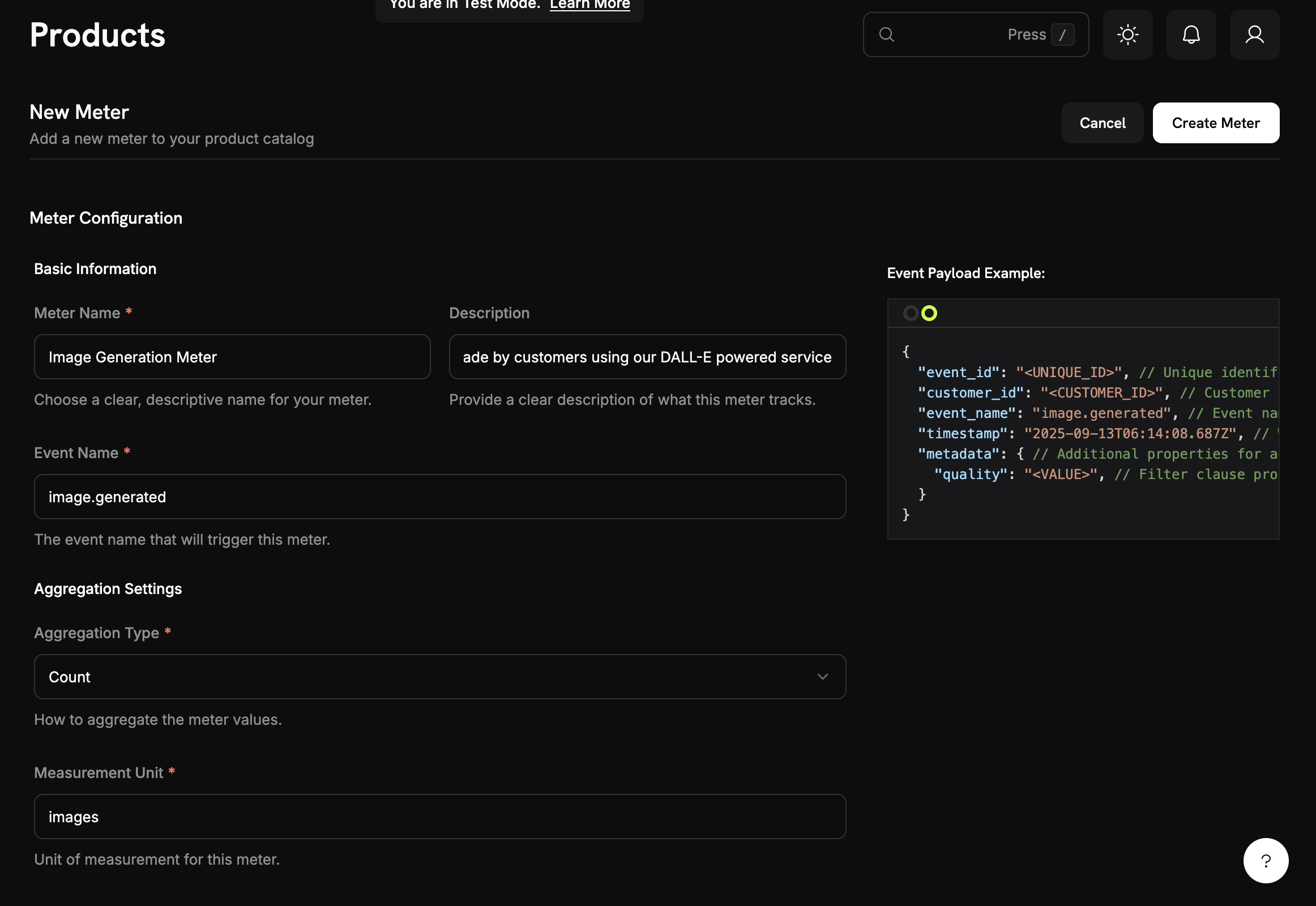
### Meters
Meters aggregate events into billable quantities:
* **Count**: Total number of events (API calls, uploads)
* **Sum**: Sum of numeric values (total bytes, tokens)
* **Max**: Highest value in the period (peak users, max storage)
* **Last**: Most recent value
 ### Products with Usage Pricing
Set pricing per unit and optional free thresholds:
### Products with Usage Pricing
Set pricing per unit and optional free thresholds:
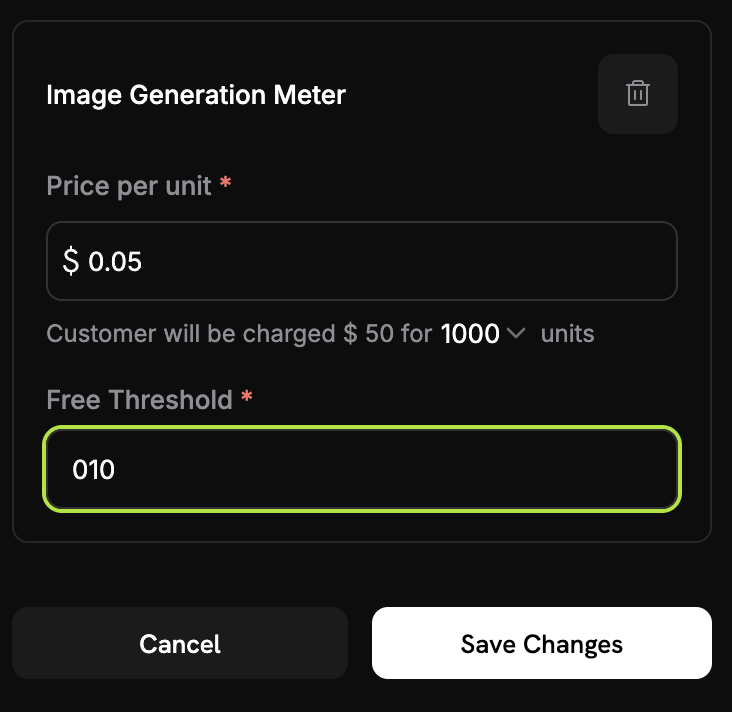 **Example**: 2,500 calls minus 1,000 free = 1,500 chargeable calls × \$0.02 = \$30.00
### Credit-Based Deduction
Instead of charging per-unit in dollars, you can configure meters to deduct from a customer's [credit balance](/features/credit-based-billing). Credits refresh each billing cycle and apply before any overage charges.
## Quick Start
Go to **Meters** in the dashboard and click **Create Meter**.
1. Enter an event name (e.g., `api.call`)
2. Choose an aggregation type (Count, Sum, Max, or Last)
3. Add optional filters to exclude certain events
Link the meter to a product and set pricing:
**Example**: 2,500 calls minus 1,000 free = 1,500 chargeable calls × \$0.02 = \$30.00
### Credit-Based Deduction
Instead of charging per-unit in dollars, you can configure meters to deduct from a customer's [credit balance](/features/credit-based-billing). Credits refresh each billing cycle and apply before any overage charges.
## Quick Start
Go to **Meters** in the dashboard and click **Create Meter**.
1. Enter an event name (e.g., `api.call`)
2. Choose an aggregation type (Count, Sum, Max, or Last)
3. Add optional filters to exclude certain events
Link the meter to a product and set pricing:
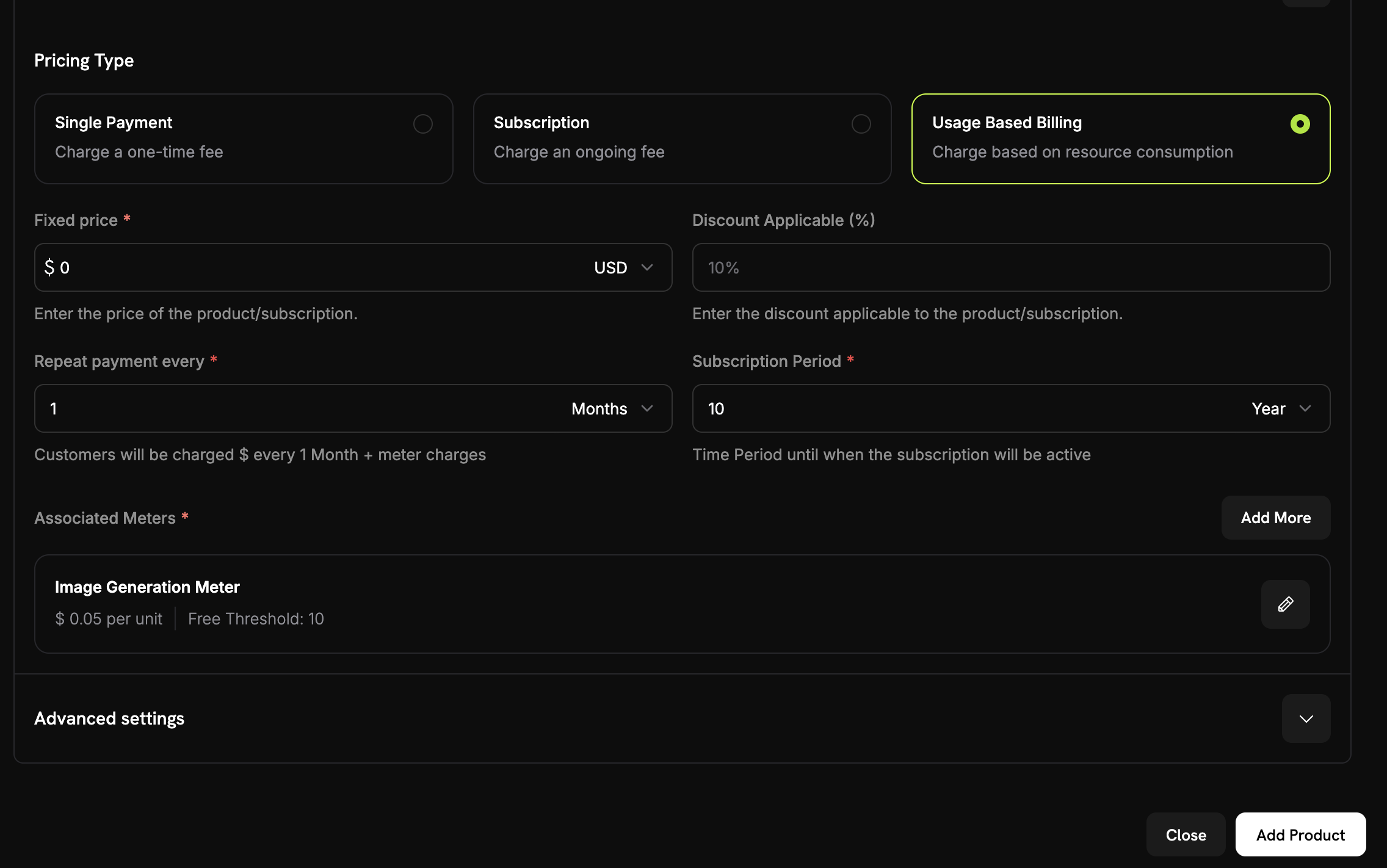 1. Go to **Products** and select or create a product
2. Select **Usage Based Billing** as the pricing type
3. Choose your meter
4. Set the price per unit and optional free threshold
```javascript theme={null}
await fetch('https://test.dodopayments.com/events/ingest', {
method: 'POST',
headers: {
'Authorization': `Bearer ${process.env.DODO_PAYMENTS_API_KEY}`,
'Content-Type': 'application/json'
},
body: JSON.stringify({
events: [{
event_id: "unique_event_id",
customer_id: "cus_abc123",
event_name: "api.call",
metadata: { endpoint: "/v1/users" }
}]
})
});
```
1. Go to **Products** and select or create a product
2. Select **Usage Based Billing** as the pricing type
3. Choose your meter
4. Set the price per unit and optional free threshold
```javascript theme={null}
await fetch('https://test.dodopayments.com/events/ingest', {
method: 'POST',
headers: {
'Authorization': `Bearer ${process.env.DODO_PAYMENTS_API_KEY}`,
'Content-Type': 'application/json'
},
body: JSON.stringify({
events: [{
event_id: "unique_event_id",
customer_id: "cus_abc123",
event_name: "api.call",
metadata: { endpoint: "/v1/users" }
}]
})
});
```
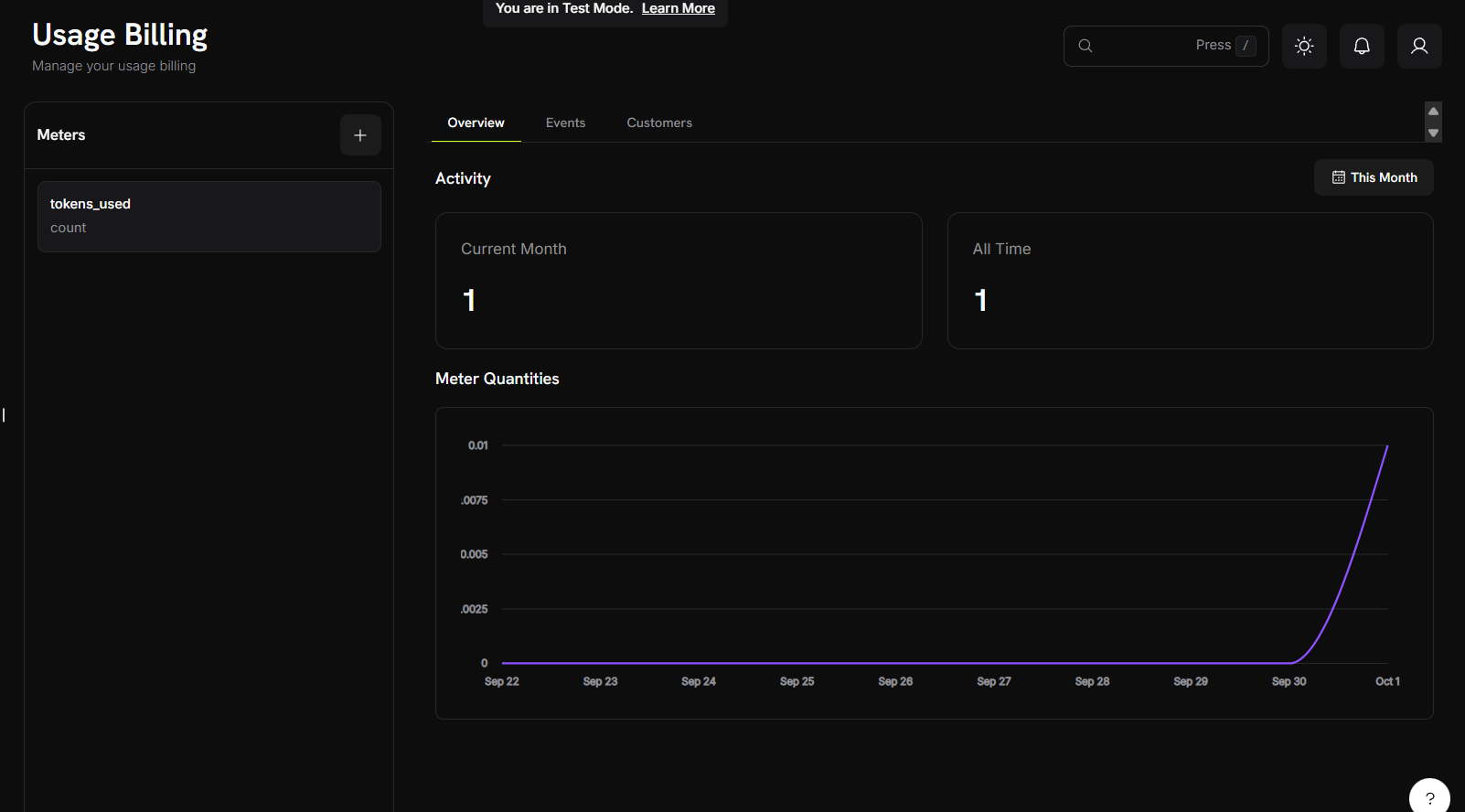 View your meter's dashboard to see events and aggregated usage. Customers are billed automatically each billing cycle.
## Use Cases
Track API calls, compute hours, bandwidth, or storage. Example: \$0.001 per call after 10,000 free calls.
Track tokens, image generations, or processing time. Example: \$0.04 per standard image, \$0.08 per HD image.
Bill by data processed, queries run, or records analyzed. Example: \$5 per GB after 10 GB free.
Count messages, minutes, or data transferred. Example: \$0.01 per SMS sent.
## Next Steps
Learn how to structure and send usage events from your application.
Master meter configuration, aggregation types, and event filtering.
Build a complete AI image generator with usage-based billing from scratch.
Comprehensive guide to implementing usage-based billing in your application.
This documentation is built and hosted on [Mintlify](https://mintlify.com), a developer documentation platform.
View your meter's dashboard to see events and aggregated usage. Customers are billed automatically each billing cycle.
## Use Cases
Track API calls, compute hours, bandwidth, or storage. Example: \$0.001 per call after 10,000 free calls.
Track tokens, image generations, or processing time. Example: \$0.04 per standard image, \$0.08 per HD image.
Bill by data processed, queries run, or records analyzed. Example: \$5 per GB after 10 GB free.
Count messages, minutes, or data transferred. Example: \$0.01 per SMS sent.
## Next Steps
Learn how to structure and send usage events from your application.
Master meter configuration, aggregation types, and event filtering.
Build a complete AI image generator with usage-based billing from scratch.
Comprehensive guide to implementing usage-based billing in your application.
This documentation is built and hosted on [Mintlify](https://mintlify.com), a developer documentation platform.