> ## Documentation Index
> Fetch the complete documentation index at: https://docs.dodopayments.com/llms.txt
> Use this file to discover all available pages before exploring further.
# Close CRM
> Create Close CRM contacts and opportunities when customers pay or subscribe through Dodo Payments, so your sales team can track leads and revenue in Close.
## Introduction
The Close CRM integration creates records in Close from Dodo Payments events. A successful payment can create a contact, and a new subscription can create an opportunity, so your sales team sees revenue activity next to its leads.
This integration requires a Close API key with permission to create contacts and opportunities. To create one in Close, go to **Settings → Developer → API Keys** and click **New API Key**.
## Getting Started
In the Dodo Payments dashboard, go to **Developer → Webhooks** and click **Add endpoint**.
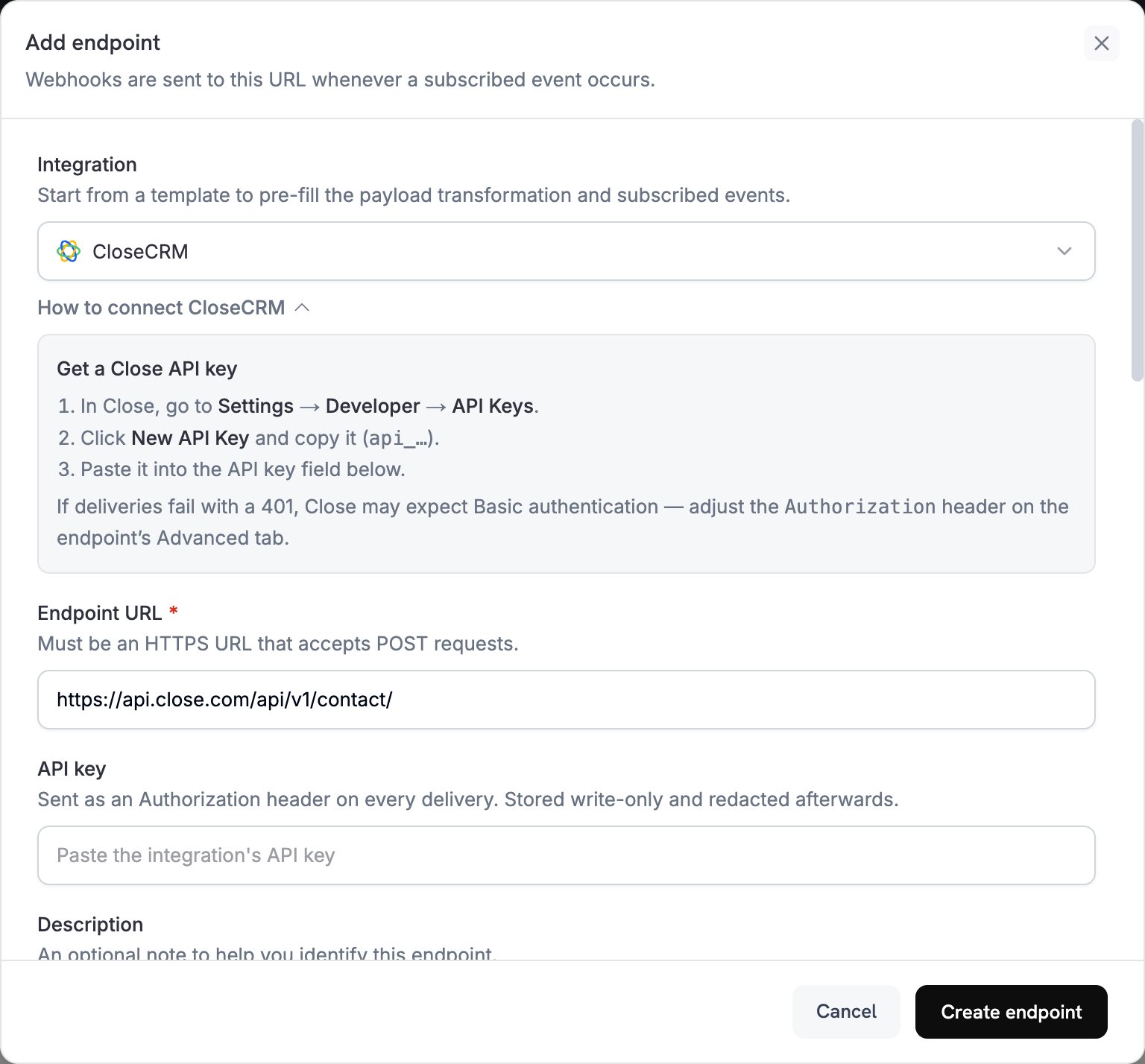 In **Integration**, select **CloseCRM**.
In **API key**, paste your Close API key. Dodo Payments sends it in the `Authorization` header of every delivery.
In **Subscribed events**, select the events your transformation handles. The examples on this page use `payment.succeeded` and `subscription.active`.
Under **Transformation code**, edit the handler to map payment data to Close objects. Start from the [examples](#transformation-code-examples).
Under **Test this code**, click **Simulate** to run the handler against a sample payload. Then click **Create endpoint**.
Each subscribed event now creates a record in Close.
## Transformation Code Examples
Each handler sets `webhook.url` to a Close API endpoint and replaces `webhook.payload` with the request body. Close sets custom fields through `custom.cf_` keys, so replace the `cf_` keys in the examples with the IDs of your own custom fields. Dodo Payments amounts are in the smallest currency unit, for example cents for USD.
### Create Contact from Payment
When a payment succeeds, create a contact. Close takes `emails` and `phones` as lists of objects. If the request has no `lead_id`, Close creates a new lead named after the contact.
```javascript create_contact.js icon="js" expandable theme={null}
function handler(webhook) {
if (webhook.eventType === "payment.succeeded") {
const p = webhook.payload.data;
webhook.url = "https://api.close.com/api/v1/contact/";
webhook.payload = {
name: p.customer.name,
emails: [{ email: p.customer.email, type: "office" }],
phones: p.customer.phone_number ? [{ phone: p.customer.phone_number, type: "office" }] : [],
// Replace each cf_ key with the ID of a contact custom field in Close
"custom.cf_payment_amount": (p.total_amount / 100).toFixed(2),
"custom.cf_payment_method": p.payment_method || '',
"custom.cf_dodo_customer_id": p.customer.customer_id
};
}
return webhook;
}
```
### Create Opportunity from Subscription
When a subscription becomes active, create an opportunity. Close takes `value` as an integer in cents and `value_period` as `one_time`, `monthly`, or `annual`, so the example maps the subscription's `payment_frequency_interval` to a period. `lead_id` must be a Close lead ID, not a Dodo Payments customer ID. The example reads it from the subscription's `metadata`, so store the lead ID there when you create the subscription. Without a `lead_id`, Close creates a new, untitled lead.
```javascript create_opportunity.js icon="js" expandable theme={null}
function handler(webhook) {
if (webhook.eventType === "subscription.active") {
const s = webhook.payload.data;
// Close accepts one_time, monthly, or annual
const periods = { Month: "monthly", Year: "annual" };
webhook.url = "https://api.close.com/api/v1/opportunity/";
webhook.payload = {
lead_id: s.metadata.close_lead_id, // A Close lead ID stored in the subscription's metadata
value: s.recurring_pre_tax_amount, // Integer in the smallest currency unit
value_period: periods[s.payment_frequency_interval] || "one_time",
note: `Subscription - ${s.product_id}`,
// Replace each cf_ key with the ID of an opportunity custom field in Close
"custom.cf_subscription_id": s.subscription_id,
"custom.cf_billing_frequency": s.payment_frequency_interval,
"custom.cf_next_billing": s.next_billing_date
};
}
return webhook;
}
```
## Tips
* Check field names and types in the [Close API documentation](https://developer.close.com/) before you map fields.
* Store payment-specific data, such as the amount and payment method, in custom fields. Create the fields in Close first, then use their IDs.
* Map the subscription's `recurring_pre_tax_amount` to the opportunity `value`, and its billing interval to `value_period`.
* Use IDs to link records: store the Dodo Payments `customer_id` on the Close contact, and the Close lead ID in the Dodo Payments `metadata`.
* The contact example runs on every `payment.succeeded`, including renewals and repeat purchases, so a returning customer creates another contact.
## Troubleshooting
* Verify that the API key has write permissions.
* Check that the required fields are included.
* Check that each email address is valid.
* Review the Close API rate limits.
* If deliveries fail with a `401`, Close may expect Basic authentication. Adjust the `Authorization` header on the endpoint's **Advanced** tab.
* Open the endpoint's delivery attempts in the **Logs** tab of **Developer → Webhooks** to see the response from Close.
* Check that the payload matches the Close API format.
* Check that all required fields are present.
* Check that field names match the Close schema exactly, and that custom fields use `custom.cf_` IDs.
This documentation is built and hosted on [Mintlify](https://mintlify.com), a developer documentation platform.
In **Integration**, select **CloseCRM**.
In **API key**, paste your Close API key. Dodo Payments sends it in the `Authorization` header of every delivery.
In **Subscribed events**, select the events your transformation handles. The examples on this page use `payment.succeeded` and `subscription.active`.
Under **Transformation code**, edit the handler to map payment data to Close objects. Start from the [examples](#transformation-code-examples).
Under **Test this code**, click **Simulate** to run the handler against a sample payload. Then click **Create endpoint**.
Each subscribed event now creates a record in Close.
## Transformation Code Examples
Each handler sets `webhook.url` to a Close API endpoint and replaces `webhook.payload` with the request body. Close sets custom fields through `custom.cf_` keys, so replace the `cf_` keys in the examples with the IDs of your own custom fields. Dodo Payments amounts are in the smallest currency unit, for example cents for USD.
### Create Contact from Payment
When a payment succeeds, create a contact. Close takes `emails` and `phones` as lists of objects. If the request has no `lead_id`, Close creates a new lead named after the contact.
```javascript create_contact.js icon="js" expandable theme={null}
function handler(webhook) {
if (webhook.eventType === "payment.succeeded") {
const p = webhook.payload.data;
webhook.url = "https://api.close.com/api/v1/contact/";
webhook.payload = {
name: p.customer.name,
emails: [{ email: p.customer.email, type: "office" }],
phones: p.customer.phone_number ? [{ phone: p.customer.phone_number, type: "office" }] : [],
// Replace each cf_ key with the ID of a contact custom field in Close
"custom.cf_payment_amount": (p.total_amount / 100).toFixed(2),
"custom.cf_payment_method": p.payment_method || '',
"custom.cf_dodo_customer_id": p.customer.customer_id
};
}
return webhook;
}
```
### Create Opportunity from Subscription
When a subscription becomes active, create an opportunity. Close takes `value` as an integer in cents and `value_period` as `one_time`, `monthly`, or `annual`, so the example maps the subscription's `payment_frequency_interval` to a period. `lead_id` must be a Close lead ID, not a Dodo Payments customer ID. The example reads it from the subscription's `metadata`, so store the lead ID there when you create the subscription. Without a `lead_id`, Close creates a new, untitled lead.
```javascript create_opportunity.js icon="js" expandable theme={null}
function handler(webhook) {
if (webhook.eventType === "subscription.active") {
const s = webhook.payload.data;
// Close accepts one_time, monthly, or annual
const periods = { Month: "monthly", Year: "annual" };
webhook.url = "https://api.close.com/api/v1/opportunity/";
webhook.payload = {
lead_id: s.metadata.close_lead_id, // A Close lead ID stored in the subscription's metadata
value: s.recurring_pre_tax_amount, // Integer in the smallest currency unit
value_period: periods[s.payment_frequency_interval] || "one_time",
note: `Subscription - ${s.product_id}`,
// Replace each cf_ key with the ID of an opportunity custom field in Close
"custom.cf_subscription_id": s.subscription_id,
"custom.cf_billing_frequency": s.payment_frequency_interval,
"custom.cf_next_billing": s.next_billing_date
};
}
return webhook;
}
```
## Tips
* Check field names and types in the [Close API documentation](https://developer.close.com/) before you map fields.
* Store payment-specific data, such as the amount and payment method, in custom fields. Create the fields in Close first, then use their IDs.
* Map the subscription's `recurring_pre_tax_amount` to the opportunity `value`, and its billing interval to `value_period`.
* Use IDs to link records: store the Dodo Payments `customer_id` on the Close contact, and the Close lead ID in the Dodo Payments `metadata`.
* The contact example runs on every `payment.succeeded`, including renewals and repeat purchases, so a returning customer creates another contact.
## Troubleshooting
* Verify that the API key has write permissions.
* Check that the required fields are included.
* Check that each email address is valid.
* Review the Close API rate limits.
* If deliveries fail with a `401`, Close may expect Basic authentication. Adjust the `Authorization` header on the endpoint's **Advanced** tab.
* Open the endpoint's delivery attempts in the **Logs** tab of **Developer → Webhooks** to see the response from Close.
* Check that the payload matches the Close API format.
* Check that all required fields are present.
* Check that field names match the Close schema exactly, and that custom fields use `custom.cf_` IDs.
This documentation is built and hosted on [Mintlify](https://mintlify.com), a developer documentation platform.