> ## Documentation Index
> Fetch the complete documentation index at: https://docs.dodopayments.com/llms.txt
> Use this file to discover all available pages before exploring further.
# Customer.io
> Send Dodo Payments events to Customer.io to trigger email campaigns and customer journeys, such as welcome emails and payment failure notices.
## Introduction
The Customer.io integration sends Dodo Payments events to Customer.io's Track API, so payments and subscription changes can trigger campaigns and customer journeys. For example, a new customer can receive a welcome email, a subscription change can send an update, and a failed payment can send a notification.
This integration requires your Customer.io Site ID and API key. The Track API uses HTTP Basic authentication, with the Site ID as the username and the API key as the password.
## Getting Started
In the Dodo Payments dashboard, go to **Developer → Webhooks** and click **Add endpoint**.
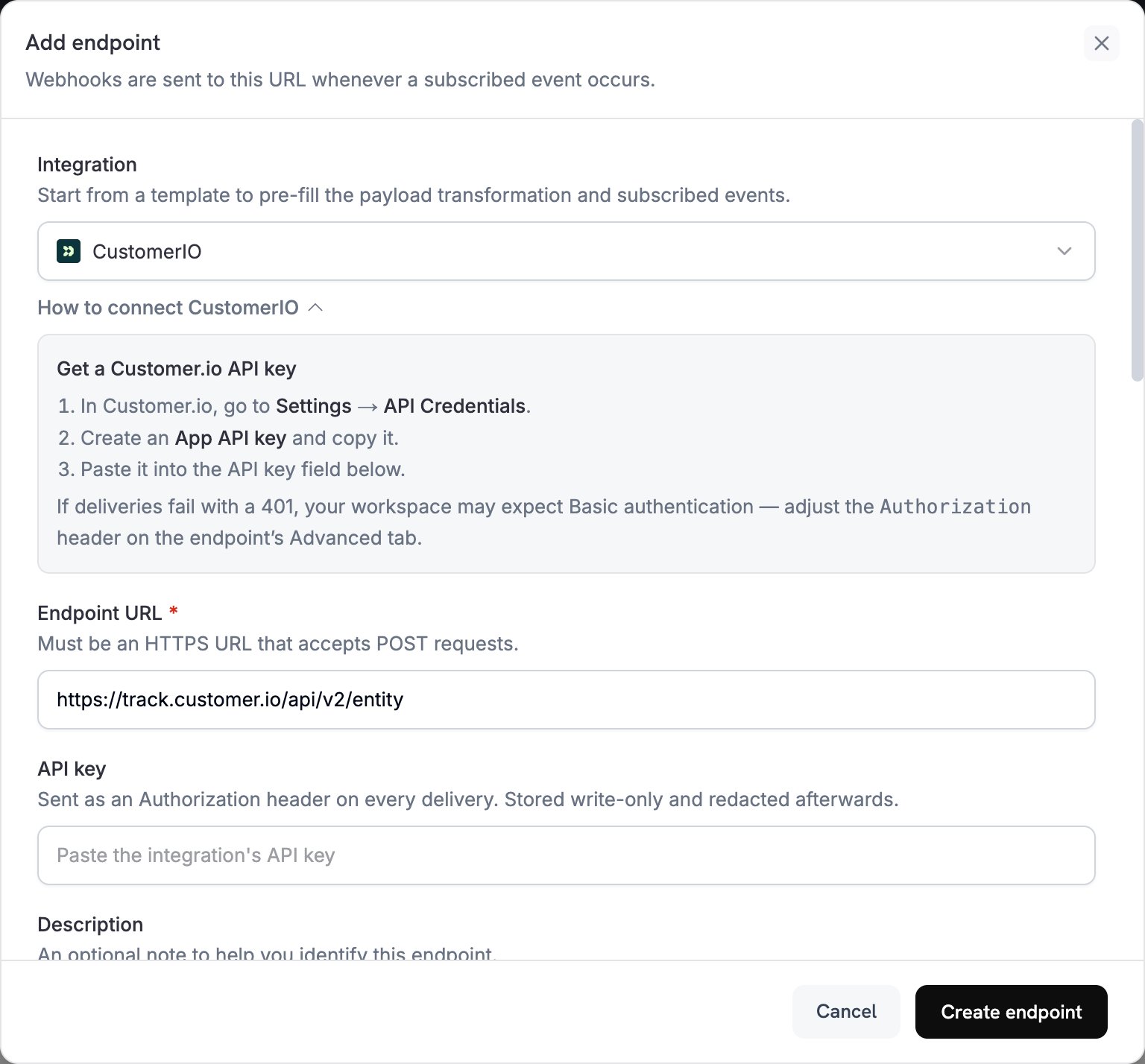 In **Integration**, select **CustomerIO**.
In **API key**, paste your Customer.io API key. Dodo Payments sends the key in the `Authorization` header as a bearer token.
The Track API expects Basic authentication. If deliveries fail with a `401`, open the endpoint's **Advanced** tab and replace the `Authorization` header with `Basic` followed by the Base64 encoding of `site_id:api_key`.
In **Subscribed events**, select the events your transformation handles. The examples on this page use `payment.succeeded`, `subscription.active`, and `subscription.cancelled`.
Under **Transformation code**, edit the handler to format events for Customer.io's Track API. Start from the [examples](#transformation-code-examples).
Under **Test this code**, click **Simulate** to run the handler against a sample payload. Then click **Create endpoint**.
Subscribed events now reach Customer.io, where they can trigger your email automations.
## Transformation Code Examples
Each handler sends one request to the Track API v2 `entity` endpoint and identifies the person by their Dodo Payments `customer_id`. To record an event, the request sets `action` to `event` and puts the event name in `name`. To update a person's attributes, it sets `action` to `identify`. Dodo Payments amounts are in the smallest currency unit, so the examples divide by 100.
### Track Payment Events
Record a `payment_completed` event when a payment succeeds:
```javascript track_payments.js icon="js" expandable theme={null}
function handler(webhook) {
if (webhook.eventType === "payment.succeeded") {
const p = webhook.payload.data;
webhook.url = "https://track.customer.io/api/v2/entity";
webhook.payload = {
type: "person",
identifiers: {
id: p.customer.customer_id
},
action: "event",
name: "payment_completed",
attributes: {
email: p.customer.email,
name: p.customer.name,
payment_amount: (p.total_amount / 100).toFixed(2),
payment_method: p.payment_method || "unknown",
payment_id: p.payment_id,
currency: p.currency || "USD"
}
};
}
return webhook;
}
```
### Track Subscription Lifecycle
Record a `subscription_started` event when a subscription becomes active, and a `subscription_cancelled` event when it's cancelled:
```javascript track_subscriptions.js icon="js" expandable theme={null}
function handler(webhook) {
const s = webhook.payload.data;
switch (webhook.eventType) {
case "subscription.active":
webhook.url = "https://track.customer.io/api/v2/entity";
webhook.payload = {
type: "person",
identifiers: {
id: s.customer.customer_id
},
action: "event",
name: "subscription_started",
attributes: {
email: s.customer.email,
subscription_id: s.subscription_id,
product_id: s.product_id,
amount: (s.recurring_pre_tax_amount / 100).toFixed(2),
frequency: s.payment_frequency_interval,
next_billing: s.next_billing_date
}
};
break;
case "subscription.cancelled":
webhook.url = "https://track.customer.io/api/v2/entity";
webhook.payload = {
type: "person",
identifiers: {
id: s.customer.customer_id
},
action: "event",
name: "subscription_cancelled",
attributes: {
email: s.customer.email,
subscription_id: s.subscription_id,
cancelled_at: s.cancelled_at,
cancel_at_next_billing: s.cancel_at_next_billing_date
}
};
break;
}
return webhook;
}
```
### Track Customer Attributes
Update the person's profile attributes when a payment succeeds. Each `identify` request overwrites the attributes it sends, so `last_payment_amount` and `last_payment_date` always hold the latest payment.
```javascript track_attributes.js icon="js" expandable theme={null}
function handler(webhook) {
if (webhook.eventType === "payment.succeeded") {
const p = webhook.payload.data;
webhook.url = "https://track.customer.io/api/v2/entity";
webhook.payload = {
type: "person",
identifiers: {
id: p.customer.customer_id
},
action: "identify",
name: "Customer Identified",
attributes: {
email: p.customer.email,
name: p.customer.name,
last_payment_amount: (p.total_amount / 100).toFixed(2),
payment_method: p.payment_method || "unknown",
last_payment_date: webhook.payload.timestamp
}
};
}
return webhook;
}
```
## Tips
* Use the same event names in the transformation and in your Customer.io campaign triggers, for example `payment_completed`. Choose names that describe what happened.
* Include the attributes your messages use for personalization.
* Identify each person by the same ID in every request. The examples use the Dodo Payments `customer_id`.
* For every request field, see the [Customer.io Track API reference](https://docs.customer.io/integrations/api/track/).
## Troubleshooting
* Verify that the Site ID and API key are correct.
* If deliveries fail with a `401`, set the `Authorization` header to Basic authentication, as described in [Getting Started](#getting-started).
* Check that event names match your Customer.io campaign triggers.
* Check that customer identifiers are set.
* Review the Customer.io API rate limits.
* Check that the payload matches the Customer.io API format.
* Check that all required fields are present, and that `action` is an action the Track API supports, such as `event` or `identify`.
* Check that event names and attributes are formatted correctly.
This documentation is built and hosted on [Mintlify](https://mintlify.com), a developer documentation platform.
In **Integration**, select **CustomerIO**.
In **API key**, paste your Customer.io API key. Dodo Payments sends the key in the `Authorization` header as a bearer token.
The Track API expects Basic authentication. If deliveries fail with a `401`, open the endpoint's **Advanced** tab and replace the `Authorization` header with `Basic` followed by the Base64 encoding of `site_id:api_key`.
In **Subscribed events**, select the events your transformation handles. The examples on this page use `payment.succeeded`, `subscription.active`, and `subscription.cancelled`.
Under **Transformation code**, edit the handler to format events for Customer.io's Track API. Start from the [examples](#transformation-code-examples).
Under **Test this code**, click **Simulate** to run the handler against a sample payload. Then click **Create endpoint**.
Subscribed events now reach Customer.io, where they can trigger your email automations.
## Transformation Code Examples
Each handler sends one request to the Track API v2 `entity` endpoint and identifies the person by their Dodo Payments `customer_id`. To record an event, the request sets `action` to `event` and puts the event name in `name`. To update a person's attributes, it sets `action` to `identify`. Dodo Payments amounts are in the smallest currency unit, so the examples divide by 100.
### Track Payment Events
Record a `payment_completed` event when a payment succeeds:
```javascript track_payments.js icon="js" expandable theme={null}
function handler(webhook) {
if (webhook.eventType === "payment.succeeded") {
const p = webhook.payload.data;
webhook.url = "https://track.customer.io/api/v2/entity";
webhook.payload = {
type: "person",
identifiers: {
id: p.customer.customer_id
},
action: "event",
name: "payment_completed",
attributes: {
email: p.customer.email,
name: p.customer.name,
payment_amount: (p.total_amount / 100).toFixed(2),
payment_method: p.payment_method || "unknown",
payment_id: p.payment_id,
currency: p.currency || "USD"
}
};
}
return webhook;
}
```
### Track Subscription Lifecycle
Record a `subscription_started` event when a subscription becomes active, and a `subscription_cancelled` event when it's cancelled:
```javascript track_subscriptions.js icon="js" expandable theme={null}
function handler(webhook) {
const s = webhook.payload.data;
switch (webhook.eventType) {
case "subscription.active":
webhook.url = "https://track.customer.io/api/v2/entity";
webhook.payload = {
type: "person",
identifiers: {
id: s.customer.customer_id
},
action: "event",
name: "subscription_started",
attributes: {
email: s.customer.email,
subscription_id: s.subscription_id,
product_id: s.product_id,
amount: (s.recurring_pre_tax_amount / 100).toFixed(2),
frequency: s.payment_frequency_interval,
next_billing: s.next_billing_date
}
};
break;
case "subscription.cancelled":
webhook.url = "https://track.customer.io/api/v2/entity";
webhook.payload = {
type: "person",
identifiers: {
id: s.customer.customer_id
},
action: "event",
name: "subscription_cancelled",
attributes: {
email: s.customer.email,
subscription_id: s.subscription_id,
cancelled_at: s.cancelled_at,
cancel_at_next_billing: s.cancel_at_next_billing_date
}
};
break;
}
return webhook;
}
```
### Track Customer Attributes
Update the person's profile attributes when a payment succeeds. Each `identify` request overwrites the attributes it sends, so `last_payment_amount` and `last_payment_date` always hold the latest payment.
```javascript track_attributes.js icon="js" expandable theme={null}
function handler(webhook) {
if (webhook.eventType === "payment.succeeded") {
const p = webhook.payload.data;
webhook.url = "https://track.customer.io/api/v2/entity";
webhook.payload = {
type: "person",
identifiers: {
id: p.customer.customer_id
},
action: "identify",
name: "Customer Identified",
attributes: {
email: p.customer.email,
name: p.customer.name,
last_payment_amount: (p.total_amount / 100).toFixed(2),
payment_method: p.payment_method || "unknown",
last_payment_date: webhook.payload.timestamp
}
};
}
return webhook;
}
```
## Tips
* Use the same event names in the transformation and in your Customer.io campaign triggers, for example `payment_completed`. Choose names that describe what happened.
* Include the attributes your messages use for personalization.
* Identify each person by the same ID in every request. The examples use the Dodo Payments `customer_id`.
* For every request field, see the [Customer.io Track API reference](https://docs.customer.io/integrations/api/track/).
## Troubleshooting
* Verify that the Site ID and API key are correct.
* If deliveries fail with a `401`, set the `Authorization` header to Basic authentication, as described in [Getting Started](#getting-started).
* Check that event names match your Customer.io campaign triggers.
* Check that customer identifiers are set.
* Review the Customer.io API rate limits.
* Check that the payload matches the Customer.io API format.
* Check that all required fields are present, and that `action` is an action the Track API supports, such as `event` or `identify`.
* Check that event names and attributes are formatted correctly.
This documentation is built and hosted on [Mintlify](https://mintlify.com), a developer documentation platform.