> ## Documentation Index
> Fetch the complete documentation index at: https://docs.dodopayments.com/llms.txt
> Use this file to discover all available pages before exploring further.
# DataFast
> Attribute Dodo Payments revenue to marketing channels with DataFast analytics, and see which traffic sources bring paying customers.
## Introduction
DataFast is a revenue-first analytics tool that shows which marketing channels bring paying customers. When you send your Dodo Payments transactions to DataFast, it attributes the revenue to each customer's original traffic source, so you can see which channels and customer segments generate the most revenue.
This integration requires your DataFast API key, which you create in your [DataFast dashboard](https://datafa.st/).
## How It Works
DataFast identifies each visitor with an ID stored in the `datafast_visitor_id` cookie. To attribute revenue to marketing channels:
1. **Capture DataFast's visitor ID** from the `datafast_visitor_id` cookie when you create the checkout.
2. **Store the visitor ID** in the payment's `metadata`.
3. **Send the payment to DataFast** through its Payment API when the payment succeeds.
DataFast matches each successful payment to the visitor's original traffic source, which attributes the revenue to that channel.
## Getting Started
Install the DataFast tracking script on your website. The script sets the `datafast_visitor_id` cookie that identifies each visitor.
For installation instructions for your platform, see the [DataFast documentation](https://datafa.st/docs).
In your [DataFast dashboard](https://datafa.st/), open your website's settings, go to **API**, and click **Create API Key**.
Keep your API key secure. Never expose it in client-side code.
When you create a checkout, read the DataFast visitor ID from the cookie and add it to the payment's `metadata`. See [Step 1](#step-1-add-visitor-id-to-checkout-metadata).
Create a webhook endpoint that sends each successful payment to DataFast's Payment API. See [Step 2](#step-2-send-payment-data-to-datafast).
Revenue appears in your DataFast dashboard, attributed to the marketing channel that brought each customer.
## Implementation Guide
### Step 1: Add Visitor ID to Checkout Metadata
When you create a checkout, read the DataFast visitor ID from the cookie and include it in the payment's `metadata`.
The examples below use `POST /payments`, which is **deprecated**. It still works for existing integrations, but new integrations should use [Checkout Sessions](/developer-resources/checkout-session) (`POST /checkouts`), which accept `metadata` the same way.
```typescript Next.js theme={null}
import { cookies } from 'next/headers';
import { dodopayments } from '@/lib/dodopayments';
export async function createCheckout(productId: string) {
// Capture DataFast visitor ID from cookie (cookies() is async in Next.js 15 and later)
const datafastVisitorId = (await cookies()).get('datafast_visitor_id')?.value;
const payment = await dodopayments.payments.create({
product_cart: [{ product_id: productId, quantity: 1 }],
// ... other payment configuration
metadata: {
datafast_visitor_id: datafastVisitorId ?? '', // Store visitor ID in metadata
},
});
return payment;
}
```
```javascript Express.js theme={null}
const express = require('express');
const router = express.Router();
// dodopayments is your initialized Dodo Payments client
router.post('/create-checkout', async (req, res) => {
// Capture DataFast visitor ID from cookie (req.cookies requires the cookie-parser middleware)
const datafastVisitorId = req.cookies?.datafast_visitor_id;
const payment = await dodopayments.payments.create({
product_cart: [{ product_id: req.body.productId, quantity: 1 }],
// ... other payment configuration
metadata: {
datafast_visitor_id: datafastVisitorId, // Store visitor ID in metadata
},
});
res.json({ payment });
});
```
```javascript Other Frameworks theme={null}
// Capture DataFast visitor ID from cookie
const datafastVisitorId = getCookie('datafast_visitor_id'); // Use your framework's cookie method
// dodopayments is your initialized Dodo Payments client, and productId is the product to sell
const payment = await dodopayments.payments.create({
product_cart: [{ product_id: productId, quantity: 1 }],
// ... other payment configuration
metadata: {
datafast_visitor_id: datafastVisitorId, // Store visitor ID in metadata
},
});
```
### Step 2: Send Payment Data to DataFast
Create a webhook endpoint that sends successful payments to DataFast's Payment API.
In the Dodo Payments dashboard, go to **Developer → Webhooks** and click **Add endpoint**.
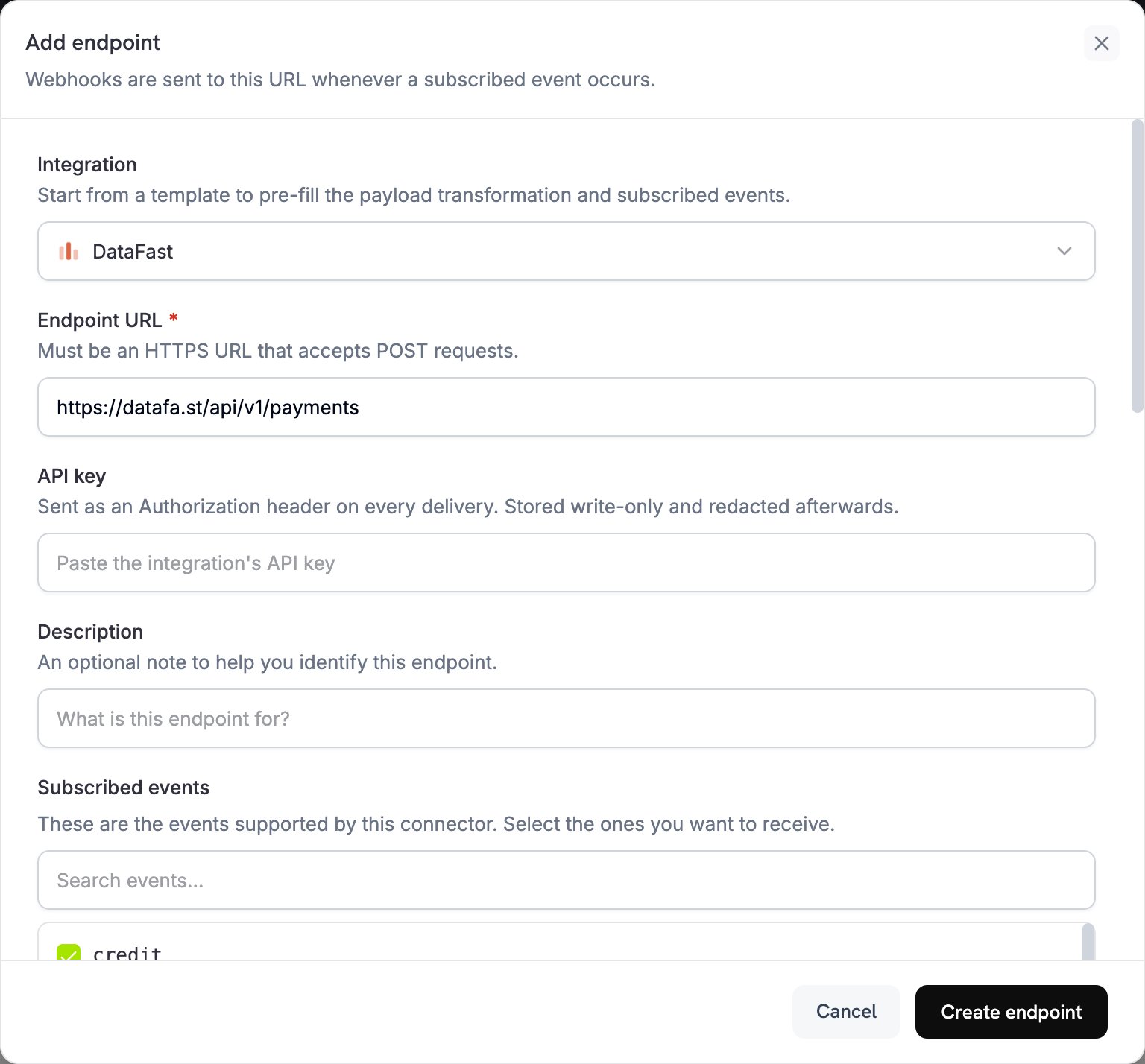 In **Integration**, select **DataFast**.
In **API key**, paste your DataFast API key. Dodo Payments sends it in the `Authorization` header of every delivery.
In **Integration**, select **DataFast**.
In **API key**, paste your DataFast API key. Dodo Payments sends it in the `Authorization` header of every delivery.
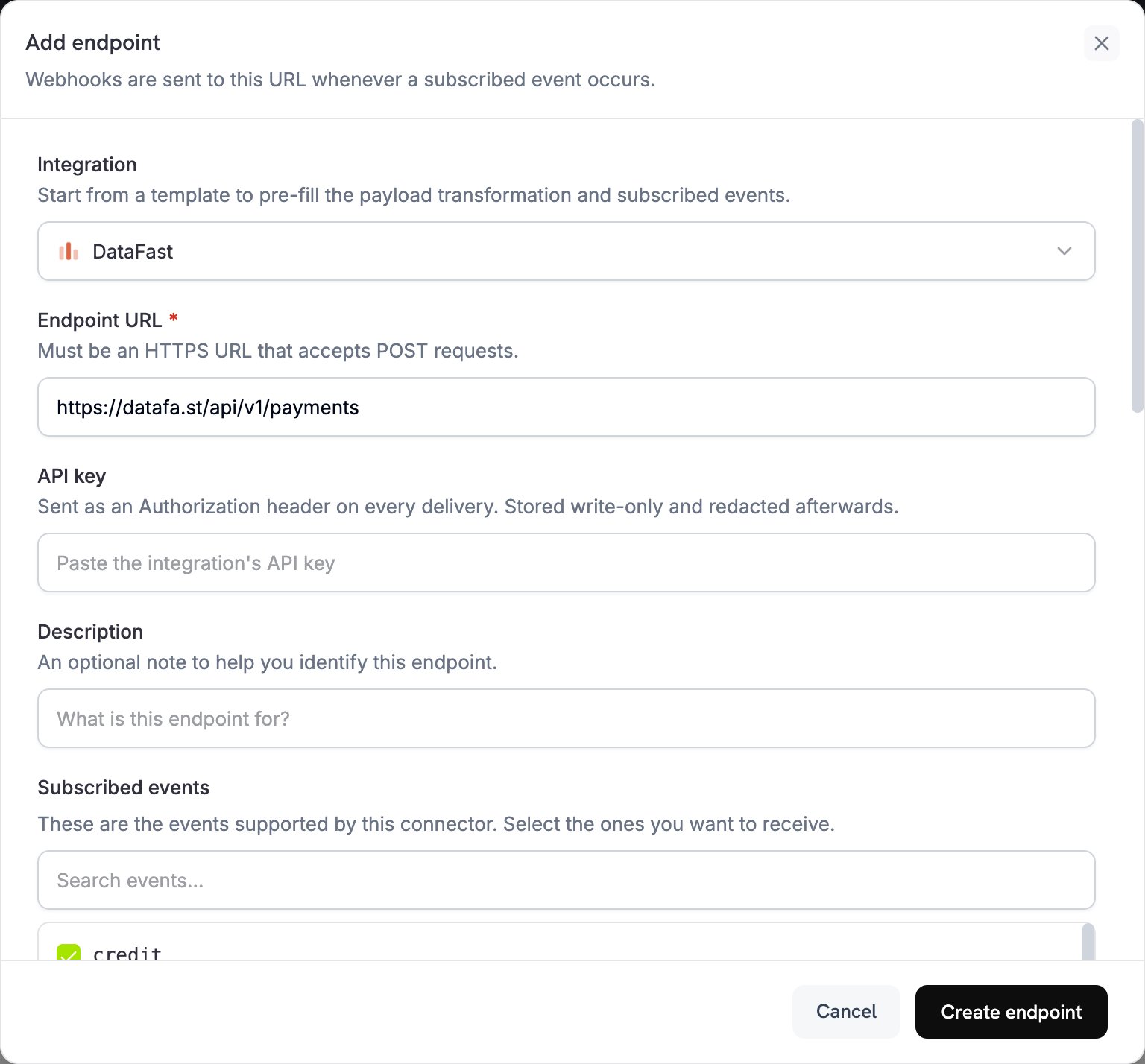 If **Endpoint URL** is empty, enter `https://datafa.st/api/v1/payments`. In **Subscribed events**, select `payment.succeeded`.
Under **Transformation code**, edit the handler to format payment data for DataFast's Payment API. Start from the [examples](#transformation-code-examples).
Under **Test this code**, click **Simulate** to run the handler against a sample payload. Then click **Create endpoint**.
## Transformation Code Examples
Each handler runs on `payment.succeeded`. When the payment's `metadata` has no visitor ID, it sets `webhook.cancel = true`, so no request goes to DataFast. A canceled delivery still shows as successful in the webhook logs.
DataFast's Payment API takes `amount` in major currency units, for example `29.99`. Dodo Payments sends `total_amount` in the smallest currency unit, for example cents for USD, so the examples convert it.
### Basic Payment Attribution
```javascript basic_payment.js icon="js" expandable theme={null}
function handler(webhook) {
if (webhook.eventType === "payment.succeeded") {
const payment = webhook.payload.data;
// Only send to DataFast if visitor ID exists in metadata
if (payment.metadata && payment.metadata.datafast_visitor_id) {
webhook.payload = {
amount: payment.total_amount / 100, // Convert from cents to dollars
currency: payment.currency,
transaction_id: payment.payment_id,
datafast_visitor_id: payment.metadata.datafast_visitor_id,
};
} else {
// Cancel dispatch if no visitor ID (prevents unnecessary API calls)
webhook.cancel = true;
}
}
return webhook;
}
```
### Handle Zero Decimal Currencies
Zero-decimal currencies, such as JPY, have no minor unit, so `total_amount` is already in major units. Three-decimal currencies, such as KWD, have 1,000 minor units per major unit. This example converts the amount for each case, using the currencies Dodo Payments treats as zero-decimal and three-decimal:
```javascript zero_decimal.js icon="js" expandable theme={null}
function handler(webhook) {
if (webhook.eventType === "payment.succeeded") {
const payment = webhook.payload.data;
if (payment.metadata && payment.metadata.datafast_visitor_id) {
// Zero-decimal currencies: the smallest unit is the major unit
const zeroDecimalCurrencies = ['BIF', 'CLP', 'DJF', 'GNF', 'JPY', 'KMF', 'KRW', 'MGA', 'PYG', 'RWF', 'UGX', 'VND', 'VUV', 'XAF', 'XOF', 'XPF'];
// Three-decimal currencies: 1 major unit = 1000 minor units
const threeDecimalCurrencies = ['BHD', 'IQD', 'JOD', 'KWD', 'LYD', 'OMR', 'TND'];
const isZeroDecimal = zeroDecimalCurrencies.includes(payment.currency);
const isThreeDecimal = threeDecimalCurrencies.includes(payment.currency);
webhook.payload = {
amount: isZeroDecimal
? payment.total_amount // Use amount as-is for zero decimal currencies
: payment.total_amount / (isThreeDecimal ? 1000 : 100), // Convert from minor units
currency: payment.currency,
transaction_id: payment.payment_id,
datafast_visitor_id: payment.metadata.datafast_visitor_id,
};
} else {
// Cancel dispatch if no visitor ID (prevents unnecessary API calls)
webhook.cancel = true;
}
}
return webhook;
}
```
### Subscription Payments
Subscription payments also fire `payment.succeeded`, with `subscription_id` set. This handler sends every subscription payment to DataFast and sets `renewal: true` on renewals, so DataFast can tell a renewal from the first payment.
A renewal is charged off-session, so its payload has `subscription_id` set and `checkout_session_id` set to `null`. The first payment of a subscription created through a [Checkout Session](/developer-resources/checkout-session) has `checkout_session_id` set. Renewal payments carry the subscription's `metadata`, so keep `datafast_visitor_id` in the subscription's metadata to attribute renewals.
```javascript subscription_payment.js icon="js" expandable theme={null}
function handler(webhook) {
if (webhook.eventType === "payment.succeeded") {
const payment = webhook.payload.data;
// A renewal belongs to a subscription and isn't paid through a checkout session
const isRenewal = Boolean(payment.subscription_id) && !payment.checkout_session_id;
if (payment.metadata && payment.metadata.datafast_visitor_id) {
webhook.payload = {
amount: payment.total_amount / 100,
currency: payment.currency,
transaction_id: payment.payment_id,
datafast_visitor_id: payment.metadata.datafast_visitor_id,
renewal: isRenewal,
};
} else {
// Cancel dispatch if no visitor ID (prevents unnecessary API calls)
webhook.cancel = true;
}
}
return webhook;
}
```
## Best Practices
**Capture visitor ID early**: Store the DataFast visitor ID as early as possible in your checkout flow, so attribution stays accurate even if the customer leaves and returns later.
* **Include the visitor ID in metadata**: Without the visitor ID, DataFast can't attribute revenue to marketing channels.
* **Handle zero-decimal currencies**: Some currencies, such as JPY and KRW, have no decimal places. Adjust your amount conversion for them, and for three-decimal currencies such as KWD.
* **Test with sample payments**: Run the handler with **Test this code**, and confirm the integration works before you go live.
* **Monitor your DataFast dashboard**: Check that payments appear with the expected attribution.
* **Rely on webhook retries**: DataFast skips a payment whose `transaction_id` it has already recorded, so a retried delivery doesn't create a duplicate.
## Troubleshooting
* Verify that your DataFast API key is correct and active.
* Check that the `datafast_visitor_id` is captured and stored in the payment metadata.
* Check that the webhook transformation formats the payload correctly.
* Verify that the endpoint is subscribed to `payment.succeeded`.
* Check the DataFast dashboard for error messages or API logs.
* Open the endpoint's delivery attempts in the **Logs** tab of **Developer → Webhooks** to see DataFast's response. A payment with no visitor ID is canceled and shows as successful.
* Confirm that the DataFast tracking script is installed and running on your website.
* Verify that the `datafast_visitor_id` cookie is set.
* Check that the visitor ID in the payment metadata matches the one DataFast recorded for the visit.
* Capture the visitor ID before you create the checkout.
* See DataFast's [Payment API documentation](https://datafa.st/docs/payments-api) for more guidance.
* Check that the payload matches DataFast's Payment API format.
* Check that all required fields are present: `amount`, `currency`, and `transaction_id`. Include `datafast_visitor_id` for attribution.
* Check the amount conversion: divide by 100 for most currencies, by 1,000 for three-decimal currencies, and not at all for zero-decimal currencies.
* Verify that the endpoint URL is `https://datafa.st/api/v1/payments`.
* Test the transformation with sample webhook payloads.
* For zero-decimal currencies (BIF, CLP, DJF, GNF, JPY, KMF, KRW, MGA, PYG, RWF, UGX, VND, VUV, XAF, XOF, and XPF), send the amount as is.
* For three-decimal currencies (BHD, IQD, JOD, KWD, LYD, OMR, and TND), divide the amount by 1,000.
* For all other currencies, divide the amount by 100 to convert from the smallest unit to the major unit.
* Check that the currency code uses the ISO 4217 format, for example `USD`, `EUR`, or `JPY`.
## Additional Resources
Read about DataFast's Payment API and revenue attribution.
View revenue analytics and attribution data in your DataFast dashboard.
For help with this integration, contact Dodo Payments support at [support@dodopayments.com](mailto:support@dodopayments.com).
This documentation is built and hosted on [Mintlify](https://mintlify.com), a developer documentation platform.
If **Endpoint URL** is empty, enter `https://datafa.st/api/v1/payments`. In **Subscribed events**, select `payment.succeeded`.
Under **Transformation code**, edit the handler to format payment data for DataFast's Payment API. Start from the [examples](#transformation-code-examples).
Under **Test this code**, click **Simulate** to run the handler against a sample payload. Then click **Create endpoint**.
## Transformation Code Examples
Each handler runs on `payment.succeeded`. When the payment's `metadata` has no visitor ID, it sets `webhook.cancel = true`, so no request goes to DataFast. A canceled delivery still shows as successful in the webhook logs.
DataFast's Payment API takes `amount` in major currency units, for example `29.99`. Dodo Payments sends `total_amount` in the smallest currency unit, for example cents for USD, so the examples convert it.
### Basic Payment Attribution
```javascript basic_payment.js icon="js" expandable theme={null}
function handler(webhook) {
if (webhook.eventType === "payment.succeeded") {
const payment = webhook.payload.data;
// Only send to DataFast if visitor ID exists in metadata
if (payment.metadata && payment.metadata.datafast_visitor_id) {
webhook.payload = {
amount: payment.total_amount / 100, // Convert from cents to dollars
currency: payment.currency,
transaction_id: payment.payment_id,
datafast_visitor_id: payment.metadata.datafast_visitor_id,
};
} else {
// Cancel dispatch if no visitor ID (prevents unnecessary API calls)
webhook.cancel = true;
}
}
return webhook;
}
```
### Handle Zero Decimal Currencies
Zero-decimal currencies, such as JPY, have no minor unit, so `total_amount` is already in major units. Three-decimal currencies, such as KWD, have 1,000 minor units per major unit. This example converts the amount for each case, using the currencies Dodo Payments treats as zero-decimal and three-decimal:
```javascript zero_decimal.js icon="js" expandable theme={null}
function handler(webhook) {
if (webhook.eventType === "payment.succeeded") {
const payment = webhook.payload.data;
if (payment.metadata && payment.metadata.datafast_visitor_id) {
// Zero-decimal currencies: the smallest unit is the major unit
const zeroDecimalCurrencies = ['BIF', 'CLP', 'DJF', 'GNF', 'JPY', 'KMF', 'KRW', 'MGA', 'PYG', 'RWF', 'UGX', 'VND', 'VUV', 'XAF', 'XOF', 'XPF'];
// Three-decimal currencies: 1 major unit = 1000 minor units
const threeDecimalCurrencies = ['BHD', 'IQD', 'JOD', 'KWD', 'LYD', 'OMR', 'TND'];
const isZeroDecimal = zeroDecimalCurrencies.includes(payment.currency);
const isThreeDecimal = threeDecimalCurrencies.includes(payment.currency);
webhook.payload = {
amount: isZeroDecimal
? payment.total_amount // Use amount as-is for zero decimal currencies
: payment.total_amount / (isThreeDecimal ? 1000 : 100), // Convert from minor units
currency: payment.currency,
transaction_id: payment.payment_id,
datafast_visitor_id: payment.metadata.datafast_visitor_id,
};
} else {
// Cancel dispatch if no visitor ID (prevents unnecessary API calls)
webhook.cancel = true;
}
}
return webhook;
}
```
### Subscription Payments
Subscription payments also fire `payment.succeeded`, with `subscription_id` set. This handler sends every subscription payment to DataFast and sets `renewal: true` on renewals, so DataFast can tell a renewal from the first payment.
A renewal is charged off-session, so its payload has `subscription_id` set and `checkout_session_id` set to `null`. The first payment of a subscription created through a [Checkout Session](/developer-resources/checkout-session) has `checkout_session_id` set. Renewal payments carry the subscription's `metadata`, so keep `datafast_visitor_id` in the subscription's metadata to attribute renewals.
```javascript subscription_payment.js icon="js" expandable theme={null}
function handler(webhook) {
if (webhook.eventType === "payment.succeeded") {
const payment = webhook.payload.data;
// A renewal belongs to a subscription and isn't paid through a checkout session
const isRenewal = Boolean(payment.subscription_id) && !payment.checkout_session_id;
if (payment.metadata && payment.metadata.datafast_visitor_id) {
webhook.payload = {
amount: payment.total_amount / 100,
currency: payment.currency,
transaction_id: payment.payment_id,
datafast_visitor_id: payment.metadata.datafast_visitor_id,
renewal: isRenewal,
};
} else {
// Cancel dispatch if no visitor ID (prevents unnecessary API calls)
webhook.cancel = true;
}
}
return webhook;
}
```
## Best Practices
**Capture visitor ID early**: Store the DataFast visitor ID as early as possible in your checkout flow, so attribution stays accurate even if the customer leaves and returns later.
* **Include the visitor ID in metadata**: Without the visitor ID, DataFast can't attribute revenue to marketing channels.
* **Handle zero-decimal currencies**: Some currencies, such as JPY and KRW, have no decimal places. Adjust your amount conversion for them, and for three-decimal currencies such as KWD.
* **Test with sample payments**: Run the handler with **Test this code**, and confirm the integration works before you go live.
* **Monitor your DataFast dashboard**: Check that payments appear with the expected attribution.
* **Rely on webhook retries**: DataFast skips a payment whose `transaction_id` it has already recorded, so a retried delivery doesn't create a duplicate.
## Troubleshooting
* Verify that your DataFast API key is correct and active.
* Check that the `datafast_visitor_id` is captured and stored in the payment metadata.
* Check that the webhook transformation formats the payload correctly.
* Verify that the endpoint is subscribed to `payment.succeeded`.
* Check the DataFast dashboard for error messages or API logs.
* Open the endpoint's delivery attempts in the **Logs** tab of **Developer → Webhooks** to see DataFast's response. A payment with no visitor ID is canceled and shows as successful.
* Confirm that the DataFast tracking script is installed and running on your website.
* Verify that the `datafast_visitor_id` cookie is set.
* Check that the visitor ID in the payment metadata matches the one DataFast recorded for the visit.
* Capture the visitor ID before you create the checkout.
* See DataFast's [Payment API documentation](https://datafa.st/docs/payments-api) for more guidance.
* Check that the payload matches DataFast's Payment API format.
* Check that all required fields are present: `amount`, `currency`, and `transaction_id`. Include `datafast_visitor_id` for attribution.
* Check the amount conversion: divide by 100 for most currencies, by 1,000 for three-decimal currencies, and not at all for zero-decimal currencies.
* Verify that the endpoint URL is `https://datafa.st/api/v1/payments`.
* Test the transformation with sample webhook payloads.
* For zero-decimal currencies (BIF, CLP, DJF, GNF, JPY, KMF, KRW, MGA, PYG, RWF, UGX, VND, VUV, XAF, XOF, and XPF), send the amount as is.
* For three-decimal currencies (BHD, IQD, JOD, KWD, LYD, OMR, and TND), divide the amount by 1,000.
* For all other currencies, divide the amount by 100 to convert from the smallest unit to the major unit.
* Check that the currency code uses the ISO 4217 format, for example `USD`, `EUR`, or `JPY`.
## Additional Resources
Read about DataFast's Payment API and revenue attribution.
View revenue analytics and attribution data in your DataFast dashboard.
For help with this integration, contact Dodo Payments support at [support@dodopayments.com](mailto:support@dodopayments.com).
This documentation is built and hosted on [Mintlify](https://mintlify.com), a developer documentation platform.