> ## Documentation Index
> Fetch the complete documentation index at: https://docs.dodopayments.com/llms.txt
> Use this file to discover all available pages before exploring further.
# Dub
> Track sale conversion events in Dub when customers complete purchases through Dodo Payments, and attribute revenue to your short links and partners.
## Introduction
[Dub](https://dub.co) is a link attribution platform for short links, conversion tracking, and affiliate programs. With this integration, Dub records a sale conversion event each time a customer pays through Dodo Payments, so you can measure the return on your marketing campaigns and referral programs.
Dub records a sale when a customer:
* Completes a one-time payment
* Subscribes to a paid plan
* Makes a recurring subscription payment
This integration requires a Dub account with conversion tracking enabled on your links. Dub's conversion tracking requires a Business plan or higher.
**Affiliate Program Integration**: This integration also works with **Dub Partners**, Dub's affiliate program product. Dub attributes sales to your partners' affiliate links, so you can track referrals, commissions, and each partner's performance. To set up an affiliate program, see the [Affiliates feature guide](/features/affiliates).
## How It Works
When a visitor clicks one of your Dub short links, Dub stores a unique click ID in the `dub_id` cookie. To attribute sales to your links:
1. **Capture Dub's click ID** from the `dub_id` cookie when you create the checkout.
2. **Store the click ID** in the payment's `metadata`, along with your customer's ID in your system (the external ID).
3. **Send the sale to Dub** through its Track API when the payment succeeds.
Dub matches each successful sale to the original link click, which attributes the conversion to that link.
## Prerequisites
Before you set up this integration, you need:
1. A [Dub account](https://dub.co) with a workspace.
2. Conversion tracking enabled for your links.
3. A Dub API key, which you create in your Dub dashboard under **Settings → API Keys**.
## Getting Started
In your Dub dashboard, enable conversion tracking for the links you want to track sales for. Dub then records sale events for customers who arrive through those links.
To enable conversion tracking, see the [Dub documentation](https://dub.co/docs/conversions/quickstart).
In your [Dub dashboard](https://app.dub.co), go to **Settings → API Keys** and create an API key with the `conversions.write` scope.
Keep your API key secure. Never expose it in client-side code.
When you create a checkout, read the Dub click ID from the cookie and add it to the payment's `metadata`. See [Step 1](#step-1-add-click-id-and-customer-id-to-checkout-metadata).
Create a webhook endpoint that sends each sale to Dub's Track API when a payment succeeds. See [Step 2](#step-2-send-sale-data-to-dub).
Sale conversion events appear in your Dub analytics dashboard, attributed to your links.
## Implementation Guide
### Step 1: Add Click ID and Customer ID to Checkout Metadata
When you create a checkout, read the Dub click ID from the cookie and include it in the payment's `metadata`, along with your customer's external ID.
The examples below use `POST /payments`, which is **deprecated**. It still works for existing integrations, but new integrations should use [Checkout Sessions](/developer-resources/checkout-session) (`POST /checkouts`), which accept `metadata` the same way.
```typescript Next.js theme={null}
import { cookies } from 'next/headers';
import DodoPayments from 'dodopayments';
const client = new DodoPayments();
export async function createCheckout(productId: string, customerId: string) {
// Capture Dub click ID from cookie (cookies() is async in Next.js 15 and later)
const dubClickId = (await cookies()).get('dub_id')?.value;
const payment = await client.payments.create({
billing: {
city: 'New York',
country: 'US',
state: 'NY',
street: '123 Main St',
zipcode: '10001',
},
customer: {
email: 'customer@example.com',
name: 'John Doe',
},
product_cart: [{ product_id: productId, quantity: 1 }],
metadata: {
dub_click_id: dubClickId ?? '', // Store Dub click ID
dub_external_id: customerId, // Store your customer's unique ID
},
});
return payment;
}
```
```javascript Express.js theme={null}
const express = require('express');
const DodoPayments = require('dodopayments').default;
const router = express.Router();
const client = new DodoPayments();
router.post('/create-checkout', async (req, res) => {
// Capture Dub click ID from cookie (req.cookies requires the cookie-parser middleware)
const dubClickId = req.cookies?.dub_id;
const payment = await client.payments.create({
billing: {
city: 'New York',
country: 'US',
state: 'NY',
street: '123 Main St',
zipcode: '10001',
},
customer: {
email: req.body.email,
name: req.body.name,
},
product_cart: [{ product_id: req.body.productId, quantity: 1 }],
metadata: {
dub_click_id: dubClickId, // Store Dub click ID
dub_external_id: req.body.customerId, // Store your customer's unique ID
},
});
res.json({ payment });
});
```
```python Python (FastAPI) theme={null}
from fastapi import FastAPI, Request
from dodopayments import DodoPayments
app = FastAPI()
client = DodoPayments()
@app.post("/create-checkout")
async def create_checkout(request: Request):
# Capture Dub click ID from cookie (empty string if the cookie is missing)
dub_click_id = request.cookies.get("dub_id", "")
body = await request.json()
payment = client.payments.create(
billing={
"city": "New York",
"country": "US",
"state": "NY",
"street": "123 Main St",
"zipcode": "10001",
},
customer={
"email": body["email"],
"name": body["name"],
},
product_cart=[{"product_id": body["product_id"], "quantity": 1}],
metadata={
"dub_click_id": dub_click_id, # Store Dub click ID
"dub_external_id": body["customer_id"], # Store your customer's unique ID
},
)
return {"payment": payment}
```
```go Go theme={null}
package main
import (
"context"
"github.com/dodopayments/dodopayments-go"
"github.com/dodopayments/dodopayments-go/shared"
)
func createCheckout(dubClickId, customerId, productId string) (*dodopayments.PaymentNewResponse, error) {
client := dodopayments.NewClient()
payment, err := client.Payments.New(context.Background(), dodopayments.PaymentNewParams{
Billing: dodopayments.F(dodopayments.BillingAddressParam{
City: dodopayments.F("New York"),
Country: dodopayments.F(dodopayments.CountryCodeUs),
State: dodopayments.F("NY"),
Street: dodopayments.F("123 Main St"),
Zipcode: dodopayments.F("10001"),
}),
Customer: dodopayments.F[dodopayments.CustomerRequestUnionParam](
dodopayments.NewCustomerParam{
Email: dodopayments.F("customer@example.com"),
Name: dodopayments.F("John Doe"),
},
),
ProductCart: dodopayments.F([]dodopayments.OneTimeProductCartItemParam{{
ProductID: dodopayments.F(productId),
Quantity: dodopayments.F(int64(1)),
}}),
Metadata: dodopayments.F(dodopayments.MetadataParam{
"dub_click_id": shared.UnionString(dubClickId), // Store Dub click ID
"dub_external_id": shared.UnionString(customerId), // Store your customer's unique ID
}),
})
return payment, err
}
```
### Step 2: Send Sale Data to Dub
Create a webhook endpoint that sends sale data to Dub's Track API when a payment succeeds.
In the Dodo Payments dashboard, go to **Developer → Webhooks** and click **Add endpoint**.
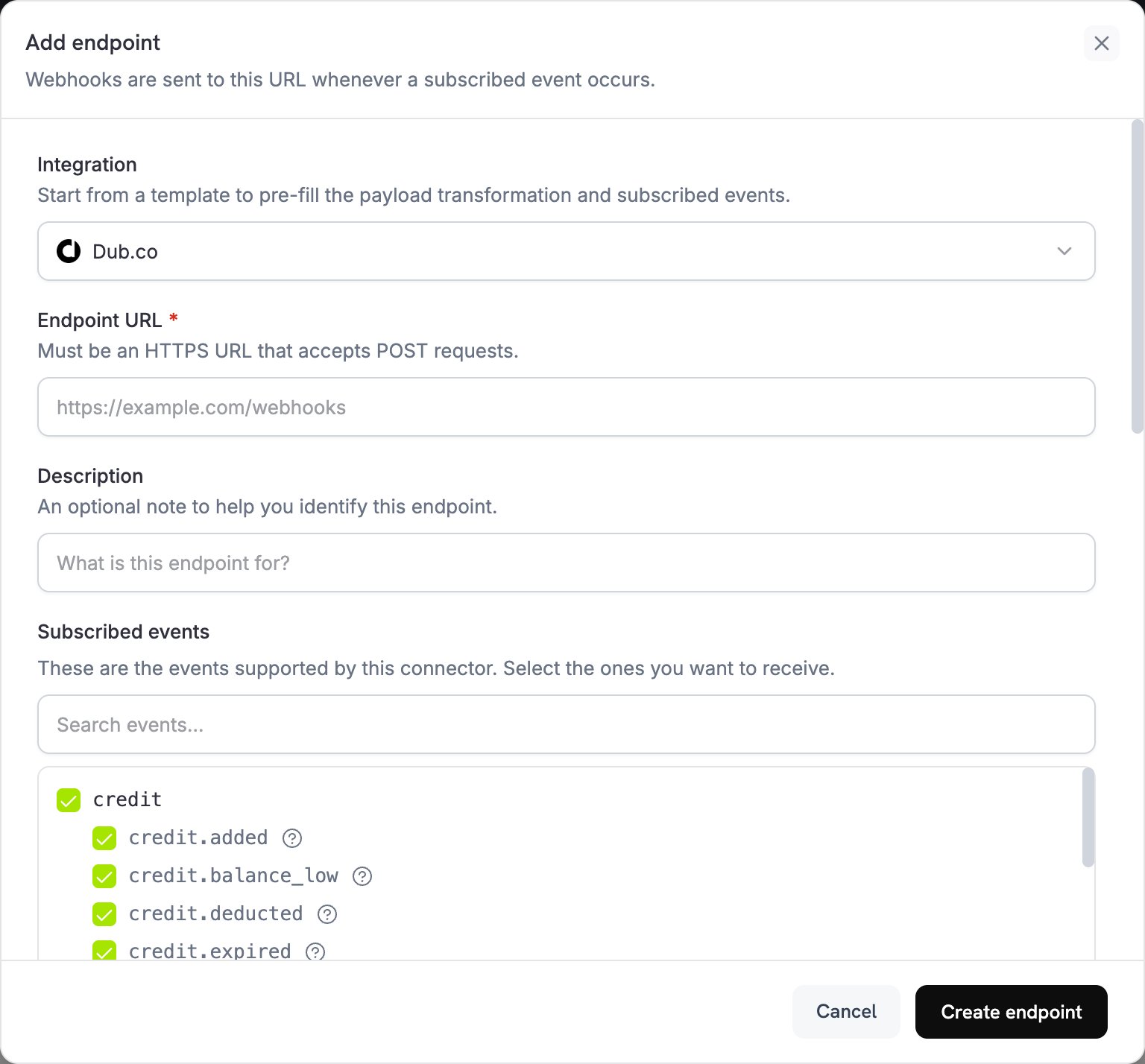 In **Integration**, select **Dub.co**.
In **API key**, paste your Dub API key. Dodo Payments sends it in the `Authorization` header of every delivery.
In **Integration**, select **Dub.co**.
In **API key**, paste your Dub API key. Dodo Payments sends it in the `Authorization` header of every delivery.
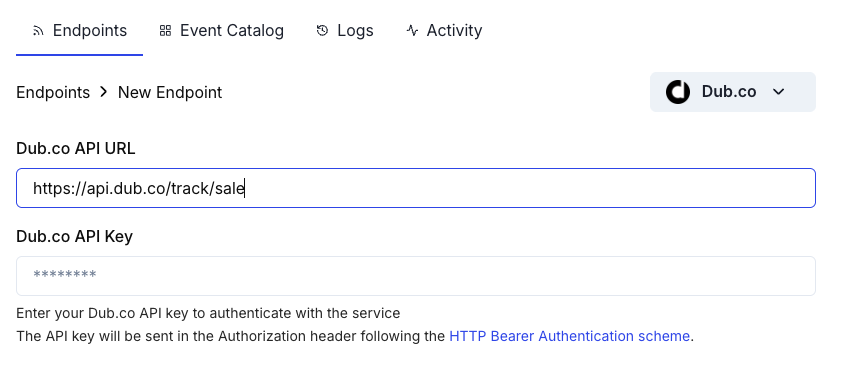 If **Endpoint URL** is empty, enter `https://api.dub.co/track/sale`. In **Subscribed events**, select the events your transformation handles, such as `payment.succeeded`.
Under **Transformation code**, edit the handler to format payment data for Dub's Track Sale API. Start from the [examples](#transformation-code-examples).
Under **Test this code**, click **Simulate** to run the handler against a sample payload. Then click **Create endpoint**.
## Transformation Code Examples
Each handler sends a sale to Dub only when the `metadata` has a click ID. For organic traffic, with no click ID, it sets `webhook.cancel = true`, so no request goes to Dub; the canceled delivery still shows as successful in the webhook logs.
The request body follows Dub's Track Sale API: `customerExternalId` and `amount` are required, and `paymentProcessor` is `custom`, because Dub's list of payment processors has no Dodo Payments value. Dub takes `amount` in the same unit as Dodo Payments amounts: cents for two-decimal currencies, and the full integer for zero-decimal currencies such as JPY. The examples pass the amount unchanged.
### Basic Sale Tracking
Track a sale when a payment succeeds:
```javascript basic_sale.js icon="js" expandable theme={null}
function handler(webhook) {
if (webhook.eventType === "payment.succeeded") {
const payment = webhook.payload.data;
// Only send to Dub if click ID exists in metadata
if (payment.metadata && payment.metadata.dub_click_id) {
webhook.payload = {
clickId: payment.metadata.dub_click_id,
customerExternalId: payment.metadata.dub_external_id || payment.customer.customer_id,
amount: payment.total_amount, // Already in the smallest currency unit
currency: payment.currency || "USD",
paymentProcessor: "custom",
invoiceId: payment.payment_id,
metadata: {
customer_email: payment.customer.email,
customer_name: payment.customer.name,
product_id: payment.product_cart ? payment.product_cart.map(product => product.product_id).join(', ') : undefined,
},
};
} else {
// Cancel dispatch if no click ID (organic traffic)
webhook.cancel = true;
}
}
return webhook;
}
```
### Track Subscription Sales
Track both initial subscriptions and recurring payments. Use this handler for subscriptions instead of the `payment.succeeded` handlers, not alongside them: each subscription payment also fires `payment.succeeded`, so handling both events records every sale twice. See [Subscription Integration Guide](/developer-resources/subscription-integration-guide).
The handler reads the click ID from the subscription's `metadata`, so pass the same metadata when you create the subscription. For renewals, `invoiceId` combines the subscription ID with `previous_billing_date`, the start of the current billing period, so a retried delivery reuses the same `invoiceId`.
```javascript subscription_sale.js icon="js" expandable theme={null}
function handler(webhook) {
const data = webhook.payload.data;
// Track initial subscription activation
if (webhook.eventType === "subscription.active") {
if (data.metadata && data.metadata.dub_click_id) {
webhook.payload = {
clickId: data.metadata.dub_click_id,
customerExternalId: data.metadata.dub_external_id || data.customer.customer_id,
amount: data.recurring_pre_tax_amount, // Amount in cents
currency: data.currency || "USD",
paymentProcessor: "custom",
invoiceId: data.subscription_id,
eventName: "Subscription Started",
metadata: {
subscription_id: data.subscription_id,
product_id: data.product_id,
billing_interval: data.payment_frequency_interval,
customer_email: data.customer.email,
},
};
} else {
// Cancel dispatch if no click ID (organic traffic)
webhook.cancel = true;
}
}
// Track recurring subscription payments
if (webhook.eventType === "subscription.renewed") {
if (data.metadata && data.metadata.dub_click_id) {
webhook.payload = {
clickId: data.metadata.dub_click_id,
customerExternalId: data.metadata.dub_external_id || data.customer.customer_id,
amount: data.recurring_pre_tax_amount,
currency: data.currency || "USD",
paymentProcessor: "custom",
invoiceId: `${data.subscription_id}_${data.previous_billing_date}`, // Same value on every retry
eventName: "Subscription Renewed",
metadata: {
subscription_id: data.subscription_id,
product_id: data.product_id,
customer_email: data.customer.email,
},
};
} else {
// Cancel dispatch if no click ID (organic traffic)
webhook.cancel = true;
}
}
return webhook;
}
```
### Track Sales with Tax Exclusion
Send only the pre-tax amount to Dub, so revenue in Dub excludes tax:
```javascript sale_without_tax.js icon="js" expandable theme={null}
function handler(webhook) {
if (webhook.eventType === "payment.succeeded") {
const payment = webhook.payload.data;
if (payment.metadata && payment.metadata.dub_click_id) {
// Calculate pre-tax amount (total minus tax)
const preTaxAmount = payment.total_amount - (payment.tax || 0);
webhook.payload = {
clickId: payment.metadata.dub_click_id,
customerExternalId: payment.metadata.dub_external_id || payment.customer.customer_id,
amount: preTaxAmount, // Pre-tax amount in cents
currency: payment.currency || "USD",
paymentProcessor: "custom",
invoiceId: payment.payment_id,
metadata: {
total_amount: payment.total_amount,
tax_amount: payment.tax || 0,
customer_email: payment.customer.email,
},
};
} else {
// Cancel dispatch if no click ID (organic traffic)
webhook.cancel = true;
}
}
return webhook;
}
```
### Track Sales with Custom Event Names
Use custom event names to categorize different types of sales. The example reads an `is_upgrade` flag that you set in the payment's `metadata`:
```javascript custom_events.js icon="js" expandable theme={null}
function handler(webhook) {
if (webhook.eventType === "payment.succeeded") {
const payment = webhook.payload.data;
if (payment.metadata && payment.metadata.dub_click_id) {
// Determine event name based on payment type
let eventName = "Purchase";
if (payment.subscription_id) {
eventName = "Subscription Purchase";
} else if (payment.metadata && payment.metadata.is_upgrade) {
eventName = "Plan Upgrade";
}
webhook.payload = {
clickId: payment.metadata.dub_click_id,
customerExternalId: payment.metadata.dub_external_id || payment.customer.customer_id,
amount: payment.total_amount,
currency: payment.currency || "USD",
paymentProcessor: "custom",
invoiceId: payment.payment_id,
eventName: eventName,
metadata: {
product_id: payment.product_cart ? payment.product_cart.map(product => product.product_id).join(', ') : undefined,
customer_email: payment.customer.email,
},
};
} else {
// Cancel dispatch if no click ID (organic traffic)
webhook.cancel = true;
}
}
return webhook;
}
```
## Alternative: Client-Side Implementation
To track sales from your own server instead of through a webhook transformation, call Dub's Track API directly after a successful payment, for example from your `payment.succeeded` webhook handler. The code uses your Dub API key, so run it on your server, never in the browser.
```typescript Next.js (Server Action) theme={null}
'use server';
import { Dub } from 'dub';
const dub = new Dub();
export async function trackSale(
paymentId: string,
clickId: string,
customerId: string,
amount: number,
currency: string
) {
await dub.track.sale({
clickId: clickId,
customerExternalId: customerId,
amount: amount,
currency: currency,
paymentProcessor: 'custom',
invoiceId: paymentId,
});
}
```
```javascript Node.js theme={null}
const { Dub } = require('dub');
const dub = new Dub();
async function trackSale(payment) {
if (payment.metadata?.dub_click_id) {
await dub.track.sale({
clickId: payment.metadata.dub_click_id,
customerExternalId: payment.metadata.dub_external_id || payment.customer.customer_id,
amount: payment.total_amount,
currency: payment.currency,
paymentProcessor: 'custom',
invoiceId: payment.payment_id,
});
}
}
```
## Best Practices
**Capture the click ID early**: Store the Dub click ID as early as possible in your checkout flow, so attribution stays accurate even if the customer leaves and returns later.
* **Include the click ID in metadata**: Without the click ID, Dub can't attribute revenue to your links.
* **Use external IDs consistently**: Pass the same customer ID from your system as `customerExternalId` every time, for accurate customer-level analytics.
* **Handle organic traffic**: Set `webhook.cancel = true` when there's no click ID, to avoid unnecessary API calls.
* **Test with sample payments**: Run the handler with **Test this code**, and confirm the integration works before you go live.
* **Monitor your Dub dashboard**: Check that sales appear with the expected attribution.
## Important Notes
* **Amount format**: Dub expects amounts in cents for two-decimal currencies (for example, \$10.00 is `1000`) and the full integer for zero-decimal currencies such as JPY.
* **Currency**: Use ISO 4217 currency codes, such as USD, EUR, and GBP. Dub converts each sale to USD at the latest exchange rate.
* **Free trials**: Dub's Track Sale API accepts an `amount` of `0`, and the examples don't skip \$0 payments, so each \$0 payment reaches Dub as a sale. To skip \$0 payments, set `webhook.cancel = true` when `total_amount` is `0`.
* **Refunds**: If you need accurate revenue reporting, track refunds separately.
## Troubleshooting
* Verify that your Dub API key is correct and has the `conversions.write` scope.
* Check that the `dub_click_id` is captured and stored in the payment metadata.
* Check that the webhook transformation formats the payload correctly.
* Verify that the endpoint is subscribed to `payment.succeeded`.
* Confirm that conversion tracking is enabled for your Dub links.
* Open the endpoint's delivery attempts in the **Logs** tab of **Developer → Webhooks** to see Dub's response. A payment with no click ID is canceled and shows as successful.
* Confirm that customers click through your Dub short links before checkout.
* Verify that the `dub_id` cookie is set on your domain.
* Check that the click ID in the payment metadata matches the click the customer made.
* Capture the click ID before you create the checkout.
* Check that the payload matches Dub's Track Sale API format.
* Check that the required fields, `customerExternalId` and `amount`, are present, and that `clickId` is set for attribution.
* Check that the amount is an integer in the smallest currency unit, not a decimal.
* Verify that the endpoint URL is `https://api.dub.co/track/sale`.
* Test the transformation with sample webhook payloads.
* Track sales on `payment.succeeded` events only, not on `payment.processing`.
* Use a unique `invoiceId` for each sale. Dub records only one sale for each `invoiceId`.
* For renewals, build `invoiceId` from the subscription ID and the billing period, as in [Track Subscription Sales](#track-subscription-sales). A value that changes on every delivery, such as the current time, records a duplicate sale when a delivery is retried.
## Additional Resources
Read about Dub's conversion tracking and analytics features.
See the complete API reference for Dub's Track Sale endpoint.
View conversion analytics and attribution data in your Dub dashboard.
Browse all Dodo Payments webhook events.
For help with this integration, contact Dodo Payments support at [support@dodopayments.com](mailto:support@dodopayments.com).
This documentation is built and hosted on [Mintlify](https://mintlify.com), a developer documentation platform.
If **Endpoint URL** is empty, enter `https://api.dub.co/track/sale`. In **Subscribed events**, select the events your transformation handles, such as `payment.succeeded`.
Under **Transformation code**, edit the handler to format payment data for Dub's Track Sale API. Start from the [examples](#transformation-code-examples).
Under **Test this code**, click **Simulate** to run the handler against a sample payload. Then click **Create endpoint**.
## Transformation Code Examples
Each handler sends a sale to Dub only when the `metadata` has a click ID. For organic traffic, with no click ID, it sets `webhook.cancel = true`, so no request goes to Dub; the canceled delivery still shows as successful in the webhook logs.
The request body follows Dub's Track Sale API: `customerExternalId` and `amount` are required, and `paymentProcessor` is `custom`, because Dub's list of payment processors has no Dodo Payments value. Dub takes `amount` in the same unit as Dodo Payments amounts: cents for two-decimal currencies, and the full integer for zero-decimal currencies such as JPY. The examples pass the amount unchanged.
### Basic Sale Tracking
Track a sale when a payment succeeds:
```javascript basic_sale.js icon="js" expandable theme={null}
function handler(webhook) {
if (webhook.eventType === "payment.succeeded") {
const payment = webhook.payload.data;
// Only send to Dub if click ID exists in metadata
if (payment.metadata && payment.metadata.dub_click_id) {
webhook.payload = {
clickId: payment.metadata.dub_click_id,
customerExternalId: payment.metadata.dub_external_id || payment.customer.customer_id,
amount: payment.total_amount, // Already in the smallest currency unit
currency: payment.currency || "USD",
paymentProcessor: "custom",
invoiceId: payment.payment_id,
metadata: {
customer_email: payment.customer.email,
customer_name: payment.customer.name,
product_id: payment.product_cart ? payment.product_cart.map(product => product.product_id).join(', ') : undefined,
},
};
} else {
// Cancel dispatch if no click ID (organic traffic)
webhook.cancel = true;
}
}
return webhook;
}
```
### Track Subscription Sales
Track both initial subscriptions and recurring payments. Use this handler for subscriptions instead of the `payment.succeeded` handlers, not alongside them: each subscription payment also fires `payment.succeeded`, so handling both events records every sale twice. See [Subscription Integration Guide](/developer-resources/subscription-integration-guide).
The handler reads the click ID from the subscription's `metadata`, so pass the same metadata when you create the subscription. For renewals, `invoiceId` combines the subscription ID with `previous_billing_date`, the start of the current billing period, so a retried delivery reuses the same `invoiceId`.
```javascript subscription_sale.js icon="js" expandable theme={null}
function handler(webhook) {
const data = webhook.payload.data;
// Track initial subscription activation
if (webhook.eventType === "subscription.active") {
if (data.metadata && data.metadata.dub_click_id) {
webhook.payload = {
clickId: data.metadata.dub_click_id,
customerExternalId: data.metadata.dub_external_id || data.customer.customer_id,
amount: data.recurring_pre_tax_amount, // Amount in cents
currency: data.currency || "USD",
paymentProcessor: "custom",
invoiceId: data.subscription_id,
eventName: "Subscription Started",
metadata: {
subscription_id: data.subscription_id,
product_id: data.product_id,
billing_interval: data.payment_frequency_interval,
customer_email: data.customer.email,
},
};
} else {
// Cancel dispatch if no click ID (organic traffic)
webhook.cancel = true;
}
}
// Track recurring subscription payments
if (webhook.eventType === "subscription.renewed") {
if (data.metadata && data.metadata.dub_click_id) {
webhook.payload = {
clickId: data.metadata.dub_click_id,
customerExternalId: data.metadata.dub_external_id || data.customer.customer_id,
amount: data.recurring_pre_tax_amount,
currency: data.currency || "USD",
paymentProcessor: "custom",
invoiceId: `${data.subscription_id}_${data.previous_billing_date}`, // Same value on every retry
eventName: "Subscription Renewed",
metadata: {
subscription_id: data.subscription_id,
product_id: data.product_id,
customer_email: data.customer.email,
},
};
} else {
// Cancel dispatch if no click ID (organic traffic)
webhook.cancel = true;
}
}
return webhook;
}
```
### Track Sales with Tax Exclusion
Send only the pre-tax amount to Dub, so revenue in Dub excludes tax:
```javascript sale_without_tax.js icon="js" expandable theme={null}
function handler(webhook) {
if (webhook.eventType === "payment.succeeded") {
const payment = webhook.payload.data;
if (payment.metadata && payment.metadata.dub_click_id) {
// Calculate pre-tax amount (total minus tax)
const preTaxAmount = payment.total_amount - (payment.tax || 0);
webhook.payload = {
clickId: payment.metadata.dub_click_id,
customerExternalId: payment.metadata.dub_external_id || payment.customer.customer_id,
amount: preTaxAmount, // Pre-tax amount in cents
currency: payment.currency || "USD",
paymentProcessor: "custom",
invoiceId: payment.payment_id,
metadata: {
total_amount: payment.total_amount,
tax_amount: payment.tax || 0,
customer_email: payment.customer.email,
},
};
} else {
// Cancel dispatch if no click ID (organic traffic)
webhook.cancel = true;
}
}
return webhook;
}
```
### Track Sales with Custom Event Names
Use custom event names to categorize different types of sales. The example reads an `is_upgrade` flag that you set in the payment's `metadata`:
```javascript custom_events.js icon="js" expandable theme={null}
function handler(webhook) {
if (webhook.eventType === "payment.succeeded") {
const payment = webhook.payload.data;
if (payment.metadata && payment.metadata.dub_click_id) {
// Determine event name based on payment type
let eventName = "Purchase";
if (payment.subscription_id) {
eventName = "Subscription Purchase";
} else if (payment.metadata && payment.metadata.is_upgrade) {
eventName = "Plan Upgrade";
}
webhook.payload = {
clickId: payment.metadata.dub_click_id,
customerExternalId: payment.metadata.dub_external_id || payment.customer.customer_id,
amount: payment.total_amount,
currency: payment.currency || "USD",
paymentProcessor: "custom",
invoiceId: payment.payment_id,
eventName: eventName,
metadata: {
product_id: payment.product_cart ? payment.product_cart.map(product => product.product_id).join(', ') : undefined,
customer_email: payment.customer.email,
},
};
} else {
// Cancel dispatch if no click ID (organic traffic)
webhook.cancel = true;
}
}
return webhook;
}
```
## Alternative: Client-Side Implementation
To track sales from your own server instead of through a webhook transformation, call Dub's Track API directly after a successful payment, for example from your `payment.succeeded` webhook handler. The code uses your Dub API key, so run it on your server, never in the browser.
```typescript Next.js (Server Action) theme={null}
'use server';
import { Dub } from 'dub';
const dub = new Dub();
export async function trackSale(
paymentId: string,
clickId: string,
customerId: string,
amount: number,
currency: string
) {
await dub.track.sale({
clickId: clickId,
customerExternalId: customerId,
amount: amount,
currency: currency,
paymentProcessor: 'custom',
invoiceId: paymentId,
});
}
```
```javascript Node.js theme={null}
const { Dub } = require('dub');
const dub = new Dub();
async function trackSale(payment) {
if (payment.metadata?.dub_click_id) {
await dub.track.sale({
clickId: payment.metadata.dub_click_id,
customerExternalId: payment.metadata.dub_external_id || payment.customer.customer_id,
amount: payment.total_amount,
currency: payment.currency,
paymentProcessor: 'custom',
invoiceId: payment.payment_id,
});
}
}
```
## Best Practices
**Capture the click ID early**: Store the Dub click ID as early as possible in your checkout flow, so attribution stays accurate even if the customer leaves and returns later.
* **Include the click ID in metadata**: Without the click ID, Dub can't attribute revenue to your links.
* **Use external IDs consistently**: Pass the same customer ID from your system as `customerExternalId` every time, for accurate customer-level analytics.
* **Handle organic traffic**: Set `webhook.cancel = true` when there's no click ID, to avoid unnecessary API calls.
* **Test with sample payments**: Run the handler with **Test this code**, and confirm the integration works before you go live.
* **Monitor your Dub dashboard**: Check that sales appear with the expected attribution.
## Important Notes
* **Amount format**: Dub expects amounts in cents for two-decimal currencies (for example, \$10.00 is `1000`) and the full integer for zero-decimal currencies such as JPY.
* **Currency**: Use ISO 4217 currency codes, such as USD, EUR, and GBP. Dub converts each sale to USD at the latest exchange rate.
* **Free trials**: Dub's Track Sale API accepts an `amount` of `0`, and the examples don't skip \$0 payments, so each \$0 payment reaches Dub as a sale. To skip \$0 payments, set `webhook.cancel = true` when `total_amount` is `0`.
* **Refunds**: If you need accurate revenue reporting, track refunds separately.
## Troubleshooting
* Verify that your Dub API key is correct and has the `conversions.write` scope.
* Check that the `dub_click_id` is captured and stored in the payment metadata.
* Check that the webhook transformation formats the payload correctly.
* Verify that the endpoint is subscribed to `payment.succeeded`.
* Confirm that conversion tracking is enabled for your Dub links.
* Open the endpoint's delivery attempts in the **Logs** tab of **Developer → Webhooks** to see Dub's response. A payment with no click ID is canceled and shows as successful.
* Confirm that customers click through your Dub short links before checkout.
* Verify that the `dub_id` cookie is set on your domain.
* Check that the click ID in the payment metadata matches the click the customer made.
* Capture the click ID before you create the checkout.
* Check that the payload matches Dub's Track Sale API format.
* Check that the required fields, `customerExternalId` and `amount`, are present, and that `clickId` is set for attribution.
* Check that the amount is an integer in the smallest currency unit, not a decimal.
* Verify that the endpoint URL is `https://api.dub.co/track/sale`.
* Test the transformation with sample webhook payloads.
* Track sales on `payment.succeeded` events only, not on `payment.processing`.
* Use a unique `invoiceId` for each sale. Dub records only one sale for each `invoiceId`.
* For renewals, build `invoiceId` from the subscription ID and the billing period, as in [Track Subscription Sales](#track-subscription-sales). A value that changes on every delivery, such as the current time, records a duplicate sale when a delivery is retried.
## Additional Resources
Read about Dub's conversion tracking and analytics features.
See the complete API reference for Dub's Track Sale endpoint.
View conversion analytics and attribution data in your Dub dashboard.
Browse all Dodo Payments webhook events.
For help with this integration, contact Dodo Payments support at [support@dodopayments.com](mailto:support@dodopayments.com).
This documentation is built and hosted on [Mintlify](https://mintlify.com), a developer documentation platform.