> ## Documentation Index
> Fetch the complete documentation index at: https://docs.dodopayments.com/llms.txt
> Use this file to discover all available pages before exploring further.
# Keplars
> Send transactional emails through Keplars when Dodo Payments payment and subscription events occur, with no middleware server.
## Introduction
Send transactional emails automatically when payment and subscription events occur. Payment confirmations, subscription updates, and failure notifications go out through Keplars with no middleware server: Dodo Payments calls the Keplars API directly, using a JavaScript transformation handler.
This integration authenticates with your Keplars API key. Find it in the Keplars dashboard under **Settings → API Keys**, and verify a sender domain or address under **Domains**.
## Getting Started
In the Dodo Payments dashboard, go to **Developer → Webhooks** and click **Add endpoint**.
In **Integration**, select **Keplars**. The template fills in the Keplars API URL and the transformation code.
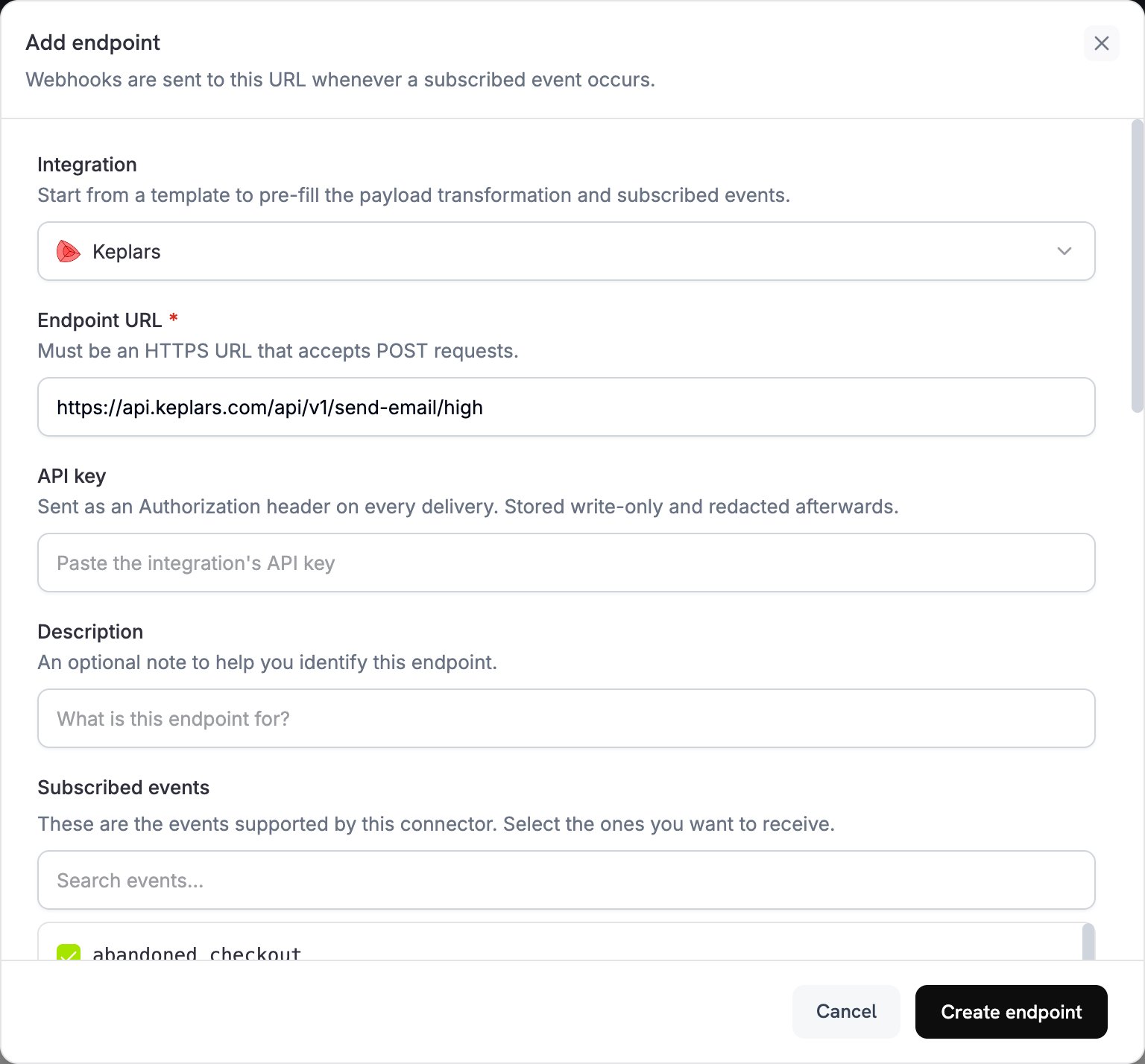 Paste your Keplars API key into **API key**. Dodo Payments sends it as a Bearer token on every request. Under **Subscribed events**, select the events that should send an email.
 In **Transformation code**, edit the code to format emails for Keplars. Replace the placeholder template IDs with your own.
Under **Test this code**, select an event type and click **Simulate** to run the transformation against a sample payload. Then click **Create endpoint** to start sending emails.
Dodo Payments events now send transactional emails through Keplars.
## Transformation Code Examples
Each handler sets `webhook.url` to the Keplars high-priority send endpoint and rewrites `webhook.payload` into a Keplars request. Dodo Payments adds the API key as a Bearer token. Replace `your-keplars-*-template-id` with your template IDs. The Keplars send API has no `from` field, so Keplars sends each email from a sender you set up in the Keplars dashboard.
`to` must be an **array**, even for a single recipient. When you use `template_id`, **don't** also send `subject` or `body`, because the template supplies them.
### Payment Confirmation Email
```javascript payment_succeeded.js icon="js" expandable theme={null}
function handler(webhook) {
if (webhook.eventType !== "payment.succeeded") return webhook;
const data = webhook.payload.data || {};
const paymentDate = new Date(webhook.payload.timestamp).toLocaleDateString("en-US", {
year: "numeric", month: "long", day: "numeric",
});
webhook.url = "https://api.keplars.com/api/v1/send-email/high";
webhook.payload = {
to: [data.customer?.email],
template_id: "your-keplars-payment-success-template-id",
params: {
customer_name: data.customer?.name,
amount: ((data.total_amount || 0) / 100).toFixed(2),
currency: data.currency || "USD",
payment_id: data.payment_id,
payment_method: data.payment_method,
payment_date: paymentDate,
},
};
return webhook;
}
```
### Payment Failure Notification
```javascript payment_failed.js icon="js" expandable theme={null}
function handler(webhook) {
if (webhook.eventType !== "payment.failed") return webhook;
const data = webhook.payload.data || {};
const paymentDate = new Date(webhook.payload.timestamp).toLocaleDateString("en-US", {
year: "numeric", month: "long", day: "numeric",
});
webhook.url = "https://api.keplars.com/api/v1/send-email/high";
webhook.payload = {
to: [data.customer?.email],
template_id: "your-keplars-payment-failed-template-id",
params: {
customer_name: data.customer?.name,
amount: ((data.total_amount || 0) / 100).toFixed(2),
currency: data.currency || "USD",
payment_id: data.payment_id,
error_message: data.error_message || "Your payment could not be processed.",
payment_date: paymentDate,
},
};
return webhook;
}
```
### Subscription Welcome Email
```javascript subscription_active.js icon="js" expandable theme={null}
function handler(webhook) {
if (webhook.eventType !== "subscription.active") return webhook;
const data = webhook.payload.data || {};
const nextBilling = data.next_billing_date
? new Date(data.next_billing_date).toLocaleDateString("en-US", {
year: "numeric", month: "long", day: "numeric",
})
: "";
webhook.url = "https://api.keplars.com/api/v1/send-email/high";
webhook.payload = {
to: [data.customer?.email],
template_id: "your-keplars-subscription-active-template-id",
params: {
customer_name: data.customer?.name,
subscription_id: data.subscription_id,
product_id: data.product_id,
amount: ((data.recurring_pre_tax_amount || 0) / 100).toFixed(2),
currency: data.currency || "USD",
billing_interval: data.payment_frequency_interval || "Month",
next_billing_date: nextBilling,
},
};
return webhook;
}
```
### Subscription Cancellation Email
```javascript subscription_cancelled.js icon="js" expandable theme={null}
function handler(webhook) {
if (webhook.eventType !== "subscription.cancelled") return webhook;
const data = webhook.payload.data || {};
const cancellationDate = new Date(webhook.payload.timestamp).toLocaleDateString("en-US", {
year: "numeric", month: "long", day: "numeric",
});
webhook.url = "https://api.keplars.com/api/v1/send-email/high";
webhook.payload = {
to: [data.customer?.email],
template_id: "your-keplars-subscription-cancelled-template-id",
params: {
customer_name: data.customer?.name,
subscription_id: data.subscription_id,
cancellation_date: cancellationDate,
},
};
return webhook;
}
```
## Tips
* Send from a verified domain or address to improve deliverability.
* Create one Keplars template per event type, so each email stays on-brand and on-message.
* Personalize each email by passing customer data, such as the name, amount, and payment ID, in `params`.
* Test in sandbox mode first. Keplars captures sandbox sends in its Test Inbox instead of delivering them.
## Troubleshooting
* Check that your API key is correct and active in Keplars under **Settings → API Keys**.
* Check that your sender domain or address is verified.
* In the Dodo Payments dashboard, open the message in the **Logs** tab of **Developer → Webhooks**. Each delivery attempt shows the raw error response from Keplars.
* The `template_id` in your handler must match an active template in your Keplars account. Check the ID, and check that the template is active, in the Keplars dashboard.
* Each handler checks `webhook.eventType` and returns the webhook unchanged if the event doesn't match. Check that the endpoint's **Subscribed events** include only the events you want.
This documentation is built and hosted on [Mintlify](https://mintlify.com), a developer documentation platform.
In **Transformation code**, edit the code to format emails for Keplars. Replace the placeholder template IDs with your own.
Under **Test this code**, select an event type and click **Simulate** to run the transformation against a sample payload. Then click **Create endpoint** to start sending emails.
Dodo Payments events now send transactional emails through Keplars.
## Transformation Code Examples
Each handler sets `webhook.url` to the Keplars high-priority send endpoint and rewrites `webhook.payload` into a Keplars request. Dodo Payments adds the API key as a Bearer token. Replace `your-keplars-*-template-id` with your template IDs. The Keplars send API has no `from` field, so Keplars sends each email from a sender you set up in the Keplars dashboard.
`to` must be an **array**, even for a single recipient. When you use `template_id`, **don't** also send `subject` or `body`, because the template supplies them.
### Payment Confirmation Email
```javascript payment_succeeded.js icon="js" expandable theme={null}
function handler(webhook) {
if (webhook.eventType !== "payment.succeeded") return webhook;
const data = webhook.payload.data || {};
const paymentDate = new Date(webhook.payload.timestamp).toLocaleDateString("en-US", {
year: "numeric", month: "long", day: "numeric",
});
webhook.url = "https://api.keplars.com/api/v1/send-email/high";
webhook.payload = {
to: [data.customer?.email],
template_id: "your-keplars-payment-success-template-id",
params: {
customer_name: data.customer?.name,
amount: ((data.total_amount || 0) / 100).toFixed(2),
currency: data.currency || "USD",
payment_id: data.payment_id,
payment_method: data.payment_method,
payment_date: paymentDate,
},
};
return webhook;
}
```
### Payment Failure Notification
```javascript payment_failed.js icon="js" expandable theme={null}
function handler(webhook) {
if (webhook.eventType !== "payment.failed") return webhook;
const data = webhook.payload.data || {};
const paymentDate = new Date(webhook.payload.timestamp).toLocaleDateString("en-US", {
year: "numeric", month: "long", day: "numeric",
});
webhook.url = "https://api.keplars.com/api/v1/send-email/high";
webhook.payload = {
to: [data.customer?.email],
template_id: "your-keplars-payment-failed-template-id",
params: {
customer_name: data.customer?.name,
amount: ((data.total_amount || 0) / 100).toFixed(2),
currency: data.currency || "USD",
payment_id: data.payment_id,
error_message: data.error_message || "Your payment could not be processed.",
payment_date: paymentDate,
},
};
return webhook;
}
```
### Subscription Welcome Email
```javascript subscription_active.js icon="js" expandable theme={null}
function handler(webhook) {
if (webhook.eventType !== "subscription.active") return webhook;
const data = webhook.payload.data || {};
const nextBilling = data.next_billing_date
? new Date(data.next_billing_date).toLocaleDateString("en-US", {
year: "numeric", month: "long", day: "numeric",
})
: "";
webhook.url = "https://api.keplars.com/api/v1/send-email/high";
webhook.payload = {
to: [data.customer?.email],
template_id: "your-keplars-subscription-active-template-id",
params: {
customer_name: data.customer?.name,
subscription_id: data.subscription_id,
product_id: data.product_id,
amount: ((data.recurring_pre_tax_amount || 0) / 100).toFixed(2),
currency: data.currency || "USD",
billing_interval: data.payment_frequency_interval || "Month",
next_billing_date: nextBilling,
},
};
return webhook;
}
```
### Subscription Cancellation Email
```javascript subscription_cancelled.js icon="js" expandable theme={null}
function handler(webhook) {
if (webhook.eventType !== "subscription.cancelled") return webhook;
const data = webhook.payload.data || {};
const cancellationDate = new Date(webhook.payload.timestamp).toLocaleDateString("en-US", {
year: "numeric", month: "long", day: "numeric",
});
webhook.url = "https://api.keplars.com/api/v1/send-email/high";
webhook.payload = {
to: [data.customer?.email],
template_id: "your-keplars-subscription-cancelled-template-id",
params: {
customer_name: data.customer?.name,
subscription_id: data.subscription_id,
cancellation_date: cancellationDate,
},
};
return webhook;
}
```
## Tips
* Send from a verified domain or address to improve deliverability.
* Create one Keplars template per event type, so each email stays on-brand and on-message.
* Personalize each email by passing customer data, such as the name, amount, and payment ID, in `params`.
* Test in sandbox mode first. Keplars captures sandbox sends in its Test Inbox instead of delivering them.
## Troubleshooting
* Check that your API key is correct and active in Keplars under **Settings → API Keys**.
* Check that your sender domain or address is verified.
* In the Dodo Payments dashboard, open the message in the **Logs** tab of **Developer → Webhooks**. Each delivery attempt shows the raw error response from Keplars.
* The `template_id` in your handler must match an active template in your Keplars account. Check the ID, and check that the template is active, in the Keplars dashboard.
* Each handler checks `webhook.eventType` and returns the webhook unchanged if the event doesn't match. Check that the endpoint's **Subscribed events** include only the events you want.
This documentation is built and hosted on [Mintlify](https://mintlify.com), a developer documentation platform.