> ## Documentation Index
> Fetch the complete documentation index at: https://docs.dodopayments.com/llms.txt
> Use this file to discover all available pages before exploring further.
# n8n
> Trigger n8n workflows from Dodo Payments webhook events and connect payments to the apps n8n integrates with, in self-hosted or cloud n8n.
## Introduction
The n8n integration starts an n8n workflow whenever a payment event occurs, so you can connect Dodo Payments to any app that n8n integrates with. Workflows can send emails, update spreadsheets, create tasks, write to databases, and more.
This integration requires the webhook URL from a Webhook node in your n8n workflow.
## Getting Started
In the Dodo Payments dashboard, go to **Developer → Webhooks** and click **Add endpoint**.
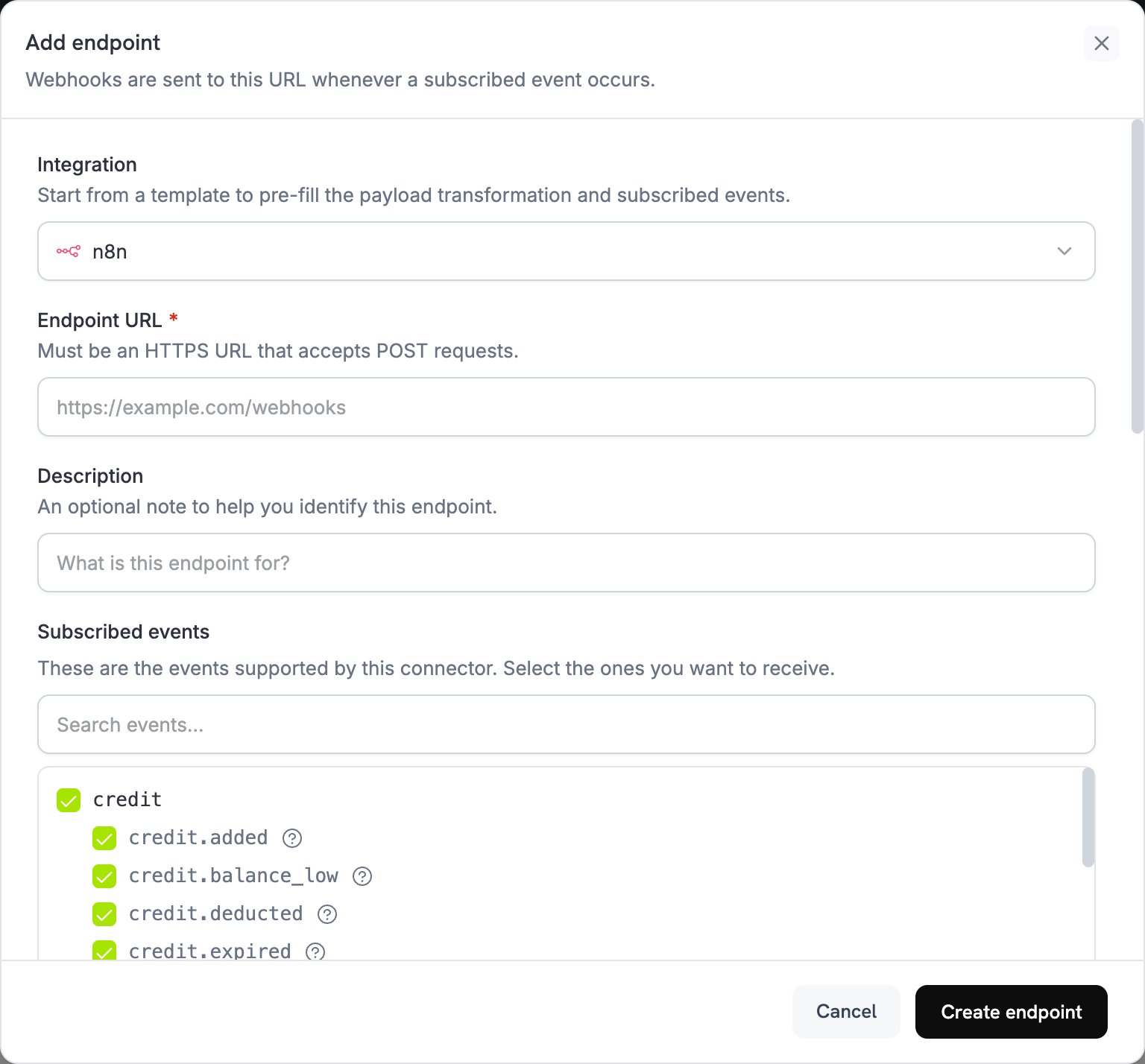 In the **Integration** list, select **n8n**.
In n8n, create a workflow and add a **Webhook** node as the trigger. Set **HTTP Method** to `POST`, then copy the **Production URL**. The test URL only receives events while n8n is listening for a test event.
Paste the n8n production URL into the **Endpoint URL** field.
Edit the code under **Transformation code** to shape the data for your n8n workflow. Start from the examples below.
Under **Test this code**, run the transformation against a sample payload, then click **Create endpoint**.
In n8n, publish your workflow. n8n registers the production webhook URL only when the workflow is published.
Payment events now trigger your n8n workflows.
## Transformation Code Examples
Each example flattens a Dodo Payments event into a small JSON object that n8n nodes can read directly.
### Basic Webhook Payload
This example sends the payment amount, currency, customer, and payment method when a payment succeeds.
```javascript basic_webhook.js icon="js" expandable theme={null}
function handler(webhook) {
if (webhook.eventType === "payment.succeeded") {
const p = webhook.payload.data;
webhook.payload = {
event_type: webhook.eventType,
payment_id: p.payment_id,
amount: (p.total_amount / 100).toFixed(2),
currency: p.currency || "USD",
customer_email: p.customer.email,
customer_name: p.customer.name,
payment_method: p.payment_method || "unknown",
timestamp: webhook.payload.timestamp
};
}
return webhook;
}
```
### Subscription Event Handler
This example sends a `subscription_started` or `subscription_cancelled` event, so one workflow can branch on `event_type`.
```javascript subscription_webhook.js icon="js" expandable theme={null}
function handler(webhook) {
const s = webhook.payload.data;
switch (webhook.eventType) {
case "subscription.active":
webhook.payload = {
event_type: "subscription_started",
subscription_id: s.subscription_id,
customer_email: s.customer.email,
customer_name: s.customer.name,
product_id: s.product_id,
amount: (s.recurring_pre_tax_amount / 100).toFixed(2),
frequency: s.payment_frequency_interval,
next_billing: s.next_billing_date,
timestamp: webhook.payload.timestamp
};
break;
case "subscription.cancelled":
webhook.payload = {
event_type: "subscription_cancelled",
subscription_id: s.subscription_id,
customer_email: s.customer.email,
cancelled_at: s.cancelled_at,
cancel_at_next_billing: s.cancel_at_next_billing_date,
timestamp: webhook.payload.timestamp
};
break;
}
return webhook;
}
```
### Dispute Alert Handler
This example sends every `dispute.*` event and sets `urgent` to `true` when a dispute opens.
```javascript dispute_webhook.js icon="js" expandable theme={null}
function handler(webhook) {
if (webhook.eventType.startsWith("dispute.")) {
const d = webhook.payload.data;
webhook.payload = {
event_type: webhook.eventType,
dispute_id: d.dispute_id,
payment_id: d.payment_id,
amount: (d.amount / 100).toFixed(2),
status: d.dispute_status,
stage: d.dispute_stage,
remarks: d.remarks || "",
urgent: webhook.eventType === "dispute.opened",
timestamp: webhook.payload.timestamp
};
}
return webhook;
}
```
## Popular N8N Use Cases
These are common workflows that merchants build on Dodo Payments events.
* Send Gmail or Outlook emails for payment confirmations.
* Create email sequences in Mailchimp or ConvertKit.
* Send Slack or Discord notifications through webhooks.
* Create Google Sheets records.
* Send Telegram or WhatsApp messages.
* Add contacts to HubSpot or Salesforce.
* Create deals in Pipedrive or Close.
* Update customer records in Airtable.
* Log activities in Monday.com.
* Sync data to PostgreSQL or MySQL databases.
* Create tasks in Asana or Trello.
* Add to-do items in Notion.
* Create events in Google Calendar.
* Send SMS notifications through Twilio.
* Create GitHub issues for disputes.
* Transform and enrich payment data.
* Store events in databases such as PostgreSQL or MongoDB.
* Aggregate metrics and analytics.
* Generate reports and exports.
* Trigger multi-step workflows.
## Tips
* Keep the payload structure simple, so n8n nodes can parse it.
* Use the same field names across all events.
* Include timestamps for workflow timing and scheduling.
* Test your workflow with sample data before you publish it.
* Use the **IF** node for conditional logic and routing.
* Use the **Code** node for custom data transformations.
* Use the **Switch** node to route each event type to its own path.
* Set up an error workflow in n8n to catch failed executions.
## Troubleshooting
* Check that the endpoint uses the n8n production URL, and that n8n can be reached from the internet.
* Check that the workflow is published in n8n.
* Check that the Webhook node's **HTTP Method** is `POST`.
* Check for incoming requests in the workflow's **Executions** tab.
* Check that firewall and network settings allow incoming webhooks.
* If the Webhook node requires authentication, add the matching header to the endpoint under [Custom Headers](/developer-resources/webhooks#custom-headers).
* Check the field names in your n8n node configurations.
* Check that data types match the formats your nodes expect.
* Use the n8n test URL to inspect incoming data.
* Check that the transformation code returns valid JSON.
* Check the Webhook node's response settings.
* Use the **Edit Fields (Set)** node to rename or restructure fields.
* Review the execution logs in n8n for detailed error messages.
* Check node connection settings and credentials.
* Check that all required fields are present in the payload.
* Test individual nodes with sample data.
* Enable an error workflow to catch and handle failures.
* Check rate limits and API quotas for connected services.
This documentation is built and hosted on [Mintlify](https://mintlify.com), a developer documentation platform.
In the **Integration** list, select **n8n**.
In n8n, create a workflow and add a **Webhook** node as the trigger. Set **HTTP Method** to `POST`, then copy the **Production URL**. The test URL only receives events while n8n is listening for a test event.
Paste the n8n production URL into the **Endpoint URL** field.
Edit the code under **Transformation code** to shape the data for your n8n workflow. Start from the examples below.
Under **Test this code**, run the transformation against a sample payload, then click **Create endpoint**.
In n8n, publish your workflow. n8n registers the production webhook URL only when the workflow is published.
Payment events now trigger your n8n workflows.
## Transformation Code Examples
Each example flattens a Dodo Payments event into a small JSON object that n8n nodes can read directly.
### Basic Webhook Payload
This example sends the payment amount, currency, customer, and payment method when a payment succeeds.
```javascript basic_webhook.js icon="js" expandable theme={null}
function handler(webhook) {
if (webhook.eventType === "payment.succeeded") {
const p = webhook.payload.data;
webhook.payload = {
event_type: webhook.eventType,
payment_id: p.payment_id,
amount: (p.total_amount / 100).toFixed(2),
currency: p.currency || "USD",
customer_email: p.customer.email,
customer_name: p.customer.name,
payment_method: p.payment_method || "unknown",
timestamp: webhook.payload.timestamp
};
}
return webhook;
}
```
### Subscription Event Handler
This example sends a `subscription_started` or `subscription_cancelled` event, so one workflow can branch on `event_type`.
```javascript subscription_webhook.js icon="js" expandable theme={null}
function handler(webhook) {
const s = webhook.payload.data;
switch (webhook.eventType) {
case "subscription.active":
webhook.payload = {
event_type: "subscription_started",
subscription_id: s.subscription_id,
customer_email: s.customer.email,
customer_name: s.customer.name,
product_id: s.product_id,
amount: (s.recurring_pre_tax_amount / 100).toFixed(2),
frequency: s.payment_frequency_interval,
next_billing: s.next_billing_date,
timestamp: webhook.payload.timestamp
};
break;
case "subscription.cancelled":
webhook.payload = {
event_type: "subscription_cancelled",
subscription_id: s.subscription_id,
customer_email: s.customer.email,
cancelled_at: s.cancelled_at,
cancel_at_next_billing: s.cancel_at_next_billing_date,
timestamp: webhook.payload.timestamp
};
break;
}
return webhook;
}
```
### Dispute Alert Handler
This example sends every `dispute.*` event and sets `urgent` to `true` when a dispute opens.
```javascript dispute_webhook.js icon="js" expandable theme={null}
function handler(webhook) {
if (webhook.eventType.startsWith("dispute.")) {
const d = webhook.payload.data;
webhook.payload = {
event_type: webhook.eventType,
dispute_id: d.dispute_id,
payment_id: d.payment_id,
amount: (d.amount / 100).toFixed(2),
status: d.dispute_status,
stage: d.dispute_stage,
remarks: d.remarks || "",
urgent: webhook.eventType === "dispute.opened",
timestamp: webhook.payload.timestamp
};
}
return webhook;
}
```
## Popular N8N Use Cases
These are common workflows that merchants build on Dodo Payments events.
* Send Gmail or Outlook emails for payment confirmations.
* Create email sequences in Mailchimp or ConvertKit.
* Send Slack or Discord notifications through webhooks.
* Create Google Sheets records.
* Send Telegram or WhatsApp messages.
* Add contacts to HubSpot or Salesforce.
* Create deals in Pipedrive or Close.
* Update customer records in Airtable.
* Log activities in Monday.com.
* Sync data to PostgreSQL or MySQL databases.
* Create tasks in Asana or Trello.
* Add to-do items in Notion.
* Create events in Google Calendar.
* Send SMS notifications through Twilio.
* Create GitHub issues for disputes.
* Transform and enrich payment data.
* Store events in databases such as PostgreSQL or MongoDB.
* Aggregate metrics and analytics.
* Generate reports and exports.
* Trigger multi-step workflows.
## Tips
* Keep the payload structure simple, so n8n nodes can parse it.
* Use the same field names across all events.
* Include timestamps for workflow timing and scheduling.
* Test your workflow with sample data before you publish it.
* Use the **IF** node for conditional logic and routing.
* Use the **Code** node for custom data transformations.
* Use the **Switch** node to route each event type to its own path.
* Set up an error workflow in n8n to catch failed executions.
## Troubleshooting
* Check that the endpoint uses the n8n production URL, and that n8n can be reached from the internet.
* Check that the workflow is published in n8n.
* Check that the Webhook node's **HTTP Method** is `POST`.
* Check for incoming requests in the workflow's **Executions** tab.
* Check that firewall and network settings allow incoming webhooks.
* If the Webhook node requires authentication, add the matching header to the endpoint under [Custom Headers](/developer-resources/webhooks#custom-headers).
* Check the field names in your n8n node configurations.
* Check that data types match the formats your nodes expect.
* Use the n8n test URL to inspect incoming data.
* Check that the transformation code returns valid JSON.
* Check the Webhook node's response settings.
* Use the **Edit Fields (Set)** node to rename or restructure fields.
* Review the execution logs in n8n for detailed error messages.
* Check node connection settings and credentials.
* Check that all required fields are present in the payload.
* Test individual nodes with sample data.
* Enable an error workflow to catch and handle failures.
* Check rate limits and API quotas for connected services.
This documentation is built and hosted on [Mintlify](https://mintlify.com), a developer documentation platform.