> ## Documentation Index
> Fetch the complete documentation index at: https://docs.dodopayments.com/llms.txt
> Use this file to discover all available pages before exploring further.
# Resend
> Send transactional emails through Resend when Dodo Payments events occur, such as payment confirmations, subscription welcomes, and payment failure notices.
## Introduction
The Resend integration sends a transactional email through Resend when a Dodo Payments event occurs. Use it to confirm payments, welcome new subscribers, and tell customers when a payment fails, from your own sending domain.
This integration requires a Resend API key with **Sending access** and a sending domain verified in Resend. You also need access to **Developer → Webhooks** in the Dodo Payments dashboard.
## Getting Started
In the Dodo Payments dashboard, go to **Developer → Webhooks** and click **Add endpoint**.
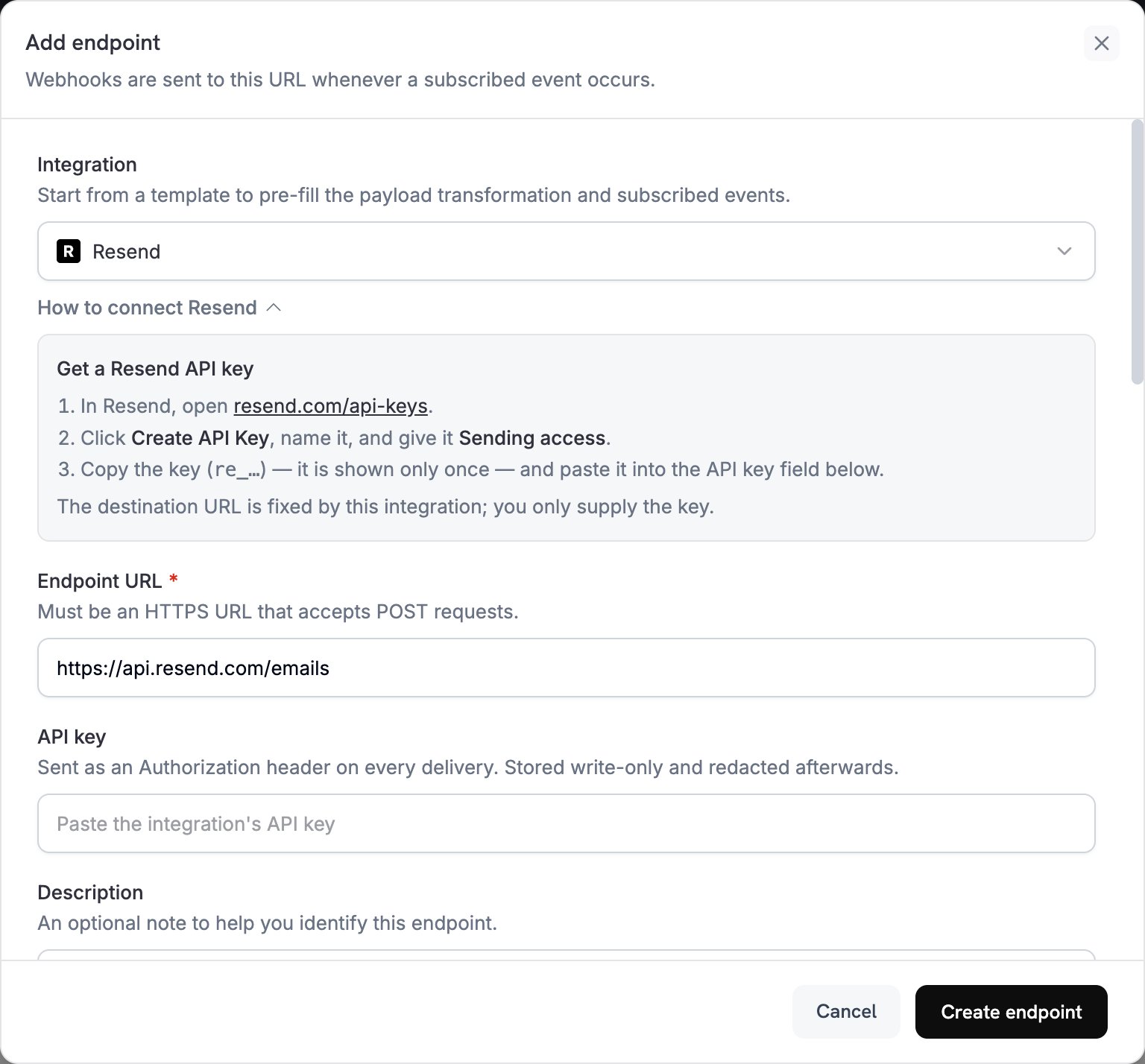 In **Integration**, select **Resend**. The dashboard fills in the **Endpoint URL** and the transformation code for Resend, and the **How to connect Resend** panel shows the setup steps.
In Resend, open [API Keys](https://resend.com/api-keys), click **Create API Key**, and give the key **Sending access**. Resend shows the key, which starts with `re_`, only once. Paste it into **API key**. Dodo Payments sends it as a bearer token in the `Authorization` header of every request to Resend.
In **Subscribed events**, select only the events your transformation handles. An event that the transformation leaves unchanged reaches Resend in the Dodo Payments format, and Resend rejects it.
Under **Transformation code**, edit the handler so each subscribed event becomes a Resend email. Start from the [examples](#transformation-code-examples).
Under **Test this code**, select an event type and click **Simulate** to preview the request to Resend. Then click **Create endpoint**.
Dodo Payments now sends an email through Resend for each subscribed event. To see each delivery and Resend's response, open the **Logs** tab in **Developer → Webhooks**.
## Transformation Code Examples
Each handler sets `webhook.url` to Resend's send-email endpoint and replaces `webhook.payload` with the email. Dodo Payments amounts are in the smallest currency unit, so the examples divide by 100 and show the currency code. For zero-decimal currencies such as JPY and KRW, use the amount as is.
### Payment Confirmation Email
Send a receipt when a payment succeeds (`payment.succeeded`):
```javascript payment_confirmation.js icon="js" expandable theme={null}
function handler(webhook) {
if (webhook.eventType === "payment.succeeded") {
const p = webhook.payload.data;
webhook.url = "https://api.resend.com/emails";
webhook.payload = {
from: "payments@yourdomain.com",
to: [p.customer.email],
subject: "Payment Confirmation - " + (p.total_amount / 100).toFixed(2) + " " + p.currency,
html: `
In **Integration**, select **Resend**. The dashboard fills in the **Endpoint URL** and the transformation code for Resend, and the **How to connect Resend** panel shows the setup steps.
In Resend, open [API Keys](https://resend.com/api-keys), click **Create API Key**, and give the key **Sending access**. Resend shows the key, which starts with `re_`, only once. Paste it into **API key**. Dodo Payments sends it as a bearer token in the `Authorization` header of every request to Resend.
In **Subscribed events**, select only the events your transformation handles. An event that the transformation leaves unchanged reaches Resend in the Dodo Payments format, and Resend rejects it.
Under **Transformation code**, edit the handler so each subscribed event becomes a Resend email. Start from the [examples](#transformation-code-examples).
Under **Test this code**, select an event type and click **Simulate** to preview the request to Resend. Then click **Create endpoint**.
Dodo Payments now sends an email through Resend for each subscribed event. To see each delivery and Resend's response, open the **Logs** tab in **Developer → Webhooks**.
## Transformation Code Examples
Each handler sets `webhook.url` to Resend's send-email endpoint and replaces `webhook.payload` with the email. Dodo Payments amounts are in the smallest currency unit, so the examples divide by 100 and show the currency code. For zero-decimal currencies such as JPY and KRW, use the amount as is.
### Payment Confirmation Email
Send a receipt when a payment succeeds (`payment.succeeded`):
```javascript payment_confirmation.js icon="js" expandable theme={null}
function handler(webhook) {
if (webhook.eventType === "payment.succeeded") {
const p = webhook.payload.data;
webhook.url = "https://api.resend.com/emails";
webhook.payload = {
from: "payments@yourdomain.com",
to: [p.customer.email],
subject: "Payment Confirmation - " + (p.total_amount / 100).toFixed(2) + " " + p.currency,
html: `
Payment Successful!
Hi ${p.customer.name},
Your payment of ${(p.total_amount / 100).toFixed(2)} ${p.currency} has been processed successfully.
- Payment ID: ${p.payment_id}
- Amount: ${(p.total_amount / 100).toFixed(2)} ${p.currency}
- Date: ${new Date(webhook.payload.timestamp).toLocaleDateString()}
- Method: ${p.payment_method || "Unknown"}
Thank you for your business!
`,
text: `Payment Successful! Your payment of ${(p.total_amount / 100).toFixed(2)} ${p.currency} has been processed. Payment ID: ${p.payment_id}`
};
}
return webhook;
}
```
### Subscription Welcome Email
Welcome a customer when a subscription becomes active (`subscription.active`):
```javascript subscription_welcome.js icon="js" expandable theme={null}
function handler(webhook) {
if (webhook.eventType === "subscription.active") {
const s = webhook.payload.data;
webhook.url = "https://api.resend.com/emails";
webhook.payload = {
from: "welcome@yourdomain.com",
to: [s.customer.email],
subject: "Welcome to Your Subscription!",
html: `
Welcome to Your Subscription!
Hi ${s.customer.name},
Your subscription has been activated successfully.
- Subscription ID: ${s.subscription_id}
- Product: ${s.product_id}
- Amount: ${(s.recurring_pre_tax_amount / 100).toFixed(2)} ${s.currency}/${s.payment_frequency_interval}
- Next Billing: ${new Date(s.next_billing_date).toLocaleDateString()}
You can manage your subscription anytime from your account dashboard.
`,
text: `Welcome! Your subscription is now active. Amount: ${(s.recurring_pre_tax_amount / 100).toFixed(2)} ${s.currency}/${s.payment_frequency_interval}`
};
}
return webhook;
}
```
### Payment Failure Notification
Ask the customer to update their payment method when a payment fails (`payment.failed`):
```javascript payment_failure.js icon="js" expandable theme={null}
function handler(webhook) {
if (webhook.eventType === "payment.failed") {
const p = webhook.payload.data;
webhook.url = "https://api.resend.com/emails";
webhook.payload = {
from: "support@yourdomain.com",
to: [p.customer.email],
subject: "Payment Failed - Action Required",
html: `
Payment Failed
Hi ${p.customer.name},
We were unable to process your payment of ${(p.total_amount / 100).toFixed(2)} ${p.currency}.
- Payment ID: ${p.payment_id}
- Amount: ${(p.total_amount / 100).toFixed(2)} ${p.currency}
- Error: ${p.error_message || "Payment processing failed"}
Please update your payment method or contact support for assistance.
Update Payment Method
`,
text: `Payment Failed: We couldn't process your ${(p.total_amount / 100).toFixed(2)} ${p.currency} payment. Please update your payment method.`
};
}
return webhook;
}
```
## Tips
* Send from a domain you've verified in Resend, which improves deliverability.
* Include both an `html` and a `text` version of each email.
* Personalize content with customer data from the payload, such as `customer.name`.
* Write subject lines that state the result or the action needed.
* Include an unsubscribe link in any email that contains marketing content.
* Preview each template with **Simulate** before you create the endpoint.
* To skip an event in code, set `webhook.cancel = true` before you return the webhook. The logs record a skipped delivery as successful.
## Troubleshooting
* Check that the API key is correct, active, and has **Sending access**. To replace it, edit the endpoint and paste a new key in **API key**.
* Check that the sender domain is verified in Resend.
* Check that the recipient email addresses are valid.
* Check Resend's sending limits and quotas for your plan.
* Open the **Logs** tab in **Developer → Webhooks** and read Resend's response to the failed delivery.
* Check that the payload matches Resend's send-email format. Resend requires `from`, `to`, and `subject`.
* Check that every event your code handles sets all the required fields.
* Check that the `html` value is well-formed HTML.
* Check that the `from` address uses a domain verified in Resend.
This documentation is built and hosted on [Mintlify](https://mintlify.com), a developer documentation platform.