> ## Documentation Index
> Fetch the complete documentation index at: https://docs.dodopayments.com/llms.txt
> Use this file to discover all available pages before exploring further.
# Segment
> Send Dodo Payments events to Segment as Track and Identify calls, so payments and subscriptions reach your analytics and marketing tools.
## Introduction
The Segment integration sends Dodo Payments events to Segment's HTTP Tracking API as Track and Identify calls. Segment then forwards payment, subscription, and customer data to the analytics, marketing, and warehouse tools connected to your workspace, from a catalog of 300+ destinations.
This integration requires the Write Key of an **HTTP API** source in your Segment workspace. You also need access to **Developer → Webhooks** in the Dodo Payments dashboard.
## Getting Started
In the Dodo Payments dashboard, go to **Developer → Webhooks** and click **Add endpoint**.
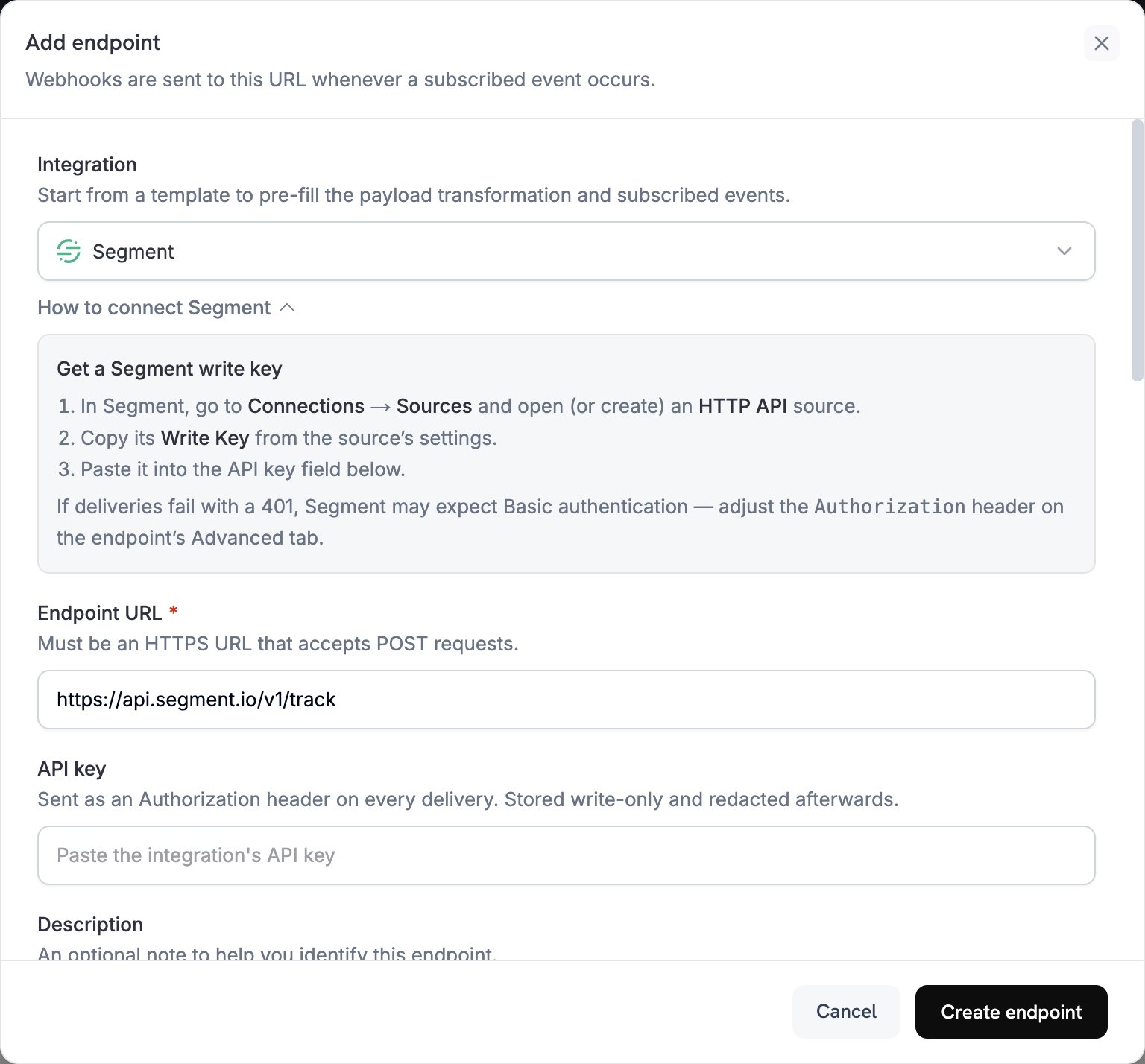 In **Integration**, select **Segment**. The dashboard fills in the **Endpoint URL** and the transformation code for Segment.
In Segment, go to **Connections → Sources** and open or create an **HTTP API** source. Copy the **Write Key** from the source's settings and paste it into **API key**.
In **Subscribed events**, select only the events your transformation handles. The examples on this page use `payment.succeeded`, `subscription.active`, and `subscription.cancelled`.
Under **Transformation code**, edit the handler to format events for Segment's Track or Identify API. Start from the [examples](#transformation-code-examples).
Under **Test this code**, select an event type and click **Simulate** to preview the call to Segment. Then click **Create endpoint**.
Dodo Payments sends the **API key** value as a bearer token, but Segment's HTTP API accepts a Write Key through Basic authentication or a `writeKey` field in the body. Right after you create the endpoint, open its **Advanced** tab. Under **Custom headers**, enter a new value in the hidden `Authorization` row: `Basic`, a space, and the Base64 encoding of your Write Key with a colon appended. Then click **Save**. For example, `echo -n 'YOUR_WRITE_KEY:' | base64` prints the encoded value.
Subscribed events now reach Segment, which forwards them to your connected destinations.
## Transformation Code Examples
Each handler sets `webhook.url` to a Segment API endpoint and replaces `webhook.payload` with the call. Dodo Payments amounts are in the smallest currency unit, so the examples divide by 100. For zero-decimal currencies such as JPY and KRW, use the amount as is.
### Track Payment Events
Record a `Payment Completed` event when a payment succeeds:
```javascript track_payments.js icon="js" expandable theme={null}
function handler(webhook) {
if (webhook.eventType === "payment.succeeded") {
const p = webhook.payload.data;
webhook.url = "https://api.segment.io/v1/track";
webhook.payload = {
userId: p.customer.customer_id,
event: "Payment Completed",
properties: {
amount: (p.total_amount / 100).toFixed(2),
currency: p.currency || "USD",
payment_method: p.payment_method || "unknown",
payment_id: p.payment_id,
customer_email: p.customer.email,
customer_name: p.customer.name
},
timestamp: webhook.payload.timestamp
};
}
return webhook;
}
```
### Track Subscription Lifecycle
Record `Subscription Started` and `Subscription Cancelled` events:
```javascript track_subscriptions.js icon="js" expandable theme={null}
function handler(webhook) {
const s = webhook.payload.data;
switch (webhook.eventType) {
case "subscription.active":
webhook.url = "https://api.segment.io/v1/track";
webhook.payload = {
userId: s.customer.customer_id,
event: "Subscription Started",
properties: {
subscription_id: s.subscription_id,
product_id: s.product_id,
amount: (s.recurring_pre_tax_amount / 100).toFixed(2),
frequency: s.payment_frequency_interval,
next_billing: s.next_billing_date,
customer_email: s.customer.email
},
timestamp: webhook.payload.timestamp
};
break;
case "subscription.cancelled":
webhook.url = "https://api.segment.io/v1/track";
webhook.payload = {
userId: s.customer.customer_id,
event: "Subscription Cancelled",
properties: {
subscription_id: s.subscription_id,
product_id: s.product_id,
cancelled_at: s.cancelled_at,
cancel_at_next_billing: s.cancel_at_next_billing_date,
customer_email: s.customer.email
},
timestamp: webhook.payload.timestamp
};
break;
}
return webhook;
}
```
### Identify Customer Properties
Update the customer's traits after each successful payment. Each Identify call sets the traits to the values it sends, so these traits describe the latest payment:
```javascript identify_customer.js icon="js" expandable theme={null}
function handler(webhook) {
if (webhook.eventType === "payment.succeeded") {
const p = webhook.payload.data;
webhook.url = "https://api.segment.io/v1/identify";
webhook.payload = {
userId: p.customer.customer_id,
traits: {
email: p.customer.email,
name: p.customer.name,
last_payment_amount: (p.total_amount / 100).toFixed(2),
payment_method: p.payment_method || "unknown",
last_payment_date: webhook.payload.timestamp
}
};
}
return webhook;
}
```
## Tips
* Use consistent event names across your integration, such as Segment's object and action format in `Payment Completed`.
* Include the properties you need for analytics and segmentation.
* Set `timestamp` from the event's `timestamp`, so Segment records when the event occurred rather than when it arrived.
* Use the Dodo Payments `customer_id` as `userId`, so every call for a customer attaches to the same Segment user.
## Troubleshooting
* Check that the Write Key belongs to an **HTTP API** source and that the `Authorization` header uses Basic authentication.
* Segment returns `200` for most requests, including ones it doesn't accept, so a successful delivery in the Dodo Payments logs doesn't prove the event arrived. Check the source's **Debugger** in Segment.
* Check that event names follow Segment's naming conventions.
* Check that every call sets `userId`. Segment rejects a call that has neither a `userId` nor an `anonymousId`.
* Check Segment's rate limits for the HTTP API. Segment recommends staying under 1,000 requests per second per workspace.
* If your workspace uses Segment's EU region, send calls to `https://events.eu1.segmentapis.com/v1/track` and `https://events.eu1.segmentapis.com/v1/identify` instead.
* Check that the payload matches Segment's API format.
* Check that all required fields are present. Track requires `event`, and both Track and Identify require a `userId` or an `anonymousId`.
* Check that event names are strings, not objects.
This documentation is built and hosted on [Mintlify](https://mintlify.com), a developer documentation platform.
In **Integration**, select **Segment**. The dashboard fills in the **Endpoint URL** and the transformation code for Segment.
In Segment, go to **Connections → Sources** and open or create an **HTTP API** source. Copy the **Write Key** from the source's settings and paste it into **API key**.
In **Subscribed events**, select only the events your transformation handles. The examples on this page use `payment.succeeded`, `subscription.active`, and `subscription.cancelled`.
Under **Transformation code**, edit the handler to format events for Segment's Track or Identify API. Start from the [examples](#transformation-code-examples).
Under **Test this code**, select an event type and click **Simulate** to preview the call to Segment. Then click **Create endpoint**.
Dodo Payments sends the **API key** value as a bearer token, but Segment's HTTP API accepts a Write Key through Basic authentication or a `writeKey` field in the body. Right after you create the endpoint, open its **Advanced** tab. Under **Custom headers**, enter a new value in the hidden `Authorization` row: `Basic`, a space, and the Base64 encoding of your Write Key with a colon appended. Then click **Save**. For example, `echo -n 'YOUR_WRITE_KEY:' | base64` prints the encoded value.
Subscribed events now reach Segment, which forwards them to your connected destinations.
## Transformation Code Examples
Each handler sets `webhook.url` to a Segment API endpoint and replaces `webhook.payload` with the call. Dodo Payments amounts are in the smallest currency unit, so the examples divide by 100. For zero-decimal currencies such as JPY and KRW, use the amount as is.
### Track Payment Events
Record a `Payment Completed` event when a payment succeeds:
```javascript track_payments.js icon="js" expandable theme={null}
function handler(webhook) {
if (webhook.eventType === "payment.succeeded") {
const p = webhook.payload.data;
webhook.url = "https://api.segment.io/v1/track";
webhook.payload = {
userId: p.customer.customer_id,
event: "Payment Completed",
properties: {
amount: (p.total_amount / 100).toFixed(2),
currency: p.currency || "USD",
payment_method: p.payment_method || "unknown",
payment_id: p.payment_id,
customer_email: p.customer.email,
customer_name: p.customer.name
},
timestamp: webhook.payload.timestamp
};
}
return webhook;
}
```
### Track Subscription Lifecycle
Record `Subscription Started` and `Subscription Cancelled` events:
```javascript track_subscriptions.js icon="js" expandable theme={null}
function handler(webhook) {
const s = webhook.payload.data;
switch (webhook.eventType) {
case "subscription.active":
webhook.url = "https://api.segment.io/v1/track";
webhook.payload = {
userId: s.customer.customer_id,
event: "Subscription Started",
properties: {
subscription_id: s.subscription_id,
product_id: s.product_id,
amount: (s.recurring_pre_tax_amount / 100).toFixed(2),
frequency: s.payment_frequency_interval,
next_billing: s.next_billing_date,
customer_email: s.customer.email
},
timestamp: webhook.payload.timestamp
};
break;
case "subscription.cancelled":
webhook.url = "https://api.segment.io/v1/track";
webhook.payload = {
userId: s.customer.customer_id,
event: "Subscription Cancelled",
properties: {
subscription_id: s.subscription_id,
product_id: s.product_id,
cancelled_at: s.cancelled_at,
cancel_at_next_billing: s.cancel_at_next_billing_date,
customer_email: s.customer.email
},
timestamp: webhook.payload.timestamp
};
break;
}
return webhook;
}
```
### Identify Customer Properties
Update the customer's traits after each successful payment. Each Identify call sets the traits to the values it sends, so these traits describe the latest payment:
```javascript identify_customer.js icon="js" expandable theme={null}
function handler(webhook) {
if (webhook.eventType === "payment.succeeded") {
const p = webhook.payload.data;
webhook.url = "https://api.segment.io/v1/identify";
webhook.payload = {
userId: p.customer.customer_id,
traits: {
email: p.customer.email,
name: p.customer.name,
last_payment_amount: (p.total_amount / 100).toFixed(2),
payment_method: p.payment_method || "unknown",
last_payment_date: webhook.payload.timestamp
}
};
}
return webhook;
}
```
## Tips
* Use consistent event names across your integration, such as Segment's object and action format in `Payment Completed`.
* Include the properties you need for analytics and segmentation.
* Set `timestamp` from the event's `timestamp`, so Segment records when the event occurred rather than when it arrived.
* Use the Dodo Payments `customer_id` as `userId`, so every call for a customer attaches to the same Segment user.
## Troubleshooting
* Check that the Write Key belongs to an **HTTP API** source and that the `Authorization` header uses Basic authentication.
* Segment returns `200` for most requests, including ones it doesn't accept, so a successful delivery in the Dodo Payments logs doesn't prove the event arrived. Check the source's **Debugger** in Segment.
* Check that event names follow Segment's naming conventions.
* Check that every call sets `userId`. Segment rejects a call that has neither a `userId` nor an `anonymousId`.
* Check Segment's rate limits for the HTTP API. Segment recommends staying under 1,000 requests per second per workspace.
* If your workspace uses Segment's EU region, send calls to `https://events.eu1.segmentapis.com/v1/track` and `https://events.eu1.segmentapis.com/v1/identify` instead.
* Check that the payload matches Segment's API format.
* Check that all required fields are present. Track requires `event`, and both Track and Identify require a `userId` or an `anonymousId`.
* Check that event names are strings, not objects.
This documentation is built and hosted on [Mintlify](https://mintlify.com), a developer documentation platform.