> ## Documentation Index
> Fetch the complete documentation index at: https://docs.dodopayments.com/llms.txt
> Use this file to discover all available pages before exploring further.
# SendGrid
> Send transactional emails through SendGrid's Mail Send API when Dodo Payments events occur, using your SendGrid dynamic templates.
## Introduction
The SendGrid integration sends a transactional email through SendGrid's Mail Send API when a Dodo Payments event occurs. Each email uses one of your SendGrid dynamic templates, filled with data from the event, so you can confirm payments, welcome new subscribers, and follow up on failed payments.
This integration requires a SendGrid API key with the **Mail Send** permission, a verified sender in SendGrid, and a dynamic template for each email you send. You also need access to **Developer → Webhooks** in the Dodo Payments dashboard.
## Getting Started
In the Dodo Payments dashboard, go to **Developer → Webhooks** and click **Add endpoint**.
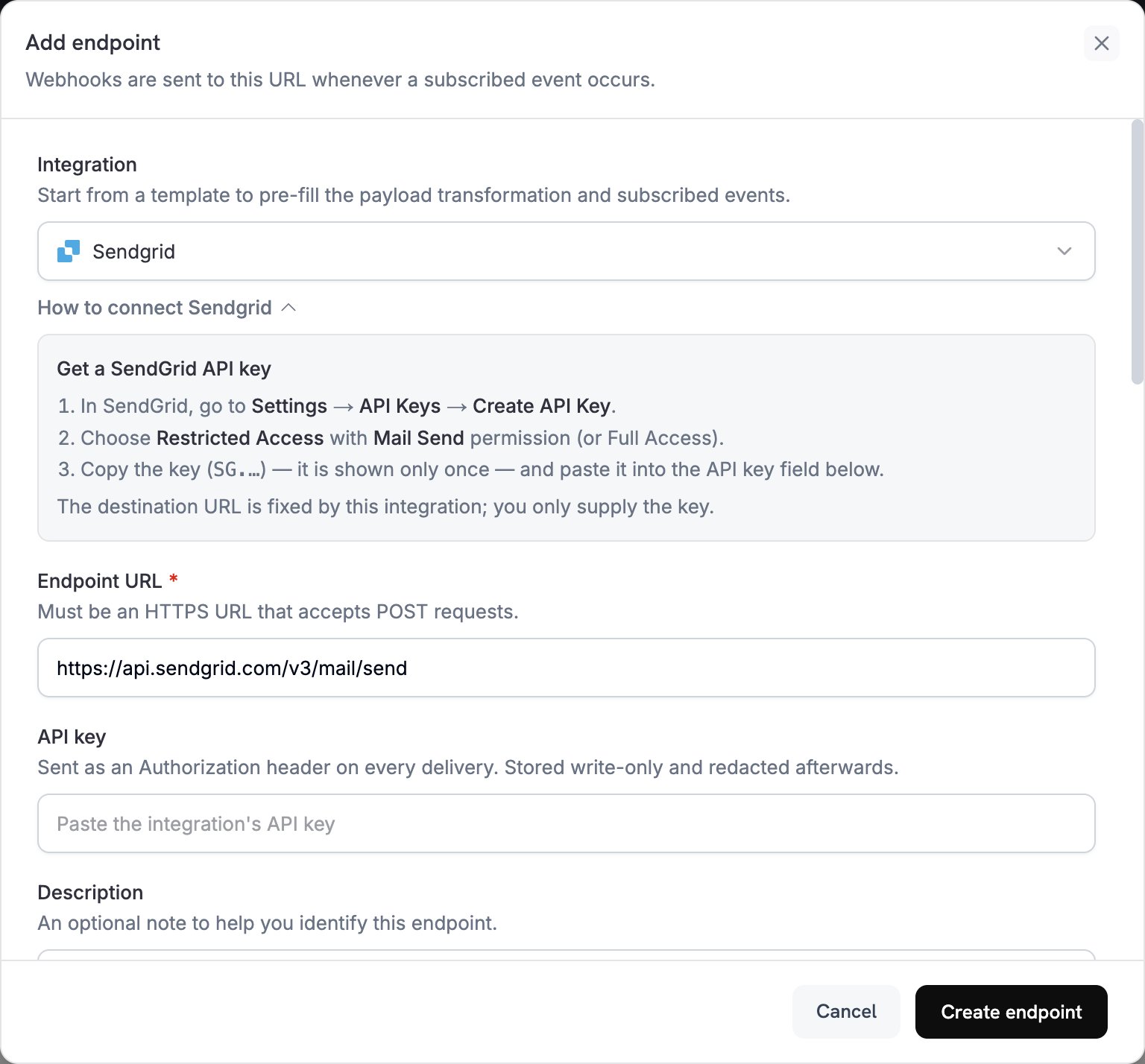 In **Integration**, select **SendGrid**. The dashboard fills in the **Endpoint URL** and the transformation code for SendGrid, and the **How to connect SendGrid** panel shows the setup steps.
In SendGrid, go to **Settings → API Keys** and click **Create API Key**. Choose **Restricted Access** with the **Mail Send** permission, or **Full Access**. SendGrid shows the key, which starts with `SG.`, only once. Paste it into **API key**. Dodo Payments sends it as a bearer token in the `Authorization` header of every request to SendGrid.
In **Subscribed events**, select only the events your transformation handles. An event that the transformation leaves unchanged reaches SendGrid in the Dodo Payments format, and SendGrid rejects it.
Under **Transformation code**, edit the handler to format emails for SendGrid's Mail Send API. Start from the [examples](#transformation-code-examples), and replace each `template_id` with the ID of your own dynamic template, which starts with `d-`.
Under **Test this code**, select an event type and click **Simulate** to preview the request to SendGrid. Then click **Create endpoint**.
Dodo Payments now sends an email through SendGrid for each subscribed event. To see each delivery and SendGrid's response, open the **Logs** tab in **Developer → Webhooks**.
## Transformation Code Examples
Each handler sets `webhook.url` to the Mail Send endpoint and passes event data to a dynamic template through `dynamic_template_data`. Dodo Payments amounts are in the smallest currency unit, so the examples divide by 100. For zero-decimal currencies such as JPY and KRW, use the amount as is.
### Payment Confirmation Email
Send a receipt when a payment succeeds (`payment.succeeded`):
```javascript payment_confirmation.js icon="js" expandable theme={null}
function handler(webhook) {
if (webhook.eventType === "payment.succeeded") {
const p = webhook.payload.data;
webhook.url = "https://api.sendgrid.com/v3/mail/send";
webhook.payload = {
personalizations: [
{
to: [{ email: p.customer.email }],
dynamic_template_data: {
customer_name: p.customer.name,
payment_amount: (p.total_amount / 100).toFixed(2),
payment_id: p.payment_id,
payment_date: new Date(webhook.payload.timestamp).toLocaleDateString(),
currency: p.currency || "USD"
}
}
],
from: {
email: "payments@yourdomain.com",
name: "Your Company"
},
template_id: "d-xxxxxxxxxxxxxxxxxxxxxxxxxxxxxxxx"
};
}
return webhook;
}
```
### Subscription Welcome Email
Welcome a customer when a subscription becomes active (`subscription.active`):
```javascript subscription_welcome.js icon="js" expandable theme={null}
function handler(webhook) {
if (webhook.eventType === "subscription.active") {
const s = webhook.payload.data;
webhook.url = "https://api.sendgrid.com/v3/mail/send";
webhook.payload = {
personalizations: [
{
to: [{ email: s.customer.email }],
dynamic_template_data: {
customer_name: s.customer.name,
subscription_id: s.subscription_id,
product_id: s.product_id,
amount: (s.recurring_pre_tax_amount / 100).toFixed(2),
frequency: s.payment_frequency_interval,
next_billing: new Date(s.next_billing_date).toLocaleDateString()
}
}
],
from: {
email: "welcome@yourdomain.com",
name: "Your Company"
},
template_id: "d-xxxxxxxxxxxxxxxxxxxxxxxxxxxxxxxx"
};
}
return webhook;
}
```
### Payment Failure Notification
Ask the customer to retry when a payment fails (`payment.failed`):
```javascript payment_failure.js icon="js" expandable theme={null}
function handler(webhook) {
if (webhook.eventType === "payment.failed") {
const p = webhook.payload.data;
webhook.url = "https://api.sendgrid.com/v3/mail/send";
webhook.payload = {
personalizations: [
{
to: [{ email: p.customer.email }],
dynamic_template_data: {
customer_name: p.customer.name,
payment_amount: (p.total_amount / 100).toFixed(2),
error_message: p.error_message || "Payment processing failed",
payment_id: p.payment_id,
retry_link: `https://yourdomain.com/retry-payment/${p.payment_id}`
}
}
],
from: {
email: "support@yourdomain.com",
name: "Your Company Support"
},
template_id: "d-xxxxxxxxxxxxxxxxxxxxxxxxxxxxxxxx"
};
}
return webhook;
}
```
## Tips
* Use SendGrid dynamic templates to personalize content.
* Pass the payment data your template needs in `dynamic_template_data`.
* Set a `from` address that matches a verified sender, and a sender `name`.
* Reuse template IDs so emails of the same type keep the same format.
* Include an unsubscribe link in any email that contains marketing content.
* To skip an event in code, set `webhook.cancel = true` before you return the webhook. The logs record a skipped delivery as successful.
## Troubleshooting
* Check that the API key has the **Mail Send** permission. To replace it, edit the endpoint and paste a new key in **API key**.
* Check that each `template_id` belongs to an active dynamic template.
* Check that the recipient email addresses are valid.
* Check SendGrid's sending limits and quotas for your plan.
* Open the **Logs** tab in **Developer → Webhooks** and read SendGrid's response to the failed delivery.
* Check that the payload matches SendGrid's Mail Send format.
* Check that all required fields are present: `personalizations` with at least one `to` address, and `from`.
* Check that the keys in `dynamic_template_data` match the variables in your template, such as `{{customer_name}}`.
* Check that each `from` address is verified in SendGrid.
This documentation is built and hosted on [Mintlify](https://mintlify.com), a developer documentation platform.
In **Integration**, select **SendGrid**. The dashboard fills in the **Endpoint URL** and the transformation code for SendGrid, and the **How to connect SendGrid** panel shows the setup steps.
In SendGrid, go to **Settings → API Keys** and click **Create API Key**. Choose **Restricted Access** with the **Mail Send** permission, or **Full Access**. SendGrid shows the key, which starts with `SG.`, only once. Paste it into **API key**. Dodo Payments sends it as a bearer token in the `Authorization` header of every request to SendGrid.
In **Subscribed events**, select only the events your transformation handles. An event that the transformation leaves unchanged reaches SendGrid in the Dodo Payments format, and SendGrid rejects it.
Under **Transformation code**, edit the handler to format emails for SendGrid's Mail Send API. Start from the [examples](#transformation-code-examples), and replace each `template_id` with the ID of your own dynamic template, which starts with `d-`.
Under **Test this code**, select an event type and click **Simulate** to preview the request to SendGrid. Then click **Create endpoint**.
Dodo Payments now sends an email through SendGrid for each subscribed event. To see each delivery and SendGrid's response, open the **Logs** tab in **Developer → Webhooks**.
## Transformation Code Examples
Each handler sets `webhook.url` to the Mail Send endpoint and passes event data to a dynamic template through `dynamic_template_data`. Dodo Payments amounts are in the smallest currency unit, so the examples divide by 100. For zero-decimal currencies such as JPY and KRW, use the amount as is.
### Payment Confirmation Email
Send a receipt when a payment succeeds (`payment.succeeded`):
```javascript payment_confirmation.js icon="js" expandable theme={null}
function handler(webhook) {
if (webhook.eventType === "payment.succeeded") {
const p = webhook.payload.data;
webhook.url = "https://api.sendgrid.com/v3/mail/send";
webhook.payload = {
personalizations: [
{
to: [{ email: p.customer.email }],
dynamic_template_data: {
customer_name: p.customer.name,
payment_amount: (p.total_amount / 100).toFixed(2),
payment_id: p.payment_id,
payment_date: new Date(webhook.payload.timestamp).toLocaleDateString(),
currency: p.currency || "USD"
}
}
],
from: {
email: "payments@yourdomain.com",
name: "Your Company"
},
template_id: "d-xxxxxxxxxxxxxxxxxxxxxxxxxxxxxxxx"
};
}
return webhook;
}
```
### Subscription Welcome Email
Welcome a customer when a subscription becomes active (`subscription.active`):
```javascript subscription_welcome.js icon="js" expandable theme={null}
function handler(webhook) {
if (webhook.eventType === "subscription.active") {
const s = webhook.payload.data;
webhook.url = "https://api.sendgrid.com/v3/mail/send";
webhook.payload = {
personalizations: [
{
to: [{ email: s.customer.email }],
dynamic_template_data: {
customer_name: s.customer.name,
subscription_id: s.subscription_id,
product_id: s.product_id,
amount: (s.recurring_pre_tax_amount / 100).toFixed(2),
frequency: s.payment_frequency_interval,
next_billing: new Date(s.next_billing_date).toLocaleDateString()
}
}
],
from: {
email: "welcome@yourdomain.com",
name: "Your Company"
},
template_id: "d-xxxxxxxxxxxxxxxxxxxxxxxxxxxxxxxx"
};
}
return webhook;
}
```
### Payment Failure Notification
Ask the customer to retry when a payment fails (`payment.failed`):
```javascript payment_failure.js icon="js" expandable theme={null}
function handler(webhook) {
if (webhook.eventType === "payment.failed") {
const p = webhook.payload.data;
webhook.url = "https://api.sendgrid.com/v3/mail/send";
webhook.payload = {
personalizations: [
{
to: [{ email: p.customer.email }],
dynamic_template_data: {
customer_name: p.customer.name,
payment_amount: (p.total_amount / 100).toFixed(2),
error_message: p.error_message || "Payment processing failed",
payment_id: p.payment_id,
retry_link: `https://yourdomain.com/retry-payment/${p.payment_id}`
}
}
],
from: {
email: "support@yourdomain.com",
name: "Your Company Support"
},
template_id: "d-xxxxxxxxxxxxxxxxxxxxxxxxxxxxxxxx"
};
}
return webhook;
}
```
## Tips
* Use SendGrid dynamic templates to personalize content.
* Pass the payment data your template needs in `dynamic_template_data`.
* Set a `from` address that matches a verified sender, and a sender `name`.
* Reuse template IDs so emails of the same type keep the same format.
* Include an unsubscribe link in any email that contains marketing content.
* To skip an event in code, set `webhook.cancel = true` before you return the webhook. The logs record a skipped delivery as successful.
## Troubleshooting
* Check that the API key has the **Mail Send** permission. To replace it, edit the endpoint and paste a new key in **API key**.
* Check that each `template_id` belongs to an active dynamic template.
* Check that the recipient email addresses are valid.
* Check SendGrid's sending limits and quotas for your plan.
* Open the **Logs** tab in **Developer → Webhooks** and read SendGrid's response to the failed delivery.
* Check that the payload matches SendGrid's Mail Send format.
* Check that all required fields are present: `personalizations` with at least one `to` address, and `from`.
* Check that the keys in `dynamic_template_data` match the variables in your template, such as `{{customer_name}}`.
* Check that each `from` address is verified in SendGrid.
This documentation is built and hosted on [Mintlify](https://mintlify.com), a developer documentation platform.