> ## Documentation Index
> Fetch the complete documentation index at: https://docs.dodopayments.com/llms.txt
> Use this file to discover all available pages before exploring further.
# Slack
> Post Dodo Payments events, such as payments, subscription changes, and disputes, to a Slack channel through a Slack incoming webhook.
## Introduction
The Slack integration posts Dodo Payments events, such as successful payments, subscription changes, and disputes, to a Slack channel you choose. Your team can follow payments and act on disputes from Slack, without checking the dashboard.
The Slack connector turns each Dodo Payments event into a Slack message with a transformation: JavaScript code that runs on the event before delivery. The connector comes with transformation code, so no coding is required to start. You need access to **Developer → Webhooks** in the Dodo Payments dashboard, and permission to add apps to your Slack workspace.
## Getting Started
In the Dodo Payments dashboard, go to **Developer → Webhooks** and click **Add endpoint**.
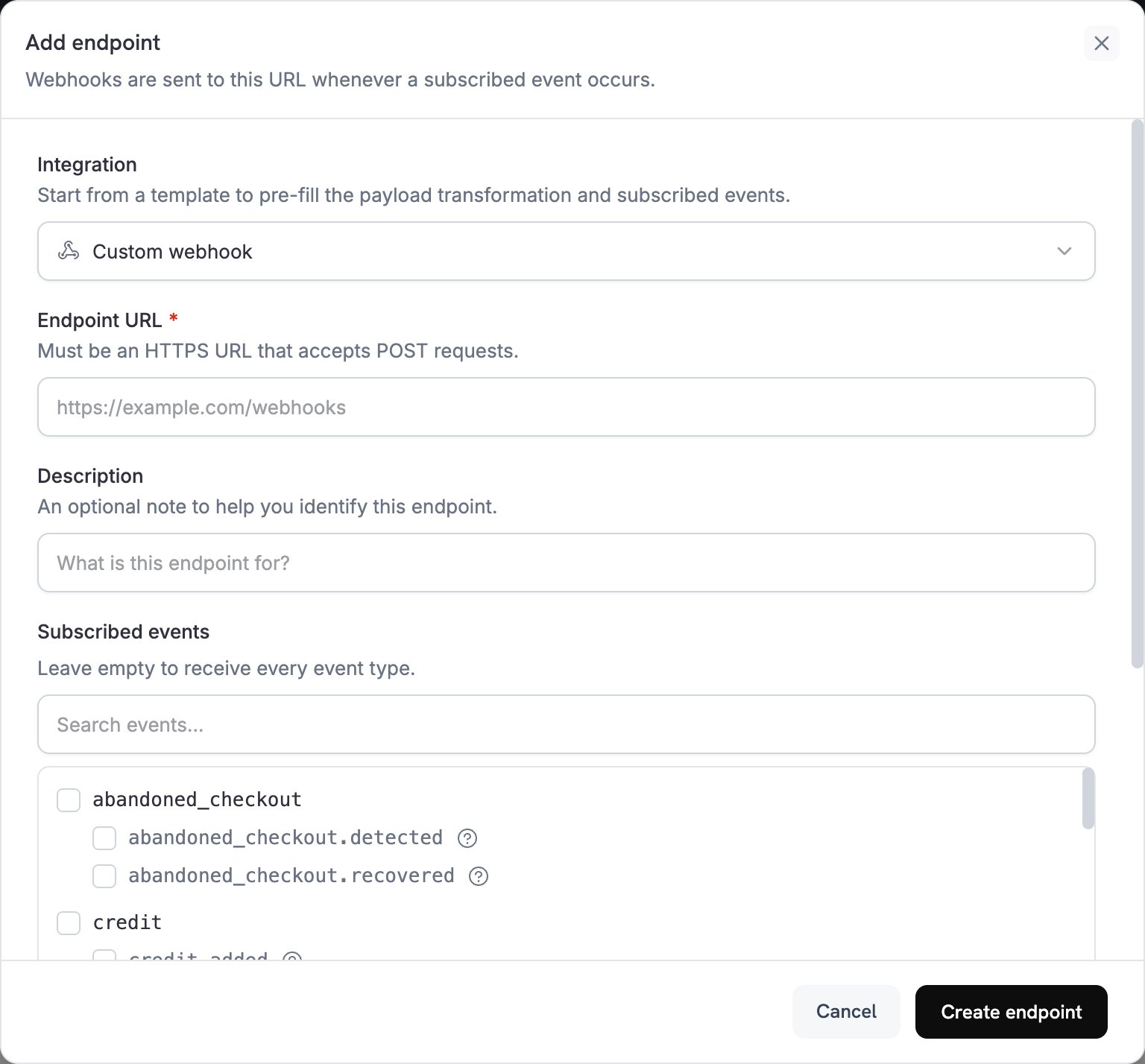 In **Integration**, select **Slack**. The dashboard loads the Slack transformation code and shows setup steps in the **How to connect Slack** panel.
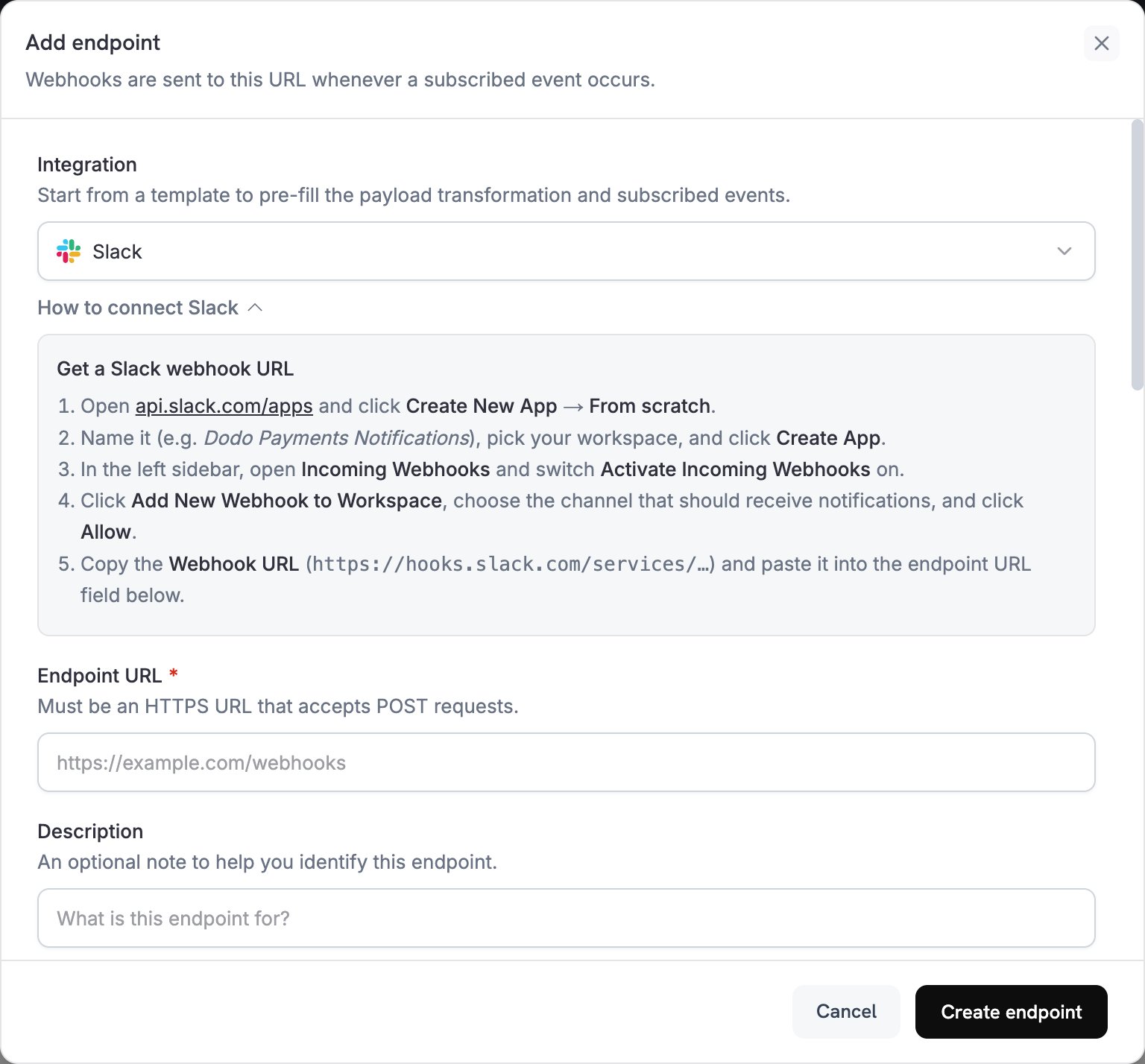 In Slack, create an app with an incoming webhook for the channel that should receive notifications:
1. Open [api.slack.com/apps](https://api.slack.com/apps), click **Create New App**, and choose **From scratch**.
2. Name the app, for example `Dodo Payments Notifications`, pick your workspace, and click **Create App**.
3. In the sidebar, open **Incoming Webhooks** and turn on **Activate Incoming Webhooks**.
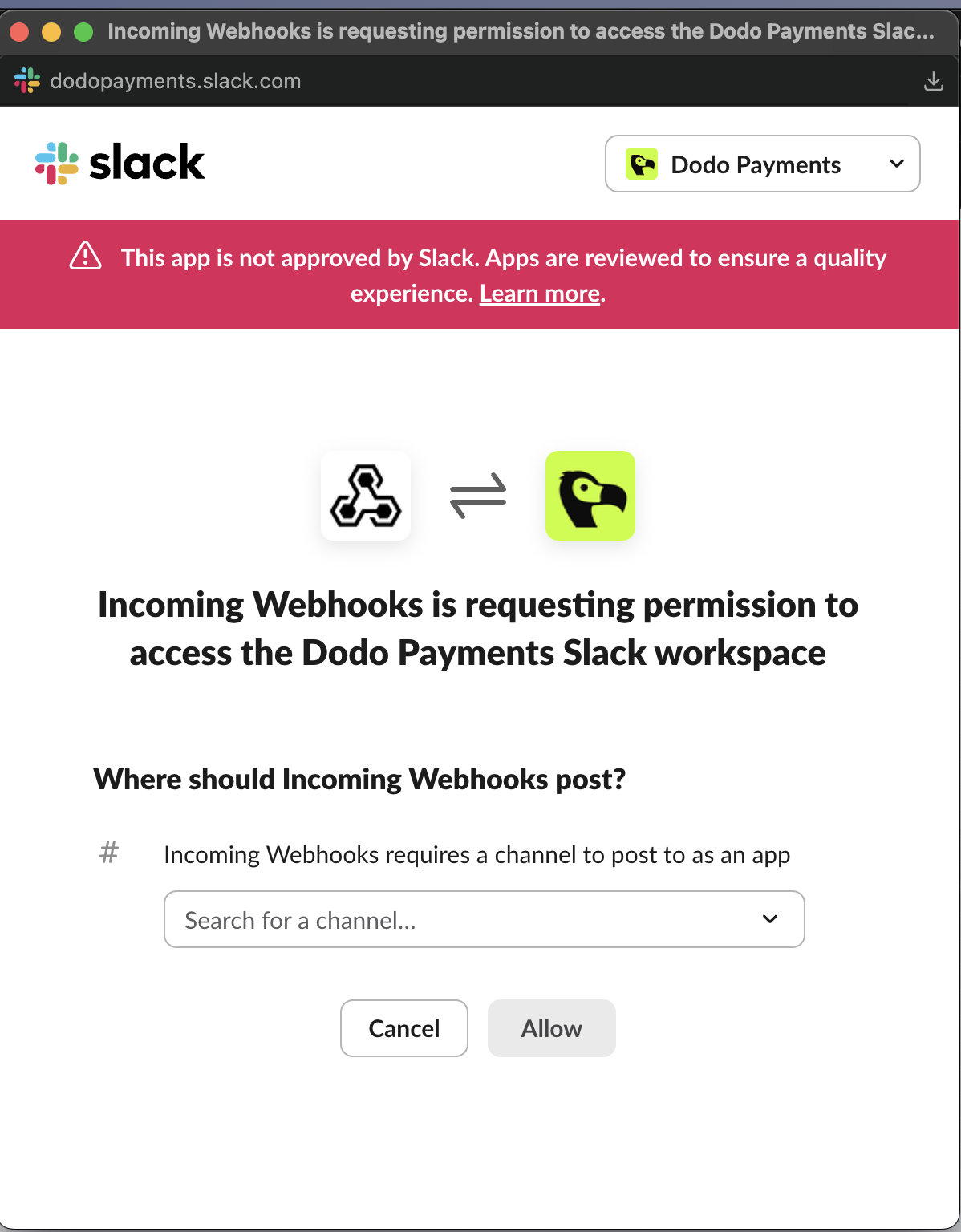
4. Click **Add New Webhook to Workspace**, choose the channel, and click **Allow**.
5. Copy the **Webhook URL**, which starts with `https://hooks.slack.com/services/`.
In Slack, create an app with an incoming webhook for the channel that should receive notifications:
1. Open [api.slack.com/apps](https://api.slack.com/apps), click **Create New App**, and choose **From scratch**.
2. Name the app, for example `Dodo Payments Notifications`, pick your workspace, and click **Create App**.
3. In the sidebar, open **Incoming Webhooks** and turn on **Activate Incoming Webhooks**.
4. Click **Add New Webhook to Workspace**, choose the channel, and click **Allow**.
5. Copy the **Webhook URL**, which starts with `https://hooks.slack.com/services/`.
 Paste the Slack webhook URL into **Endpoint URL**. Slack doesn't need an API key.
**Subscribed events** lists the events the Slack connector supports. If you change the transformation, keep only the events it handles. Slack rejects a request that isn't a Slack message, so an event that the transformation leaves unchanged fails to deliver.
Under **Transformation code**, edit the handler to choose which events post a message and how each message looks. Keep the connector's code, or start from the [examples](#transformation-code-examples).
Paste the Slack webhook URL into **Endpoint URL**. Slack doesn't need an API key.
**Subscribed events** lists the events the Slack connector supports. If you change the transformation, keep only the events it handles. Slack rejects a request that isn't a Slack message, so an event that the transformation leaves unchanged fails to deliver.
Under **Transformation code**, edit the handler to choose which events post a message and how each message looks. Keep the connector's code, or start from the [examples](#transformation-code-examples).
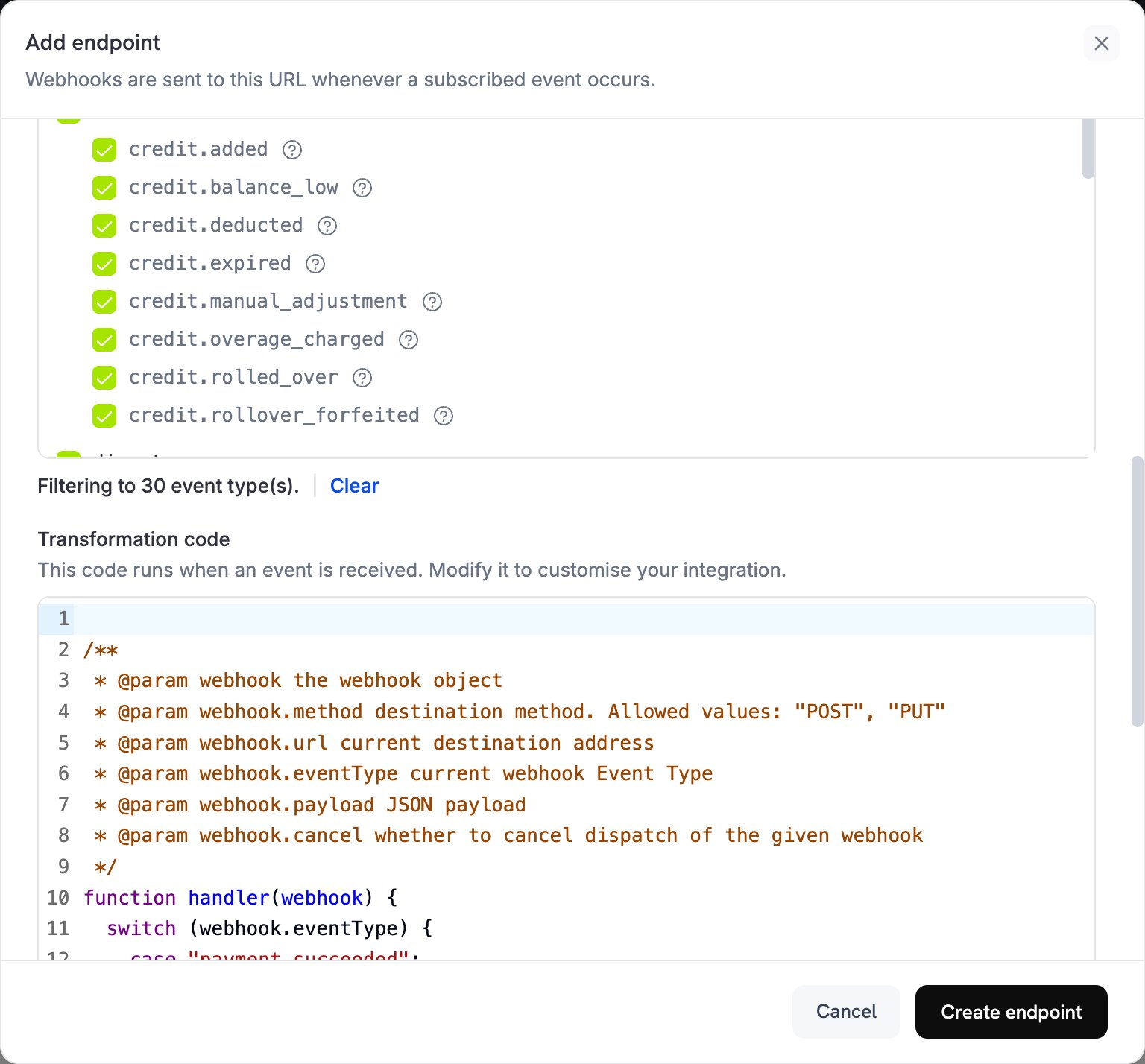 Under **Test this code**, select an event type and click **Simulate**. The **Result** shows the message that Slack would receive. Then click **Create endpoint**.
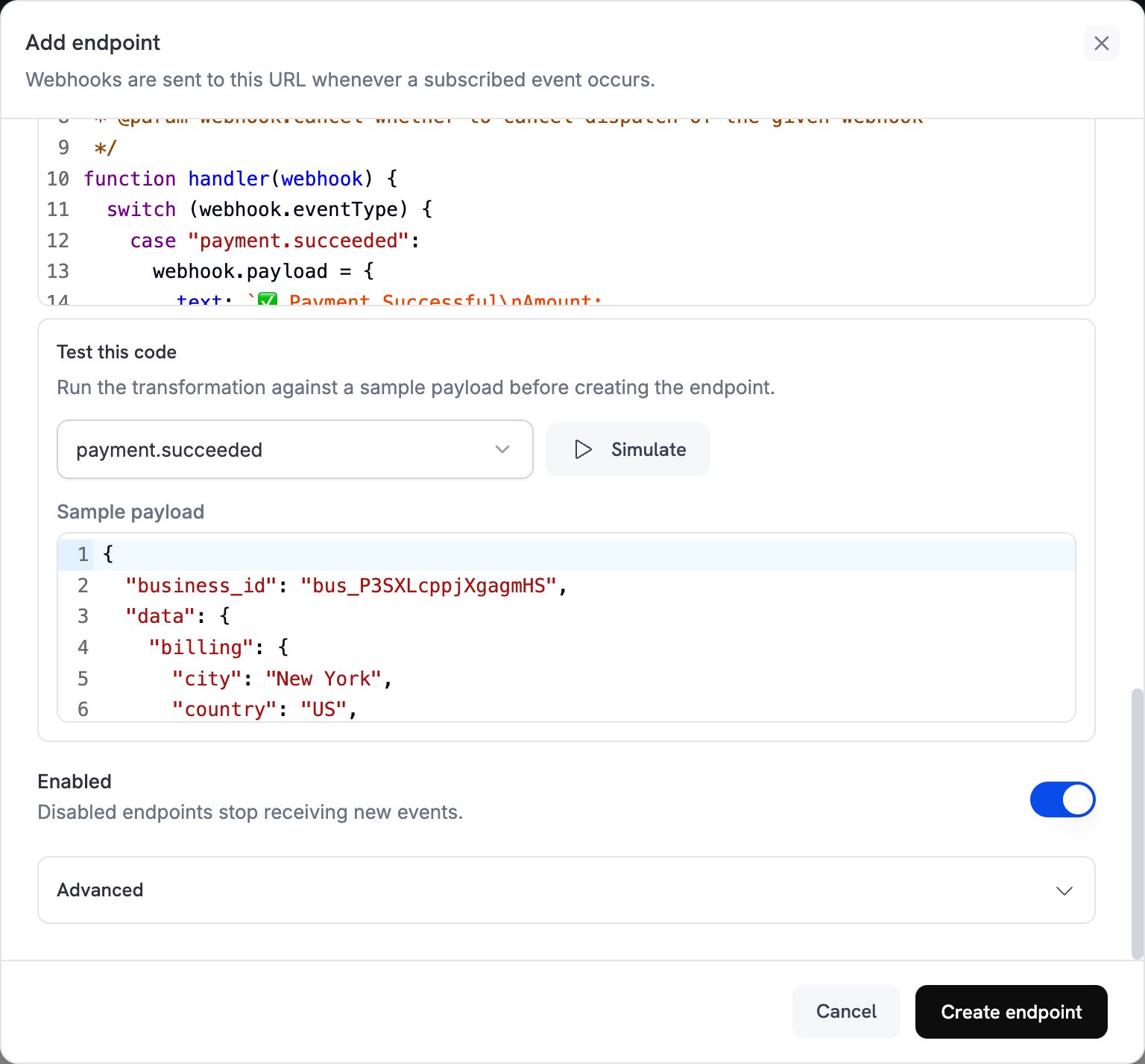 Dodo Payments now posts each subscribed event to your Slack channel. To post a test message, open the endpoint's **Testing** tab, select an event type, and click **Send example**.
## Transformation Code Examples
Each handler replaces `webhook.payload` with a Slack message and keeps `webhook.url`, your incoming webhook URL. Dodo Payments amounts are in the smallest currency unit, so the examples divide by 100 and show the currency code. For zero-decimal currencies such as JPY and KRW, use the amount as is.
### Basic Payment Notifications
Post a plain-text message when a payment succeeds, fails, or is processing:
```javascript payment_notifs.js icon="js" expandable theme={null}
function handler(webhook) {
switch (webhook.eventType) {
case "payment.succeeded":
webhook.payload = {
text: `✅ Payment Successful\nAmount: ${(webhook.payload.data.total_amount / 100).toFixed(2)} ${webhook.payload.data.currency}\nCustomer: ${webhook.payload.data.customer.email}\nPayment ID: ${webhook.payload.data.payment_id}`
};
break;
case "payment.failed":
webhook.payload = {
text: `❌ Payment Failed\nAmount: ${(webhook.payload.data.total_amount / 100).toFixed(2)} ${webhook.payload.data.currency}\nCustomer: ${webhook.payload.data.customer.email}\nReason: ${webhook.payload.data.error_message || 'Unknown'}`
};
break;
case "payment.processing":
webhook.payload = {
text: `⏳ Payment Processing\nAmount: ${(webhook.payload.data.total_amount / 100).toFixed(2)} ${webhook.payload.data.currency}\nCustomer: ${webhook.payload.data.customer.email}`
};
break;
}
return webhook;
}
```
### Rich Subscription Notifications
Post a color-coded message with attachment fields when a subscription becomes active, is cancelled, or renews:
```javascript subscription_notifs.js icon="js" expandable theme={null}
function handler(webhook) {
switch (webhook.eventType) {
case "subscription.active":
webhook.payload = {
attachments: [{
color: "good",
title: "🎉 Subscription Activated",
fields: [
{
title: "Customer",
value: webhook.payload.data.customer.email,
short: true
},
{
title: "Product ID",
value: webhook.payload.data.product_id,
short: true
},
{
title: "Amount",
value: `${(webhook.payload.data.recurring_pre_tax_amount / 100).toFixed(2)} ${webhook.payload.data.currency}/${webhook.payload.data.payment_frequency_interval}`,
short: true
},
{
title: "Next Billing",
value: new Date(webhook.payload.data.next_billing_date).toLocaleDateString(),
short: true
}
],
footer: "Dodo Payments",
ts: Math.floor(new Date(webhook.payload.timestamp).getTime() / 1000)
}]
};
break;
case "subscription.cancelled":
webhook.payload = {
attachments: [{
color: "warning",
title: "⚠️ Subscription Cancelled",
fields: [
{
title: "Customer",
value: webhook.payload.data.customer.email,
short: true
},
{
title: "Product ID",
value: webhook.payload.data.product_id,
short: true
},
{
title: "Cancellation Date",
value: new Date(webhook.payload.data.cancelled_at).toLocaleDateString(),
short: true
},
{
title: "Cancel at Next Billing",
value: webhook.payload.data.cancel_at_next_billing_date ? "Yes" : "No",
short: true
}
],
footer: "Dodo Payments",
ts: Math.floor(new Date(webhook.payload.timestamp).getTime() / 1000)
}]
};
break;
case "subscription.renewed":
webhook.payload = {
attachments: [{
color: "good",
title: "🔄 Subscription Renewed",
fields: [
{
title: "Customer",
value: webhook.payload.data.customer.email,
short: true
},
{
title: "Product ID",
value: webhook.payload.data.product_id,
short: true
},
{
title: "Amount",
value: `${(webhook.payload.data.recurring_pre_tax_amount / 100).toFixed(2)} ${webhook.payload.data.currency}`,
short: true
},
{
title: "Next Billing",
value: new Date(webhook.payload.data.next_billing_date).toLocaleDateString(),
short: true
}
],
footer: "Dodo Payments",
ts: Math.floor(new Date(webhook.payload.timestamp).getTime() / 1000)
}]
};
break;
}
return webhook;
}
```
### Dispute Management Notifications
Post a red message when a dispute opens or is lost, and a green one when it's won:
```javascript dispute_notifs.js icon="js" expandable theme={null}
function handler(webhook) {
switch (webhook.eventType) {
case "dispute.opened":
webhook.payload = {
attachments: [{
color: "danger",
title: "🚨 New Dispute Opened",
fields: [
{
title: "Payment ID",
value: webhook.payload.data.payment_id,
short: true
},
{
title: "Amount",
value: `${(webhook.payload.data.amount / 100).toFixed(2)} ${webhook.payload.data.currency}`,
short: true
},
{
title: "Status",
value: webhook.payload.data.dispute_status,
short: true
},
{
title: "Stage",
value: webhook.payload.data.dispute_stage,
short: true
},
{
title: "Remarks",
value: webhook.payload.data.remarks || "No remarks",
short: false
}
],
footer: "Dodo Payments - Action Required",
ts: Math.floor(new Date(webhook.payload.timestamp).getTime() / 1000)
}]
};
break;
case "dispute.won":
webhook.payload = {
attachments: [{
color: "good",
title: "✅ Dispute Won",
fields: [
{
title: "Payment ID",
value: webhook.payload.data.payment_id,
short: true
},
{
title: "Amount",
value: `${(webhook.payload.data.amount / 100).toFixed(2)} ${webhook.payload.data.currency}`,
short: true
},
{
title: "Status",
value: webhook.payload.data.dispute_status,
short: true
},
{
title: "Resolution",
value: "Dispute resolved in your favor",
short: false
}
],
footer: "Dodo Payments",
ts: Math.floor(new Date(webhook.payload.timestamp).getTime() / 1000)
}]
};
break;
case "dispute.lost":
webhook.payload = {
attachments: [{
color: "danger",
title: "❌ Dispute Lost",
fields: [
{
title: "Payment ID",
value: webhook.payload.data.payment_id,
short: true
},
{
title: "Amount",
value: `${(webhook.payload.data.amount / 100).toFixed(2)} ${webhook.payload.data.currency}`,
short: true
},
{
title: "Status",
value: webhook.payload.data.dispute_status,
short: true
},
{
title: "Impact",
value: "The disputed amount stays deducted from your balance",
short: false
}
],
footer: "Dodo Payments - Review Required",
ts: Math.floor(new Date(webhook.payload.timestamp).getTime() / 1000)
}]
};
break;
}
return webhook;
}
```
### Comprehensive All-Events Handler
Post a message in the same format for every event type. Events without their own `case` get a generic message with the event type and time:
```javascript all_events_notifs.js icon="js" expandable theme={null}
function handler(webhook) {
const event = webhook.payload.data;
const timestamp = new Date(webhook.payload.timestamp).toLocaleString();
let color, emoji, title, fields = [];
switch (webhook.eventType) {
case "payment.succeeded":
color = "good";
emoji = "✅";
title = "Payment Successful";
fields = [
{ title: "Amount", value: `${(event.total_amount / 100).toFixed(2)} ${event.currency}`, short: true },
{ title: "Customer", value: event.customer.email, short: true },
{ title: "Payment ID", value: event.payment_id, short: true },
{ title: "Method", value: event.payment_method || "Unknown", short: true }
];
break;
case "payment.failed":
color = "danger";
emoji = "❌";
title = "Payment Failed";
fields = [
{ title: "Amount", value: `${(event.total_amount / 100).toFixed(2)} ${event.currency}`, short: true },
{ title: "Customer", value: event.customer.email, short: true },
{ title: "Reason", value: event.error_message || "Unknown", short: false }
];
break;
case "subscription.active":
color = "good";
emoji = "🎉";
title = "Subscription Activated";
fields = [
{ title: "Customer", value: event.customer.email, short: true },
{ title: "Product ID", value: event.product_id, short: true },
{ title: "Amount", value: `${(event.recurring_pre_tax_amount / 100).toFixed(2)} ${event.currency}/${event.payment_frequency_interval}`, short: true },
{ title: "Next Billing", value: new Date(event.next_billing_date).toLocaleDateString(), short: true }
];
break;
case "subscription.cancelled":
color = "warning";
emoji = "⚠️";
title = "Subscription Cancelled";
fields = [
{ title: "Customer", value: event.customer.email, short: true },
{ title: "Product ID", value: event.product_id, short: true },
{ title: "Cancellation Date", value: new Date(event.cancelled_at).toLocaleDateString(), short: true },
{ title: "Cancel at Next Billing", value: event.cancel_at_next_billing_date ? "Yes" : "No", short: true }
];
break;
case "refund.succeeded":
color = "good";
emoji = "💰";
title = "Refund Processed";
fields = [
{ title: "Amount", value: `${(event.amount / 100).toFixed(2)} ${event.currency || ""}`, short: true },
{ title: "Refund ID", value: event.refund_id, short: true },
{ title: "Payment ID", value: event.payment_id, short: true },
{ title: "Reason", value: event.reason || "Not specified", short: true }
];
break;
case "dispute.opened":
color = "danger";
emoji = "🚨";
title = "New Dispute Opened";
fields = [
{ title: "Payment ID", value: event.payment_id, short: true },
{ title: "Amount", value: `${(event.amount / 100).toFixed(2)} ${event.currency}`, short: true },
{ title: "Status", value: event.dispute_status, short: true },
{ title: "Stage", value: event.dispute_stage, short: true },
{ title: "Remarks", value: event.remarks || "No remarks", short: false }
];
break;
case "license_key.created":
color = "good";
emoji = "🔑";
title = "License Key Created";
fields = [
{ title: "License ID", value: event.id, short: true },
{ title: "Product ID", value: event.product_id, short: true },
{ title: "License Key", value: event.key.substring(0, 8) + "****", short: true },
{ title: "Expires", value: event.expires_at ? new Date(event.expires_at).toLocaleDateString() : "Never", short: true }
];
break;
default:
// Handle any other events with a generic format
color = "#3aa3e3";
emoji = "ℹ️";
title = webhook.eventType.replace(/_/g, ' ').replace(/\b\w/g, l => l.toUpperCase());
fields = [
{ title: "Event Type", value: webhook.eventType, short: true },
{ title: "Timestamp", value: timestamp, short: true }
];
}
webhook.payload = {
attachments: [{
color: color,
title: `${emoji} ${title}`,
fields: fields,
footer: "Dodo Payments",
ts: Math.floor(new Date(webhook.payload.timestamp).getTime() / 1000)
}]
};
return webhook;
}
```
## Best Practices
Follow these practices to keep Slack notifications useful:
* Use message attachments with colors and fields, so each event is clear and easy to act on.
* Include key data such as the amount, customer email, and IDs, so your team can find the record quickly.
* Match the color to the event type: green (`good`) for success, red (`danger`) for disputes or failures, yellow (`warning`) for cancellations, and blue (`#3aa3e3`) for informational events.
* Add a timestamp (`ts`), so each message shows when the event occurred.
**Handle Sensitive Data**: Don't post sensitive values such as full license keys or personal data to Slack. Truncate or mask them, as the license key field in the all-events example does.
## Troubleshooting
* Check that the Slack webhook URL is correct and that its Slack app is still installed.
* Check that the transformation code is valid JavaScript.
* Check that the subscribed events are occurring. To send one, use **Send example** on the endpoint's **Testing** tab.
* Check that your Slack app has **Incoming Webhooks** turned on and can post to the channel.
* Open the **Logs** tab in **Developer → Webhooks** and check the failed delivery's response.
* Check that the payload fields your code reads match the [event payload](/developer-resources/webhooks/intents/payment) for that event type.
* Test your code with **Simulate** and a sample payload.
* Check that each field your code reads is present. Optional fields, such as `error_message`, can be `null`.
* Check that the event is selected in **Subscribed events**. To change the selection, open the endpoint and click **Edit**.
* Check that the Slack connector supports the event. **Subscribed events** lists only the events the connector supports.
* Check that your transformation has a `case` for the event. The examples leave other events unchanged, and Slack rejects them.
This documentation is built and hosted on [Mintlify](https://mintlify.com), a developer documentation platform.
Dodo Payments now posts each subscribed event to your Slack channel. To post a test message, open the endpoint's **Testing** tab, select an event type, and click **Send example**.
## Transformation Code Examples
Each handler replaces `webhook.payload` with a Slack message and keeps `webhook.url`, your incoming webhook URL. Dodo Payments amounts are in the smallest currency unit, so the examples divide by 100 and show the currency code. For zero-decimal currencies such as JPY and KRW, use the amount as is.
### Basic Payment Notifications
Post a plain-text message when a payment succeeds, fails, or is processing:
```javascript payment_notifs.js icon="js" expandable theme={null}
function handler(webhook) {
switch (webhook.eventType) {
case "payment.succeeded":
webhook.payload = {
text: `✅ Payment Successful\nAmount: ${(webhook.payload.data.total_amount / 100).toFixed(2)} ${webhook.payload.data.currency}\nCustomer: ${webhook.payload.data.customer.email}\nPayment ID: ${webhook.payload.data.payment_id}`
};
break;
case "payment.failed":
webhook.payload = {
text: `❌ Payment Failed\nAmount: ${(webhook.payload.data.total_amount / 100).toFixed(2)} ${webhook.payload.data.currency}\nCustomer: ${webhook.payload.data.customer.email}\nReason: ${webhook.payload.data.error_message || 'Unknown'}`
};
break;
case "payment.processing":
webhook.payload = {
text: `⏳ Payment Processing\nAmount: ${(webhook.payload.data.total_amount / 100).toFixed(2)} ${webhook.payload.data.currency}\nCustomer: ${webhook.payload.data.customer.email}`
};
break;
}
return webhook;
}
```
### Rich Subscription Notifications
Post a color-coded message with attachment fields when a subscription becomes active, is cancelled, or renews:
```javascript subscription_notifs.js icon="js" expandable theme={null}
function handler(webhook) {
switch (webhook.eventType) {
case "subscription.active":
webhook.payload = {
attachments: [{
color: "good",
title: "🎉 Subscription Activated",
fields: [
{
title: "Customer",
value: webhook.payload.data.customer.email,
short: true
},
{
title: "Product ID",
value: webhook.payload.data.product_id,
short: true
},
{
title: "Amount",
value: `${(webhook.payload.data.recurring_pre_tax_amount / 100).toFixed(2)} ${webhook.payload.data.currency}/${webhook.payload.data.payment_frequency_interval}`,
short: true
},
{
title: "Next Billing",
value: new Date(webhook.payload.data.next_billing_date).toLocaleDateString(),
short: true
}
],
footer: "Dodo Payments",
ts: Math.floor(new Date(webhook.payload.timestamp).getTime() / 1000)
}]
};
break;
case "subscription.cancelled":
webhook.payload = {
attachments: [{
color: "warning",
title: "⚠️ Subscription Cancelled",
fields: [
{
title: "Customer",
value: webhook.payload.data.customer.email,
short: true
},
{
title: "Product ID",
value: webhook.payload.data.product_id,
short: true
},
{
title: "Cancellation Date",
value: new Date(webhook.payload.data.cancelled_at).toLocaleDateString(),
short: true
},
{
title: "Cancel at Next Billing",
value: webhook.payload.data.cancel_at_next_billing_date ? "Yes" : "No",
short: true
}
],
footer: "Dodo Payments",
ts: Math.floor(new Date(webhook.payload.timestamp).getTime() / 1000)
}]
};
break;
case "subscription.renewed":
webhook.payload = {
attachments: [{
color: "good",
title: "🔄 Subscription Renewed",
fields: [
{
title: "Customer",
value: webhook.payload.data.customer.email,
short: true
},
{
title: "Product ID",
value: webhook.payload.data.product_id,
short: true
},
{
title: "Amount",
value: `${(webhook.payload.data.recurring_pre_tax_amount / 100).toFixed(2)} ${webhook.payload.data.currency}`,
short: true
},
{
title: "Next Billing",
value: new Date(webhook.payload.data.next_billing_date).toLocaleDateString(),
short: true
}
],
footer: "Dodo Payments",
ts: Math.floor(new Date(webhook.payload.timestamp).getTime() / 1000)
}]
};
break;
}
return webhook;
}
```
### Dispute Management Notifications
Post a red message when a dispute opens or is lost, and a green one when it's won:
```javascript dispute_notifs.js icon="js" expandable theme={null}
function handler(webhook) {
switch (webhook.eventType) {
case "dispute.opened":
webhook.payload = {
attachments: [{
color: "danger",
title: "🚨 New Dispute Opened",
fields: [
{
title: "Payment ID",
value: webhook.payload.data.payment_id,
short: true
},
{
title: "Amount",
value: `${(webhook.payload.data.amount / 100).toFixed(2)} ${webhook.payload.data.currency}`,
short: true
},
{
title: "Status",
value: webhook.payload.data.dispute_status,
short: true
},
{
title: "Stage",
value: webhook.payload.data.dispute_stage,
short: true
},
{
title: "Remarks",
value: webhook.payload.data.remarks || "No remarks",
short: false
}
],
footer: "Dodo Payments - Action Required",
ts: Math.floor(new Date(webhook.payload.timestamp).getTime() / 1000)
}]
};
break;
case "dispute.won":
webhook.payload = {
attachments: [{
color: "good",
title: "✅ Dispute Won",
fields: [
{
title: "Payment ID",
value: webhook.payload.data.payment_id,
short: true
},
{
title: "Amount",
value: `${(webhook.payload.data.amount / 100).toFixed(2)} ${webhook.payload.data.currency}`,
short: true
},
{
title: "Status",
value: webhook.payload.data.dispute_status,
short: true
},
{
title: "Resolution",
value: "Dispute resolved in your favor",
short: false
}
],
footer: "Dodo Payments",
ts: Math.floor(new Date(webhook.payload.timestamp).getTime() / 1000)
}]
};
break;
case "dispute.lost":
webhook.payload = {
attachments: [{
color: "danger",
title: "❌ Dispute Lost",
fields: [
{
title: "Payment ID",
value: webhook.payload.data.payment_id,
short: true
},
{
title: "Amount",
value: `${(webhook.payload.data.amount / 100).toFixed(2)} ${webhook.payload.data.currency}`,
short: true
},
{
title: "Status",
value: webhook.payload.data.dispute_status,
short: true
},
{
title: "Impact",
value: "The disputed amount stays deducted from your balance",
short: false
}
],
footer: "Dodo Payments - Review Required",
ts: Math.floor(new Date(webhook.payload.timestamp).getTime() / 1000)
}]
};
break;
}
return webhook;
}
```
### Comprehensive All-Events Handler
Post a message in the same format for every event type. Events without their own `case` get a generic message with the event type and time:
```javascript all_events_notifs.js icon="js" expandable theme={null}
function handler(webhook) {
const event = webhook.payload.data;
const timestamp = new Date(webhook.payload.timestamp).toLocaleString();
let color, emoji, title, fields = [];
switch (webhook.eventType) {
case "payment.succeeded":
color = "good";
emoji = "✅";
title = "Payment Successful";
fields = [
{ title: "Amount", value: `${(event.total_amount / 100).toFixed(2)} ${event.currency}`, short: true },
{ title: "Customer", value: event.customer.email, short: true },
{ title: "Payment ID", value: event.payment_id, short: true },
{ title: "Method", value: event.payment_method || "Unknown", short: true }
];
break;
case "payment.failed":
color = "danger";
emoji = "❌";
title = "Payment Failed";
fields = [
{ title: "Amount", value: `${(event.total_amount / 100).toFixed(2)} ${event.currency}`, short: true },
{ title: "Customer", value: event.customer.email, short: true },
{ title: "Reason", value: event.error_message || "Unknown", short: false }
];
break;
case "subscription.active":
color = "good";
emoji = "🎉";
title = "Subscription Activated";
fields = [
{ title: "Customer", value: event.customer.email, short: true },
{ title: "Product ID", value: event.product_id, short: true },
{ title: "Amount", value: `${(event.recurring_pre_tax_amount / 100).toFixed(2)} ${event.currency}/${event.payment_frequency_interval}`, short: true },
{ title: "Next Billing", value: new Date(event.next_billing_date).toLocaleDateString(), short: true }
];
break;
case "subscription.cancelled":
color = "warning";
emoji = "⚠️";
title = "Subscription Cancelled";
fields = [
{ title: "Customer", value: event.customer.email, short: true },
{ title: "Product ID", value: event.product_id, short: true },
{ title: "Cancellation Date", value: new Date(event.cancelled_at).toLocaleDateString(), short: true },
{ title: "Cancel at Next Billing", value: event.cancel_at_next_billing_date ? "Yes" : "No", short: true }
];
break;
case "refund.succeeded":
color = "good";
emoji = "💰";
title = "Refund Processed";
fields = [
{ title: "Amount", value: `${(event.amount / 100).toFixed(2)} ${event.currency || ""}`, short: true },
{ title: "Refund ID", value: event.refund_id, short: true },
{ title: "Payment ID", value: event.payment_id, short: true },
{ title: "Reason", value: event.reason || "Not specified", short: true }
];
break;
case "dispute.opened":
color = "danger";
emoji = "🚨";
title = "New Dispute Opened";
fields = [
{ title: "Payment ID", value: event.payment_id, short: true },
{ title: "Amount", value: `${(event.amount / 100).toFixed(2)} ${event.currency}`, short: true },
{ title: "Status", value: event.dispute_status, short: true },
{ title: "Stage", value: event.dispute_stage, short: true },
{ title: "Remarks", value: event.remarks || "No remarks", short: false }
];
break;
case "license_key.created":
color = "good";
emoji = "🔑";
title = "License Key Created";
fields = [
{ title: "License ID", value: event.id, short: true },
{ title: "Product ID", value: event.product_id, short: true },
{ title: "License Key", value: event.key.substring(0, 8) + "****", short: true },
{ title: "Expires", value: event.expires_at ? new Date(event.expires_at).toLocaleDateString() : "Never", short: true }
];
break;
default:
// Handle any other events with a generic format
color = "#3aa3e3";
emoji = "ℹ️";
title = webhook.eventType.replace(/_/g, ' ').replace(/\b\w/g, l => l.toUpperCase());
fields = [
{ title: "Event Type", value: webhook.eventType, short: true },
{ title: "Timestamp", value: timestamp, short: true }
];
}
webhook.payload = {
attachments: [{
color: color,
title: `${emoji} ${title}`,
fields: fields,
footer: "Dodo Payments",
ts: Math.floor(new Date(webhook.payload.timestamp).getTime() / 1000)
}]
};
return webhook;
}
```
## Best Practices
Follow these practices to keep Slack notifications useful:
* Use message attachments with colors and fields, so each event is clear and easy to act on.
* Include key data such as the amount, customer email, and IDs, so your team can find the record quickly.
* Match the color to the event type: green (`good`) for success, red (`danger`) for disputes or failures, yellow (`warning`) for cancellations, and blue (`#3aa3e3`) for informational events.
* Add a timestamp (`ts`), so each message shows when the event occurred.
**Handle Sensitive Data**: Don't post sensitive values such as full license keys or personal data to Slack. Truncate or mask them, as the license key field in the all-events example does.
## Troubleshooting
* Check that the Slack webhook URL is correct and that its Slack app is still installed.
* Check that the transformation code is valid JavaScript.
* Check that the subscribed events are occurring. To send one, use **Send example** on the endpoint's **Testing** tab.
* Check that your Slack app has **Incoming Webhooks** turned on and can post to the channel.
* Open the **Logs** tab in **Developer → Webhooks** and check the failed delivery's response.
* Check that the payload fields your code reads match the [event payload](/developer-resources/webhooks/intents/payment) for that event type.
* Test your code with **Simulate** and a sample payload.
* Check that each field your code reads is present. Optional fields, such as `error_message`, can be `null`.
* Check that the event is selected in **Subscribed events**. To change the selection, open the endpoint and click **Edit**.
* Check that the Slack connector supports the event. **Subscribed events** lists only the events the connector supports.
* Check that your transformation has a `case` for the event. The examples leave other events unchanged, and Slack rejects them.
This documentation is built and hosted on [Mintlify](https://mintlify.com), a developer documentation platform.