

Subscription Dunning emails customers whose subscription lapsed after a failed payment, or who cancelled it, and asks them to update their payment method or re-purchase. It runs automatically once you turn it on.
What Is Subscription Dunning?
Dunning detects when a subscription enters a recoverable state and sends a sequence of emails that ask the customer to act. Three states start a sequence:- On Hold subscriptions: A renewal payment failed, for example because of insufficient funds or an expired card.
- Past Due subscriptions: A renewal payment failed while a grace period is open.
- Cancelled subscriptions: The customer cancelled from the Customer Portal.
How Dunning Works
1
Trigger
A subscription enters one of the three states:
- On Hold: A renewal payment failed.
- Past Due: A renewal payment failed while a grace period is open.
- Cancelled: The customer cancelled their subscription from the Customer Portal.
dunning.started webhook. No attempt starts when the matching sequence has no enabled emails, and a subscription has at most one active attempt at a time.2
Grace Period
If you set a grace period, a failed renewal moves the subscription to
past_due instead of on_hold.The on-hold email sequence runs during that window, so the customer is asked to pay while they still have access.One failed payment starts one sequence. The end of the window doesn’t start a second sequence. If the window ends with the subscription on hold, the remaining emails in the sequence still go out. If it ends with the subscription cancelled, the attempt is marked exhausted.The dunning attempt records a past_due trigger state. When you read dunning analytics, filter on past_due as well as on on_hold.3
Email Sequence
Based on the trigger state, Dodo Payments sends up to 4 dunning emails at the delays you configure. Each email links to the Customer Portal, where the customer can update their payment method, or to a checkout where they can re-purchase a cancelled subscription.
4
Recovery
When the customer updates their payment method in the Customer Portal, Dodo Payments automatically charges the remaining dues. If the payment succeeds, the subscription is reactivated and the dunning attempt is marked
recovered.Status Lifecycle
Each dunning attempt has one of these statuses:When a dunning attempt is marked
exhausted, Dodo Payments doesn’t change the subscription. It stays in its current state (past due, on hold, or cancelled).Configuring Dunning
Turn on and configure Dunning in Settings → Recovery in your dashboard. Dunning is off by default.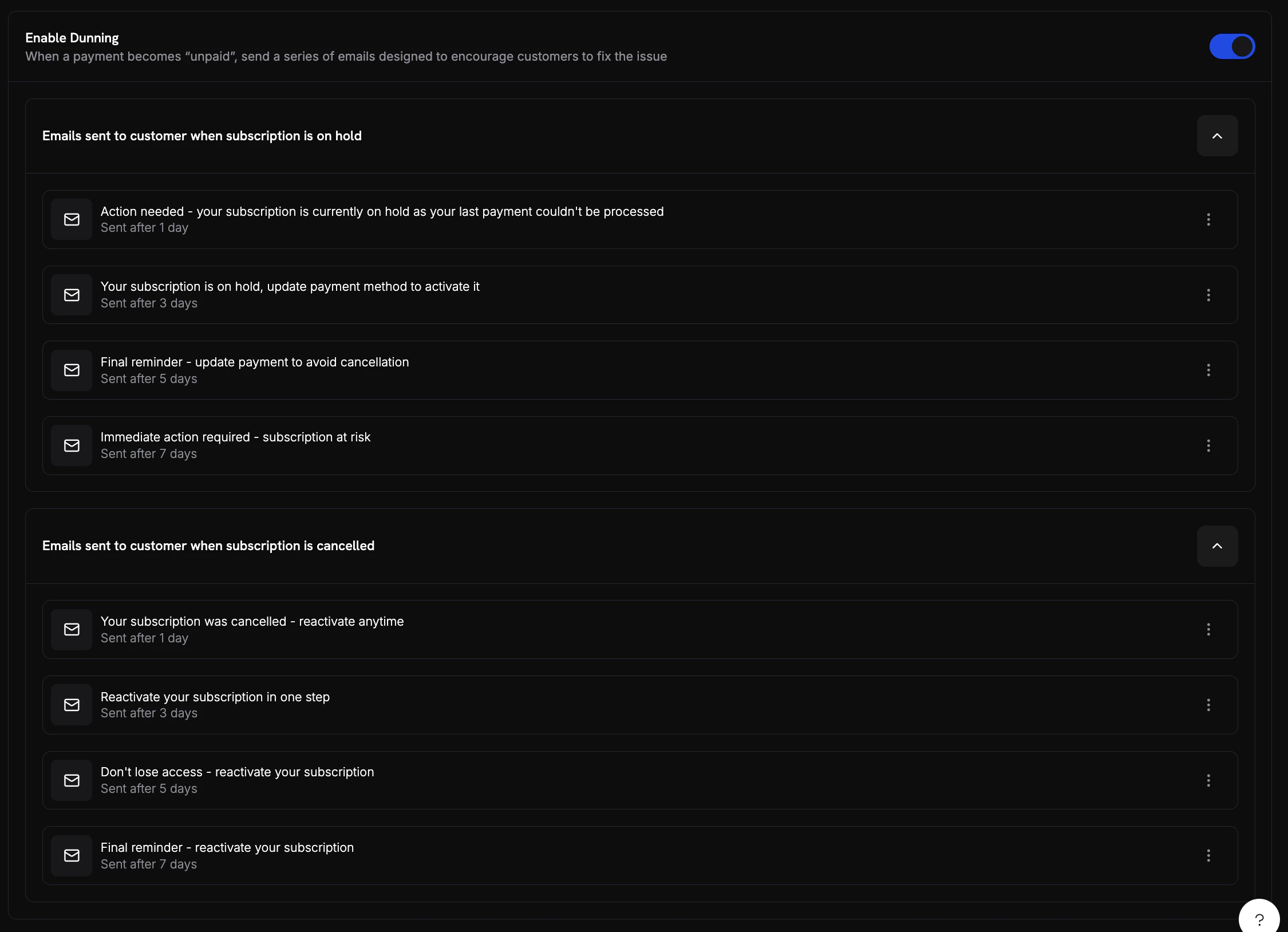
Dunning settings in the dashboard showing enable toggle, on-hold sequence, and cancelled sequence
Email Sequences
Dunning has two email sequences, On Hold and Cancelled, each with up to 4 emails. The dashboard lists them as Emails sent to customer when subscription is on hold and Emails sent to customer when subscription is cancelled. Apast_due attempt uses the On Hold sequence.
Each email has these settings:
In Subject Line, Dodo Payments replaces these placeholders:
{store_name}, {store_owner_name}, {store_contact_email}, {subscription_id}, {failure_reason}, and {payment_form_link}.
The default delays are:
Example Dunning Emails
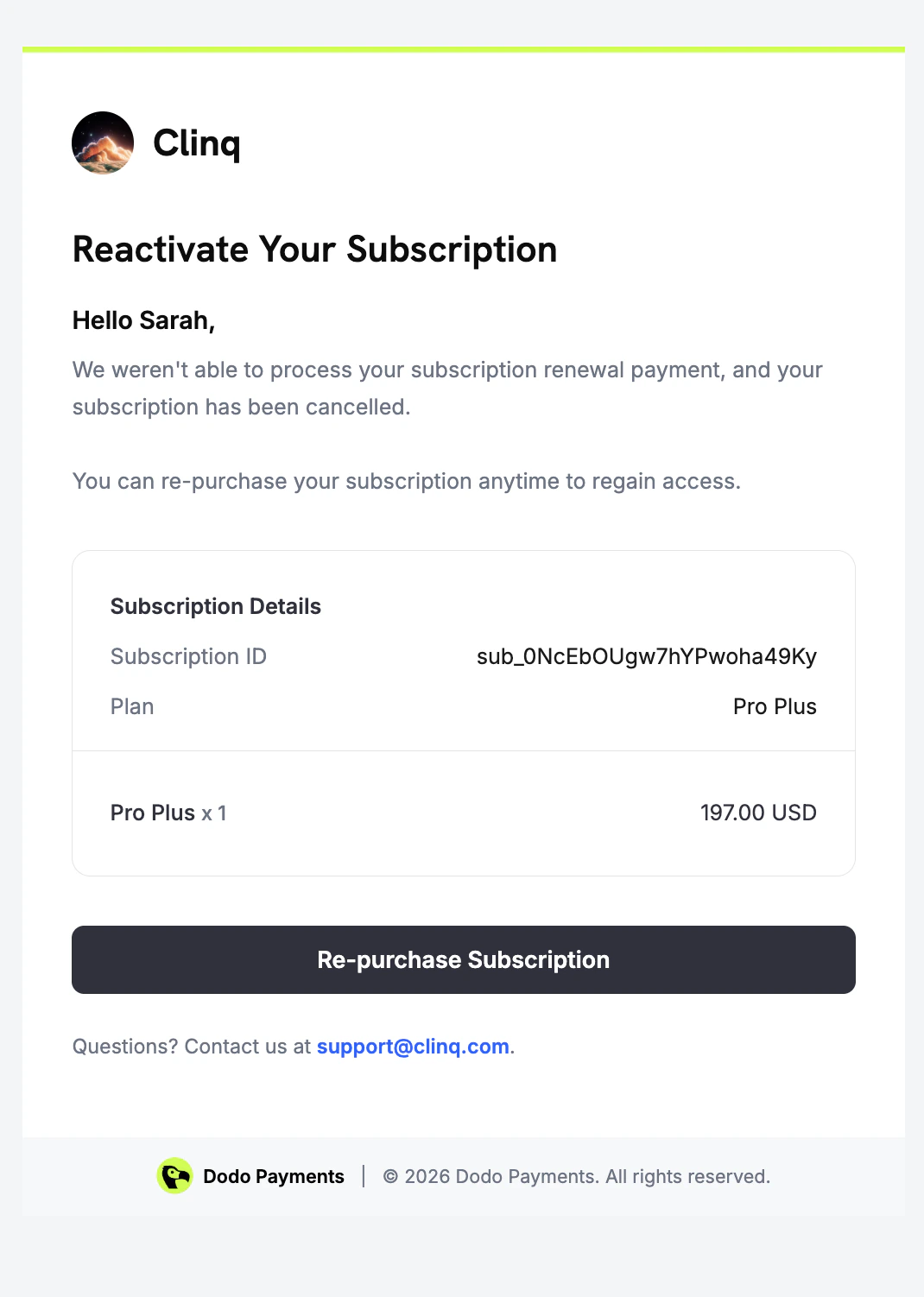
Dunning sends a different email for each subscription state. These examples show what the customer sees.- On Hold
- Cancelled
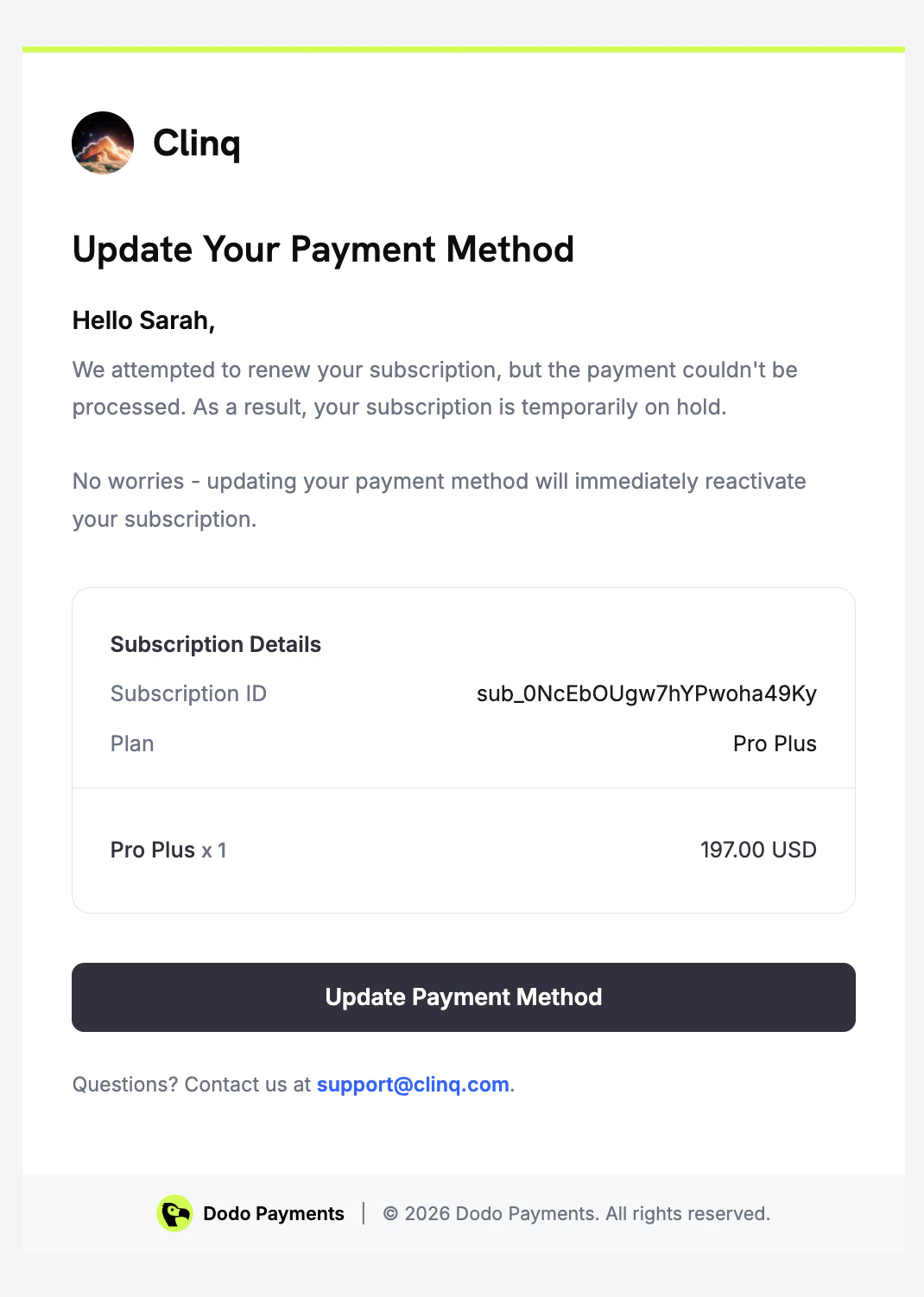
Dunning email sent when a renewal payment fails and the subscription is on hold
Customer Recovery Experience
When a customer clicks the link in an on-hold dunning email, the Customer Portal opens on their subscription. There they can see the subscription status and update their payment method.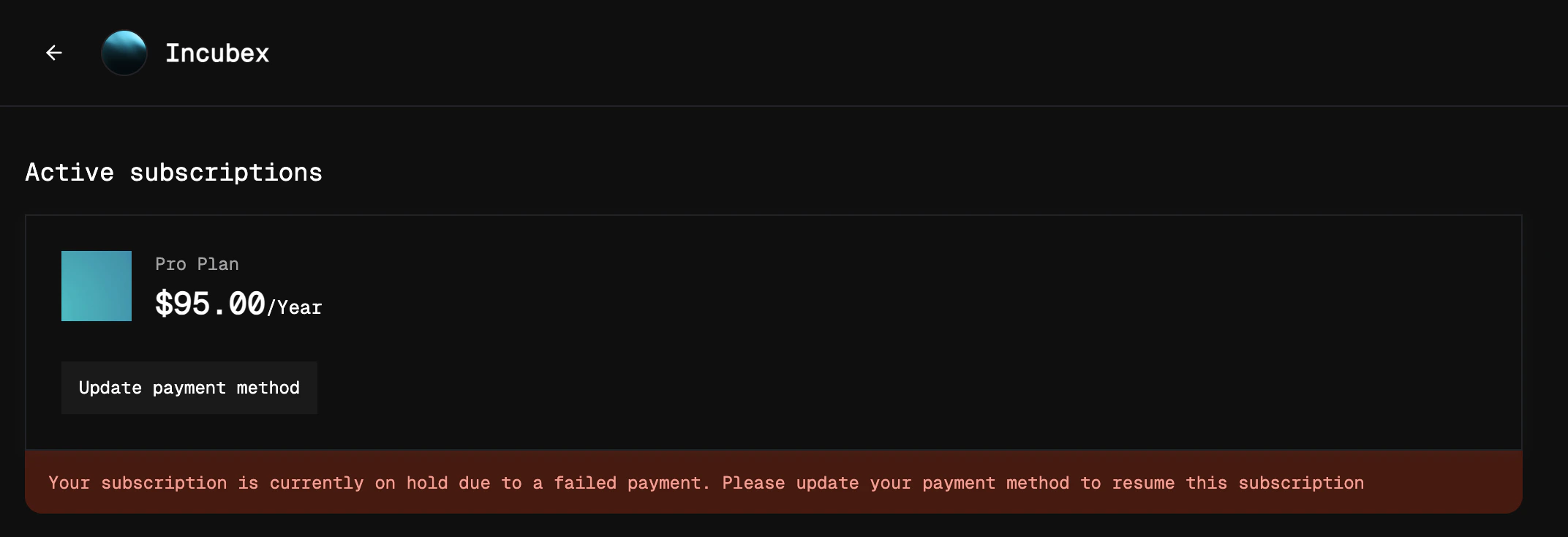
Customer portal showing an on-hold subscription with option to update payment method
active.
For a cancelled subscription, the link opens a checkout page with the subscription’s product already in the cart.
Analytics
Track Dunning performance under Analytics → Recovery in your dashboard.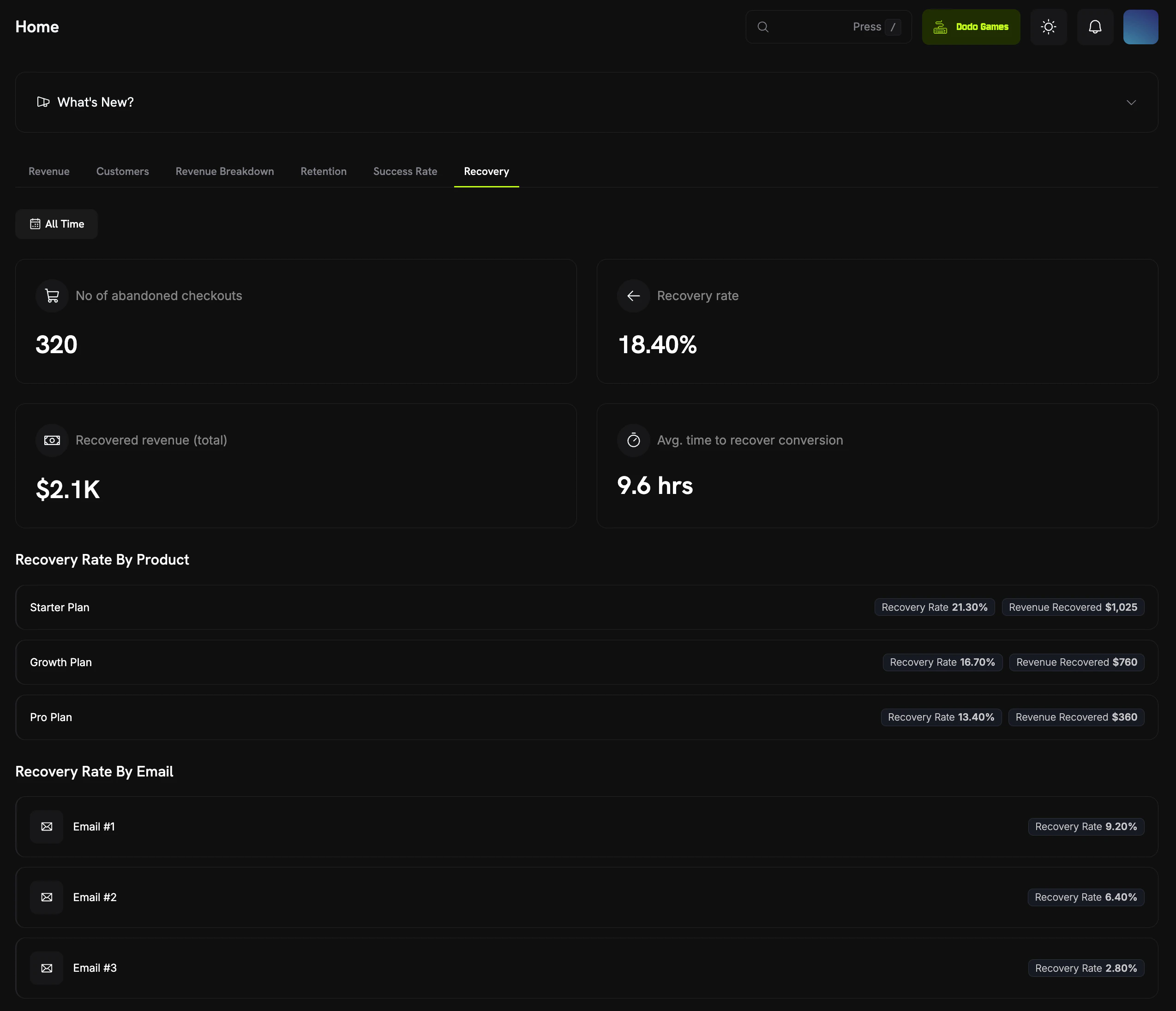
Recovery analytics dashboard showing ACR and dunning metrics
Webhook Events
Dunning sends two webhook events:Recovery Webhook Payloads
View the full webhook payload schemas for dunning events.
Edge Cases
Dunning handles these cases automatically:Best Practices
- Start with defaults: The default delays (1, 3, 5, and 7 days) spread the emails over a week, so customers aren’t flooded but still see a steady reminder.
- Monitor recovery rates: Check Recovery rate by email to see which email drives the most recoveries. If later emails recover almost nothing, turn them off.
- Coordinate with support: Tell your support team that dunning emails are going out, so they can help customers who reply.
- Review subscription states: Pair dunning with the
subscription.on_holdandsubscription.cancelledwebhooks to track the full subscription lifecycle.
Dunning works alongside the existing on-hold and reactivation flows in the Customer Portal. Once you turn it on, it runs automatically with no integration work.
Related
Recovery Webhooks
React to
dunning.started and dunning.recovered events.Abandoned Cart Recovery
Recover abandoned or failed checkouts with recovery emails.
Customer Portal
Customers update their payment methods in the Customer Portal.
Subscriptions
The subscription states that trigger dunning.