

Introduction
A dispute, also called a chargeback, starts when a customer asks their card issuer to reverse a payment. As your Merchant of Record, Dodo Payments handles the dispute process with the card networks. You decide whether to accept or counter each dispute, and you supply the evidence. When a dispute opens, the disputed amount and a dispute fee are deducted from your balance. The Disputes tab shows the status, reason, and dispute ID of every dispute on your account. Dodo Payments also provides three tools that stop disputes before they become chargebacks:- Visa Rapid Dispute Resolution (RDR) refunds Visa disputes at or below your threshold automatically.
- Ethoca Alerts refund Mastercard and other non-Visa payments automatically when the issuer sends an alert.
- Deflections block fraud claims on Visa and Mastercard payments before they are filed, so you keep the funds.
Viewing and Understanding Disputes
Open the Transactions Page
View Dispute Details
Access Associated Payment Information
Responding to a Dispute
When a customer opens a dispute, Dodo Payments emails you, and the dispute appears in the Disputes tab with the status Dispute opened.Check Your Dashboard
Review the Email Notification
Choose Your Response
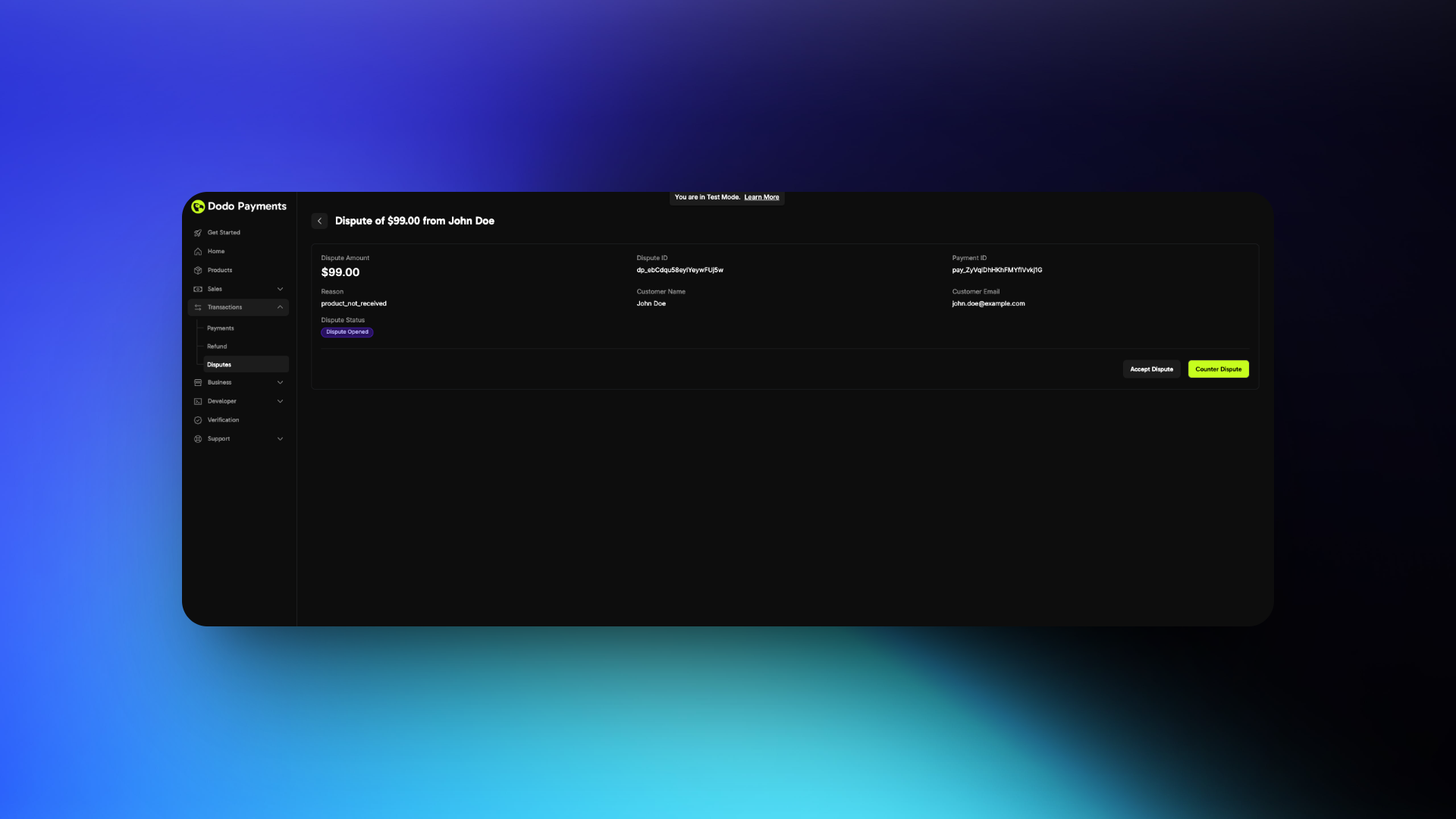
If Accepting
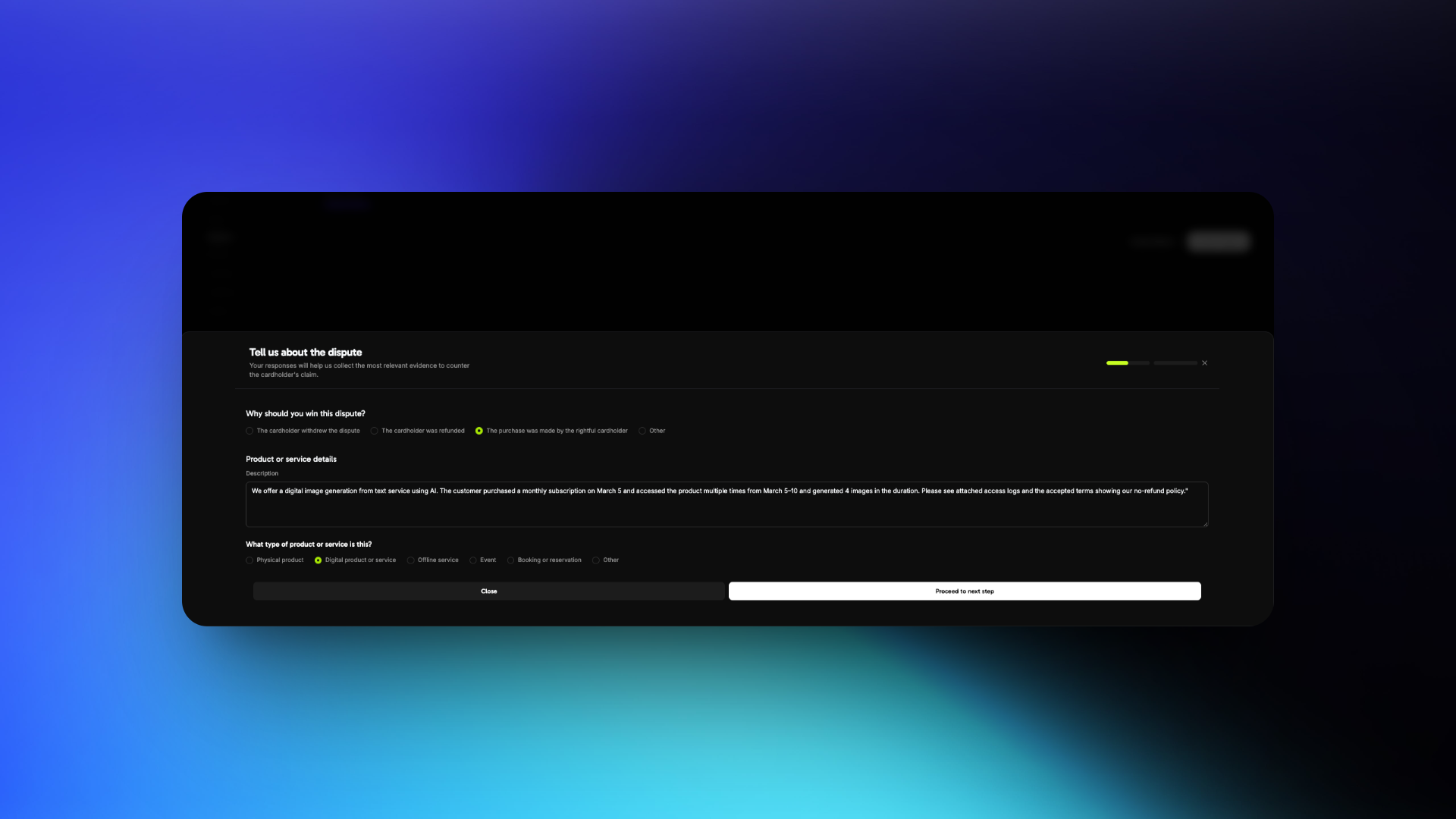
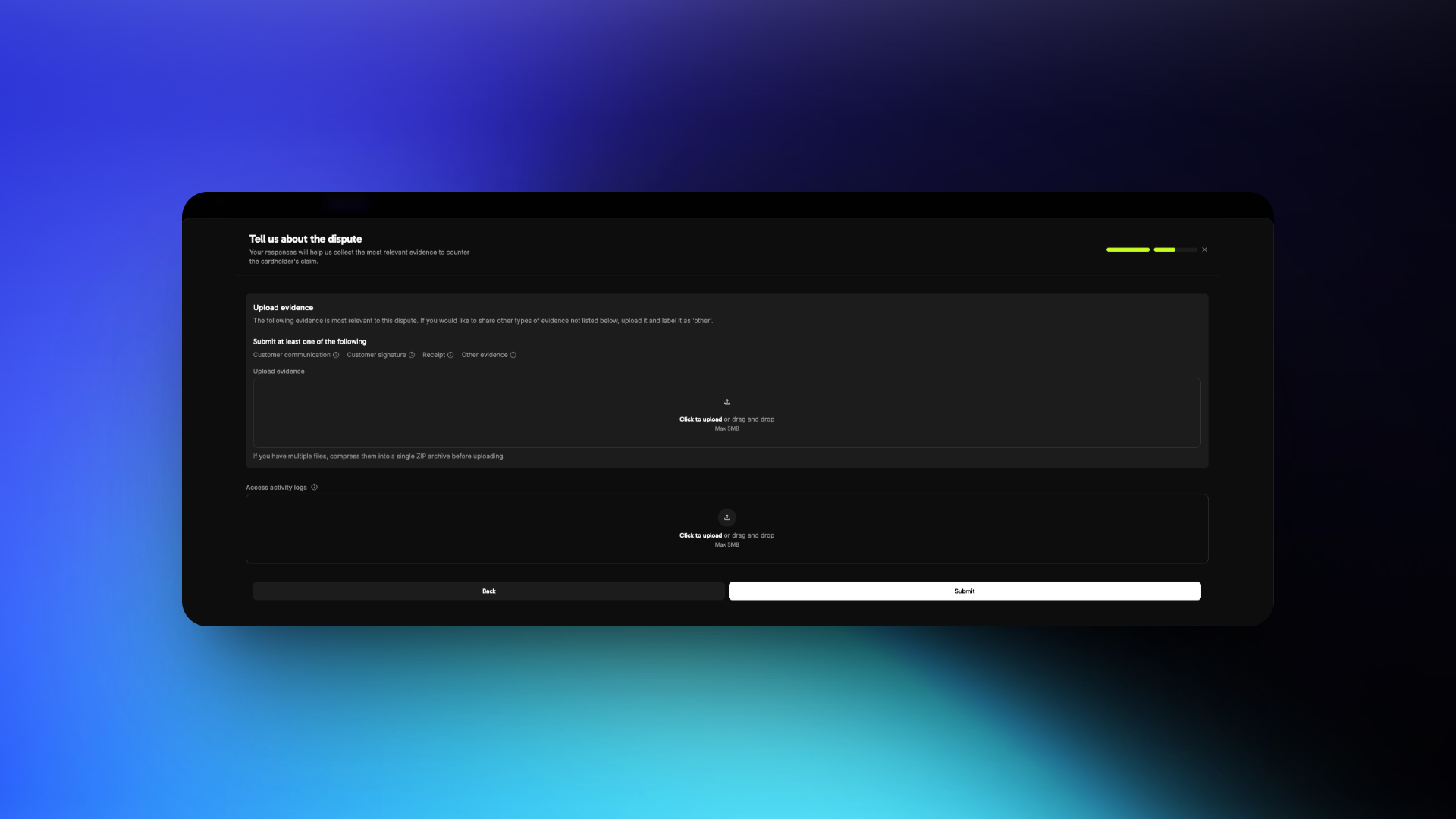
If Countering
Dispute Response Best Practices
Understand the Dispute Reason
Fraudulent Transaction
Product/Service Not Received
Not as Described
Gather the Right Evidence
- Fraudulent Transaction
- Product/Service Not Received
- Not as Described
Required Evidence
- Invoice of the purchase
- IP address, device, and location details at the time of purchase
- Login timestamps showing access to your platform or service
- Browser or device fingerprint, or account activity logs
- Previous successful transactions from the same customer or account
- Terms of Service and Refund Policy accepted at the time of purchase
Craft a Clear Description
Focus Points
- What the customer purchased
- When and how they accessed it
- Why the dispute claim is inaccurate
Example Response
Format and Submit Evidence
Submission Guidelines
- Use PDF, JPG, PNG, or ZIP files only
- Label each file clearly, for example
Login_Log_March_5.pdf - Submit only relevant and organized files
- Keep each file under 5 MB
- To upload several files for one evidence type, compress them into a single ZIP archive
- Do not include links or URLs
Common Mistakes to Avoid
Common Mistakes to Avoid
Avoid These Errors
- Ignoring the actual dispute reason
- Using vague or emotional statements
- Uploading unrelated or unstructured files
- Providing links instead of files
Bonus Tips
Bonus Tips
Strengthen Your Case
- Include timestamps with a time zone to prove access timelines
- Highlight any two-factor authentication or verification steps
- Share refund refusal communication if it aligns with your policy
- Keep your policies visible, so you can prove the customer accepted them
Visa Rapid Dispute Resolution (RDR)
Visa Rapid Dispute Resolution (RDR) resolves eligible Visa disputes before they become formal chargebacks. When a cardholder disputes a Visa payment with their bank, RDR checks the amount against your configured threshold. If the amount qualifies, RDR refunds the cardholder on your behalf, so no chargeback is filed.Why RDR Matters
Disputes cost digital businesses money and time. A high dispute rate also has consequences beyond each lost payment:Financial Impact
Dispute Rate Penalties
Account Risk
Operational Overhead
How RDR Works
Cardholder Initiates a Dispute
RDR Intercepts the Dispute
Automatic Refund Issued
No Chargeback Recorded
dispute.lost with is_resolved_by_rdr: true. A Visa RDR fee replaces the dispute fee for these disputes.Key Benefits
RDR changes the outcome of a low-value Visa dispute in four ways:Configuration
RDR uses a USD threshold. A Visa dispute at or below your threshold is resolved automatically with a refund. A dispute above the threshold goes through the normal dispute process, so you can counter it with evidence.Enable RDR for Your Account
Visa RDR is enabled by default on all Dodo Payments accounts with a $100 USD threshold. Any Visa dispute at or below $100 is resolved automatically with a refund, with no action from you. For pricing, see the Dodo Payments pricing page.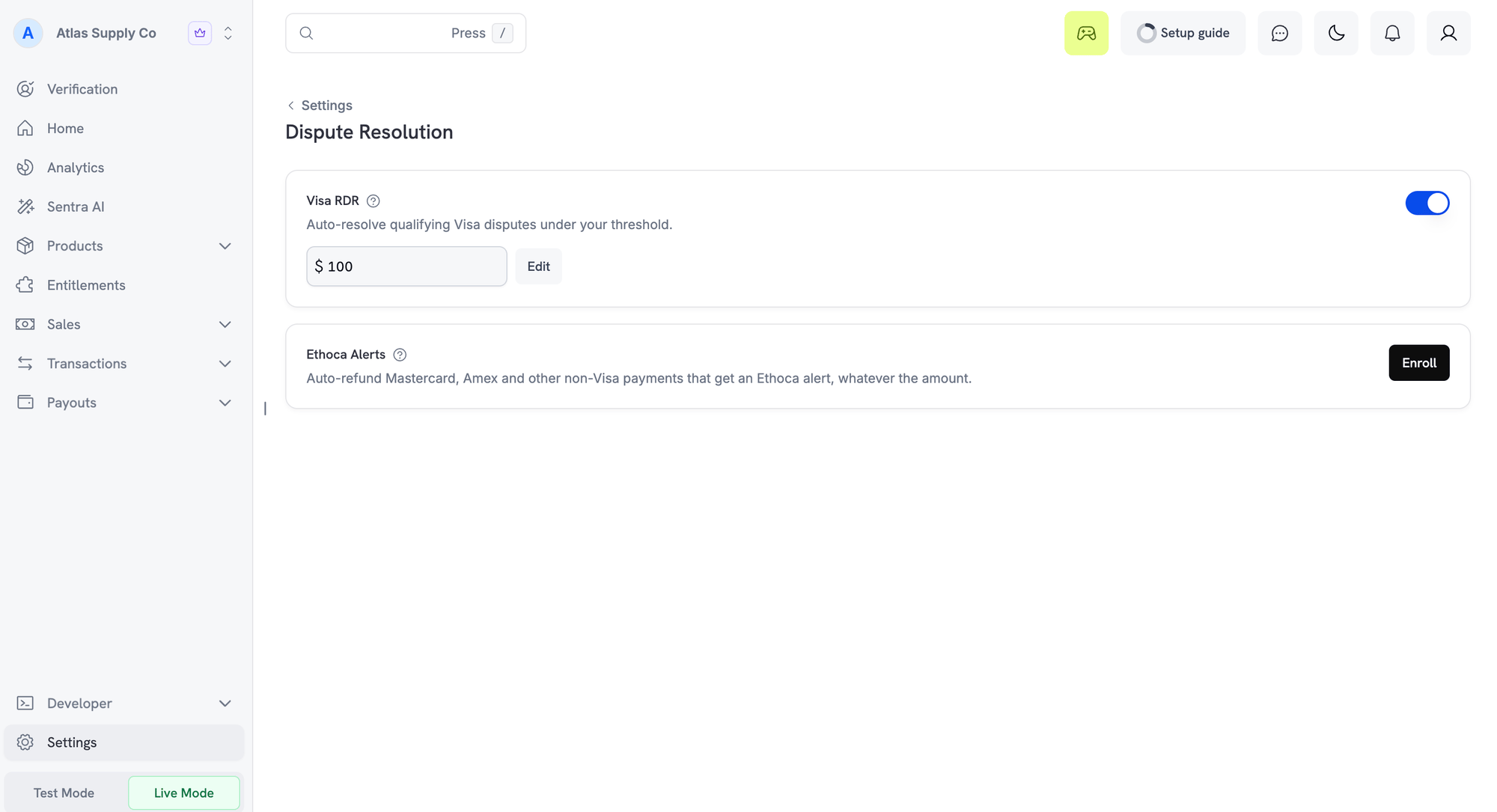
Visa RDR on the Dispute Resolution settings page
Customizing Your Threshold
To change the RDR threshold:Open the Dispute Resolution Settings
Edit the Threshold
Save Your Changes
Frequently Asked Questions
Can a cardholder dispute the same transaction again after RDR resolution?
Can a cardholder dispute the same transaction again after RDR resolution?
Ethoca Alerts
Visa RDR covers only Visa cards. Ethoca alerts give you the same pre-chargeback protection on Mastercard and other non-Visa cards. Ethoca is Mastercard’s alert network. When a cardholder reports fraud or disputes a charge, their card issuer sends an alert before it files a chargeback. Dodo Payments then refunds the payment automatically, so the chargeback is never filed. Alerts come only from card issuers that take part in Ethoca. Most alerts are on Mastercard payments. Alerts on American Express and other non-Visa cards are handled the same way when the issuer takes part. Visa disputes are always handled by Visa RDR.How Ethoca Alerts Work
After your business is enrolled, every alert on a non-Visa payment is resolved automatically:Cardholder Reports the Charge
The Issuer Sends an Alert
The Payment Is Refunded in Full
Any Linked Subscription Is Cancelled
The Alert Is Resolved
What You See in the Dashboard
An Ethoca alert does not appear in the Disputes tab, because no dispute is created. Instead:Enable Ethoca Alerts
Ethoca alerts are opt-in. Before you enroll, your business needs live payments enabled and a statement descriptor. A fee applies for each alert. For pricing, see the Dodo Payments pricing page.Open Dispute Resolution Settings
Ethoca Alerts on the Dispute Resolution settings page
Enroll
Wait for Confirmation
Unenrolling
Click Unenroll on the same card and confirm. Your status shows Removal requested until the removal completes, usually within a few minutes. Alerts can still arrive and be refunded until it does. You can enroll again at any time. If the dashboard reports that your enrollment can’t be removed there, contact support.Ethoca Alerts FAQ
Why was a subscription cancelled after an Ethoca alert?
Why was a subscription cancelled after an Ethoca alert?
Can I contest an Ethoca alert with evidence?
Can I contest an Ethoca alert with evidence?
Can a payment go through both Visa RDR and Ethoca alerts?
Can a payment go through both Visa RDR and Ethoca alerts?
Why was an alert not refunded automatically?
Why was an alert not refunded automatically?
Why did I still receive a chargeback on a non-Visa payment after enrolling?
Why did I still receive a chargeback on a non-Visa payment after enrolling?
Deflections
A deflection stops a dispute before it is filed, without a refund. When a cardholder tells their bank they did not make a purchase, the bank checks the payment against the order details and the customer’s earlier purchases from you. If the evidence shows that the same customer made the purchase, the bank blocks the dispute. You keep the payment, and nothing counts against your dispute rate. A deflection fee applies.How Deflections Work
Cardholder Questions a Charge
The Bank Looks Up the Order
The Network Checks Earlier Purchases
The Dispute Is Deflected
What You See in the Dashboard
A deflection creates no dispute and no refund. Instead:Availability
Every Dodo Payments business is enrolled in deflections automatically. There is nothing to enable or configure. For pricing, see the Dodo Payments pricing page.Deflections FAQ
Why did I receive a deflection email but see no dispute?
Why did I receive a deflection email but see no dispute?
Should I refund a deflected payment?
Should I refund a deflected payment?